HotXLS stores worksheet cells in compact 256-row blocks, resolves row, column and rectangle formatting through lazy interval overlays instead of creating cell objects, and streams each row straight into the package deflate stream when saving. Together those three changes decide the memory profile of a large workbook: peak usage follows the largest single row rather than the size of the complete worksheet XML
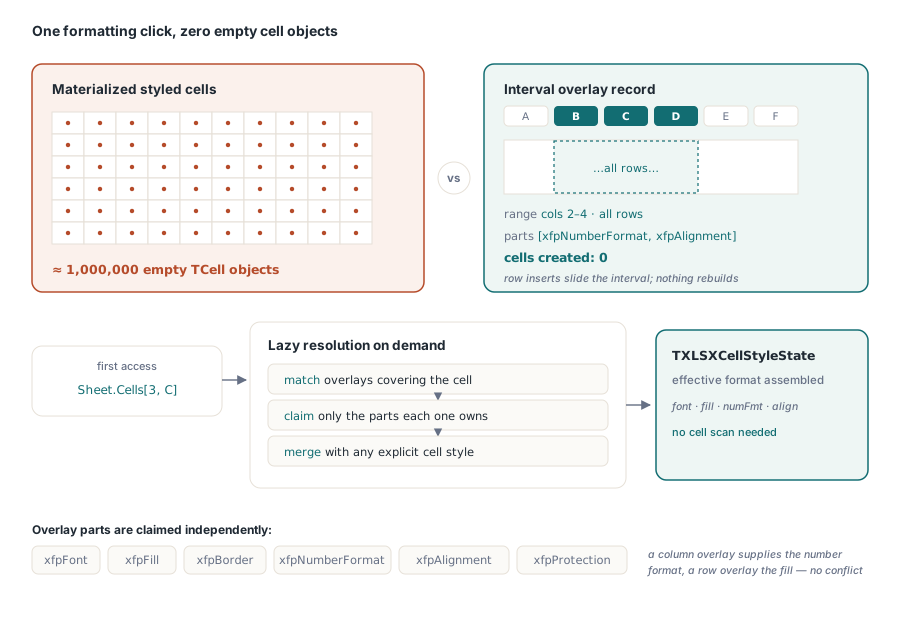
The reason this matters is a shape that every spreadsheet developer meets eventually. A user formats an entire column — one click, one million cells — and a naive object model answers by allocating a million cell objects to hold one number-format index. The file on disk stays tiny because the XLSX format expresses that as a single <col> entry. The process does not stay tiny at all
Why does formatting a column cost more memory than filling it?
Because formatting has no data to justify the object. A cell with a value has to exist somewhere. A cell that is empty but styled exists only to carry a style index, and materializing millions of those is the classic way a Delphi spreadsheet application runs out of address space on a file that Excel opens instantly
Interval style overlays remove the need. A row, column or rectangle formatting instruction is stored once as a range plus the style parts it contributes, and resolves lazily when a cell in that range is actually accessed. Overlays survive structural edits — inserting a row inside a formatted block moves the interval rather than rebuilding it — and they round-trip as compact column, row and style-only cell entries, which is exactly how Excel writes them
var
  Sheet: TXLSXWorksheet;
  State: TXLSXCellStyleState;
begin
  Sheet := Workbook.Sheets[1];
  // Style indexes come from the workbook style pools, e.g. from a cell
  // you have already formatted the way you want the range to look
  State := BuildStateFromTemplateCell(Sheet.Cells.Item[1, 1]);
  // Format columns B..D without creating a single empty cell object
  Sheet.StyleOverlays.Add(1, 2, MaxRowIndex, 4,
    [xfpNumberFormat, xfpAlignment], State);
end;
TXLSXFormatParts is the set that decides what an overlay contributes: xfpFont, xfpFill, xfpBorder, xfpNumberFormat, xfpAlignment and xfpProtection. Naming only the parts you mean is what lets overlays layer sensibly — a column overlay that supplies a number format does not fight a row overlay that supplies a fill, because neither claims the other's part
What the 256-row block gives you
Locality. Cells are held in blocks of 256 rows with stable public handles, serialized row-major, so writing a worksheet walks memory in the order it will emit bytes rather than chasing pointers across the heap. Stable handles matter for the API surface: a handle a caller holds stays valid across the internal reorganization the block layout performs, which is what makes the compact representation an implementation detail rather than a breaking change
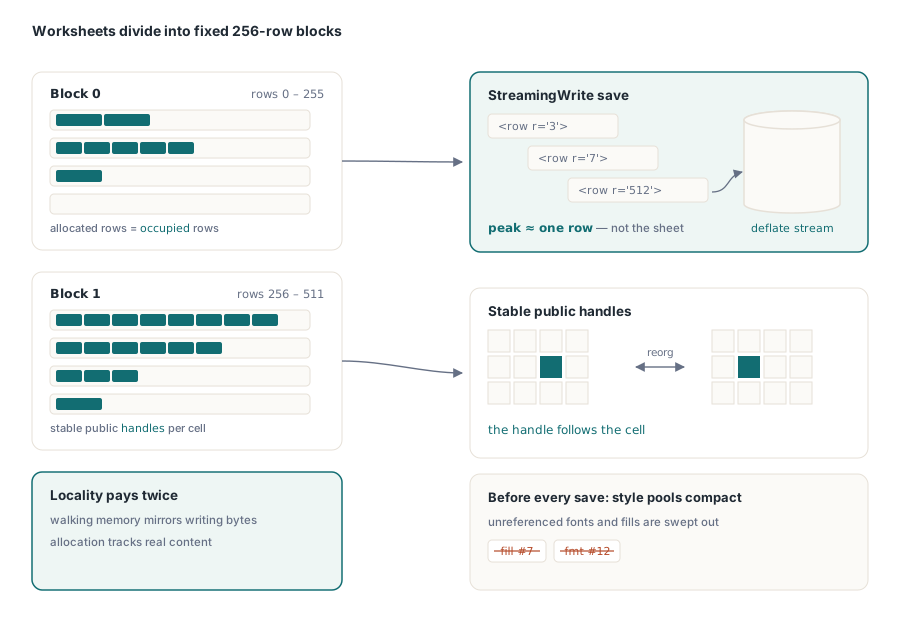
Style pool compaction runs alongside it. Before every save, fonts, fills, borders, number formats, alignments and protections that no cell references are dropped. Long-lived workbooks accumulate unreferenced style records the way long-lived documents accumulate unused styles, and a workbook that has been edited by a user for an hour can carry hundreds of them into a file nobody will ever read them from
Row-streamed saving, and when it does not apply
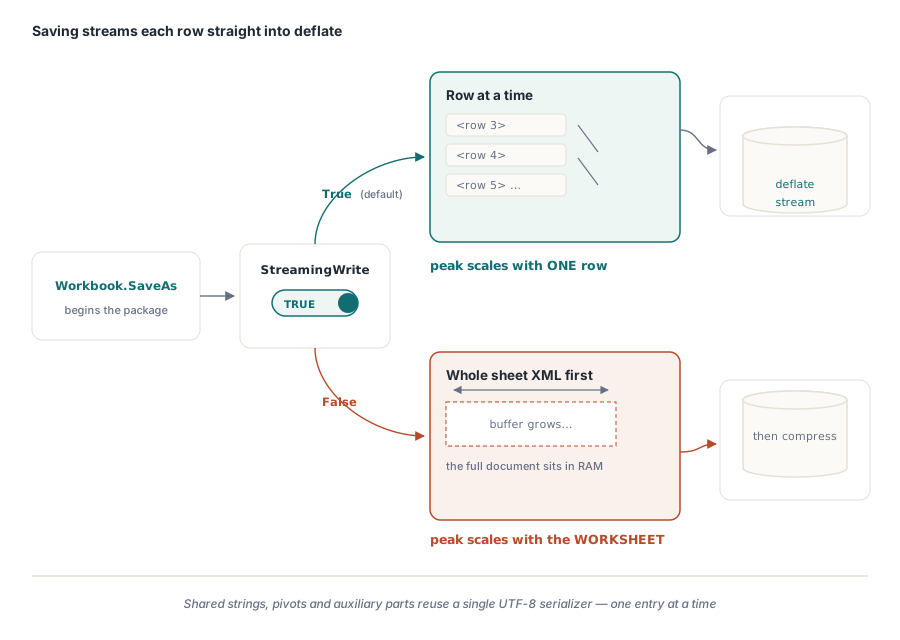
With StreamingWrite enabled — the default — each worksheet row is written directly into the package deflate stream. The alternative, which is what the flag turns off, builds the complete worksheet XML first and compresses it afterward, so peak memory scales with the whole sheet. Streaming makes it scale with one row
Shared strings and auxiliary parts follow the same discipline through one reusable UTF-8 serializer that emits entries one at a time, bounding peak memory by the largest single entry rather than the whole part. That covers the shared string table and pivot records, which on a wide analytical workbook are frequently larger than any individual worksheet
var
  Workbook: TXLSXWorkbook;
begin
  Workbook := TXLSXWorkbook.Create;
  try
    Workbook.Open('ledger-2026.xlsx');
    // StreamingWrite defaults to True; turn it off only when a downstream
    // step requires the whole worksheet XML to exist before compression
    Workbook.StreamingWrite := True;
    Workbook.SaveAs('ledger-2026-out.xlsx');
  finally
    Workbook.Free;
  end;
end;
Leave it on unless you have a concrete reason not to. The non-streaming path exists for the cases where something else in the pipeline needs the assembled XML, and paying for it by default is paying for a case most applications never hit
How to tell whether overlays are actually being used
Watch the cell count, not the memory graph. If a worksheet reports a plausible number of physical cells after you have applied broad formatting, overlays are doing their job. If the count jumps by the size of the formatted range, something in the code path materialized the cells — usually a loop that reads every cell in the range to check its style, which forces resolution one cell at a time and defeats the whole arrangement
Resolve a style when you need one cell's effective format. Do not resolve a style for a million cells to find out that the column has a number format; ask the overlay. The same rule applies to writing: assign values to the cells that have values, and let formatting stay an interval
Where the remaining memory goes
Once cells and styles are compact, the next largest consumers on a big workbook are the shared string table and whatever satellite parts the file carries — pivot caches, drawings, preserved XML from parts the object model does not model. Those have their own strategies, and the honest answer is that no single setting solves all of them at once
If your bottleneck is opening rather than saving, selective loading is the lever: the walkthrough of metadata-only and selective worksheet loading covers reading a workbook without paying for the sheets you will not touch. For read-path throughput on very large files, see the notes on parallel XLSX parsing and the memory allocator, and for output-only workloads that never need an object model at all, streaming writes for server batch jobs is usually a better fit than any amount of tuning here
HotXLS reads and writes XLS and XLSX from native Delphi and C++Builder code with no Excel installation and no OLE automation, which is what makes these memory characteristics observable and controllable in the first place — the HotXLS Delphi spreadsheet component page lists the supported formats and RAD Studio versions