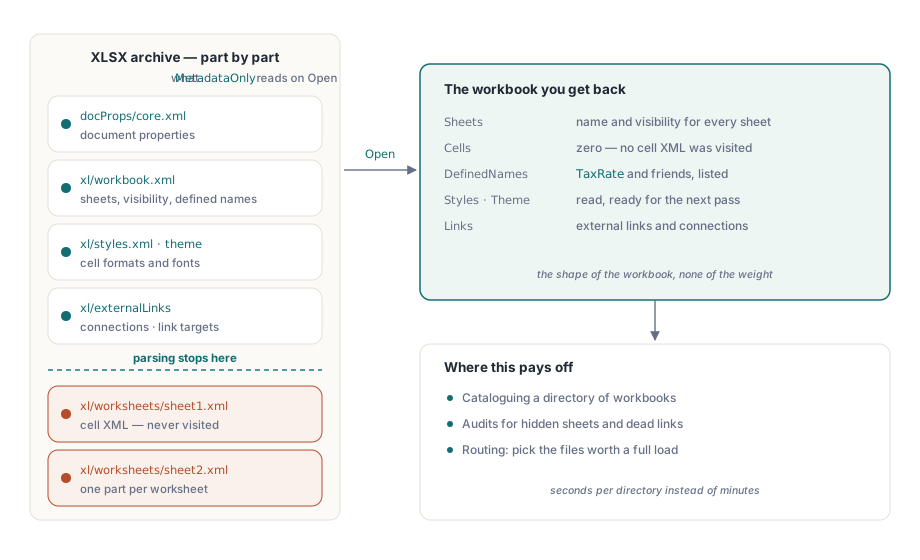
HotXLS can open an XLSX workbook and parse no worksheet cells at all. TXLSXWorkbook.MetadataOnly reads workbook properties, defined names, sheet names and visibility states, styles, theme, connections and external links, then stops before the cell XML. For a scanner that needs to know what is in a directory of workbooks, that is the difference between minutes and seconds
Three related switches complete the picture: SelectedSheets parses cells for a named subset, LoadSheet materializes a skipped sheet later from the original archive, and PreserveRawParts copies the compressed bytes of unchanged parts straight through on save. Used together they turn "open a workbook" from one all-or-nothing operation into something you can scope
What can you learn without parsing a single cell?
More than most discovery tasks need. With MetadataOnly set before Open, the workbook comes back carrying its sheet names and visibility states, its defined names, its document properties, its styles and theme, its external links and its connections. The sheets are present as objects with zero cells
That is exactly the information a catalog, an audit or a routing decision runs on. Which workbooks define a name called TaxRate? Which ones have hidden sheets? Which ones link to a server that has been decommissioned? Answering those by fully loading every file is how a nightly job becomes an all-night job
var
  Workbook: TXLSXWorkbook;
  I: Integer;
begin
  Workbook := TXLSXWorkbook.Create;
  try
    Workbook.MetadataOnly := True;      // set before Open
    Workbook.Open(FileName);
    for I := 1 to Workbook.Sheets.Count do      // Sheets[] is 1-based
      if not Workbook.Sheets[I].Visible then
        Report.Add(FileName + ': hidden sheet ' +
          Workbook.Sheets[I].Name);
  finally
    Workbook.Free;
  end;
end;
Loading two sheets out of forty
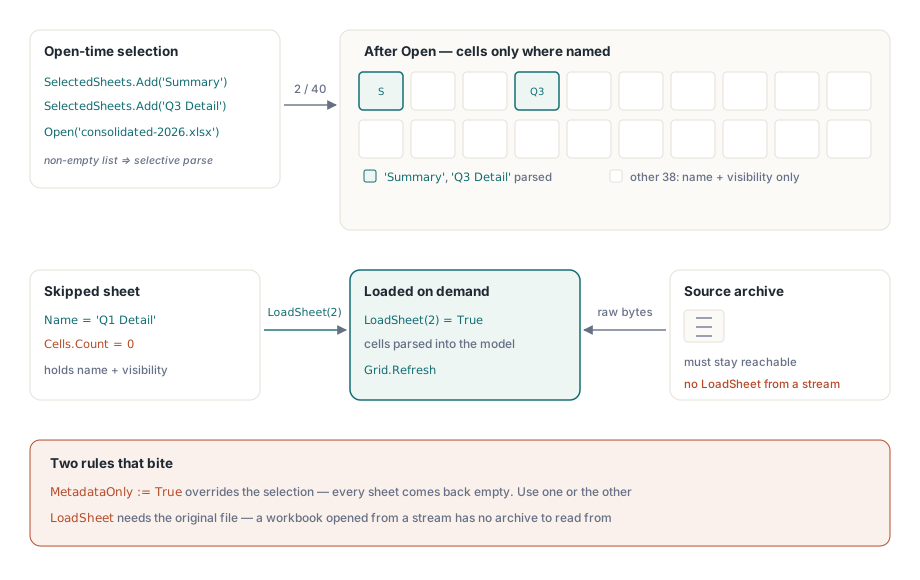
SelectedSheets is a TStringList of sheet names. When it is non-empty, Open parses cell XML only for the sheets it names; every other sheet keeps its correct name and visibility state and holds no cells. An empty list means the previous behavior, which is to load everything
The interaction with MetadataOnly is worth stating plainly, because getting it backwards produces a puzzling empty workbook: MetadataOnly = True overrides the selection and skips all sheets. Use one or the other. Discovery uses metadata-only; targeted work uses a selection
Workbook.SelectedSheets.Add('Summary');
Workbook.SelectedSheets.Add('Q3 Detail');
Workbook.Open('consolidated-2026.xlsx');
// Later, when the user opens a tab you skipped.
// LoadSheet takes the 0-based position and needs the source file,
// so it does not work on a workbook opened from a stream
if Workbook.LoadSheet(ZeroBasedPosition) then
  Grid.Refresh;
LoadSheet(Index) materializes a skipped sheet on demand from the original archive, which is what makes this pattern usable in an interactive application rather than only in a batch. Open with the sheet the user is looking at, load the others when they click. The archive stays open for exactly that reason, so keep the workbook alive as long as the user might ask for another sheet
Why does a round trip change parts you never touched?
Because a naive save regenerates everything. Decompress the theme, build an object model, serialize it back, recompress — and now the bytes differ even though nothing about the theme changed. For VBA projects and pivot caches that is worse than wasteful, because those parts carry structure the object model does not fully represent
PreserveRawParts answers this by copying the compressed representation of unchanged parts directly from the source archive during SaveAs. Theme, VBA project, pivot tables and pivot caches move across as bytes when they were not modified. No decompression, no recompression, no risk of losing something in a serialization round trip
The cost is a constraint you already had: the source archive must still be available at save time. If your workflow reads a file into memory, closes it and saves an hour later, the raw-copy path has nothing to copy from. Keep the source reachable for the lifetime of the workbook, which is the same requirement LoadSheet imposes
A discovery pipeline that reopens on purpose
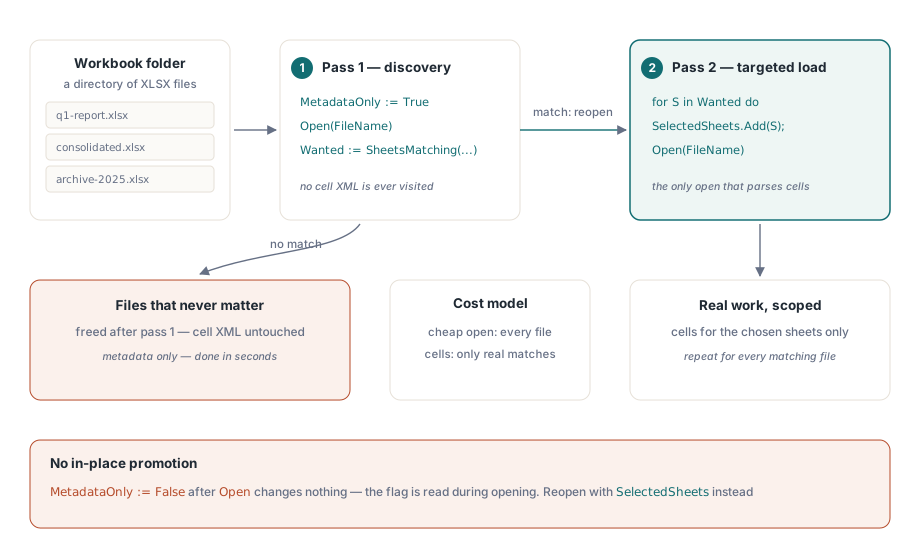
The pattern that works in production has two passes and no cleverness. Pass one opens metadata-only and decides. Pass two reopens the files that matter with a sheet selection and does the work. Reopening feels wasteful until you count what pass one avoided: the second open is the only one that parses cells, and it parses only the sheets pass one selected
// Pass 1: discovery
Workbook.MetadataOnly := True;
Workbook.Open(FileName);
Wanted := SheetsMatching(Workbook, 'Invoice');
Workbook.Free;

// Pass 2: targeted load
Workbook := TXLSXWorkbook.Create;
Workbook.SelectedSheets.AddStrings(Wanted);
Workbook.Open(FileName);
Do not try to promote a metadata-only workbook in place by clearing the flag after Open. The flag is read during opening; clearing it afterward changes nothing about a workbook whose cell XML was never visited
Where this fits with the other large-file levers
Selective loading reduces what you parse. It does not reduce what a sheet costs once loaded, and it does not help when you genuinely need every cell of every sheet. For that case the relevant work is on the storage side, described in the notes on row-block cell storage and interval style overlays, and on the parsing side in parallel XLSX parsing and the memory allocator. When the task is a pure scan with no editing at all, the streaming direct reader skips the object model entirely and will beat any load strategy that builds one
HotXLS opens XLS and XLSX files from native Delphi and C++Builder code with no Excel dependency, so a server-side discovery job runs with nothing installed beyond your own executable — see the HotXLS Delphi spreadsheet component page for the supported formats and licensing