HotXLS, the native Delphi and C++Builder Excel library, parses XLSX worksheets on multiple threads through a three-phase load: sheet XML is decompressed serially, parsed in parallel, and small parts are read serially afterward. The first release of that feature gained only 12–25%, because Delphi's default memory manager lock serialized the worker threads. Cutting heap allocations from roughly 20 to 9.1 per cell raised the parallel speedup to ×1.90 on eight threads. This article walks through the measurements, the wrong turns, and the two fixes that actually worked
How does HotXLS parse XLSX worksheets in parallel?
HotXLS splits Open into three phases, and only the middle one runs on worker threads. The reason is the zip container: a zip archive is one shared input stream with one inflate state machine, and that state machine cannot be read by two threads at once. Wrapping it in a lock would be pointless, because inflate is inherently serial per entry, so a lock would just reproduce serial execution with extra overhead. Phase A therefore decompresses each worksheet's XML into its own TMemoryStream while still single-threaded; in our benchmark file this took about 4 ms for eight sheet parts, so it is nowhere near the bottleneck. Phase B runs ParseWorksheetXml for every sheet on a worker pool, which is where almost all of the load time lives. Phase C returns to the zip serially for the small parts: comments, drawings, charts, and tables
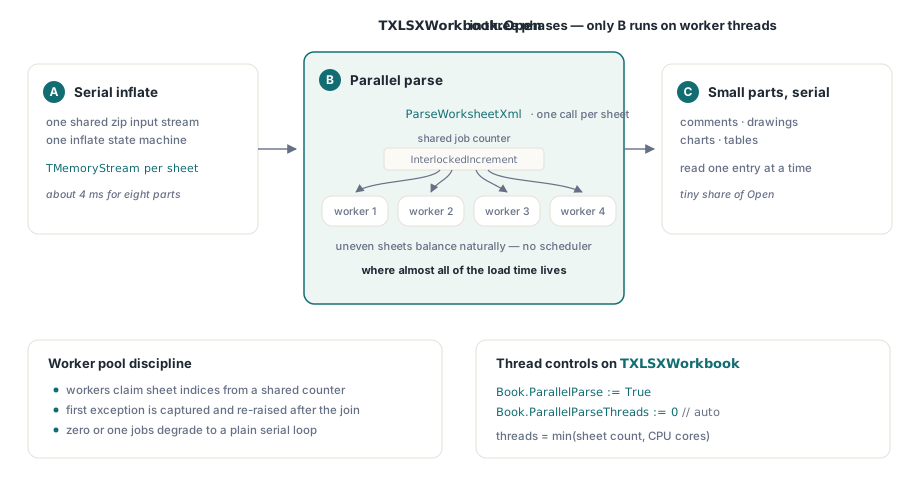
The worker pool itself is deliberately simple. Workers pull job indices from a shared counter with InterlockedIncrement, so sheets of uneven size balance naturally without any scheduler. The thread count is min(sheet count, CPU cores), the first worker exception is captured with AcquireExceptionObject and re-raised on the main thread after the join, and the dispatcher degrades to a plain serial loop when there are zero or one jobs. Two properties on TXLSXWorkbook control the feature: ParallelParse gates the pool, and ParallelParseThreads caps the thread count, with 0 meaning automatic. Multi-sheet workbooks are the shape that benefits, including the kind you produce by duplicating a template worksheet dozens of times
var
  Book: TXLSXWorkbook;
begin
  Book := TXLSXWorkbook.Create;
  try
    Book.ParallelParse := True;      // enable the parallel worker pool
    Book.ParallelParseThreads := 0;  // 0 = auto: min(sheets, CPU cores)
    if Book.Open('quarterly-ledger.xlsx') <= 0 then
      raise Exception.Create('open failed');
    // ... read cells as usual; the workbook is fully materialized ...
  finally
    Book.Free;
  end;
end;
Why does adding threads make XLSX parsing slower in Delphi?
Because Delphi's default memory manager protects its heap with a global lock, and worksheet parsing is allocation-dense: cells, Variants, and WideStrings by the million. Every worker that touches the heap queues on that lock, so threads that look independent in the source code execute nearly one at a time in practice. Our first benchmark made this painfully concrete. On an 8-sheet workbook with 5,000 rows by 4 columns per sheet, measured on an i5-11600K (6 cores, 12 threads) under Win64, parallel Open improved by only 12–25% against a plan estimate of at least 40%. A thread-count sweep across 2, 3, 4, 6, and 8 threads produced a flat curve, and in later instrumented runs the 2-thread configuration was actually 26% slower than serial, the classic signature of two threads ping-ponging a contended lock
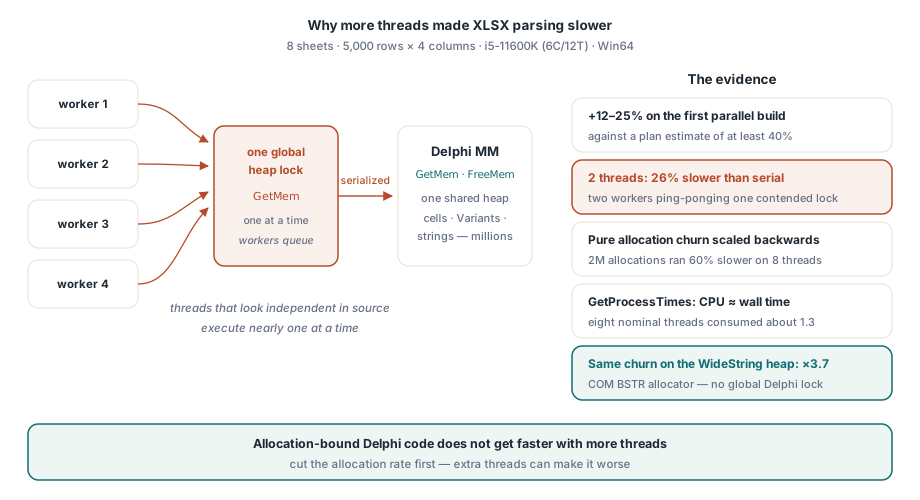
Three measurements pinned the diagnosis, and each one overturned the previous intuition. First, a tiny file (8 sheets of 1 row) opened in 1.2 ms, proving that parsing is essentially 100% of Open and there was no hidden fixed cost to blame. Second, a microbenchmark of pure allocation churn showed the Delphi memory manager scaling backwards: the same total volume of 2 million object and AnsiString allocations ran 60% slower on 8 threads than on one, while the same churn against the WideString heap, which is the COM BSTR allocator rather than the Delphi MM, scaled to ×3.7. That HotXLS uses WideString throughout turned out to be an accident of history working in our favor. Third, GetProcessTimes showed that during a parallel Open, CPU time roughly equaled wall time: eight nominal threads were consuming about 1.3 threads' worth of CPU. The workers were not spinning; they were asleep in the memory manager's contention path, blocked rather than busy
The practical lesson generalizes beyond spreadsheets. If a Delphi workload allocates heavily, raising the thread count does nothing until the allocation rate drops, and it can easily make things worse. Before this fix, we told users tuning ParallelParseThreads the honest truth: on allocation-bound files, more threads bought almost nothing
Where do 20 heap allocations per cell come from?
A counting wrapper installed with SetMemoryManager answered that question precisely: about 20 Delphi-MM allocations per cell, with 2.87 million of them at 32 bytes or under. The culprit was not the cell objects at all. TXMLScaner.GetTokenValue materialized a fresh AnsiString on every call, and it gets called roughly 15–20 times per cell: once each for element names, attribute names, attribute values, and text content. On top of that, the RTL's UTF8ToWideString route manufactured a temporary UnicodeString intermediate for every conversion. Cell objects accounted for only 160 thousand allocations, about 8% of the total, which killed our original plan on the spot: we had intended to build a cell object pool, and the numbers said it would never pay for itself
var
  OldMM, NewMM: TMemoryManagerEx;
  AllocCount, TinyCount: Int64;

function CountingGetMem(Size: NativeInt): Pointer;
begin
  AtomicIncrement(AllocCount);
  if Size <= 32 then
    AtomicIncrement(TinyCount);   // the small-object churn we care about
  Result := OldMM.GetMem(Size);
end;

// install before Open, restore afterwards
GetMemoryManager(OldMM);
NewMM := OldMM;
NewMM.GetMem := CountingGetMem;
SetMemoryManager(NewMM);
That ten-minute diagnostic is worth stealing for any Delphi performance investigation. Counting allocations by size bucket costs almost nothing to build and tells you where the memory manager pressure actually originates, which in our case was two RTL-level habits inside the XML scanner rather than anything in the object model. Profilers kept pointing at the parser as a whole; the wrapper pointed at two specific lines
The fix: token interning and a zero-intermediate UTF-8 decoder
Two targeted changes in the XML reader removed more than half of the per-cell allocations without touching the parser's structure. The first is element-name interning. Worksheet XML repeats a tiny vocabulary endlessly: row, c, v, r, t, s, and a handful of attribute names. InternTokenName keeps a 64-slot cache of previously seen names and compares the scanner's builder buffer against a cached entry with TokenEqualsAnsi, a direct byte comparison that allocates nothing. On a hit, it returns the cached AnsiString, and here the type choice matters: AnsiString is reference counted, so returning a cached instance costs one refcount increment and zero heap traffic. WideString has no reference count, and every assignment goes through SysAllocString, so interning WideStrings would save nothing. Interning is only worth doing on the refcounted string type
function TXMLScaner.InternTokenName: AnsiString;
var
  Slot: Integer;
begin
  Slot := TokenHash mod 64;
  if TokenEqualsAnsi(FInternNames[Slot]) then
    Result := FInternNames[Slot]    // refcount++ only, no allocation
  else
  begin
    Result := GetTokenValue;        // materialize once, then cache
    FInternNames[Slot] := Result;
  end;
end;
The second change attacks cell text. The old path built an AnsiString token, handed it to UTF8ToWideString, which built a UnicodeString intermediate, which was finally converted to the WideString the cell stores: two Delphi-MM allocations per text token before the real one. The replacement, XmlUtf8ToWide(TokenPtr, TokenLen), is a two-pass pure Pascal UTF-8 decoder that reads straight from the scan buffer: pass one measures the UTF-16 length, pass two decodes into a WideString allocated once. Net cost per text token: one COM allocation, zero Delphi-MM allocations. One semantic note for the cautious: on malformed UTF-8 sequences the new decoder passes bytes through instead of substituting replacement characters the way the RTL does, which only affects how corrupt files degrade; on valid input the output is byte-identical. XML character entities never reach the decoder, because the scanner has already resolved them into UTF-8 in the token buffer
What did it buy, and where parallel parsing still will not help
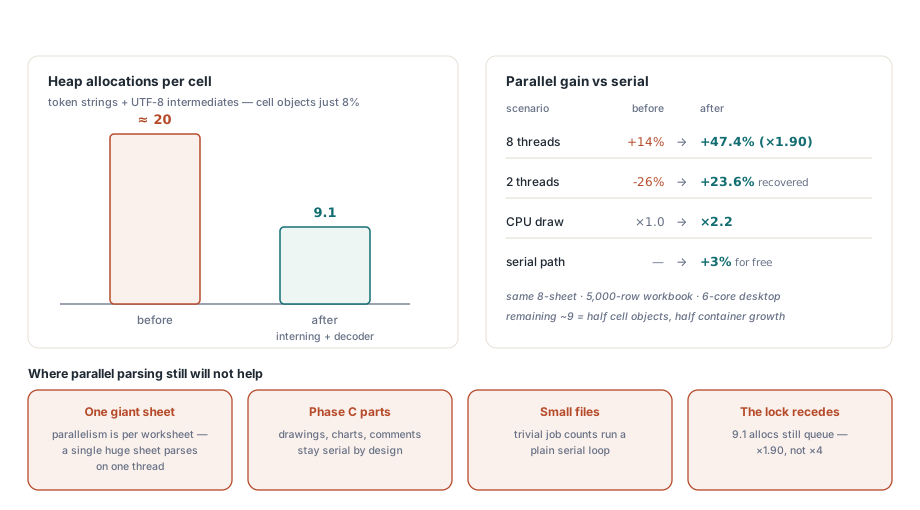
The two fixes cut per-cell allocations from about 20 to 9.1, and the parallel numbers moved the way the theory said they should. On the same 8-sheet, 5,000-row benchmark and the same 6C12T machine, the 8-thread improvement went from 14% to 47.4%, a ×1.90 speedup over serial. The 2-thread case swung from 26% slower to 23.6% faster, and measured CPU utilization rose from ×1.0 to ×2.2. The serial path got about 3% faster as a bonus, since fewer allocations help a single thread too. The remaining ~9 allocations per cell are roughly half cell objects and half amortized container growth; we measured them, judged the returns diminishing, and stopped, with the MM wrapper ready to resample by call site if a future workload justifies another round
The boundaries are worth stating as plainly as the wins. HotXLS parallelizes at worksheet granularity, so a workbook that is one giant sheet parses on one thread no matter what ParallelParseThreads says; for that shape, the streaming direct reader is the better tool, since it avoids materializing the workbook at all. Files whose time goes into Phase C parts, drawings and charts and comments, see less benefit because that phase stays serial by design. Small files are not worth threading at all, which is why the dispatcher quietly runs serial for trivial job counts. And the memory manager ceiling has not vanished, only receded: at 9.1 allocations per cell the global lock still taxes the workers, which is why eight threads yield ×1.90 rather than ×4. For the broader toolkit of cutting load and save times, including styles, pools, and bulk row callbacks, see our guide to large-workbook performance in Delphi
Parallel XLSX parsing, the ParallelParse and ParallelParseThreads properties, and the allocation-lean XML reader described here ship as standard parts of the HotXLS Delphi Excel Component, which reads and writes XLS, XLSX, and ODS natively from Delphi and C++Builder with no Excel automation involved