HotXLS evaluates Excel LAMBDA as a real first-class function value. A defined name whose RefersTo text is a LAMBDA can be called by name as =MyFunc(5), a closure bound inside LET can be called as =LET(f, LAMBDA(x, x*2), f(21)), and the lexical environment captured at definition time travels with the closure. The formula text round-trips into the workbook verbatim
This is the feature that separates a formula engine from a formula parser. Everything before LAMBDA could be evaluated by walking a tree of values. LAMBDA requires a scope stack, and once you have a scope stack, a whole class of user-authored spreadsheet logic starts working in your Delphi application instead of only in Excel
Why do most non-Excel engines stop at the LAMBDA keyword?
Because a classic spreadsheet evaluator has exactly one kind of value: a number, a string, a boolean, an error, or a reference to cells holding those. There is nowhere to put a function. When Excel 365 introduced LAMBDA, it added a value type that carries parameter names, a body expression, and the bindings visible where it was written. An engine without that type can parse LAMBDA(x, x*2) and store the text, but the moment a cell tries to call it, there is nothing to call
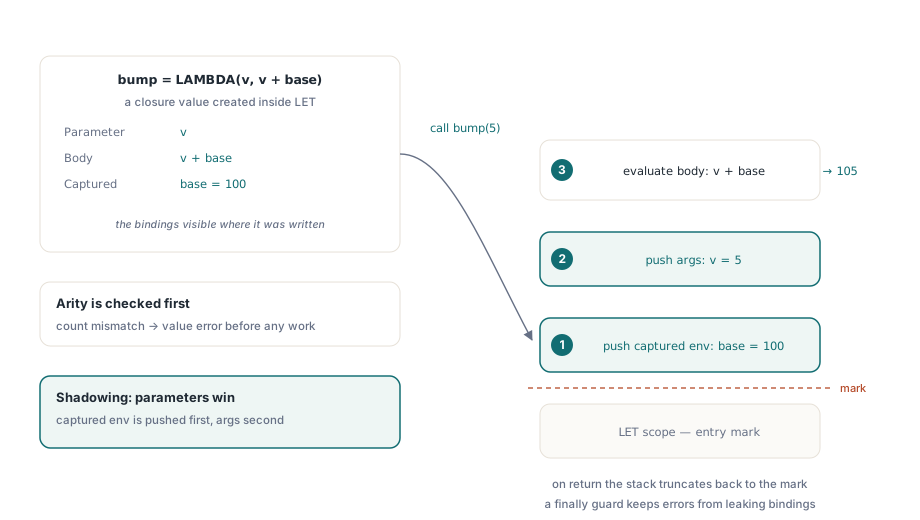
HotXLS implements the missing piece as a closure value plus a runtime scope stack. Calling a closure pushes its captured environment, then pushes the argument values under the parameter names, evaluates the body, and truncates the stack back to the mark. That order matters, and the next section explains why
The three ways a LAMBDA gets called
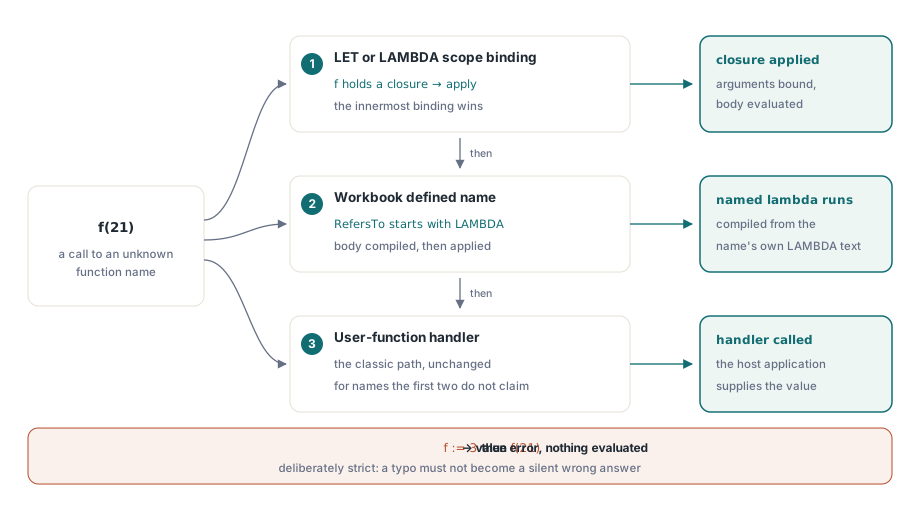
HotXLS resolves a call to an unknown function name through three paths, tried in order, and knowing which one fires explains most surprises. First, a name bound in the current LET or LAMBDA scope: if f is a local binding holding a closure, f(21) applies it. Second, a workbook defined name whose formula text begins with LAMBDA: MyFunc(5) compiles that name's body and applies it. Third, the classic user-function handler, unchanged, for everything the first two paths do not claim
A local binding that holds something other than a closure is not callable. Bind f to the number 3 and then write f(21) and you get a value error, not an attempt to multiply. This is stricter than a dynamic language would be, and deliberately so: a spelling mistake that turns a function call into an accidental reference is a silent wrong answer, which is the worst outcome a spreadsheet engine can produce
var
  Book: TXLSXWorkbook;
  Sheet: TXLSXWorksheet;
begin
  Book := TXLSXWorkbook.Create;
  try
    Sheet := Book.Sheets.Add('Model');

    // A reusable named function, workbook scope
    Book.DefinedNames.Add('NetOf', 'LAMBDA(amount, rate, amount*(1-rate))');

    Sheet.Cells[2, 2].Formula := 'NetOf(1250, 0.19)';

    // A closure bound and applied inside one formula
    Sheet.Cells[3, 2].Formula := 'LET(double, LAMBDA(x, x*2), double(21))';

    // Nested LET: every binding is visible to the ones after it
    Sheet.Cells[4, 2].Formula :=
      'LET(base, 100, bump, LAMBDA(v, v+base), LET(step, bump(5), step*2))';

    Book.Recalculate;
    Book.SaveAs('lambda-model.xlsx');
  finally
    Book.Free;
  end;
end;
How does shadowing resolve when names collide?
Parameters win. When HotXLS applies a closure it pushes the captured lexical environment first and the argument bindings second, so a parameter named rate shadows an outer binding named rate and also shadows a same-spelling column reference in the surrounding formula. That ordering is what makes a named function safe to reuse: the caller cannot accidentally change what the body means by having a similarly named binding in scope
Arity is checked before anything is evaluated. A call whose argument count does not match the closure's parameter count returns a value error immediately, rather than evaluating some arguments and then failing, which keeps side-effect-free evaluation genuinely free of partial work. The scope stack is truncated back to its entry mark in a finally block, so an error inside a body cannot leave stale bindings visible to the next formula
var
  Book: TXLSXWorkbook;
  Name: TXLSXDefinedName;
begin
  Book := TXLSXWorkbook.Create;
  try
    if Book.Open('customer-model.xlsx') = 1 then
    begin
      // Inspect what the user authored before trusting a recalculation
      Name := Book.DefinedNames.FindByName('NetOf');
      if (Name <> nil) and
         (UpperCase(Copy(Name.Formula, 1, 6)) = 'LAMBDA') then
        Log('Named lambda found: ' + Name.Formula);

      Book.Recalculate;
      Log(VarToStr(Book.Sheets[1].Cells[2, 2].Value));
    end;
  finally
    Book.Free;
  end;
end;
LET is no longer partial
Earlier HotXLS releases implemented LET only far enough to handle the common single-binding case. The current implementation is complete: every binding is visible to all later bindings and to the body expression, and nested LET composes normally, so LET(a, 1, b, a+1, LET(c, b*2, c)) evaluates the way Excel evaluates it
That completeness matters more than it sounds. LET is how users avoid recomputing the same subexpression five times in one formula, so real workbooks use it in exactly the deeply nested shapes that a partial implementation gets wrong. If you previously worked around gaps by expanding LET bindings before evaluation, that workaround can go
Comma or semicolon: both, now
Formula text in HotXLS now accepts the comma as an argument separator alongside the classic semicolon. This is not a locale setting; it is an acceptance rule in the parser. It matters because formulas arrive from places you do not control: pasted from a support ticket, copied out of documentation, generated by a script that emitted Excel's canonical syntax, imported from a CSV of formula strings
The practical effect is that SUM(A1,A2) and SUM(A1;A2) both compile. Round-tripping preserves whatever the source used, so a workbook you loaded is written back with its original separators rather than normalized behind the user's back
What round-trips, and what to check
The formula text is stored verbatim, so a LAMBDA in a defined name survives a load and save cycle intact and opens in Excel as the same function. A bare LAMBDA stored as a cell result, meaning a formula that evaluates to a closure rather than to a value, keeps the existing skip-without-value behavior: the text is preserved, no cached numeric result is invented for it. That is the honest outcome, since there is no scalar to cache
Two habits are worth adopting. Give named lambdas workbook scope unless there is a reason not to, because a sheet-scoped function that vanishes when a sheet is copied produces a name error in a place far from the cause; the scoping rules are covered in defined names and cross-sheet formulas. And when a workbook full of named lambdas is destined for a report that must be stable, consider freezing the results with ConvertFormulasToValues so downstream consumers see numbers rather than functions they may not support
For heavy recalculation, LAMBDA bodies are ordinary expressions in the dependency graph and are scheduled like any other formula, which is described in incremental recalculation and the dependency graph. If your model calls one named function across thousands of rows, the cost is the body, not the call machinery, and the same optimization advice applies as for any repeated formula
HotXLS is a native Delphi and C++Builder spreadsheet component that reads and writes XLS, XLSX and ODS without Excel or any Office automation. The formula engine, defined names and recalculation API are documented on the HotXLS Delphi spreadsheet component page