A BIFF5 workbook protected with the password secret can carry a password verifier that matches perfectly and still make Excel 16 answer that the password is incorrect. Excel accepts the file only when the FILEPASS key equals CreateXorKey_Method1(password), the 16-byte XOR array is built with XorRor, and every byte uses XorArrayIndex = (stream offset + record length) mod 16
Excel 16 has two different ways of refusing such a file, and they map cleanly onto the layers of [MS-OFFCRYPTO] §2.3.7. A password prompt that keeps rejecting the right password points at the key word in FILEPASS. A report that the file has a problem and cannot be opened, shown after the password is accepted, points at the XOR array or at the index that picks an array byte. The sections below follow that order, down to the byte
What the FILEPASS record stores in a BIFF5 file
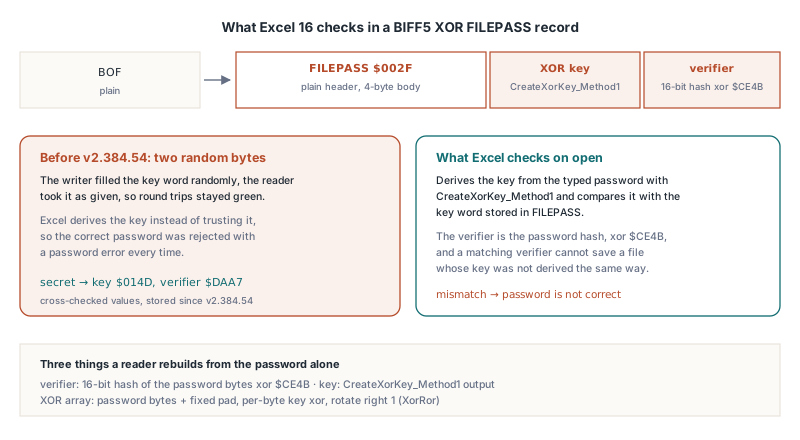
BIFF XOR obfuscation stores exactly two 16-bit words, and everything else is recomputed from the password. The FILEPASS record ($002F) sits immediately after the workbook globals BOF, and in a BIFF5 file its body is 4 bytes long: the XOR key, then the password verifier. There is no salt. There is no algorithm identifier either, and nothing like the encrypted verifier blob that RC4 and AES schemes carry
From those two words a reader rebuilds three values:
- The verifier, a 16-bit hash of the password bytes XORed with the password length and
$CE4B. Comparing it with the stored word is the documented password check - The XOR key, a 16-bit value produced by
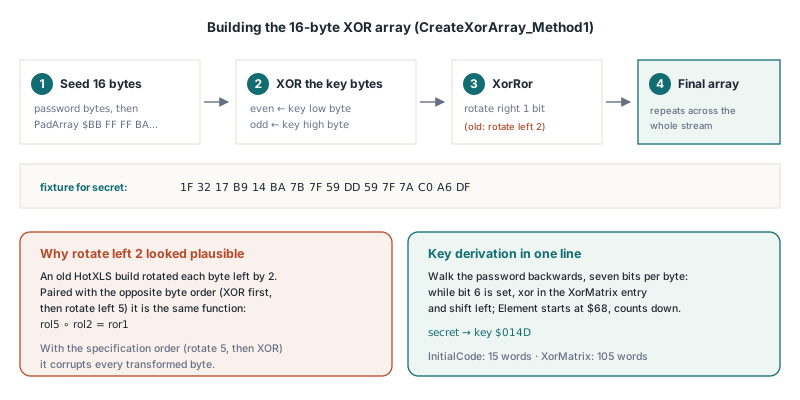
CreateXorKey_Method1in [MS-OFFCRYPTO] §2.3.7.2 from two constant tables,InitialCode(15 words) andXorMatrix(105 words) - The XOR array, 16 bytes made of the password bytes padded with a fixed 16-byte pad, each XORed with the low key byte at even positions or the high key byte at odd positions, then rotated right by one bit
Record headers stay in plain text. So do a few whole records the scheme exempts — BOF, FILEPASS, USREXCL, FILELOCK, INTERFACEHDR, RRDHEAD and RRDINFO — plus the first 4 bytes of every BOUNDSHEET. Every other record body is transformed byte by byte: rotate left by 5 bits, then XOR with one entry of the 16-byte array. Decryption, which §2.3.7.3 spells out as DecryptData_Method1, runs the mirror image: XOR first, then rotate right by 5
HotXLS keeps all of this behind two workbook properties. TXLSWorkbook.EncryptionPassword holds the password, EncryptionType picks the scheme, and SaveAs with xlExcel5 emits FILEPASS right after BOF and transforms the rest of the stream:
uses
  SysUtils, lxHandle;

procedure SaveLegacyProtectedBook(const FileName: string);
var
  Wb: IXLSWorkbook;
begin
  Wb := TXLSWorkbook.Create;
  Wb.Sheets.Add.Name := 'Ledger';
  Wb.Sheets[1].Range['A1', 'A1'].Value := 'Account';
  Wb.Sheets[1].Range['B1', 'B1'].Value := 1250.75;

  // BIFF5 only has XOR obfuscation; xletAuto picks the same scheme
  // for xlExcel5, so the explicit setting just documents intent
  Wb.EncryptionType := xletXor;
  // ASCII, at most 15 characters (see the password notes below)
  Wb.EncryptionPassword := 'secret';

  if Wb.SaveAs(FileName, xlExcel5) <> 1 then
    raise Exception.Create('BIFF5 save failed');
end;
Why does Excel say the password is wrong when the verifier matches?
Excel derives the key from the typed password with CreateXorKey_Method1 and compares it with the key word in FILEPASS, so a file whose key is anything else fails the password check even when the verifier is correct. The specification treats the key as a function of the password, and Excel 16 enforces that reading strictly
The tempting shortcut is to fill the key word with two random bytes. On paper it looks harmless: the verifier is the documented password check, and the array is built from whatever key the file declares. A reader that takes the FILEPASS key as given opens those files without complaint, which is how the shortcut survives in code tested only against itself. Excel 16, handed the same file and the correct password, refuses at the prompt. HotXLS derives the key on every save, so FILEPASS for the password secret always holds key $014D and verifier $DAA7
The derivation is short once the two tables are in place. Walk the password backwards from its last byte, test bit 6 of each byte seven times while shifting it left, and XOR in one XorMatrix entry each time the bit is set; the table index starts at the last entry, $68, and drops by one per bit whether or not the bit was set. The sketch below reproduces the specification algorithm step for step and gives the same results as the library. It is an illustration for your own reader, and none of these routines is part of the HotXLS API:
// Sketch of [MS-OFFCRYPTO] 2.3.7.2 CreateXorKey_Method1 and
// CreateXorArray_Method1 (illustration only, not a HotXLS API)
type
  TXorArray = array [0..15] of Byte;

function DemoCreateXorKey(const Password: AnsiString): Word;
const
  InitialCode: array [0..14] of Word = ($E1F0, $1D0F, $CC9C, $84C0, $110C,
    $0E10, $F1CE, $313E, $1872, $E139, $D40F, $84F9, $280C, $A96A, $4EC3);
  XorMatrix: array [0..104] of Word = (
    $AEFC, $4DD9, $9BB2, $2745, $4E8A, $9D14, $2A09,
    $7B61, $F6C2, $FDA5, $EB6B, $C6F7, $9DCF, $2BBF,
    $4563, $8AC6, $05AD, $0B5A, $16B4, $2D68, $5AD0,
    $0375, $06EA, $0DD4, $1BA8, $3750, $6EA0, $DD40,
    $D849, $A0B3, $5147, $A28E, $553D, $AA7A, $44D5,
    $6F45, $DE8A, $AD35, $4A4B, $9496, $390D, $721A,
    $EB23, $C667, $9CEF, $29FF, $53FE, $A7FC, $5FD9,
    $47D3, $8FA6, $0F6D, $1EDA, $3DB4, $7B68, $F6D0,
    $B861, $60E3, $C1C6, $93AD, $377B, $6EF6, $DDEC,
    $45A0, $8B40, $06A1, $0D42, $1A84, $3508, $6A10,
    $AA51, $4483, $8906, $022D, $045A, $08B4, $1168,
    $76B4, $ED68, $CAF1, $85C3, $1BA7, $374E, $6E9C,
    $3730, $6E60, $DCC0, $A9A1, $4363, $86C6, $1DAD,
    $3331, $6662, $CCC4, $89A9, $0373, $06E6, $0DCC,
    $1021, $2042, $4084, $8108, $1231, $2462, $48C4);
var
  Len, I, Bit, Element: Integer;
  Ch: Byte;
begin
  Result := 0;
  Len := Length(Password);
  if Len > 15 then
    Len := 15;                       // the key only sees 15 bytes
  if Len = 0 then
    Exit;
  Result := InitialCode[Len - 1];
  Element := $68;                    // last XorMatrix entry
  for I := Len downto 1 do
  begin
    Ch := Ord(Password[I]);
    for Bit := 1 to 7 do
    begin
      if (Ch and $40) <> 0 then
        Result := Result xor XorMatrix[Element];
      Ch := Byte(Ch shl 1);
      Dec(Element);
    end;
  end;
end;

function XorRor(B, KeyByte: Byte): Byte;
begin
  B := B xor KeyByte;
  Result := Byte((B shr 1) or (B shl 7));   // rotate right by one bit
end;

procedure DemoCreateXorArray(const Password: AnsiString; out Arr: TXorArray);
const
  PadArray: TXorArray = ($BB, $FF, $FF, $BA, $FF, $FF, $B9, $80,
    $00, $BE, $0F, $00, $BF, $0F, $00, $00);
var
  Key: Word;
  Len, I: Integer;
begin
  Key := DemoCreateXorKey(Password);
  Len := Length(Password);
  if Len > 16 then
    Len := 16;
  for I := 0 to Len - 1 do
    Arr[I] := Ord(Password[I + 1]);
  for I := Len to 15 do
    Arr[I] := PadArray[I - Len];
  for I := 0 to 15 do
    if Odd(I) then
      Arr[I] := XorRor(Arr[I], Byte(Key shr 8))
    else
      Arr[I] := XorRor(Arr[I], Byte(Key and $FF));
end;
For secret this produces the array 1F 32 17 B9 14 BA 7B 7F 59 DD 59 7F 7A C0 A6 DF. Together with key $014D and verifier $DAA7 that gives you three known-good values to assert against before you ever involve Excel
Rotate right by one, and why rotate left by two looks plausible
With the right key, Excel 16 moves past the password prompt and straight into the second error, the report that the file has a problem. The usual cause is an XOR array rotated the wrong way. §2.3.7.2 defines the array step as XorRor, a rotate right by one bit, yet a variant that rotates each array byte left by 2 bits circulates in several BIFF implementations, and a reader built on the same variant never notices anything wrong
Excel 16 does not save Excel 5.0/95 files, and it does not offer XOR when saving BIFF8, so there is no native sample to diff against. When you need to pin down which combination your own code implements, the reliable method runs the other way: write one plain-text BIFF5 stream, re-encode it under each combination of three independent choices, and let Excel 16 open each result:
| Choice | Option A | Option B |
|---|---|---|
| Array rotation | XorRor (rotate right 1) | Rotate left 2 |
| Array index | (offset + record length) mod 16 | offset mod 16 |
| Byte transform order | Rotate left 5, then XOR | XOR, then rotate left 5 |
Of the eight files, Excel 16 accepts the specification combination — XorRor, rotate-then-XOR, record-length index — and exactly one other that only looks different. Rotate-left-2 paired with XOR-then-rotate and the same index is the same function in disguise. Rotation distributes over XOR, so rol5(p xor rol2(b)) equals rol5(p) xor rol7(b), and on an 8-bit value a rotate left by 7 is a rotate right by 1. Put compactly, rol5 ∘ rol2 = ror1
That identity explains why the rotate-left-2 array looks right in isolation. It is correct only alongside the opposite transform order; paired with the specification order it corrupts every transformed byte. Every variant that drops the record length from the index fails too, whichever rotation it uses. Write the specification combination and nothing else. The algebraic twin opens, but it leaves the next maintainer two deviations to reverse-engineer where the specification text leaves none
How is XorArrayIndex calculated for each byte?
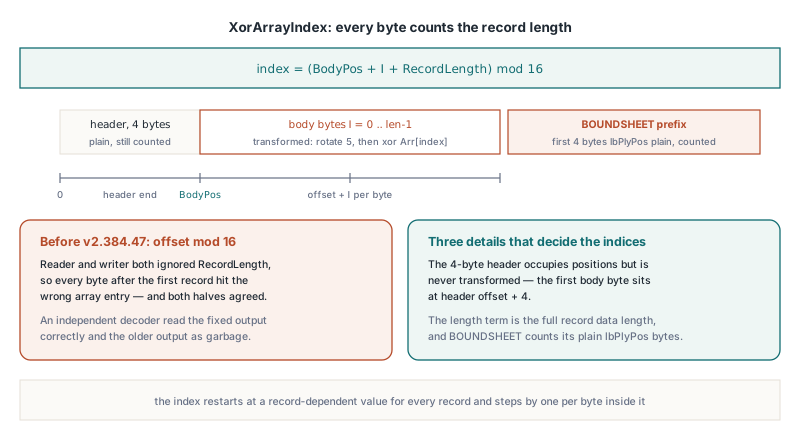
XorArrayIndex for a byte is its offset in the workbook stream plus the length of the whole record data it belongs to, mod 16. The index therefore restarts at a record-dependent value for every record and increments by one per byte inside it. The specification pseudocode names the inputs FileOffset and Data.Length, and it is easy to misread the first as the record start offset alone
Three details decide whether your indices line up with Excel:
- The 4-byte record header is never transformed, but it still occupies stream positions, so the first body byte of a record sits at header offset + 4
- The length term is the full record data length, including any plain prefix that the transform skips
- BOUNDSHEET is partly plain: its first 4 bytes,
lbPlyPos, the stream offset of the sheet BOF, stay readable so a parser can locate sheets without the password. Those 4 bytes are skipped by the transform but still count toward both the offset and the record length
Put together, the per-record transform is a few lines. As before, this sketches the rule for your own code; HotXLS applies it internally during SaveAs:
function Rol8(B: Byte; N: Integer): Byte;
begin
  Result := Byte((B shl N) or (B shr (8 - N)));
end;

// Obfuscate one record body in place. BodyPos is the stream offset of
// Body[0], i.e. the record header offset + 4. PlainPrefix is 4 for
// BOUNDSHEET, the full length for BOF / FILEPASS, 0 for most records
procedure DemoObfuscateRecord(var Body: array of Byte; RecordLength: Word;
  PlainPrefix: Integer; BodyPos: LongWord; const Arr: TXorArray);
var
  I: Integer;
begin
  for I := PlainPrefix to RecordLength - 1 do
    Body[I] := Rol8(Body[I], 5) xor
      Arr[(BodyPos + LongWord(I) + RecordLength) mod 16];
end;

// Reading is the mirror image: B := Body[I] xor Arr[...];
// then rotate right by 5, i.e. Rol8(B, 3)
A reader and a writer that both index by stream position alone drop the record length on both sides, so they agree with each other and with nobody else. On the read side, HotXLS computes the index from the current stream position plus the plain prefix length plus the transformed byte count — the same record length the writer used
Reading files that use the rotate-left-2 array
HotXLS also opens XOR files built with the rotate-left-2 array and a random key, and it tells them apart by the FILEPASS key. When the stored key equals the key derived from the password, the reader builds the specification XorRor array; when it differs, the reader switches to the rotate-left-2 array. Excel-written files always carry the derived key, so they always take the specification path
The test is a heuristic with a precise failure rate. For a file whose key was filled randomly, the chance that it happens to equal the derived key — and is therefore read with the wrong array — is 1 in 65,536. The switch covers the array rotation only; the index rule stays fixed, so it applies to files that already use the record-length index. Opening such a file with HotXLS and saving it again produces a file Excel accepts, because the writer always uses the derived key and XorRor
Two password details apply to every file, whichever array it uses:
- Length.
CreateXorKey_Method1reads only the first 15 password bytes, which is the specification limit. HotXLS applies that cap to the key and keeps the verifier on the full password and the array on its 16-byte rule, identically on the read and write sides. Because the key only ever sees 15 bytes, 15 characters is the practical maximum - Character set. HotXLS converts the password to bytes through the system ANSI code page, for the key, the verifier and the array alike. The specification describes taking the low byte of each UTF-16 character, and the two agree for ASCII. Without Excel samples protected by non-ASCII passwords there is no ground truth for anything else, so keep XOR passwords to plain ASCII
When Open meets a FILEPASS record and the password is missing or wrong, TXLSWorkbook.OnPassword fires. The handler is a TXLSPasswordEvent with a var PassWord: WideString and a var Retry: Boolean; assign a new password and set Retry to True to try again, up to three retries. Leaving Retry at False makes Open return the password error code:
procedure TImportForm.WorkbookPassword(Sender: TObject;
  var PassWord: WideString; var Retry: Boolean);
var
  S: string;
begin
  S := '';
  Retry := InputQuery('Protected workbook', 'Password:', S);
  PassWord := S;
end;

procedure TImportForm.ImportLegacyFile(const FileName: string);
var
  Wb: IXLSWorkbook;
  Rc: Integer;
begin
  Wb := TXLSWorkbook.Create;
  Wb.OnPassword := WorkbookPassword;
  Rc := Wb.Open(FileName);
  // -1003: password required but none supplied; -1005: wrong password
  if Rc <> 1 then
    raise Exception.CreateFmt('Cannot open %s (code %d)', [FileName, Rc]);
  ShowMessage(VarToStr(Wb.Sheets[1].Range['A1', 'A1'].Value));
end;
If the password is already known, the overload Open(FileName, APassWord) passes it up front and the event only fires when that password fails
Is XOR obfuscation worth writing at all?
BIFF XOR obfuscation keeps a casual user out of a file and does nothing against a motivated one. The password check is a 16-bit verifier, the key is 16 bits, and the 16-byte array repeats across the whole stream, so predictable BIFF record contents expose array bytes without any password at all. The only reason to write it today is a legacy consumer that reads Excel 5.0/95 files and nothing newer, because BIFF5 offers no other scheme
The classic engine selects the scheme through TXLSWorkbook.EncryptionType and checks the combination with the save format strictly:
xletAuto(the default) writes RC4 CryptoAPI forxlExcel97and XOR forxlExcel5, matching what Excel itself wrote for each formatxletXoris valid for BIFF5 only; withxlExcel97the save raises an exception instead of falling back to another schemexletRC4andxletRC4CryptoAPIare BIFF8 only, and requesting either on a BIFF5 save raises an exception too
Leave EncryptionType at xletAuto in code that may save either format. It always lands on the strongest scheme the target format supports, and it cannot raise the mismatch exception that an explicit xletXor raises the day someone switches the save to xlExcel97
RC4 is dated too, and making it interoperate has its own traps, covered in why Excel rejects an encrypted workbook with a correct password. If the recipient can read XLSX, skip the legacy formats and use the XLSX engine: TXLSXWorkbook.SaveAsEncryptedAgile writes Agile Encryption (SHA-512 password hashing with a 100,000-iteration spin count and AES-256-CBC), the container Excel 2010 and later write by default, while SaveAsEncrypted writes the older AES-128 Standard Encryption. The trade-offs between the two are in encrypting XLSX files with AES in Delphi, and the read side is covered in reading Agile-encrypted Excel files with HotXLS
Checking BIFF5 XOR output before Excel 16 sees it
- Save the same workbook twice with the same password and compare the FILEPASS bodies in a hex dump. Both copies should hold identical words; a key that changes between saves was filled randomly, and Excel 16 will reject the password
- For the password
secretthe 4-byte FILEPASS body reads4D 01 A7 DAon disk, key first, both words little-endian - The first 4 bytes of every BOUNDSHEET should read as a plain stream offset that lands on a sheet BOF; if they point nowhere, the transform touched the prefix and no parser can locate the sheets without the password
- Keep test passwords to plain ASCII and 15 characters or fewer, so the key, the verifier and the array all see the same bytes on every machine
The same Delphi and C++Builder library covers BIFF5 XOR, BIFF8 RC4 and RC4 CryptoAPI, XLSX Standard and Agile Encryption, and the read-side password callback, with every byte-level rule above applied on save. Editions, supported platforms and a trial download are on the HotXLS Delphi spreadsheet component page