HotXLS reads Agile-encrypted Excel files, the password protection that Excel 2010 and every later version apply by default, through a single call: TXLSXWorkbook.OpenEncrypted. The component parses the XML encryption descriptor, derives keys from the password with a SHA-512 spin-count hash chain, verifies the password against the encrypted verifier, and then decrypts the package in 4096-byte AES-CBC segments. No Excel installation, no COM, no external crypto DLL is involved
This article covers the read side of Agile encryption specifically. Two neighboring problems have their own articles: interoperating with the legacy RC4 and XOR schemes inside old BIFF .xls files is covered in the ECB and RC4 interop article, and producing password-protected workbooks with ECMA-376 Standard Encryption is covered in the AES-protected XLSX output article. Here the file already exists, someone else encrypted it, and your job is to open it
The scenario that forces the issue is familiar to anyone running a document pipeline. A server-side import service accepts workbook uploads; there is no Excel on the machine and never will be; and one morning a customer uploads a perfectly ordinary .xlsx that the ZIP reader rejects because it is not a ZIP at all. The customer saved it with a password. From that moment your loader either understands [MS-OFFCRYPTO] or it bounces the file back to a user who, from their point of view, did nothing unusual
What is Agile encryption in an Excel file?
Agile encryption is the password-protection scheme defined in [MS-OFFCRYPTO] §2.3.4.10 through §2.3.4.15, and it is what Excel 2010 and later write whenever a workbook is saved with a password. The encrypted file is no longer a ZIP package. It is an OLE Compound File Binary (CFB) container holding two streams: EncryptionInfo, which describes how the encryption was performed, and EncryptedPackage, which is the real .xlsx ZIP encrypted as an opaque blob. The CFB signature (D0 CF 11 E0 A1 B1 1A E1) is the same magic that legacy BIFF .xls files carry, which is why a renamed or encrypted file cannot be classified by extension alone
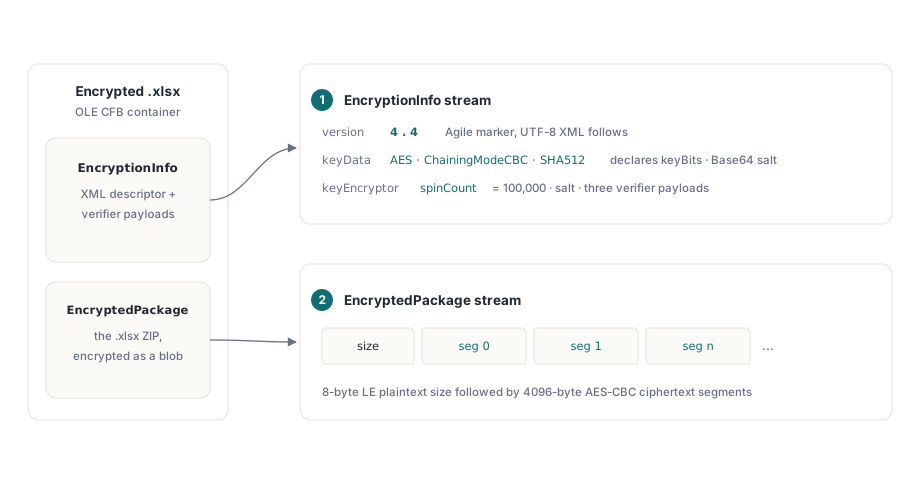
What distinguishes Agile from its predecessors is that EncryptionInfo is self-describing. After an 8-byte version prefix, with major and minor version both 4, the stream is a UTF-8 XML descriptor. A keyData element declares the cipher (AES), the chaining mode (ChainingModeCBC), the hash (SHA512), the key length in bits, the block size, and a Base64 salt. A password keyEncryptor element carries its own salt, the spinCount, and three Base64 payloads: encryptedVerifierHashInput, encryptedVerifierHashValue, and encryptedKeyValue. Excel writes AES-256 with a spin count of 100,000, but the descriptor is allowed to declare AES-128 or AES-192, and HotXLS honors whatever keyBits says rather than assuming 256
One entry point for plaintext, Standard, and Agile workbooks
TXLSXWorkbook.OpenEncrypted handles all three states a caller can encounter, plain ZIP, Standard-encrypted, and Agile-encrypted, so upload handlers do not need to classify files before loading them. The method first sniffs the file: if there is no CFB signature, it defers to the normal Open path and the password is simply ignored. If the file is a CFB container, it tries ECMA-376 Standard Encryption first and, when the EncryptionInfo version signature is the Agile 4.4, dispatches to the Agile pipeline. The return value is 1 on success, the same contract as Open
var
  Wb: TXLSXWorkbook;
begin
  Wb := TXLSXWorkbook.Create;
  try
    // Works for plain .xlsx, Standard-encrypted and
    // Agile-encrypted files alike
    if Wb.OpenEncrypted('upload.xlsx', 'customer-password') = 1 then
      Writeln(VarToWideStr(Wb.Sheets[1].Cells[1, 1].Value));
  finally
    Wb.Free;
  end;
end;
The fallback for unencrypted input matters more than it looks. A batch importer that always calls OpenEncrypted needs no branching at the call site: files that were never protected load exactly as before, and files that arrive encrypted are decrypted in place and then fed to the ordinary ZIP loader as an in-memory stream. There is one code path to test, not three
How does a password become an AES key?
Agile encryption never uses the password directly. HotXLS first computes an iterated hash: the initial digest is SHA-512 over the password salt concatenated with the UTF-16LE bytes of the password, and then the digest is rehashed spinCount times, each round prepending the 32-bit little-endian iteration counter to the previous digest. With Excel's default spin count of 100,000 that is one hundred thousand serial SHA-512 invocations per password attempt, and that is the entire point. The spin count is a brute-force throttle: it costs a legitimate caller a few milliseconds once, and costs a dictionary attacker the same few milliseconds for every single guess
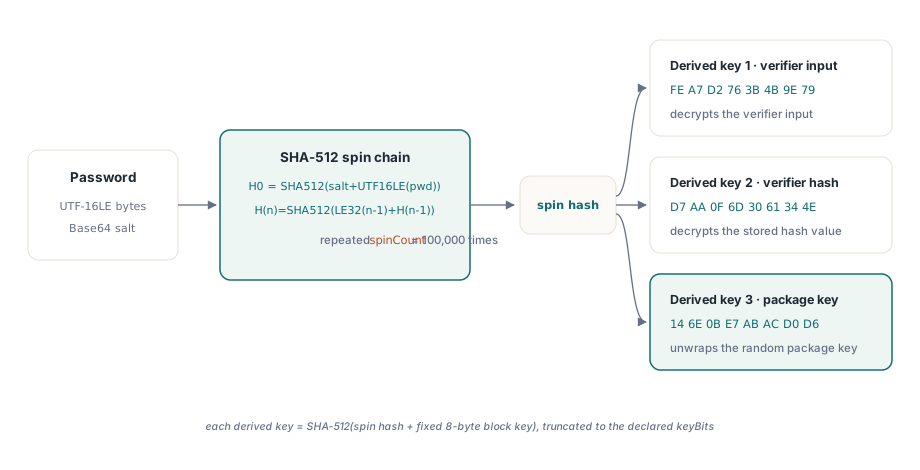
// [MS-OFFCRYPTO] iterated password hash:
//   H(0) = SHA-512(salt + UTF-16LE(password))
//   H(n) = SHA-512(LE32(n - 1) + H(n - 1)), repeated spinCount times
function AgilePasswordHash(const Password: WideString;
  const Salt: TBytes; SpinCount: Integer): TBytes;
var
  buf: TBytes;
  i: Integer;
begin
  Result := XlsSHA512(Concat(Salt, Utf16LEBytes(Password)));
  SetLength(buf, 4 + 64);
  for i := 0 to SpinCount - 1 do
  begin
    PutLE32(buf, 0, i);            // iteration counter, little-endian
    Move(Result[0], buf[4], 64);   // previous digest
    Result := XlsSHA512(buf);
  end;
end;
The spun hash is still not a key. Three distinct keys are derived from it by hashing it once more with a fixed 8-byte block key appended, one constant per purpose: FE A7 D2 76 3B 4B 9E 79 for decrypting the verifier input, D7 AA 0F 6D 30 61 34 4E for the verifier hash, and 14 6E 0B E7 AB AC D0 D6 for unwrapping the actual package key. Each SHA-512 result is truncated to the declared key length, and, per [MS-OFFCRYPTO], padded with 0x36 bytes in the theoretical case where the hash is shorter than the key. The same 0x36 padding rule applies when the password salt is extended to block size for use as the CBC initialization vector
Password verification and the saltSize truncation trap
HotXLS verifies the password before it touches the package, using the verifier pair from the descriptor. It decrypts encryptedVerifierHashInput with the first derived key, hashes the result with SHA-512, decrypts encryptedVerifierHashValue with the second derived key, and compares the two digests byte for byte. A mismatch means the password is wrong, reported as a distinct outcome rather than a garbled workbook, and critically it means the package body is never decrypted with a bad key, so there is no scenario where a wrong password produces plausible-looking corrupt data
There is a specification detail here that is easy to get wrong. [MS-OFFCRYPTO] §2.3.4.13 defines the verifier as saltSize bytes of random data, where saltSize is the length of the key encryptor's salt, not the cipher block size. Because AES-CBC ciphertext is block-aligned, the decrypted verifier input comes back padded to a multiple of 16 bytes, and it must be truncated back to saltSize before hashing. Excel always writes saltSize equal to blockSize, both 16, so an implementation that skips the truncation passes every test against real Excel output and then fails on the first file from a producer that chose a different salt length. HotXLS truncates to the salt length because that is what the specification actually says, and the two values agreeing in practice is a coincidence, not a contract
How is the EncryptedPackage decrypted?
The EncryptedPackage stream begins with an 8-byte little-endian plaintext size, followed by the ciphertext in 4096-byte segments, and HotXLS decrypts it segment by segment with a fresh IV per segment. The package key itself is not password-derived: it is a random intermediate key that the writer encrypted into encryptedKeyValue, and HotXLS unwraps it with the third derived key, truncating to the key length declared by keyData. Each segment's IV is SHA-512 over the keyData salt concatenated with the 32-bit little-endian segment index, truncated to the block size. That construction means any 4096-byte segment can be decrypted independently, which is also what makes the format friendly to random access in principle, although HotXLS decrypts the whole package to memory and hands the resulting ZIP bytes to its normal XLSX loader
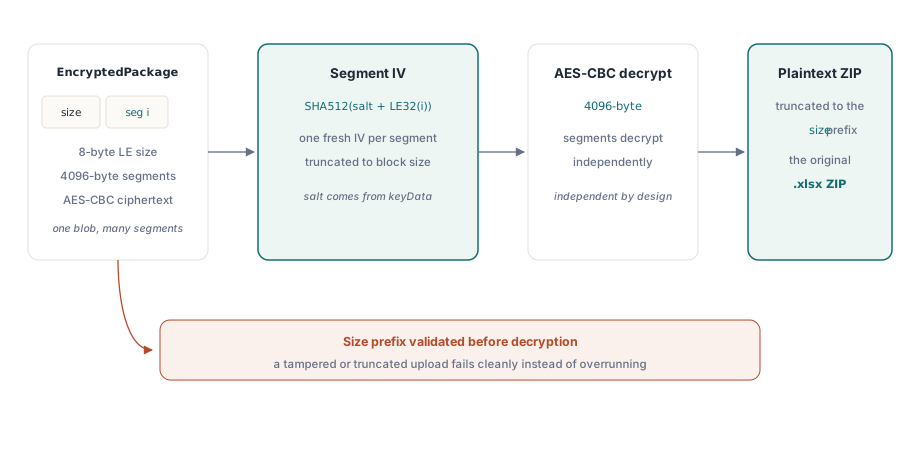
The declared plaintext size does the final piece of work. AES-CBC output is block-aligned, so the last segment carries up to 15 bytes of padding that are not part of the document; the decrypted buffer is truncated to the size prefix, and the result is exactly the .xlsx ZIP that Excel encrypted. HotXLS validates the prefix against the actual stream length before decrypting, so a truncated upload or a tampered size field fails cleanly instead of overrunning
Error reporting and honest boundaries
The failure modes are deliberately kept apart. A wrong password raises an exception with an explicit wrong-password message, driven by the verifier mismatch, so a UI can prompt the user to retry. A CFB container whose descriptor declares algorithms outside the supported set, anything other than AES with CBC chaining and SHA-512 hashing in an Agile descriptor, or a container that is neither Standard nor Agile, raises a different exception identifying the scheme as unsupported. The two must never be conflated: retrying a password against an unsupported scheme wastes the user's time, and reporting a wrong password as a format error sends your support team down the wrong road
function LoadUploadedWorkbook(const FileName: WideString;
  const Password: WideString; Wb: TXLSXWorkbook): Boolean;
begin
  Result := False;
  try
    Result := Wb.OpenEncrypted(FileName, Password) = 1;
  except
    on E: EXlsxEncryptionNotImplemented do
      // Raised for both a wrong password and an unsupported
      // scheme; E.Message states which, so log it verbatim and
      // only offer a password retry for the wrong-password case
      RejectUpload(FileName, E.Message);
  end;
end;
The boundaries are worth stating plainly. HotXLS reads Agile descriptors that declare AES in CBC mode with SHA-512, which covers what Excel 2010 through Excel 365 actually write, in all three key sizes. Descriptors declaring other ciphers or hash algorithms are rejected rather than guessed at, and certificate-based key encryptors are not consulted, only the password key encryptor is. On the write side HotXLS currently produces Standard Encryption rather than Agile, a distinction that matters if downstream tooling inspects the scheme; the details are in the article on writing AES-protected XLSX output
Password-protected uploads stop being a special case once the loader treats encryption as part of the file format rather than an exception to it. The OpenEncrypted entry point, the SHA-512 spin-count derivation, and the segmented AES-CBC pipeline described here ship as part of the HotXLS Delphi Excel Component, alongside the rest of its native XLS and XLSX reading and writing engine for Delphi and C++Builder