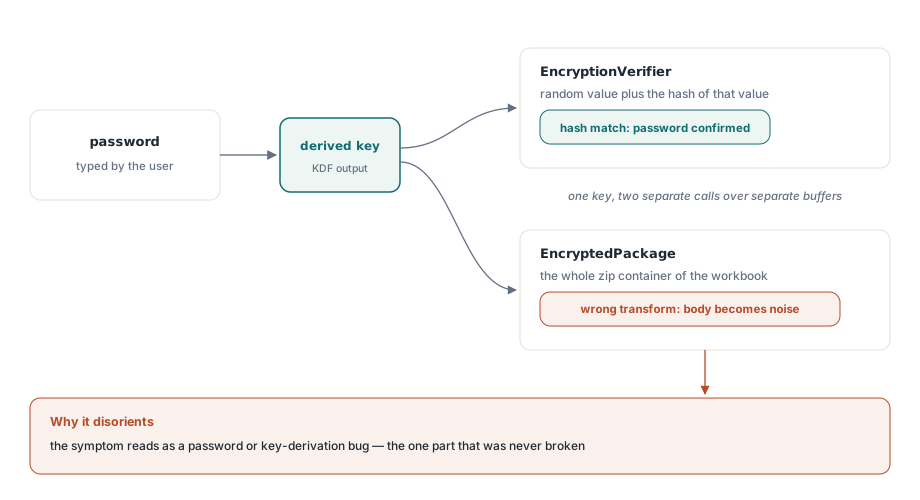
You write a workbook, encrypt it with a password, hand the file to a colleague, and the colleague opens it in Excel. Excel asks for the password. The colleague types it, and Excel accepts it. So far the encryption looks correct. Then Excel puts up a dialog that says the file is corrupt and cannot be opened, or it opens to a sheet of meaningless cells. The password was right. The file is broken anyway. This is the single most disorienting failure mode in Office encryption, because the part that tells you the password is right and the part that holds your data are protected by two different operations, and getting one correct does nothing to guarantee the other
Both bugs described here had exactly this shape. In each case the verifier passed and the body did not, which sends you hunting for a password or key-derivation bug that is not there. The real fault was downstream, in how the package bytes were transformed. The two faults are independent, one in the AES path and one in the RC4 path, but they share a diagnosis problem, so it is worth seeing why a half-correct result is the hardest kind to read
Why a passing password proves nothing about the body
The format the modern encrypted XLSX uses is ECMA-376 Standard Encryption, and it stores two encrypted things side by side. One is the EncryptionVerifier: a small block holding a random value and the hash of that value, encrypted with the key derived from the password. The other is the EncryptedPackage: the entire zip container of the workbook, encrypted with the same key. The verifier exists so that a reader can confirm a password before it spends effort on megabytes of body. Decrypt the verifier, hash the random value, compare it to the stored hash, and if they match the password is correct
The trap is that the verifier and the package are encrypted by separate calls over separate buffers. A key that is derived correctly will decrypt the verifier correctly no matter what happens to the package afterward. So if your key derivation is right but your package transform is wrong, Excel confirms the password from the verifier and then fails on the body. The symptom reads as "right password, broken file", which points the investigation at the password path, which is the one part that was never broken. The same separation governs the legacy RC4 case: the verifier hash is checked first, and a body that drifts out of sync still leaves that check intact
Bug one: AES in ECB, not CBC
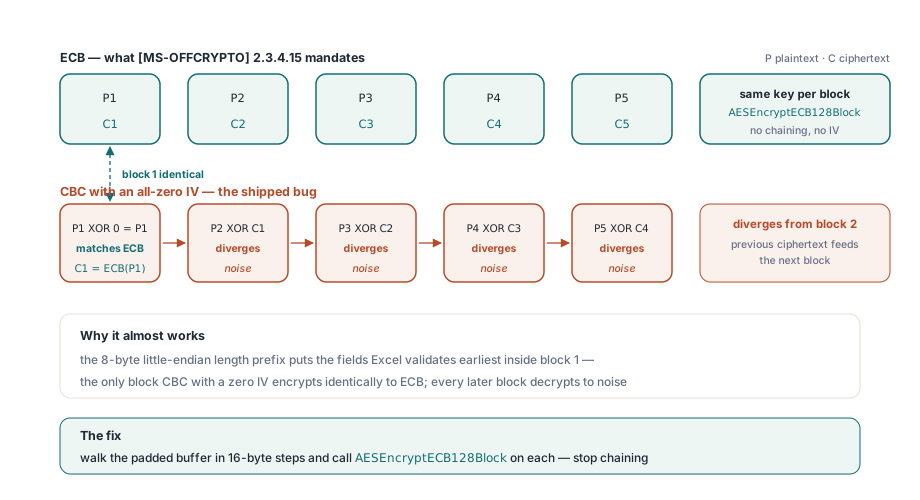
[MS-OFFCRYPTO] §2.3.4.15 specifies that Standard Encryption encrypts the package with AES in Electronic Codebook mode. Every 16-byte block of the padded package is encrypted independently with the same key. There is no chaining between blocks and there is no initialization vector. This is an unusual choice by modern standards, where ECB is normally avoided, but interop is not a place to second-guess the specification. Excel decrypts the package as ECB, so a producer must encrypt it as ECB or the two will not agree
The bug was that the package was encrypted with AES in CBC mode using an all-zero initialization vector. Here is why that almost works, and why almost is the worst place to land. In CBC, the first plaintext block is XORed with the IV before encryption. When the IV is all zeros, that XOR changes nothing, so the first block of CBC-with-zero-IV produces exactly the same ciphertext as ECB. From the second block onward CBC feeds the previous ciphertext block into the next, so every block after the first diverges from ECB
Now overlay that on the structure. The package layout places an 8-byte little-endian length prefix at the very start, so the parts of the file Excel checks earliest sit in the first block or two. A first block that happens to match means the earliest validation passes while every later block decrypts to noise. The fix is not subtle once the mode is named: encrypt each 16-byte block with ECB and stop chaining. In the engine, XlsEncryptStdPackage walks the padded buffer in 16-byte steps and calls AESEncryptECB128Block on each one, which is the same primitive already used for the verifier blocks. The source carries a comment at the loop that states the rule plainly: CBC with a zero IV only matches ECB for the first block, so the rest of the package would decrypt to garbage and Excel would reject it
var
  Book: TXLSXWorkbook;
begin
  Book := TXLSXWorkbook.Create(nil);
  try
    Book.Open('report.xlsx');
    // SaveAsEncrypted serializes the workbook, then runs the
    // ECMA-376 Standard Encryption pipeline: AES-128 ECB over the
    // package per [MS-OFFCRYPTO] 2.3.4.15. Returns 1 on success.
    if Book.SaveAsEncrypted('report_secure.xlsx', 'S3cret!') <> 1 then
      raise Exception.Create('Encryption failed');
  finally
    Book.Free;
  end;
end;
Bug two: the RC4 re-key drifts out of step
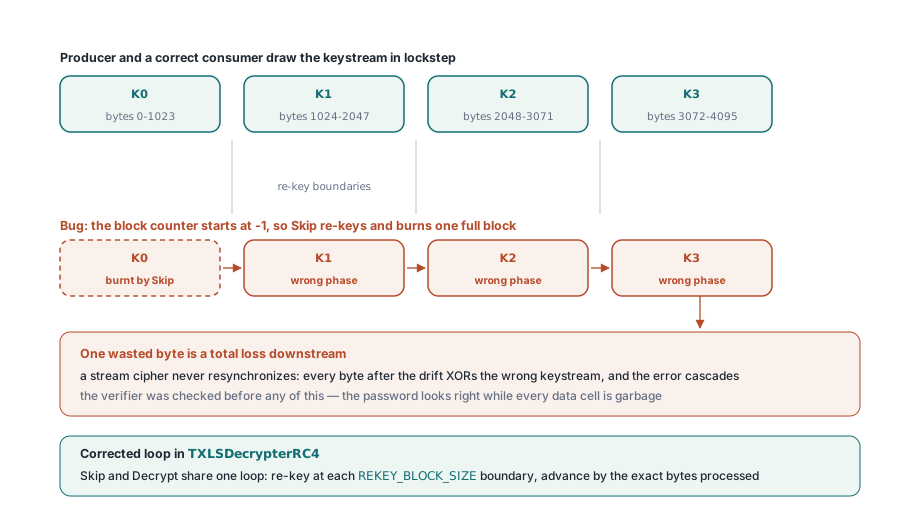
The legacy .xls path uses the RC4 CryptoAPI scheme, and its rule is different in kind. [MS-OFFCRYPTO] §2.3.6 specifies that the cipher is re-keyed at every 1024-byte block boundary. The stream is divided into blocks of 1024 bytes, a fresh RC4 key is derived for block number 0, 1, 2, and so on, and within each block the keystream is consumed continuously from byte to byte. Two invariants have to hold together: re-key on each boundary, and consume the keystream without gaps inside a block. RC4 is a stream cipher, so its keystream is a single ordered sequence; the n-th byte you draw is determined by how many bytes you have drawn before it. Decryption is the same XOR against the same sequence, which means producer and consumer must draw exactly the same bytes at exactly the same positions
That is the whole difficulty. A stream cipher has no resynchronization. If you waste one byte of keystream, every byte after it is XORed against the wrong keystream byte, and the error never corrects itself; it cascades to the end of the block and, once the running position is wrong, to every block after it. The bug here did exactly that. The block counter started from a sentinel value of negative one, and the skip routine assumed the counter already matched the current block. Starting from that sentinel, it re-keyed and ran a full 1024-byte block of keystream that should never have been consumed, and in the process it drove the remaining count negative. From that point the decrypter was a full block out of phase. The verifier, checked before any of this, still passed, so the password looked right while every data cell came out as garbage
The corrected logic lives in TXLSDecrypterRC4. Both Skip and Decrypt share one loop: re-key only when the running position crosses into a new block, where the block index is the position divided by REKEY_BLOCK_SIZE (1024), then consume up to the remainder of the current block and no more. MakeKey is called with the block index, never with a stale or sentinel index, and the position advances by the exact number of bytes processed so that Skip and Decrypt stay phase-aligned with the producer. The lesson sits in the smallest unit: a single wasted byte is not a small error in a stream cipher, it is a total loss of everything downstream
var
  Book: TXLSXWorkbook;
begin
  Book := TXLSXWorkbook.Create(nil);
  try
    // CanReadEncrypted checks the Compound File (OLE2) signature so
    // you can branch before attempting a normal Open. OpenEncrypted
    // routes plain files to Open and handles the encrypted container.
    if Book.CanReadEncrypted('legacy.xls') then
      Book.OpenEncrypted('legacy.xls', 'S3cret!')
    else
      Book.Open('legacy.xls');
    // read cells here
  finally
    Book.Free;
  end;
end;
Interop with a frozen spec is matching to the byte
Both bugs reduce to the same root principle, and it is worth stating on its own because it changes how you weigh design choices. When the consumer of your output is a fixed external program you cannot change, the cipher mode and the re-key cadence are not implementation details you get to optimize or simplify. They are part of the wire contract. Excel will decrypt with ECB and re-key on 1024-byte boundaries whether or not those choices please you, and your only job is to produce bytes that decrypt to the original under that exact procedure. A mode that is more modern, an IV that seems harmless, a counter that starts where it feels natural; any of these is a defect the instant it diverges from what the reader expects. Interop against a frozen specification is not approximate. It is byte-exact or it is broken
This is also why the verifier is a poor smoke test on its own. It tells you the key derivation works, which is necessary but far from sufficient. A test that only opens an encrypted file and confirms the password passes will report success while the body is unreadable. A real test decrypts the package and compares the recovered bytes to the original input, or round-trips a workbook through encrypt and decrypt and reads cells back. The verifier proves the password; only the body proves the encryption
The supported way to read and write protected workbooks
The public surface is small. To write a password-protected modern workbook, populate or open a TXLSXWorkbook and call SaveAsEncrypted with a file name and a password; it serializes the workbook and runs the Standard Encryption pipeline that the first fix corrected, returning 1 on success. To read, call CanReadEncrypted to test whether a file is an encrypted Compound File container, then branch: OpenEncrypted handles the encrypted path and falls back to Open for plain files, and Open with a password is available directly. The mode handling and the re-key loop described above sit underneath these calls; you supply the password and the file name and the engine matches the specification on your behalf
var
  Book: TXLSXWorkbook;
begin
  Book := TXLSXWorkbook.Create(nil);
  try
    Book.Open('quarterly.xlsx');
    Book.SaveAsEncrypted('quarterly_locked.xlsx', 'P@ssphrase');
    // Reopen on the consumer side
    Book.OpenEncrypted('quarterly_locked.xlsx', 'P@ssphrase');
  finally
    Book.Free;
  end;
end;
The shape of the protected output, the EncryptionInfo stream, the verifier blocks, and the package layout are covered in our walkthrough of AES-protected XLSX output. For the separate question of sheet-level locking and how protection interacts with page setup and printing, see the article on protection, page setup, and printing. Both build on the encryption path described here, which ships as part of the HotXLS Delphi spreadsheet component for Delphi and C++Builder alongside the reading, writing, and rendering APIs covered elsewhere on this blog