Hatching that renders as one flat gray block is the classic tiling-pattern failure. HotPDF, the native VCL PDF component for Delphi and C++Builder, paints PatternType 1 by turning the current path into a temporary clip and replaying the pattern content stream once per visible tile, with pattern selection held in the graphics state and restored by q and Q
The symptoms arrive in two flavors, and they look unrelated until you know the cause. A CAD drawing loses its section hatching and comes back as solid fills, because the renderer resolved the pattern to an average color and painted that. Or the hatching escapes: a title block that should be plain white picks up the diagonal lines from a detail view two paths earlier. Both are pattern-state problems, and only one of them is about drawing tiles at all
Why does a tiling pattern bleed onto the next path?
Because the selected pattern name is part of the graphics state, not a property of the operator that used it. ISO 32000-1 §8.6.6.2 defines a Pattern color space as one whose color value is a pattern name supplied to scn or SCN, and every other component of the color state is saved by q and restored by Q. The pattern name has to follow the same rule. HotPDF keeps it in the state record as FillPatternName and StrokePatternName, alongside the fill and stroke color space family, so a Q puts the previous selection back exactly the way it puts back the previous CTM
Store that name in a local variable inside the operator dispatcher instead, and it survives every Q in the stream. The failure then shows up somewhere unexpected: a Form XObject drawn after the patterned path inherits a pattern selection its own content stream never made, and its fills come out hatched. Nested forms make it worse, because each nesting level pushes and pops state that the stray variable ignores. Setting a non-pattern color space with cs or CS, or issuing a plain g / rg / k, must also clear the pattern name, otherwise the stale selection outlives the color space that gave it meaning

q
  /Pattern cs              % pattern colour space, ISO 32000-1 8.6.6.2
  /P1 scn                  % coloured tiling pattern, PaintType 1
  10 10 200 120 re f       % this rectangle is hatched
Q
0 0 300 200 re f           % must be black again, not hatched

q
  /Cs2 cs                  % [/Pattern /DeviceCMYK] array
  0 0.6 1 0 /P2 scn        % uncoloured pattern plus its underlying colour
  20 20 160 90 re f*
Q
A pattern is painted through a clip, never as a fill
The correct model is subtractive: restrict the device clip to the shape being painted, then run the pattern content inside it. HotPDF never draws a solid approximation first and overpaints it, because the intermediate solid would be visible through the gaps between tiles and would fight any transparency in the tile content. §8.7.3.2 describes a tiling pattern as a content stream replicated at fixed horizontal and vertical intervals, and replication only makes sense against a clip that already has the right shape. For fills the conversion is direct: HPDFSelectFillPathClip sets the polygon fill mode to ALTERNATE for f*, B* and b* and to WINDING for the nonzero variants, builds the GDI path, and intersects it into the clip with SelectClipPath. That single line is what makes an even-odd patterned fill leave the same holes as an even-odd solid fill, which is exactly what a donut-shaped hatched region needs
Strokes are the part that is easy to get wrong. A stroked path has no interior, so intersecting the path itself into the clip yields an empty region and nothing gets painted. HPDFSelectStrokePathClip therefore builds a geometric pen from the current state first, using PS_GEOMETRIC with the end cap from J, the join from j, the miter limit from M, and PS_USERSTYLE when a dash array is active, then calls WidenPath to convert the stroked outline into a fillable region before clipping. Cap, join, miter and dash behavior on a pattern-stroked path then match a normal stroke by construction rather than by a second implementation. Two honest limits live here: line widths below one device unit are clamped to one pixel, and the dash array is truncated at sixteen entries, which is the ceiling ExtCreatePen accepts
Which tiles are actually visible?
The visible range comes from running the transform backwards. Tile placement happens in pattern space, but the only thing that knows how much of the page is being touched is the device clip box, which is in device space. HotPDF composes BaseMatrix := CTM * PatternMatrix, inverts it, and maps the four corners of the GDI clip box back through the inverse. The axis-aligned bounds of those four mapped corners give the pattern-space rectangle that can possibly be covered, and dividing that rectangle by XStep and YStep against the pattern BBox gives closed index ranges. Each cell then renders with a CTM of CTM * PatternMatrix * Translate(i * XStep, j * YStep), and gets clipped a second time to its own transformed BBox polygon. That second clip matters when XStep is smaller than the bounding box width, which is how overlapping tile designs are expressed; without it, neighboring cells would paint over each other outside their declared extent. If the per-cell clip comes back as NULLREGION, the cell is skipped without tokenizing or executing anything
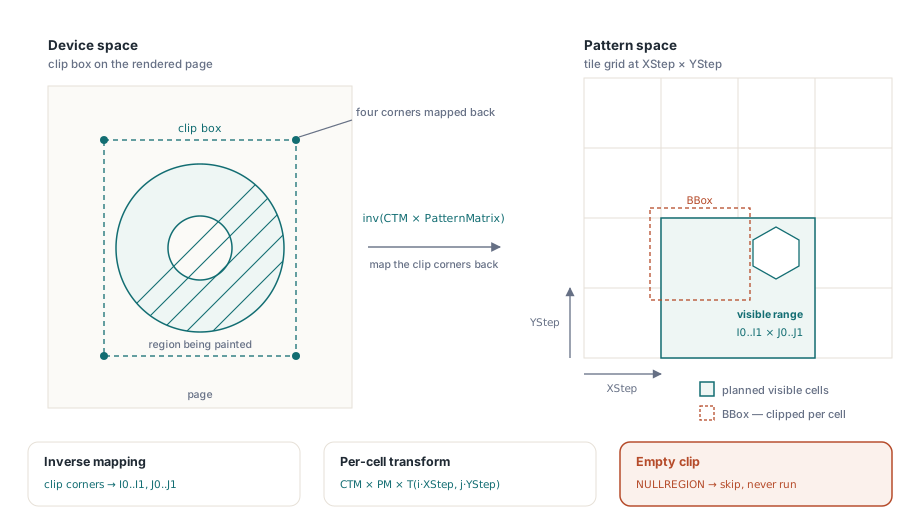
// Map the device clip box back into pattern space through the inverse of
// CTM * PatternMatrix, then convert those bounds into tile index ranges.
BaseMatrix := HPDFMatMul(FGSStack.State.CTM, PatternMatrix);
if not HPDFMatInvert(BaseMatrix, InverseMatrix) then Exit;   // singular: refuse
if GetClipBox(FDC, ClipRect) = ERROR then Exit;

// MinX..MaxY are the axis-aligned bounds of the four mapped clip corners.
I0 := Floor((MinX - BBox[2]) / StepXAbs);
I1 := Ceil ((MaxX - BBox[0]) / StepXAbs);
J0 := Floor((MinY - BBox[3]) / StepYAbs);
J1 := Ceil ((MaxY - BBox[1]) / StepYAbs);

PlannedTiles := Int64(I1 - I0 + 1) * Int64(J1 - J0 + 1);
if (PlannedTiles <= 0) or (PlannedTiles > FPatternTilesRemaining) then Exit;
Dec(FPatternTilesRemaining, Integer(PlannedTiles));
Uncolored patterns and the color that comes from outside
A PaintType 2 pattern carries shape but no color, and the color arrives with the pattern name. §8.7.3.2 specifies that an uncolored pattern is used only with a Pattern color space that declares an underlying space, so scn receives the component values first and the pattern name last. HotPDF resolves those components through the underlying space stored on the pattern color space entry, which means an uncolored hatch can be tinted with a Separation ink or a DeviceN combination exactly like any other fill; the mechanics of that resolution are covered in rendering Separation and DeviceN spot colors. Inside the tile, the two paint types diverge sharply. For PaintType 2 the renderer sets a color-operator suppression flag for the duration of the tile, so any g, rg, k or scn in the pattern content is ignored and every mark takes the externally supplied color. For PaintType 1 the opposite applies: fill and stroke state are reset to the PDF defaults, DeviceGray black with an identity color space, and the tile colors itself. Skipping that reset lets the color that happened to be current at the f operator leak into a pattern that was supposed to be self-describing
Why must the graphics state stack depth be restored after every tile?
Because a pattern content stream is allowed to be unbalanced, and the damage compounds across cells. A tile whose stream contains three q operators and two Q operators leaves the stack one frame deeper than it started. Restore only the current state record between cells and the depth keeps growing, so cell number two hundred executes from a stack frame that belongs to cell number one hundred and ninety-nine, with whatever CTM and clip that frame carried. HotPDF therefore snapshots the state record and the stack depth before the tile loop and calls RestoreSnapshot at the top of every iteration, which truncates the stack back to the saved length and reinstalls the saved state in one step. The page Resources dictionary and the color-operator suppression flag are restored on the same boundary, since a tile may reference its own resources and must not hand them to its neighbor. GDI clip state gets the same treatment through a SaveDC / RestoreDC pair around each cell, so a tile that installs its own W n clip cannot shrink the region available to the next one
Budgets, refusals, and what the renderer will not draw
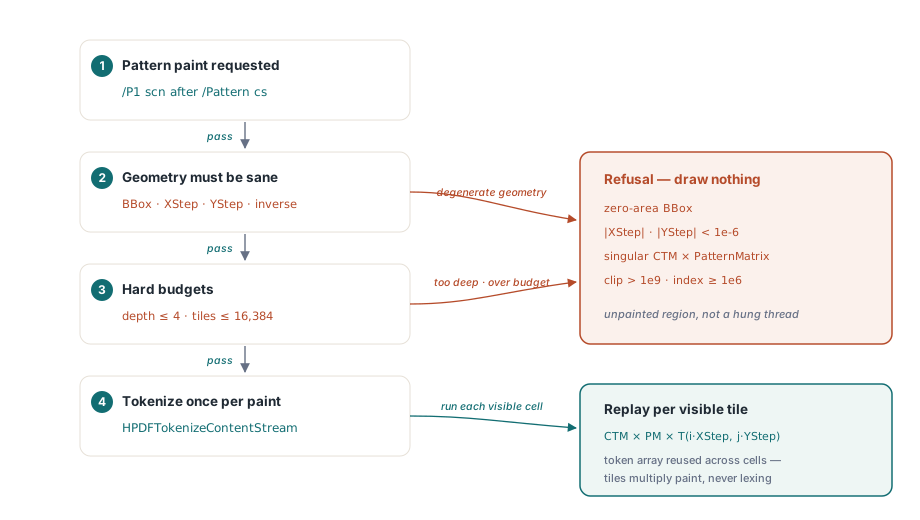
Tiling patterns are the easiest place in a PDF to write a denial-of-service file, so the limits are hard numbers rather than heuristics. Pattern nesting is capped at depth 4, the same guard used for Form XObject recursion, which stops a pattern that references itself through its own resource dictionary. A single path paint may execute at most 16,384 tiles in total, counted down across nested patterns and reset only when the outermost pattern paint begins. A tile grid whose planned cell count exceeds what is left of that budget is rejected outright, before a single cell runs
Degenerate geometry is refused rather than approximated. A missing or zero-area BBox, an XStep or YStep whose magnitude is under 1e-6, a CTM * PatternMatrix product with no inverse, mapped clip coordinates beyond 1e9, or an index magnitude past one million all cause the pattern paint to return without drawing. The result is an unpainted region instead of a hung render thread, which is the trade you want in a batch converter. Performance comes from one decision: the pattern stream is tokenized once per paint with HPDFTokenizeContentStream and the token array is reused across every visible cell, so tile count multiplies execution cost but never lexing cost
Rendering a patterned page from Delphi
Nothing about pattern support changes the calling code. Load the document, ask for a page, and the tiling work happens inside the content-stream interpreter that page-to-bitmap rendering already drives. The same interpreter feeds bitmap, metafile and printer device contexts, so a hatched drawing that looks right in a preview thumbnail prints with the same tile geometry. PatternType 2 shading patterns take a different branch that shares its evaluation path with the bare sh operator, described in detail under axial and radial shading rendering
var
  Pdf: THotPDF;
  Bmp: TBitmap;
begin
  Pdf := THotPDF.Create(nil);
  try
    if Pdf.LoadFromFile('assembly-drawing.pdf') > 0 then
    begin
      // Section hatching that previously flattened to a solid block now
      // replays the tile content once per visible cell.
      Bmp := Pdf.RenderLoadedPageToBitmap(0, 200);
      if Assigned(Bmp) then
      try
        Bmp.SaveToFile('sheet1.bmp');
      finally
        Bmp.Free;
      end;
    end;
  finally
    Pdf.Free;
  end;
end;
When a patterned region still looks wrong, check the three failure classes in order. A region that is entirely blank usually means a refusal: inspect XStep, YStep and BBox for degenerate values, or count the tiles the grid would need against the 16,384 ceiling. A region painted in a single flat color means the pattern name never reached the paint operator, which points at cs and scn ordering in the stream. A pattern that shows up where it does not belong means state restoration, and the place to look is the q / Q handling around the form or path that inherited it
Tiling patterns are one of those PDF features that stay invisible until the file that needs them lands in your inbox, and then they are the whole job. If you are building drawing viewers, engineering document converters or report renderers on Delphi or C++Builder, the full component and its rendering API are documented on the HotPDF Delphi PDF component page