HotPDF Delphi Component fills an existing AcroForm field on a loaded PDF through THotPDF.SetFormFieldValue, addressed either by zero-based field index or by fully qualified field name. Writing the new /V entry is the easy part; what makes the call reliable on real-world forms is that the same method also keeps three pieces of state consistent that are invisible until they go wrong: the decoded identity of the field so that a non-ASCII name can be found at all, the /AS appearance state on checkbox and radio widgets, and the /I selection index array on choice fields. The visible appearance stream is a separate, explicit step through EnsureLoadedFieldAppearanceStream
The scenario is the mundane one: a customer sends you their own form, a tax declaration, an insurance claim, a purchase order somebody built in Acrobat years ago, and your Delphi application has to populate it from a database and hand back a file that opens correctly everywhere. You have no control over how the form was authored. Field names may be UTF-16 encoded, checkbox export values may be 2 rather than Yes, and combo boxes may use [export display] option pairs. Each of those details has a rule in ISO 32000-1, and each rule is something SetFormFieldValue now handles for you. This article is about what it does, why, and where it stops. For the sibling problem of creating fields that do not exist yet, see adding AcroForm fields to a loaded PDF in Delphi
Why does SetFormFieldValue fail to find a field with a non-ASCII name?
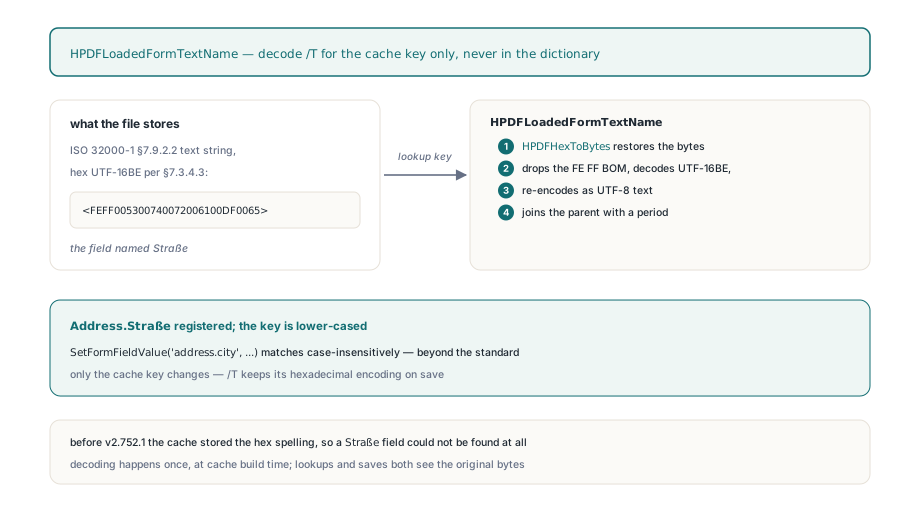
Before v2.752.1 the answer was encoding: the field lived in the file under a hexadecimal UTF-16BE name, and the name cache stored the hex spelling instead of the text. ISO 32000-1 §12.7.3.1 defines the partial field name /T as a text string, and §7.9.2.2 says a text string may be UTF-16BE with a leading FE FF byte order mark. Authoring tools routinely serialize such names as hex strings per §7.3.4.3, so a field called Straße arrives as <FEFF005300740072006100DF0065>. Inside HotPDF, THPDFStringObject.Value holds the raw hexadecimal text whenever IsHexadecimal is set, which is exactly what you want for a lossless round trip of the original dictionary and exactly what you do not want as a lookup key. HPDFLoadedFormTextName separates the two concerns. When the relationship cache is built, every /T value passes through it: if the string object is hexadecimal, HPDFHexToBytes restores the byte sequence; if the bytes begin with FE FF and have even length, the payload is decoded as UTF-16BE and re-encoded as UTF-8; the result is then joined to its parent name with a period to form the fully qualified name that §12.7.3.1 describes, so a kid named City under a parent named Address is registered as Address.City. The cache key is normalized to lower case, which makes SetFormFieldValue('address.city', ...) succeed as well; that is a convenience beyond the standard, since the specification treats names as case-sensitive. Crucially, only the cache key changes. The /T object in the field dictionary keeps its hexadecimal encoding, so saving the document does not rewrite the identity of a field you merely filled
var
  Pdf: THotPDF;
begin
  Pdf := THotPDF.Create(nil);
  try
    if Pdf.LoadFromFile('claim-form.pdf') <= 0 then Exit;

    // Qualified names are decoded from UTF-16BE /T strings and
    // joined with periods, so nested and non-ASCII names resolve
    Pdf.SetFormFieldValue('Applicant.FullName', 'Maria Schneider');
    Pdf.SetFormFieldValue('Applicant.Straße', 'Hauptstraße 12');

    // Values that are not Latin-1 travel as FEFF-prefixed UTF-16BE hex
    // and are written as a PDF hexadecimal string
    Pdf.SetFormFieldValue('Applicant.City', 'FEFF004D00FC006E006300680065006E');

    Pdf.SaveLoadedDocument('claim-form-filled.pdf');
  finally
    Pdf.Free;
  end;
end;
What does SetFormFieldValue actually write?
Both overloads run the same five steps: locate the field dictionary, write /V through HPDFSetDictFormValue, reconcile choice selection indices, mark the dictionary dirty, reconcile button appearance states, and finally record the field index through NoteLoadedFormFieldDirty. That last step matters if the form carries calculation scripts, because the dirty set is what the parameterless RecalculateLoadedFormFieldsIncremental overload consumes to re-run only the calculations that transitively read a changed field. HPDFSetDictFormValue itself is careful about the object type it replaces. If the existing /V is a name object, which is what checkbox and radio fields use for their export value, the new value is written as a name, never as a string, because PDF names are ASCII-only by construction. Otherwise it writes a string object and inspects the value you passed: a string that starts with FEFF, has even length, and consists solely of hex digits is treated as the UTF-16BE wire form from §7.9.2.2 and stored with IsHexadecimal set, so it serializes as <FEFF...> rather than as a literal (FEFF...). That is the mechanism the City line above relies on; any other string is stored as a literal string with the bytes you gave it, so for plain Latin text you pass plain text
Why does a checkbox keep its old tick after the value changes?
Because for a button field the value alone does not decide what is drawn. ISO 32000-1 §12.7.4.2.3 specifies that a checkbox widget carries an /AS appearance state naming which stream in /AP /N is currently shown, and viewers paint from /AS, not from /V. If you change /V to Yes but leave /AS at Off, the file is internally contradictory, and flattening will happily bake the stale unchecked appearance into the page while the form data says checked. ReconcileLoadedButtonAppearanceStates exists to close that gap: for a field whose /FT is Btn, it visits the field dictionary itself and every entry in its /Kids array, reads the on-state name from /AP /N, and rewrites /AS to that name when it matches the field value or to Off when it does not
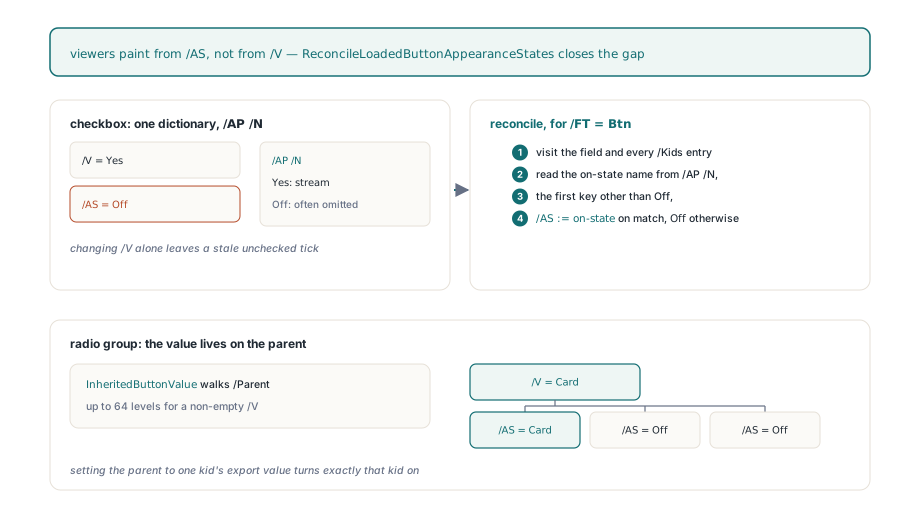
Two details from real forms shaped the v2.752.3 fix. First, a normal appearance dictionary is allowed to contain only the on state; §12.7.4.2.3 names the off appearance Off but authoring tools frequently omit its stream and let the viewer draw nothing. Earlier code bailed out when the dictionary held fewer than two entries, so those single-state checkboxes silently kept their old tick. The check is now simply that the dictionary is non-empty, and the on-state name is taken as the first key that is not Off. Second, the on-state name is whatever the author chose. Real forms use 2, Yes, On, or a localized word, so the comparison is against the actual key, case-insensitively, never against a hard-coded Yes. Radio buttons add one more wrinkle, described in §12.7.4.2.4: the selection lives in /V on the parent field, while the individual kids own the widgets and typically have no /V of their own. The nested InheritedButtonValue helper therefore walks up the /Parent chain, up to 64 levels, until it finds a non-empty value, so each kid is compared against the value of the group it belongs to. Setting the parent to one kid's export value turns exactly that kid on and every sibling off
// Checkbox: the export value must match the on-state key in /AP /N
// (often 'Yes', but real forms use '2', 'On', or anything else)
Pdf.SetFormFieldValue('Consent', 'Yes');

// Radio group: /V is written on the parent; every kid widget gets
// /AS set to its own export name or to Off
Pdf.SetFormFieldValue('PaymentMethod', 'Card');

// Clearing a checkbox: any value that matches no on state yields /AS Off
Pdf.SetFormFieldValue('Newsletter', 'Off');
Choice fields: keeping /I in step with /V
For a combo box or list box, /V is not the only place a selection is recorded. Table 231 in §12.7.4.4 defines /I as an array of zero-based indices into /Opt that identifies the selected items, and a viewer that finds /I pointing at option 0 while /V names option 3 may highlight the wrong row. Since v2.754.1, HPDFReconcileChoiceSelection runs inside every SetFormFieldValue call and, when the inherited /FT is Ch, rebuilds /I from the new value. The order of operations is deliberate. The local /I entry is deleted first, without touching its contents: if the old array was an indirect object shared with another field, mutating it in place would corrupt the other field's selection, so the routine drops the reference and creates a fresh direct array instead. It then resolves /Opt through the /Parent chain, since choice options may be inherited, and scans the entries. A bare string option is compared directly; an [export display] pair is compared on its export element, and a pair with fewer than two elements is skipped. Both sides go through HPDFLoadedFormTextName, so a hex UTF-16 option matches a hex UTF-16 value without you spelling them identically. On the first match a one-element /I is written and the scan stops; a scalar value always replaces any previous multi-selection, regardless of the MultiSelect flag
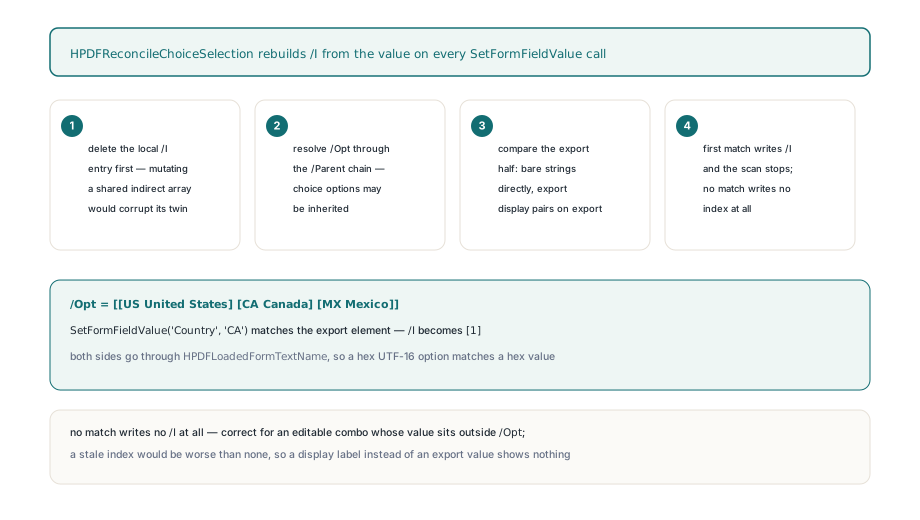
When nothing matches, no /I is written at all. That is the correct outcome for an editable combo box, where §12.7.4.4 allows the user to type a value outside the option list; such a value has no index, and a stale index would be worse than none. It is also what you get if you pass a display label instead of an export value to a paired option list, so when a combo box refuses to show your selection, check which half of the pair you supplied
// /Opt is [[US United States] [CA Canada] [MX Mexico]]:
// match on the export value, and /I becomes [1]
Pdf.SetFormFieldValue('Country', 'CA');

// Editable combo with a value outside /Opt: /V is written,
// /I is removed, and no index is fabricated
Pdf.SetFormFieldValue('Title', 'Principal Engineer');
Value and appearance are two separate operations
SetFormFieldValue never touches the appearance stream of a text or choice field. After the call, /V holds the new text while /AP /N still paints the old one, and which of the two a viewer shows depends on whether the AcroForm dictionary carries /NeedAppearances true per §12.7.3.3 and whether the viewer honors it. If you need the file to render the new value in every reader, including flatteners and thumbnail generators that ignore the flag, call EnsureLoadedFieldAppearanceStream with the field index. It builds a Form XObject from the inherited /DA string, the /Q quadding, the /MaxLen comb layout and the value, resolves the named font through the AcroForm /DR resources so a Type0 font keeps its own descendant font rather than degrading to Helvetica, and returns True when at least one widget received a stream. The by-name overload of SetFormFieldValue gives you no index back, so fetch one through GetFormField, which returns a THPDFLoadedFormField you own and must free. The regression suite for the v2.752.1 change is explicit about this split: it sets a value, calls EnsureLoadedFieldAppearanceStream, then renders the page and checks that the pixels inside the widget rectangle changed while the pixels outside it did not. Verifying that /V changed proves nothing about what a user will see
var
  Field: THPDFLoadedFormField;
begin
  Pdf.SetFormFieldValue('Applicant.FullName', 'Maria Schneider');
  Field := Pdf.GetFormField('Applicant.FullName');
  try
    // Paint the new value into /AP so viewers that ignore
    // /NeedAppearances still show it
    if not Pdf.EnsureLoadedFieldAppearanceStream(Field.Index) then
      raise Exception.Create('No widget rectangle to paint into');
  finally
    Field.Free;
  end;
  Pdf.SaveLoadedDocument('claim-form-filled.pdf');
end;
Limits worth knowing before you build on this
ReconcileLoadedButtonAppearanceStates tests the local /FT of the dictionary you addressed, so it acts on the radio parent or on a checkbox that carries its own /FT; a kid widget addressed on its own, with /FT only on its parent, is not reconciled through that path. HPDFReconcileChoiceSelection handles a single scalar value and writes at most one index; multi-selection list boxes with several chosen entries are outside what SetFormFieldValue models. Neither routine validates the value you pass against /Opt or against the on-state keys, so a typo produces an Off checkbox or an index-less combo rather than an exception. And GetFormFieldValue returns the stored /V text as it sits in the dictionary, which for a hex-encoded value means the hexadecimal spelling, not the decoded text
Once the values are in and the appearances are painted, the two natural next steps sit on either side of this operation. Exchanging field data with external systems in bulk, rather than one SetFormFieldValue call at a time, is what XFDF import and export in Delphi covers. And when the filled form is final and should no longer be editable, flattening AcroForm and XFA fields in Delphi bakes exactly the /AS states and appearance streams described here into static page content, which is why getting them consistent before flattening is not optional
The loaded-form editing API in this article, including SetFormFieldValue, EnsureLoadedFieldAppearanceStream and the incremental recalculation graph, ships as part of the HotPDF Delphi Component for Delphi and C++Builder