Two forms can carry the same fields and behave nothing alike. An AcroForm keeps its fields as ordinary PDF objects sitting on top of real page content, so any conforming reader draws it. A dynamic XFA form keeps almost nothing as PDF: the fields, the layout, even the page geometry live in an XML package, and the visible pages are produced at open time by a layout engine that only Adobe ever shipped widely. Feed that file to a web viewer, an archive renderer, or a text extractor and you do not get the form. You get a single gray page reading "Please wait... If this message is not eventually replaced by the proper contents of the document, your PDF viewer may not be able to display this type of document." Anyone who has ingested government or insurance paperwork knows that page on sight
The placeholder is not corruption. It is exactly what the format specifies should happen when no XFA processor is present, and as of 2026 that describes nearly every viewer outside desktop Acrobat. So the practical move is to convert the dynamic form into a plain AcroForm before it reaches anything downstream. HotPDF, the losLab PDF library for Delphi and C++Builder, does that conversion in code, rebuilding the XML form as native fields on native pages
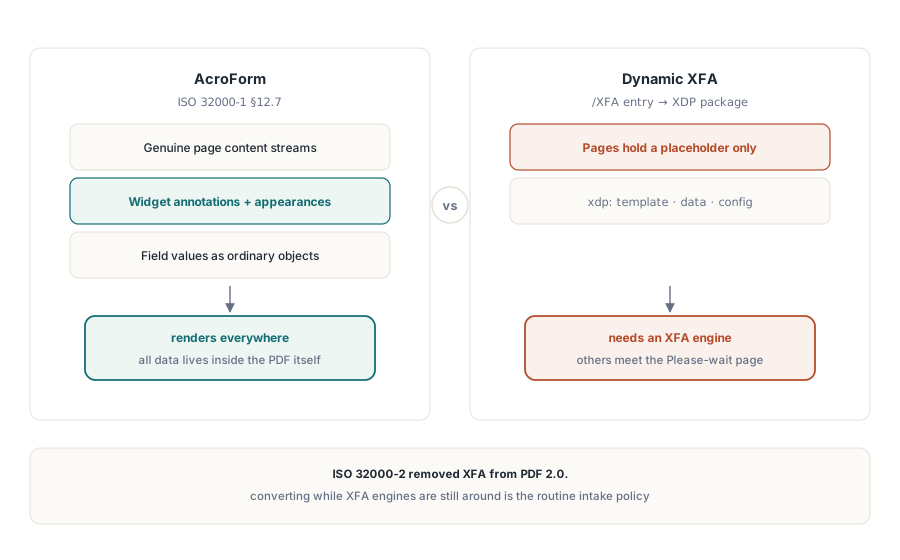
Why the two models cannot coexist
AcroForm is defined in ISO 32000-1 §12.7. Each field is a PDF object with a widget annotation and an appearance stream, the page is genuine PDF content, and the data rides on top of it. XFA inverts that: the form is an XML document, an XDP package stored in the /XFA entry of the AcroForm dictionary, and a dynamic form's PDF pages hold the "Please wait" placeholder and nothing else, because the real content was never serialized as PDF. A reader processes a file as one model or the other. Ignore the /XFA entry and you see the empty shell; honor it without an XFA engine and you see the warning. ISO 32000-2 ended the debate by dropping XFA from PDF 2.0, which is the main reason "convert while we still can" turned from an edge case into routine intake policy
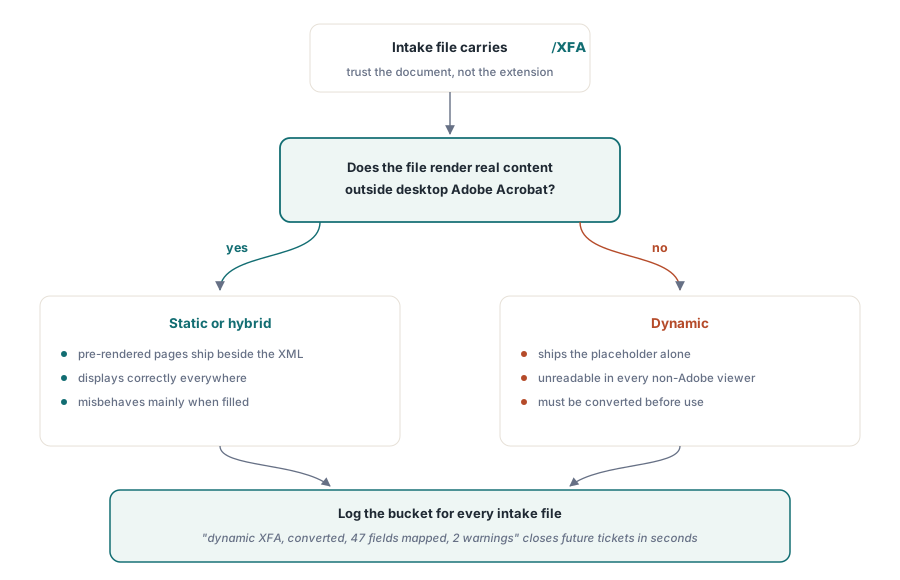
Before converting anything, classify it, because not every XFA file shows the placeholder. Static XFA forms ship pre-rendered PDF pages next to the XML, so they display everywhere and only misbehave when filled. Dynamic forms ship the placeholder alone and are unusable until converted. The thing to trust is the document, never the extension or the sender. A file that renders real content in a non-Adobe viewer yet still carries an /XFA entry is static or hybrid; a file that shows the warning page is dynamic. Record which bucket each intake file landed in. The two kinds break in different ways later, and a ticket about a blank archived form is closed in seconds when the intake log already reads "dynamic XFA, converted, 47 fields mapped, 2 warnings"
Converting a loaded XFA document into native fields
The conversion runs against a document already in memory. FlattenLoadedXFA parses the XFA template and its data packets, lays the form out, and rebuilds it as AcroForm fields on real PDF pages:
var
  Pdf: THotPDF;
  MappedCount, I: Integer;
  Warnings: TStrings;
begin
  Pdf := THotPDF.Create(nil);
  try
    Pdf.LoadFromFile('dynamic_xfa.pdf');
    MappedCount := Pdf.FlattenLoadedXFA(True);   // True = fields stay editable
    Warnings := Pdf.XFAFlattenWarnings;
    for I := 0 to Warnings.Count - 1 do
      Log('XFA flatten warning: ' + Warnings[I]); // unmapped elements
    Pdf.SaveLoadedDocument('native_acroform.pdf');
    Log(Format('Mapped %d fields', [MappedCount]));
  finally
    Pdf.Free;
  end;
end;
The return value and the warning list are output, not debug noise, so keep both. Conversion loses information by its nature: XFA scripting, calculated fields, and dynamic subform behavior have no AcroForm counterpart, and XFAFlattenWarnings names every template element that did not map. Archive the converted file without its warning list and someday you will stare at an empty totals box in an archived copy with no record of why. The Editable flag controls whether the new fields stay fillable. Pass True when people keep working with the form afterward, and lock the values down when the goal is a frozen record
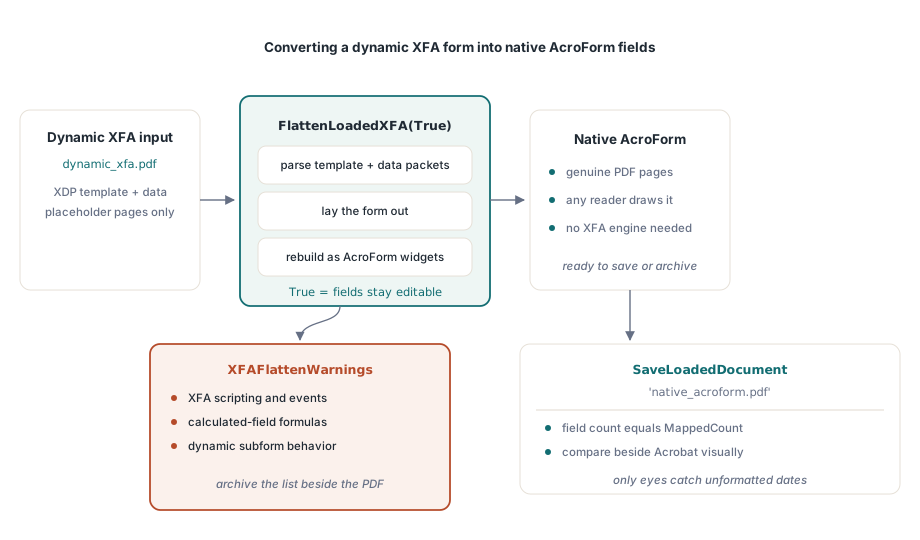
Checking a conversion is part visual, part structural, and you need both halves. The structural half is easy: confirm the field count matches MappedCount. The visual half is the one that catches real damage. Open the source form in desktop Acrobat, still the only viewer running the XFA engine, beside the converted file in an ordinary reader, and compare values and layout on at least one filled sample per template. A date the XFA engine displayed as 2026-06-11 can land in the AcroForm copy as a raw, unformatted value, and only your eyes will catch that
When the input is an XDP package
Not every job starts from a populated PDF. Sometimes you receive the XDP package on its own, exported from a form design tool or handed over by a partner system. ApplyXFAAsAcroForm drops the load step and applies the package straight to the current document:
XDPBytes := TFile.ReadAllBytes('benefit-claim.xdp');
MappedCount := Pdf.ApplyXFAAsAcroForm(XDPBytes, True);
The same group of calls also runs the other direction, for the rarer case where you have to emit XFA rather than consume it. AddXFAPacket attaches individual named packets such as 'xdp' or 'config'. SetXFADocument installs a complete single-stream payload in one call. ClearXFAPackets wipes the registration so you can start over, and AddXFASignaturePacket embeds XAdES material for workflows that sign the XML form data directly. Producing XFA in 2026 is a niche need, almost always forced by one legacy consumer that refuses anything else, but when a contract names it these calls keep it down to a configuration choice instead of a separate tool
The other meaning of "flatten"
The word "flatten" trips up a lot of conversations, because it names a second operation entirely: burning AcroForm field appearances into the page content stream until no interactive objects are left. HotPDF has no API for that today, and you want to know it now rather than halfway through a project. What the library gives you instead is locking at the field level when the field is created, backed by document permissions:
// Lock the value at field creation: read-only text field
Pdf.CurrentPage.AddTextField('CaseNumber', 'BC-2026-0117',
  Rect(50, 700, 220, 720), 0, [ffReadOnly]);

// Belt and suspenders: restrict form filling document-wide
Pdf.ActivateProtection := True;
Pdf.CryptKeyLength := aes256;
Pdf.OwnerPassword := 'records-owner';
Pdf.ProtectOptions := [prPrint, prInformationCopy, prExtractContent];
// fill permission withheld: prFillAnnotations is absent from the set
Be clear about what that buys you and what it does not. A read-only field is still a form object. It shows up in the viewer's field panel, its value is readable through the form API, and a tool that rewrites the file can clear the read-only flag again. Permission flags raise the bar but depend on the viewer choosing to respect them, a limitation ISO 32000-1 states plainly. When a regulator insists that an archived record contain no form objects at all, the honest answer with HotPDF today is to rebuild the document: read the values out, then draw them as ordinary TextOut content on a fresh page, instead of dressing up read-only flags as flattening. One thing to remember on the permissions route is that CryptKeyLength has to be set before BeginDoc; the rest is in our AES-256 encryption and permissions article
What XFA means for archival compliance
PDF/A and PDF/X both reject XFA outright. A pipeline feeding an ISO 19005 archive therefore has to convert first, and the order is not negotiable: load, FlattenLoadedXFA, save, then run archival generation or validation on the AcroForm result. Do not treat conversion as proof of compliance. It fixes the form model and leaves fonts, color, and metadata exactly as they were, so validate the output with veraPDF before you trust it. Once the form is on the AcroForm side, its behavior gets its own set of controls. JavaScript triggers, submit actions, and validation scripts are covered in the HotPDF AcroForm fields and actions article
The XFA registration, conversion, and form APIs shown here ship with the HotPDF Delphi Component for Delphi and C++Builder, whose documentation tracks the XFA feature set as it has grown across recent releases