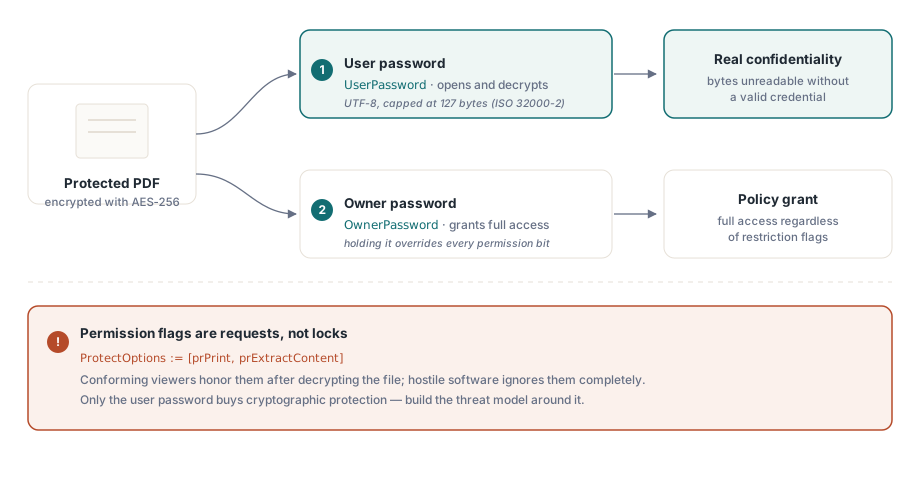
A PDF permission flag is not a lock. It is a request the file makes of whatever opens it, and a viewer is free to ignore it. That single fact decides how you should reason about every other choice on this page. Real confidentiality comes from one place only: AES-256 encryption keyed off a password the reader does not have. Everything else, the "no printing" and "no copying" checkboxes, is policy that conforming software agrees to honor and hostile software does not. Mix those two layers up and you ship something that feels secure in a demo and leaks in the field
HotPDF is a native VCL PDF component for Delphi and C++Builder, and it exposes the ISO 32000 protection model through a small set of properties. The properties are easy to set. The hard part is knowing which one buys you cryptographic protection and which one buys you a polite suggestion, and getting the assignment order right so the encryption you asked for is actually the encryption you get
What the two passwords actually promise
PDF encryption defines two credentials with different jobs, and conflating them is the most common design error in protected-output code. The user password gates decryption. Without it, or the owner password, a conforming reader cannot reconstruct the file key and the content stays cryptographically unreadable. The owner password gates the permission settings instead: a reader that receives the owner password is granted full access no matter what the restriction flags say
The permission bits sit on weaker ground. Printing, content extraction, form filling: each is a flag a viewer reads and chooses to respect (ISO 32000-2 §7.6.4). Encryption protects the bytes. The permission flags only instruct conforming software, and they instruct it after the fact. Anyone who opens the document with the user password already holds the decrypted content in memory, so "no copy" and "no print" mean something to a well-behaved viewer and nothing to a determined one. Build the threat model around that line. Confidentiality lives in the user password. Permissions shape what mainstream viewers offer, and that is the whole of what they do
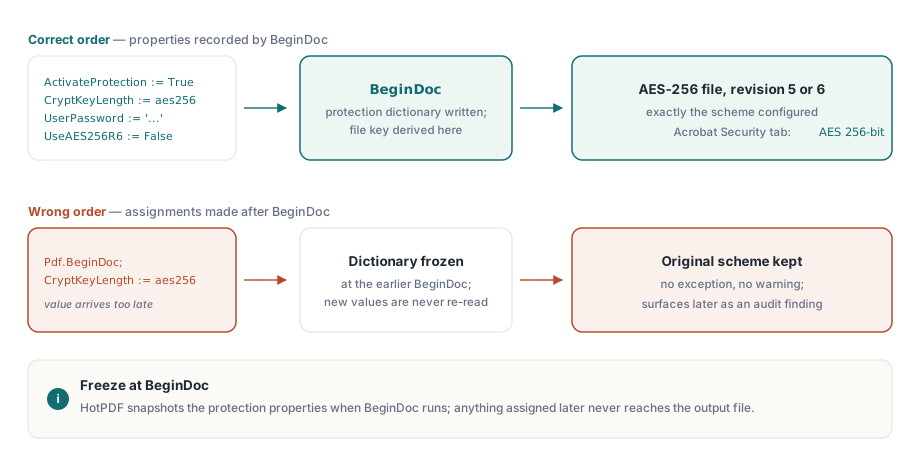
Configuration order: everything before BeginDoc
HotPDF builds the encryption dictionary and derives the file key at the moment BeginDoc runs. Whatever the protection properties hold at that instant is what the document gets, and changing them afterward changes nothing. The property that matters most here is CryptKeyLength, which picks the scheme from the THPDFKeyType values k40, k128, aes128, and aes256. Assign it after BeginDoc and you get no exception, no warning, just a file that quietly kept whatever it started with. That kind of silent divergence is the worst sort: it passes every local test and turns up months later as a compliance finding on a customer's desk
var
  Pdf: THotPDF;
begin
  Pdf := THotPDF.Create(nil);
  try
    Pdf.FileName := 'statement.pdf';
    Pdf.ActivateProtection := True;
    Pdf.CryptKeyLength := aes256;        // must be set before BeginDoc
    Pdf.UserPassword := 'open-secret';
    Pdf.OwnerPassword := 'admin-secret';
    Pdf.UseAES256R6 := False;            // R=5: widest viewer support
    Pdf.BeginDoc;
    Pdf.CurrentPage.SetFont('Arial', [], 11);
    Pdf.CurrentPage.TextOut(50, 720, 0, 'Account statement, June 2026');
    Pdf.EndDoc;
  finally
    Pdf.Free;
  end;
end;
Passwords are UTF-8 and capped at 127 bytes, which is the ISO 32000-2 limit for the AES-256 schemes. If your password policy hands you longer secrets, do the truncation yourself, on your side, where you control exactly where the cut falls. Leave it to chance and the library and some future viewer can disagree about the cutoff, which produces a file that opens for you and refuses the same password somewhere else
Revision 5 or revision 6: one boolean, two ecosystems
UseAES256R6 picks between the two AES-256 handshakes, and the choice is more consequential than its boolean type suggests. Leave it False and HotPDF writes revision 5, the AES-256 scheme that arrived as an extension to PDF 1.7 and that something like fifteen years of viewers can open. Set it True and you get revision 6, the hardened key derivation standardized in ISO 32000-2 for PDF 2.0, which closes a known weakness in how revision 5 verifies the password
So revision 6 is cryptographically the better story. It is also the one that breaks things. A revision 6 file needs a viewer built for PDF 1.7 Extension Level 3 or PDF 2.0, and plenty of deployed software is neither: records-management archives, embedded renderers in other products, line-of-business tools nobody has touched in years. Those will refuse the file outright, and they will do it on the customer's machine, never on yours. The practical default is therefore revision 5. Reach for revision 6 only when a security policy names ISO 32000-2 by revision, and when you have actually confirmed every consumer can read it. Either way, write down which one you chose and why, because the next person to touch this code will wonder
The older key types deserve a sentence so you know to skip them. THPDFKeyType still lists k40, k128, and aes128, but they exist to reproduce historical archives, not to protect new ones. 40-bit RC4 falls to commodity hardware, and the 128-bit schemes predate the AES-256 revisions that any current security review will expect. For a document you are creating in 2026 the real question is only revision 5 versus revision 6; if you find yourself reaching for the legacy types on a new design, something upstream has gone wrong
Permission flags without an open password
Often the requirement is the opposite of secrecy. Anyone should be able to read the document, but printing or extraction is meant to be limited. You express that with an empty user password and a non-empty owner password, which PDF calls open-password mode, and you list the operations you want to allow in ProtectOptions
Pdf.ActivateProtection := True;
Pdf.CryptKeyLength := aes256;
Pdf.UserPassword := '';                      // anyone can open the file
Pdf.OwnerPassword := 'rotate-me-quarterly';  // guards the permission set
Pdf.ProtectOptions := [prPrint, prPrint12bit, prExtractContent];
Pdf.BeginDoc;
// ... page content ...
Pdf.EndDoc;
The THPDFProtectOptions set maps onto the ISO permission bits: prPrint and prPrint12bit for high-resolution printing, prInformationCopy for general copy and extraction, prExtractContent for assistive-technology extraction, plus prModifyStructure, prEditAnnotations, prFillAnnotations, and prAssemble. Two of them deserve a warning. Leave prExtractContent on in almost every profile you build. It is the bit a screen reader needs to reach the text, and clearing it quietly converts a rights decision into an accessibility defect that someone with a disability hits and you never see. The other trap is prPrint on its own, without prPrint12bit: several viewers respond by degrading print quality, and your users will file that as a rendering bug rather than the permission setting it actually is
Verification takes five minutes and belongs in your release checklist. Open a sample of each profile in Acrobat, open Document Properties, and read the Security tab, which spells out the algorithm ("AES 256-bit") and lists the allowed operations one at a time. Then open the same file in the oldest viewer your customers actually run, not the newest one on your machine. That second open is the cheap insurance against a revision 6 file sailing through development and dying at a customer who never upgraded
Removing protection from existing files
Decryption runs the same property model backwards. Load the document with a valid credential, turn protection off, and save the result without it
var
  Pdf: THotPDF;
  PageCount: Integer;
begin
  Pdf := THotPDF.Create(nil);
  try
    PageCount := Pdf.LoadFromFile('encrypted.pdf', 'open-secret');
    if PageCount > 0 then
    begin
      Pdf.ActivateProtection := False;   // drop encryption on save
      Pdf.SaveLoadedDocument('plain.pdf');
    end;
  finally
    Pdf.Free;
  end;
end;
That route parses the whole document into memory, which is fine for ordinary files and wasteful for huge ones. When the input runs to hundreds of megabytes, DecryptFile is the cheaper option: it decrypts during a file-level copy, taking a direct AES-256 rewrite path that skips building the full object tree whenever the input allows it. It is part of the Direct File API covered in the companion article on processing large PDFs from Delphi
Constraints that interact with encryption
Two limits are worth knowing before you design around encryption rather than after. The first is archival conformance. ISO 19005 forbids encryption in PDF/A, so any workflow that encrypts a document and also claims PDF/A conformance is contradictory by construction; HotPDF will not let you have both in one file. When you genuinely need both, the answer is two artifacts: an encrypted copy for distribution and a separate unencrypted copy for the archive
The second limit is starker. PDF encryption has no escrow and no recovery. Lose the user password on an R5 or R6 file and your options are brute force or giving up. So treat owner and user secrets the way you treat any production credential. Generate them, store them in a vault, rotate them on a schedule. The one thing never to do is hard-code them as constants in a unit, where they ride straight into version control and sit in every developer's working copy forever
One last reflex worth building. Changing the protection on a file you did not create is the same machinery as decryption, not a separate feature: load it with its password through LoadFromFile, edit ProtectOptions or the passwords in place, and write it back with SaveLoadedDocument. If you can decrypt a file, you can re-permission it, and the code looks almost identical to the example above
The protection properties shown here are part of the standard HotPDF Delphi Component for Delphi and C++Builder; the product page carries the full encryption reference, including the complete permission enumeration