An AcroForm action is a dictionary attached to a widget that tells the viewer what to do when something happens to that widget. Click a button and the viewer reads its action dictionary: a URI action opens a web address, a JavaScript action runs script, a SubmitForm action posts the collected field values to an endpoint, a ResetForm action clears them back to defaults. The action is data, not behavior baked into the file. ISO 32000-1 §12.6 defines the dictionary shape; the viewer supplies the engine that interprets it. That split matters because an action written perfectly into the PDF still does nothing if the reader on the other end has no engine for it, and a lot of AcroForm grief traces back to that gap rather than to a malformed field
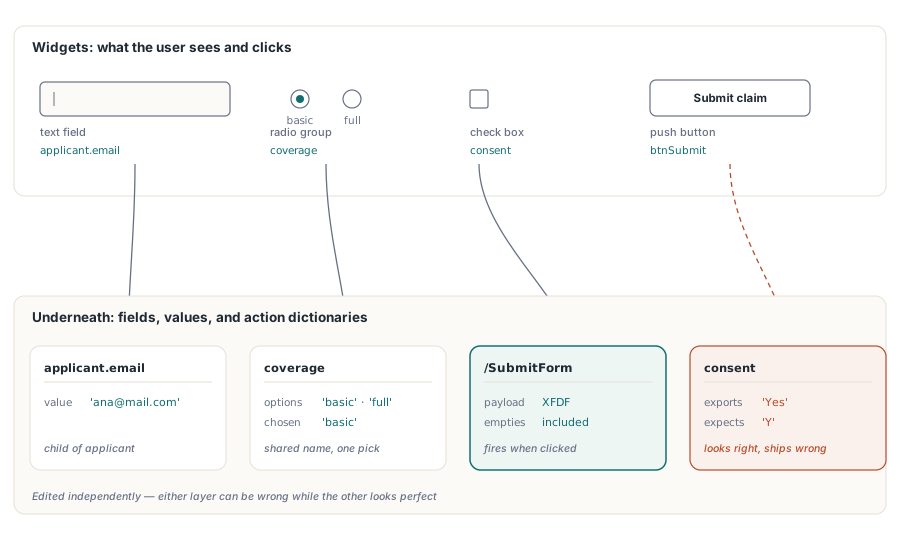
HotPDF writes those dictionaries directly from Delphi and C++Builder, alongside the field widgets they hang off. Two structures are in play for every interactive form: the widget the user sees on the page, and the field plus action machinery underneath that carries the data and the wiring. They are edited independently, and either can be wrong while the other looks fine. The sections below work through field naming, the button actions themselves, field-level JavaScript, and the class of defect that survives a visual check because it lives entirely in the second structure
Field names are routing keys, not captions
Every AcroForm field carries a fully qualified name. ISO 32000-1 §12.7.3 makes that name, not the visible caption, the key under which the field's value travels when the form is exported or submitted. Developers arriving from VCL design tend to treat a control's name as a private code identifier, and it is not one here. It is the wire format
The first thing that follows is that two fields with the same fully qualified name are not two fields. PDF treats them as two widget annotations of one field, sharing one value, so typing into one updates the other on the spot. That is exactly what you want when a customer name has to repeat on every page of a contract. It is a bug when a generation loop reuses 'Field1' across three pages by accident. No visual inspection catches the second case. Each page still draws its own box, and the linkage only surfaces once someone starts typing
Dotted names such as applicant.email build a hierarchy. The parent node applicant groups its children, which is what lets a reset or submit target only part of a form. Naming fields this way from the start costs nothing, and it pays for itself the first time the receiving system asks for just the applicant block
Radio buttons have a rule of their own. Buttons that should toggle together must share a group name. In HotPDF, AddRadioButton calls that pass the same group name attach their widgets to one parent field, and each button's export value ('basic' or 'full') identifies the chosen option. Give every button a distinct name and you get a row of independent on/off switches instead of one mutually exclusive group, which renders identically and behaves wrongly
Creating the field set page by page
HotPDF places fields through THPDFPage methods, so every field belongs to the page object that created it. The sequencing trap to watch for is AddPage. It repoints CurrentPage at the new page the instant it returns, so any field call after it lands on the new page even when the field logically belonged to the page you just left. Finish each page, drawn content and fields together, before you call AddPage
procedure BuildClaimForm(Pdf: THotPDF);
begin
  // Page 1: applicant block
  Pdf.CurrentPage.AddTextField('applicant.name', '', Rect(50, 700, 300, 722));
  Pdf.CurrentPage.AddTextField('applicant.email', '', Rect(50, 660, 300, 682));
  Pdf.CurrentPage.AddCheckBox('consent', 'Y', Rect(50, 620, 70, 640), False);
  Pdf.CurrentPage.AddRadioButton('coverage', 'basic', Rect(50, 580, 70, 600), True);
  Pdf.CurrentPage.AddRadioButton('coverage', 'full', Rect(90, 580, 110, 600), False);
  Pdf.CurrentPage.AddComboBox('plan', 'Standard',
    ['Basic', 'Standard', 'Premium'], Rect(50, 540, 200, 565));

  Pdf.AddPage;  // CurrentPage now points at page 2
  Pdf.CurrentPage.AddListBox('riders', 'None',
    ['None', 'Flood', 'Earthquake'], Rect(50, 500, 200, 600));
end;
Coordinates use the PDF convention, with the origin at the bottom-left corner of the page. This is the same origin TextOut uses for drawn text, so Rect(50, 100, 200, 120) sits near the bottom of a Letter page, not the top. VCL puts Y at the top and grows it downward, so a layout table ported straight across comes out vertically mirrored, every field flipped to the wrong end of the page. Do the conversion once in a shared helper instead of at each call site, and a single correction fixes the whole form
Wiring buttons to URI, JavaScript, and submit actions
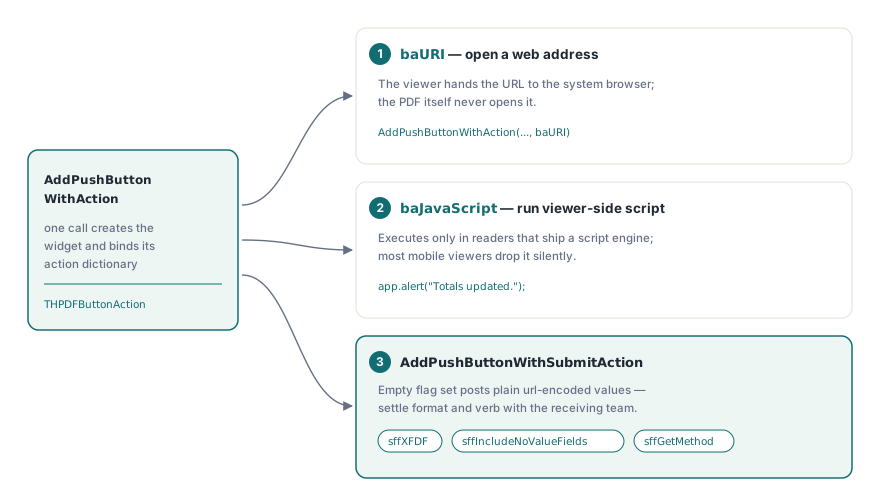
A push button is inert until an action is attached to it. HotPDF surfaces the action types from ISO 32000-1 §12.6.4 through the THPDFButtonAction enumeration (baURI, baJavaScript, baSubmitURL, baResetForm, baHide, baShow, baNamed), and provides two methods that create the button and bind its action in one call
// Open a help page in the system browser
Pdf.CurrentPage.AddPushButtonWithAction('btnHelp', 'Help',
  'https://www.example.com/claims-help', Rect(320, 700, 420, 730), baURI);

// Run viewer-side JavaScript
Pdf.CurrentPage.AddPushButtonWithAction('btnRecalc', 'Recalculate',
  'app.alert("Totals updated.");', Rect(320, 660, 420, 690), baJavaScript);

// Submit as XFDF and keep empty fields in the payload
Pdf.CurrentPage.AddPushButtonWithSubmitAction('btnSubmit', 'Submit claim',
  'https://api.example.com/claims', Rect(320, 620, 420, 650),
  [sffXFDF, sffIncludeNoValueFields]);
The submit flags deserve more thought than they usually get. AddPushButtonWithSubmitAction takes a THPDFSubmitFormFlags set, and an empty set produces a plain url-encoded post, which is the format many sample endpoints accept and many production endpoints reject. Adding sffXFDF switches the payload to XFDF. sffGetMethod changes the HTTP verb. sffIncludeNoValueFields keeps empty fields in the payload instead of dropping them silently, which matters the moment the consumer distinguishes "absent" from "blank". The flag set is part of your interface contract with the receiving endpoint, so settle it with the team that parses the submission, not after the first rejected batch
Field-level JavaScript: keystroke, format, validate
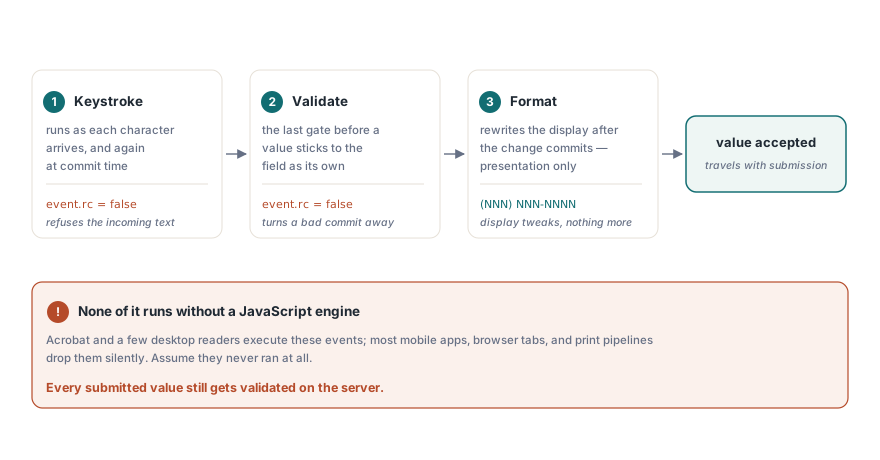
Button clicks are not the only place actions live. HotPDF also attaches JavaScript to the per-field events that script-capable viewers fire while a user is entering data. There are three triggers, and they fire at different points in the input lifecycle. A keystroke action runs as each character arrives, and again at commit. A format action rewrites the displayed value after a change has committed, purely for presentation. A validate action gets the last word, accepting or refusing the committed value before it becomes the field's value
// Reject committed values that are not plausible email addresses
Pdf.AttachFieldKeyStrokeAction('applicant.email',
  'if (event.willCommit && !/^[\w.-]+@[\w.-]+\.\w+$/.test(event.value)) event.rc = false;');

// Display US phone numbers as (NNN) NNN-NNNN
Pdf.AttachFieldFormatAction('applicant.phone',
  'event.value = event.value.replace(/(\d{3})(\d{3})(\d{4})/, "($1) $2-$3");');

// Refuse applicants under 18 at commit time
Pdf.AttachFieldValidateAction('applicant.age',
  'if (parseInt(event.value) < 18) event.rc = false;');
Setting event.rc = false inside a keystroke or validate script tells the viewer to reject the input. The catch is that none of this runs unless the viewer ships a JavaScript engine. Acrobat and a few desktop products have one. Most mobile readers, browser-embedded renderers, and print pipelines do not, and they drop the scripts on the floor without complaint. So field scripts improve data quality for the subset of users whose reader runs them, and that is all they do. They are not a security boundary. Every submitted value still has to be validated on the server once it arrives, because you cannot assume the client checked anything
Defects that pass visual review
The hardest AcroForm defects to catch are the ones that live in the data structure rather than the rendering, because opening the file and looking at it tells you nothing. Four come up often enough to be worth naming, and each has a mechanical test that finds it before release
- Export value drift. A checkbox created as
AddCheckBox('consent', 'Yes', ...)postsYes. A consumer that matches onYrejects every submission while the page looks perfect. Fill the form, export it as XFDF from Acrobat, and diff the values against the schema the consumer actually expects - Accidental value mirroring. Two fields that share a fully qualified name merge into one. The symptom shows up at data-entry time and never at generation time, so the test is to type into the form, not to render it and eyeball the result
- Combo values outside the option list. When the current value passed to
AddComboBoxis not one of the listed options, viewers disagree about whether to show it, blank it, or flag it. Keep the default inside the list and the disagreement disappears - Fields still editable after the workflow closed. HotPDF has no appearance-flattening call for AcroForm fields. The supported way to freeze a completed form is to create the fields with the
ffReadOnlyflag, which keeps the value visible through the field's own appearance stream while refusing edits. The field stays a live form object, which is what downstream assembly and signing tools expect to find
One viewer-side behavior is worth a regression note even though no code change addresses it. Enterprise Acrobat deployments can disable JavaScript or restrict submit targets by policy, so an action that worked through every development build can sit dead on a locked-down customer desktop. Plan a visible fallback for the case where the button does nothing, even if that fallback is only a printed instruction telling the user what to do instead
Where form work connects to the rest of the document
A signature field is itself an AcroForm field type. A form that will be certified or counter-signed later is better off reserving that field during generation than having it patched in afterward, and the byte-level reasons why are in the companion article on digital signatures and PAdES signing with HotPDF. Inputs that arrive as XFA packages rather than native AcroForm are a different situation: flattening XFA into AcroForm fields is its own workflow with its own loss model, because the two form technologies cannot coexist in one file
The field, action, and trigger methods shown here are part of the standard HotPDF Delphi Component API for Delphi and C++Builder; the product page links the full reference, including the field-flag overloads and the complete submit-flag enumeration