A PDF signature is mostly byte accounting, and byte accounting is where it goes wrong. The cryptography runs on code that has been audited for two decades, and that part almost never fails. What fails in production is humbler: a placeholder reserved too small for the real signature, a hash taken over the wrong stretch of the file, or a "save" after signing that quietly rewrote bytes the signature had already frozen. Lay the bytes out correctly and the green checkmark takes care of itself
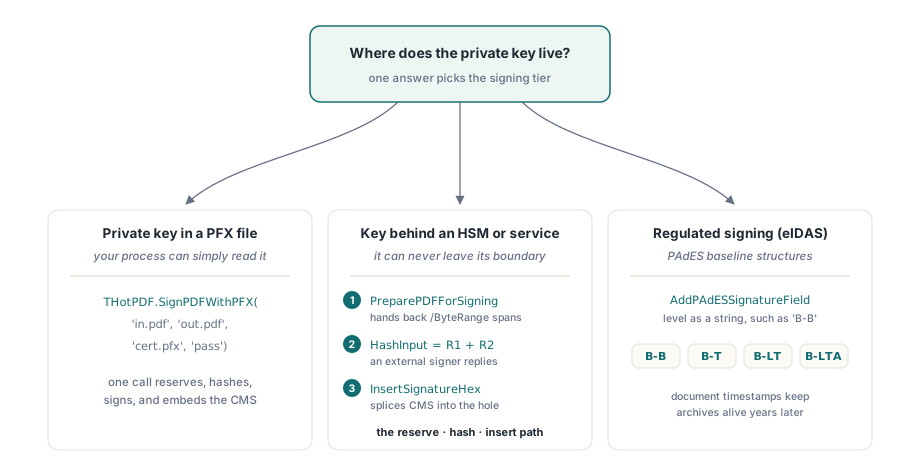
HotPDF covers signing for Delphi and C++Builder at three levels, and you choose between them by answering one question: where does the private key live? A PFX file on disk needs a single function call. A key locked in an HSM or a remote signing service needs the reserve-hash-insert sequence, because no library can reach into a token and pull the key out. A signature that has to satisfy European regulation needs the PAdES baseline structures on top of that. The sections below follow that progression
How /ByteRange pins down the signed bytes
A signature has to live inside the file it signs, and it cannot sign itself. PDF gets around the paradox by leaving a hole. Before signing, the writer reserves a fixed-size /Contents entry full of zeros and records a /ByteRange array for the two spans on either side of it: everything before the hole, everything after. The signer hashes those two spans and writes the resulting CMS blob into the hole as hexadecimal. The trap is in the word fixed. You commit to the size of that hole before you know how large the finished signature will be, so the reservation has to be a confident over-estimate. Eight kilobytes comfortably holds a detached CMS signature with a short certificate chain
HotPDF splits the two cases into two calls, and confusing them is a common early mistake. AddSignatureField drops an empty, visible field for a person to sign later in a viewer. AddSignedSignatureField creates the field and reserves the /Contents hole, which is the one you want whenever code, rather than a human, will complete the signature. Hand an external signer an empty field and it has nothing to fill
The one-call path: signing from a PFX
When the certificate and its private key sit in a PFX/PKCS#12 file your process can read, the whole pipeline reduces to a class function:
if THotPDF.SignPDFWithPFX('invoice-unsigned.pdf', 'invoice-signed.pdf',
    'company-cert.pfx', 'pfx-password') then
  Writeln('Signed: invoice-signed.pdf')
else
  raise Exception.Create('PFX signing failed');
When this fails, the PDF is rarely the problem. The PFX is. HotPDF reads containers protected with PBES2, meaning PBKDF2 key derivation over AES-256-CBC. A PFX exported by an older Windows certificate wizard, or by OpenSSL before 3.0, is usually wrapped in legacy RC2 or 3DES instead, and it simply will not parse. The fix is to re-export the container once with modern protection; today's OpenSSL does this by default, and it is not a code change. So when signing dies instantly on a certificate that "works everywhere else," look at how the PFX was created before you suspect your own code
The reserve-hash-insert path for HSMs and tokens
The one-call path assumes your process can read the key as a file. Increasingly it cannot. The key sits in an HSM, on a USB token, or behind a signing service's API, and there is no way for a library to reach it directly. HotPDF handles that by breaking signing into byte-level steps: write a placeholder document, ask the library for the hash ranges, pass the hash input to whatever holds the key, then splice the returned CMS back into the hole

var
  Doc: THotPDF;
  Fs: TFileStream;
  PdfBytes, HashInput, SigHex: AnsiString;
  R1Start, R1Len, R2Start, R2Len, CStart, CLen: Integer;
begin
  // 1. Write the document with a reserved /Contents hole
  Doc := THotPDF.Create(nil);
  try
    Doc.FileName := 'placeholder.pdf';
    Doc.BeginDoc;
    Doc.CurrentPage.AddSignedSignatureField('Sig1',
      Rect(50, 100, 350, 150), 8192, 'adbe.pkcs7.detached',
      'Contract approval', 'Boston, MA', 'legal@example.com');
    Doc.EndDoc;
  finally
    Doc.Free;
  end;

  // 2. Load the saved bytes; the returned offsets are 0-based
  Fs := TFileStream.Create('placeholder.pdf', fmOpenRead);
  try
    SetLength(PdfBytes, Fs.Size);
    Fs.ReadBuffer(PdfBytes[1], Fs.Size);
  finally
    Fs.Free;
  end;
  THotPDF.PreparePDFForSigning(PdfBytes, R1Start, R1Len, R2Start, R2Len,
    CStart, CLen);

  // 3. Hash both spans and sign externally (HSM, token, service)
  HashInput := Copy(PdfBytes, R1Start + 1, R1Len) +
               Copy(PdfBytes, R2Start + 1, R2Len);
  SigHex := SignWithHsm(HashInput);  // your integration: returns CMS as hex

  // 4. Splice the signature into the reserved hole
  THotPDF.InsertSignatureHex(PdfBytes, SigHex);
  Fs := TFileStream.Create('signed.pdf', fmCreate);
  try
    Fs.WriteBuffer(PdfBytes[1], Length(PdfBytes));
  finally
    Fs.Free;
  end;
end;
Two details in this sequence cause most of the intermittent failures. The first is that PreparePDFForSigning works on the bytes of a finished file. The placeholder has to be written and saved in full before the offsets mean anything; compute them against a stream that is still being assembled and they will not line up with the bytes you eventually hash. The second is the reservation size, again. The 8192 bytes you asked for has to hold the final CMS, and a signature carrying intermediate certificates, or one a service decorates with signed attributes, can run past it. InsertSignatureHex will not grow the hole to make room. The tell is a pipeline that signs fine with one certificate and fails with the next; the cure is to regenerate the placeholder with a reservation measured from a real signature produced by the actual signer, not guessed
PAdES baselines, and the timestamps that keep a signature alive
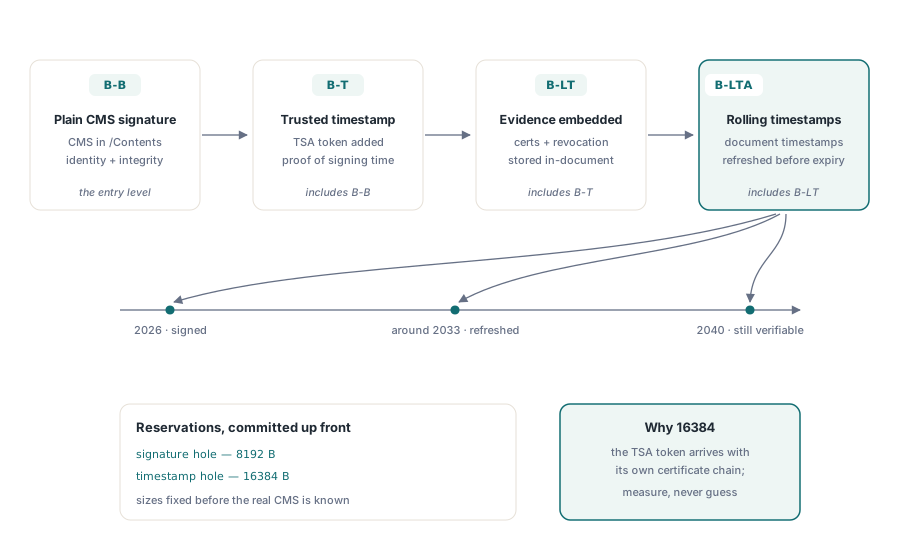
If you are signing under European rules, the standard in play is ETSI EN 319 142-1, which stacks four PAdES baseline levels. B-B is the plain signature. B-T adds a trusted timestamp that proves when it was made. B-LT embeds the validation material, the certificates and revocation data, inside the document so it can still be checked years later. B-LTA layers periodic document timestamps on top, so the evidence outlives the algorithms it was built on. HotPDF emits the document-side structures for each level:
// PAdES baseline signature field (ETSI EN 319 142-1)
Pdf.CurrentPage.AddPAdESSignatureField(
  'ApprovalSig', Rect(50, 100, 350, 150), 'B-B',
  'Contract approval', 'Boston, MA', 'legal@example.com');

// Document timestamp: larger reservation for the TSA token and chain
Pdf.CurrentPage.AddDocumentTimestampSignature('ArchiveTS', 16384);
The 16384-byte reservation on the timestamp is deliberate. A timestamp authority returns a token that drags its own certificate chain along, so it routinely needs more room than the 8 KB a plain signature is happy with. Those document timestamps are also the machinery behind B-LTA: re-timestamping an archived signature every few years, with algorithms that are still current, is what keeps a document you signed in 2026 verifiable in 2040
A word on the reason, location, and contact strings that both field calls accept: they are convenience metadata and nothing more. HotPDF stores them as plain dictionary entries and paints them into the visible signature appearance, but no validator checks them against anything. Fill them consistently from your workflow data, since auditors do read them, and then never mistake them for evidence. The actual cryptographic claim lives entirely in the CMS and its certificate chain, and a verifier ignores the visible text completely
After signing, the file may only grow
The moment a signature exists, the bytes inside its ranges are frozen. The only legitimate way to change the file afterward is an ISO 32000-1 §7.5.6 incremental update, which appends new and changed objects after the original bytes and chains a fresh cross-reference section back to them. Done that way, the signature stays valid for its revision and a viewer reports the honest state: the signed revision is intact, the document was extended afterward. Re-serialize the whole file instead and you rewrite the signed spans, which destroys the signature even when nothing visible changed. The same revision mechanism is also how one document carries several signatures: each new signature lands in its own incremental update, and its ranges cover everything before it, including the earlier signatures. The append-only mechanics, and when it is safe to compact them, are covered in the article on object streams and incremental updates
Two boundaries are worth holding in mind while you design. HotPDF's PDF/A output mode rejects signature fields outright, so archival conformance and an embedded signature have to ship as separate files. And signing says nothing about secrecy: it proves who produced a document and that it has not changed since, but anyone can still read it. Concealing the contents is a separate job, handled by AES-256 encryption and permission policy
Whatever you build, test it with something other than the code that wrote the file. Open the output in Acrobat's signature panel and confirm three things: the signature is valid, the identity chains to the root you expected, and the panel reports no changes since signing. Then flip a single byte inside the signed range of a throwaway copy and confirm the panel now calls the document altered. A signing pipeline you have never watched reject a tampered file is one whose verification has not really been tested
All three signing tiers ship with the HotPDF Delphi Component for Delphi and C++Builder; the product page links the complete signature API reference