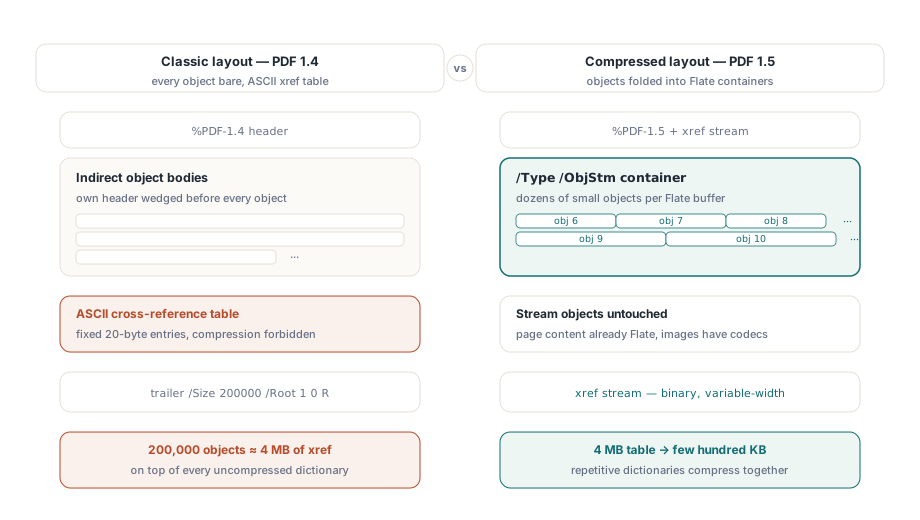
PDF 1.5 introduced two storage structures that the earlier file format had no way to express: the object stream and the cross-reference stream. An object stream is one Flate-compressed container, tagged /Type /ObjStm, that holds many small indirect objects packed end to end instead of scattering them through the file body. A cross-reference stream is the file's lookup table rewritten as compressed binary with variable-width fields, in place of the fixed-width ASCII table that closed every PDF up to version 1.4. They travel together. Once objects are folded into a stream, the old text table can no longer address them, so the binary xref has to come with it
Set that against the classic layout and the cost it removes is easy to see. In a PDF 1.4 file every indirect object sits uncompressed behind its own obj header, and the table at the tail spends exactly 20 bytes of ASCII per entry, compression forbidden. A document with 200,000 objects carries roughly 4 MB of cross-reference data before a single glyph is drawn, with all the uncompressed dictionary bodies stacked on top. PDF 1.5 attacks both numbers at once: the dictionaries fold into Flate containers, and the 4 MB table shrinks to a few hundred kilobytes of binary. ISO 32000-1 defines the two structures in §7.5.7 and §7.5.8
Where the saving actually lands
Object streams only touch non-stream objects, so they compress structure, not pixels. Page content was already Flate-compressed before 1.5, and image data carries its own codecs, which is why an image-heavy brochure barely moves. The files that collapse are the structure-heavy ones: AcroForms with thousands of field dictionaries, deep outline trees, tagged-PDF structure elements. Those objects are tiny, numerous, and nearly identical to one another, and that repetition is exactly what Flate exploits once they sit in a single buffer rather than spread across the body with headers wedged between them
It is easy to underestimate how much of an old file is overhead. A form archive that has absorbed years of edits can spend well over half its bytes on dictionary headers, xref padding, and revisions no reader will ever look at. The two features here reclaim the first two of those. The third, accumulated revisions, only yields to compaction, once the file no longer has to remember its own history
In HotPDF you turn both on through a pair of properties, and how they depend on each other matters more than the order you write them in:
var
  Pdf: THotPDF;
begin
  Pdf := THotPDF.Create(nil);
  try
    Pdf.FileName := 'catalog-2026.pdf';
    Pdf.UseXRefStream := True;      // binary xref, prerequisite for ObjStm
    Pdf.UseObjectStreams := True;   // pack objects into /Type /ObjStm
    Pdf.BeginDoc;
    Pdf.CurrentPage.SetFont('Arial', [], 11);
    Pdf.CurrentPage.TextOut(50, 760, 0, 'Compressed structure demo');
    Pdf.EndDoc;                     // emits XRefStm + ObjStm containers
  finally
    Pdf.Free;
  end;
end;
UseObjectStreams needs UseXRefStream set to True. A compressed object is reached through a type-2 xref entry, which records an object-stream number plus an index, and a classic 20-byte text row has no place to store that pair. So UseObjectStreams on its own does nothing visible; both flags, set before BeginDoc, are the configuration that works. Set them after BeginDoc and HotPDF has already committed to the older layout
Why both default to off
HotPDF leaves both properties False out of the box, and the reason shows up in integrations with old downstream code. A reader that understands only PDF 1.4 does not announce that it cannot handle compressed objects. It meets an xref stream, finds none of the trailer keywords it expects, and reports a damaged cross-reference table or simply refuses to open the file. If your output flows into an aging fax gateway, a hardware printer running an embedded interpreter, or a parser someone wrote against the 1.4 spec a decade ago, keep both flags off for that channel and live with the larger file. For archival storage and web delivery, where every mainstream viewer has read PDF 1.5 for twenty years, switching them on is compression you get for almost nothing
There is a second-order effect worth telling your support team about. Once dictionaries are packed into object streams, comparing two generated files byte for byte stops meaning anything, because changing a single field can re-Flate a whole container and shuffle everything after it. Diff such files by object content, not with a binary comparison
Incremental updates and the byte offsets they protect
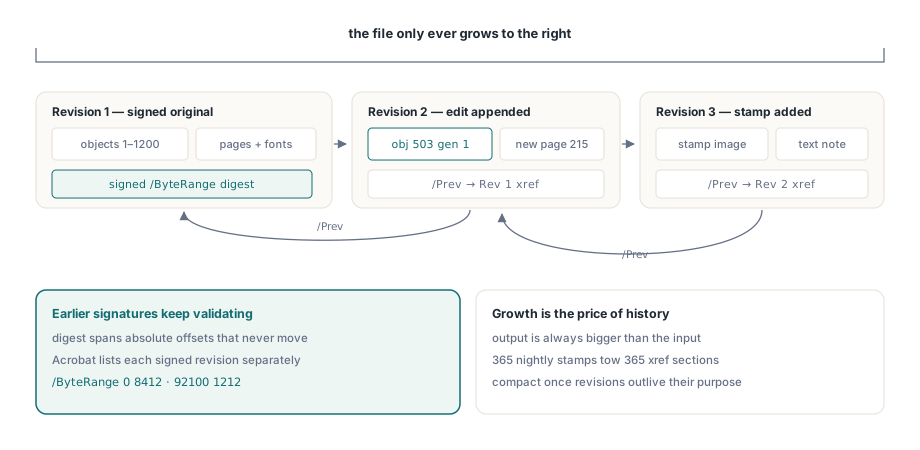
A digital signature covers an explicit /ByteRange: two spans of the physical file, given as absolute byte offsets, that the CMS digest was taken over. Rewrite the file, even into something that looks identical on screen, and those offsets all move. The digest stops matching and the signature reads as broken. That is the precise problem ISO 32000-1 §7.5.6 solves with incremental updates. New and changed objects are appended after the existing %%EOF, then a fresh cross-reference section is written whose /Prev entry points back to the one before it. The original bytes are never disturbed, so a signed revision stays verifiable and Acrobat can present each signed revision on its own in the signature panel
HotPDF exposes this through its own entry point:
Pdf.BeginIncrementalUpdate('contract-signed.pdf');
Pdf.AddPage;
Pdf.CurrentPage.SetFont('Arial', [], 10);
Pdf.CurrentPage.TextOut(50, 760, 0, 'Addendum recorded 2026-06-11');
Pdf.SaveIncrementalUpdate('contract-updated.pdf');  // appends the delta only
Two things trip people up. BeginIncrementalUpdate has to receive the original file name, because the appended xref section records offsets that are only meaningful against those exact original bytes; point it at a renamed or re-saved copy and the offsets describe a file that no longer exists. And the save is append-only by construction, so the output is always bigger than the input. That growth is not waste to be tuned away. It is the same property that leaves earlier signed revisions intact
Modifying a loaded file goes through LoadFromFile
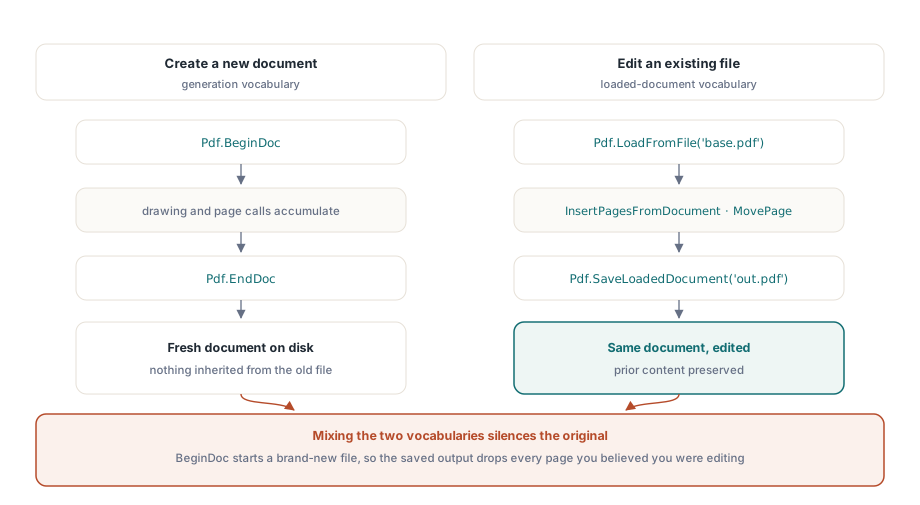
Developers who first met HotPDF through its generation API tend to hit a particular wall. BeginDoc opens a brand-new document, which is the wrong tool when you mean to change one that already exists. Editing an existing file runs through the loaded-document calls instead:
PageCount := Pdf.LoadFromFile('base.pdf');
Pdf.InsertPagesFromDocument(OtherDoc, '1-3', 5);  // pages 1-3 after page 5
Pdf.MovePage(2, 5);
Pdf.SaveLoadedDocument('modified.pdf');
Mix the two and the symptom is an output file that holds your new content and nothing of the original, because BeginDoc cheerfully built a fresh document beside the one you believed you were editing. Read LoadFromFile with SaveLoadedDocument as one vocabulary and BeginDoc with EndDoc as another. A routine that reaches for both against the same file is nearly always wrong
When to compact an appended file
Append-only saving carries a slow cost. A nightly job that stamps one status line onto the same PDF produces 365 revisions across a year, and every revision tows a new xref section behind it. When that history has outlived its usefulness, and no signature in the file needs to survive, you can flatten the whole thing by re-serializing it through the loaded-document path:
Pdf.LoadFromFile('stamped.pdf');
Pdf.SaveLoadedDocument('compacted.pdf');
This resave is a full rewrite. It throws away the prior revisions on purpose and breaks any signature still in the file, so put it behind the same policy gate you apply to any other destructive step. One production rule that holds up: compact when the revision count passes a threshold, or when the appended overhead grows past some share of the base file, and never compact a document whose signature panel has anything in it
Checking the output before it ships
Verifying this pair of features is refreshingly concrete. Open the result in Adobe Acrobat and confirm three points: document properties report PDF 1.5 or later once object streams are on; the signature panel still validates every previously signed revision after an incremental update; and page count and bookmarks came through a load, modify, and save cycle unharmed. For archival output, push the file through veraPDF too, since a compressed xref is precisely the kind of structure a strict validator scrutinizes more closely than a forgiving viewer ever will. If your work also involves very large inputs, the inspection methods in our walkthrough of the Direct File API for large PDF workflows pair naturally with incremental saving, and the signature mechanics behind the byte ranges above are treated in depth in the HotPDF digital signatures and PAdES article
Both features ship as part of the HotPDF Delphi Component for Delphi and C++Builder, next to the generation, form, encryption, and signing APIs covered elsewhere on this blog. The product page links the full API reference if you want to line the calls above up against your own document pipeline