You have a third-party invoice template, or an archived contract someone generated years ago in software nobody can find anymore, and the requirement is to make it interactive: drop a signature box in the corner, add a couple of text fields, turn a flat checklist into real checkboxes. The catch is that you are not authoring this PDF from scratch. It already exists, it already has pages and content streams and fonts you do not control, and you need to graft AcroForm widgets onto that object graph without rebuilding it. That is a different problem from creating a form on a fresh document, and the part that trips people up is invisible until you open the result in a viewer and the fields you just wrote are nowhere on the page
HotPDF is a native VCL PDF component for Delphi and C++Builder, and as of v2.247.0 it exposes a dedicated family of methods for exactly this: building all six standard field types directly on a document loaded with LoadFromFile. This article walks through what those methods do, the ISO 32000-1 dictionary they construct, and the one flag without which the whole exercise silently produces an empty-looking file
Why loaded-document field creation is its own code path
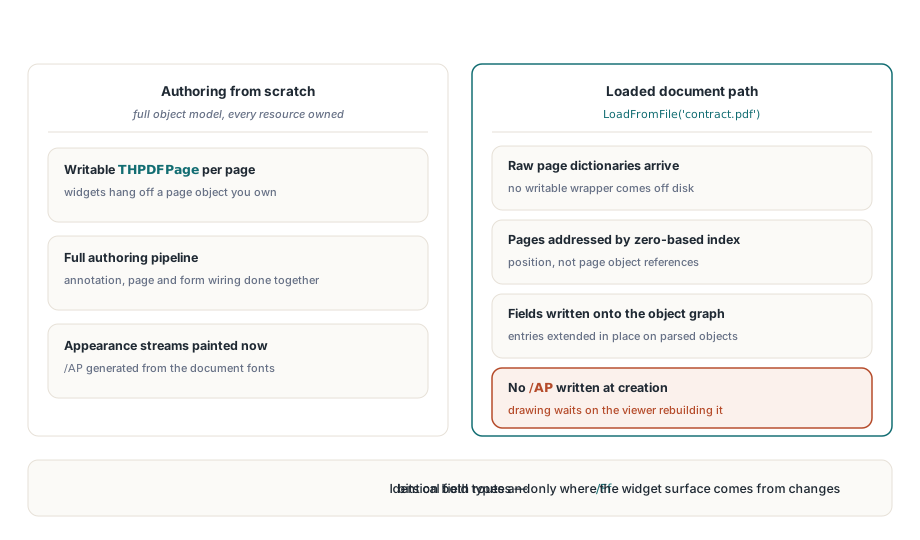
When you build a PDF from nothing, HotPDF owns the entire object model. Each page is a writable THPDFPage wrapper, and adding a text field through AddTextField wires the new widget into the page's annotation object, the page object, and the form's field collection, then generates an appearance stream from the document's font resources. The appearance stream is the visible surface of the widget, the box and border and any default text, painted as PDF drawing operators the viewer renders verbatim
A loaded document gives you none of that scaffolding. The pages came in as raw dictionaries; there is no writable THPDFPage wrapper to hang a widget on, and more importantly there is no font resource pipeline standing by to paint appearance streams. The loaded path therefore takes a different route. It writes the field dictionaries straight onto the parsed object graph and addresses pages by zero-based index rather than by page object. The field types and the flag bits match the from-scratch path exactly, so a Text field is a Text field either way; what changes is the plumbing underneath and, crucially, how the widget's surface gets drawn
The /NeedAppearances flag is not optional here
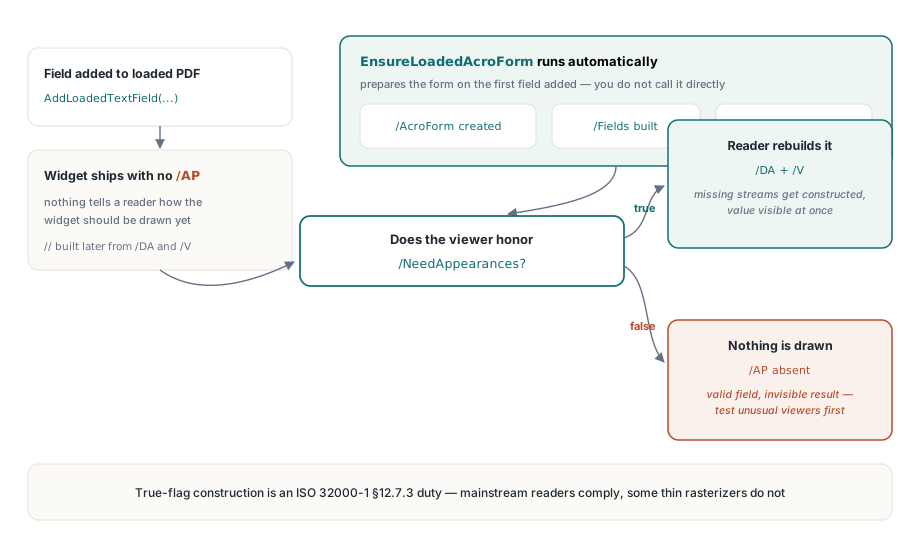
This is the single fact that decides whether your work shows up. Because the loaded path does not generate appearance streams, a freshly added widget arrives at the viewer with no /AP entry: a field with no described surface. Many viewers, asked to render a widget that has no appearance and no instruction to build one, draw nothing at all. The field is in the file, structurally valid, addressable by a form-filling tool, and completely invisible to a human
The escape hatch is defined in ISO 32000-1 §12.7.3: the AcroForm dictionary carries a /NeedAppearances boolean, and when it is true a conforming reader is required to construct the missing appearance streams itself from each field's /DA (default appearance) string and value. HotPDF sets this for you. The first time you add any field to a loaded document, EnsureLoadedAcroForm runs: if the catalog has no /AcroForm it creates one, if there is no /Fields array it creates that, and it forces /NeedAppearances true. You do not call it directly, but knowing it exists explains the behavior. It also explains a deployment caveat worth stating plainly: a handful of minimal or non-conforming viewers ignore /NeedAppearances and still render nothing. For mainstream readers the flag does its job, but if your audience runs an unusual embedded renderer, test there before you promise anything
Adding the six field types
Every method follows the same shape. You pass the zero-based page index, the four corners of the widget rectangle in PDF user-space coordinates, the field name, and whatever extra arguments the type needs. The rectangle is X1, Y1, X2, Y2 with the PDF origin at the bottom-left of the page, so larger Y values sit higher up; this is the coordinate convention from the file format, not the top-left screen convention, and getting it backwards is the second most common mistake after forgetting the flag. Each call returns the new field's zero-based index, or -1 if the page index was out of range or the page object could not be resolved
var
  Pdf: THotPDF;
  Idx: Integer;
begin
  Pdf := THotPDF.Create(nil);
  try
    if Pdf.LoadFromFile('contract.pdf') <= 0 then Exit;

    // Text field: name, initial value, max length (0 = unlimited)
    Idx := Pdf.AddLoadedTextField(0, 72, 680, 320, 700, 'FullName', '', 0);

    // CheckBox: export value, initial checked state
    Pdf.AddLoadedCheckBox(0, 72, 640, 90, 658, 'AgreeTerms', 'Yes', False);

    // Signature field: just a name and a rectangle
    Pdf.AddLoadedSignatureField(0, 360, 72, 540, 132, 'ApproverSig');

    if Idx >= 0 then
      Pdf.SaveLoadedDocument('contract-interactive.pdf');
  finally
    Pdf.Free;
  end;
end;
The text field's third and fourth string arguments are the field name and its initial /V value; the integer is /MaxLen, written only when greater than zero. HotPDF gives every editable field a default appearance string of /Helv 12 Tf 0 0 0 rg, which is what a /NeedAppearances-honoring viewer reads to decide the font and color it paints the value in. The checkbox takes an export value, the string the form submits when the box is ticked, plus a boolean for the initial state; internally it writes the matching /V, /AS, and /DV name entries so the on/off state is consistent the moment the file opens. An empty export value defaults to Yes, the conventional checkbox "on" name
Choice fields and the /Ff bit flags
ComboBox and ListBox are both choice fields, field type /Ch in ISO 32000-1 §12.7.4. The difference between a dropdown and a scrolling list is one bit in the field flags integer /Ff: bit 18, the Combo flag, value $40000. HotPDF sets that bit for AddLoadedComboBox and leaves it clear for AddLoadedListBox; otherwise the two are identical, and both take their choices as an open array of strings written to the /Opt entry
// Dropdown (Combo flag set internally) with an initial selection
Pdf.AddLoadedComboBox(0, 72, 600, 300, 620, 'Country', 'Canada',
  ['United States', 'Canada', 'Mexico']);

// Scrolling list, no initial value
Pdf.AddLoadedListBox(0, 72, 520, 300, 590, 'Priority', '',
  ['Low', 'Normal', 'High']);

// Push button with a caption drawn through /MK
Pdf.AddLoadedPushButton(0, 360, 600, 480, 626, 'SubmitBtn', 'Submit');
Two notes on the option list. HotPDF writes each /Opt entry as a plain string, where the export value and the displayed label are the same text. ISO 32000-1 §12.7.4.4 also permits the two-element [export display] form when you need the submitted value to differ from what the user reads; the loaded creation methods use the simpler single-string form, so if you need divergent export and display values you would set them on the resulting dictionary yourself. And the value you pass as the field's current selection should be one of the options you supplied, since the viewer matches it against the list
The push button is the other flag-driven case: field type /Btn with bit 17, the PushButton flag, value $10000. That bit is what separates a clickable button from a checkbox, which is also a /Btn field but without it. The caption you pass is written into the appearance characteristics dictionary /MK as the normal caption /CA. Worth being honest about scope here: the button is created with its label and rectangle, but the loaded creation method does not attach an action, so on its own it is a button that looks right and does nothing when clicked. Wiring up submit, reset, or JavaScript actions is a separate concern; for the from-scratch authoring side, the field-plus-action workflow is covered in building AcroForm fields and actions in Delphi, which is the right comparison point for what the loaded path deliberately leaves out
The dictionary every field shares
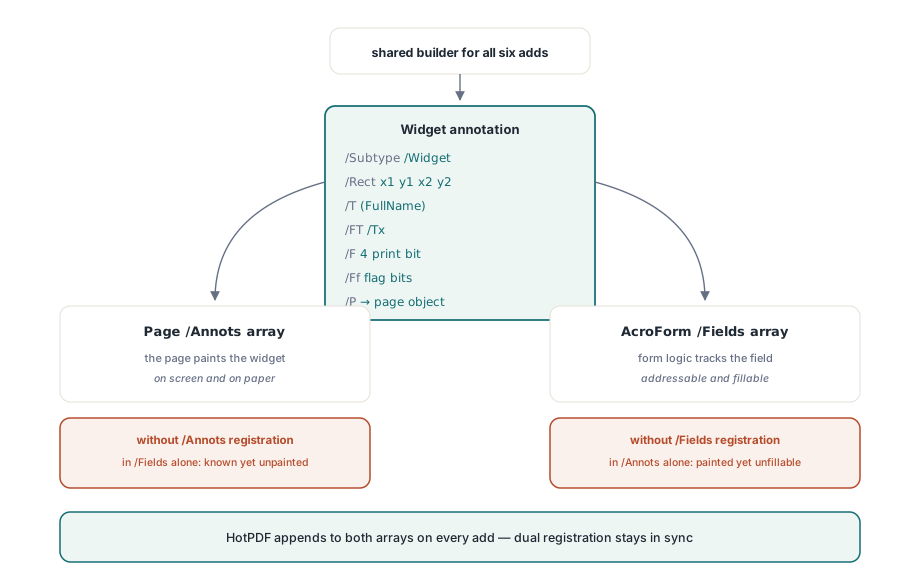
Underneath all six methods is one shared builder that constructs the widget annotation and registers it in two places. It writes /Type /Annot and /Subtype /Widget, the /Rect array from your four coordinates, the annotation flags /F 4 which sets the Print bit so the field appears on paper as well as screen, the field name /T, the field type /FT, the flags /Ff, and a /P back-reference to the page object. Then it appends the new field to the AcroForm's /Fields array and to that page's /Annots array, resolving indirect references along the way so it extends the real arrays rather than orphaning the widget
That dual registration matters because a widget that lives in only one of the two lists is broken in a subtle way. A field present in /Fields but missing from the page's /Annots is known to the form but never painted; the reverse is painted but unknown to form logic. HotPDF keeps both in sync on every add, which is the kind of bookkeeping you would otherwise have to get exactly right by hand against the spec
A few honest limits
Set expectations before you build a workflow on this. The flatten-and-regenerate behavior depends on the viewer honoring /NeedAppearances, which covers Acrobat, modern browser PDF engines, and the common desktop readers, but is not a hard guarantee across every renderer in the wild. If you must produce a file whose fields render identically everywhere, including in viewers that ignore the flag, you are in appearance-stream territory and the from-scratch authoring path that paints /AP for you is the better fit. The signature field, likewise, is created as an empty signature widget ready to be signed; placing the field is not the same as applying a cryptographic signature
For changing what already exists rather than adding to it, the related operation is form flattening, where you bake interactive fields back into static page content so the values become permanent and uneditable; that round trip, including how XFA-bearing forms are handled, is discussed in flattening XFA and AcroForm fields in Delphi. Adding fields and flattening fields are two ends of the same lifecycle: this article is how you get interactivity onto a document that lacked it, and flattening is how you take it back off once the form has served its purpose
The loaded-document form API shown here ships as part of the standard HotPDF Delphi Component for Delphi and C++Builder, alongside the full reference for field flags, appearance handling, and the rest of the AcroForm model