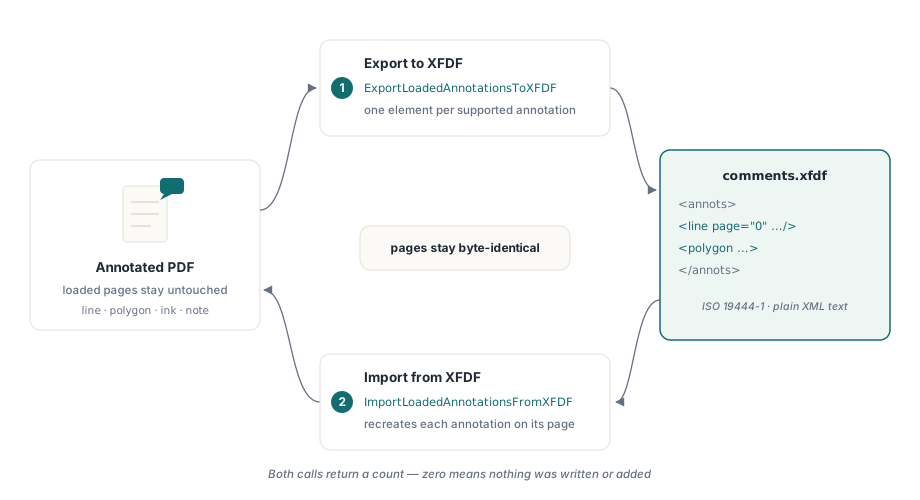
HotPDF exports and imports PDF annotations as XFDF through two functions that act on the currently loaded document, ExportLoadedAnnotationsToXFDF and ImportLoadedAnnotationsFromXFDF. XFDF is the XML annotation-exchange format standardized as ISO 19444-1, and this pair lets a Delphi or C++Builder program hand its comments to Acrobat or a third-party review tool and take the marked-up results back, all without rewriting the page content the annotations sit on
Picture the two directions this solves. A reviewer opens your generated report in Acrobat, drops a red arrow on a misaligned figure, circles a wrong total and types a note in the margin, then exports the comments to a small XFDF file. Or the reverse: your program produces the markups itself, and you need to ship them to someone whose tool is not HotPDF. Either way the annotations travel as XML that both sides understand, and the PDF pages stay byte-for-byte what they were
What is the difference between FDF and XFDF?
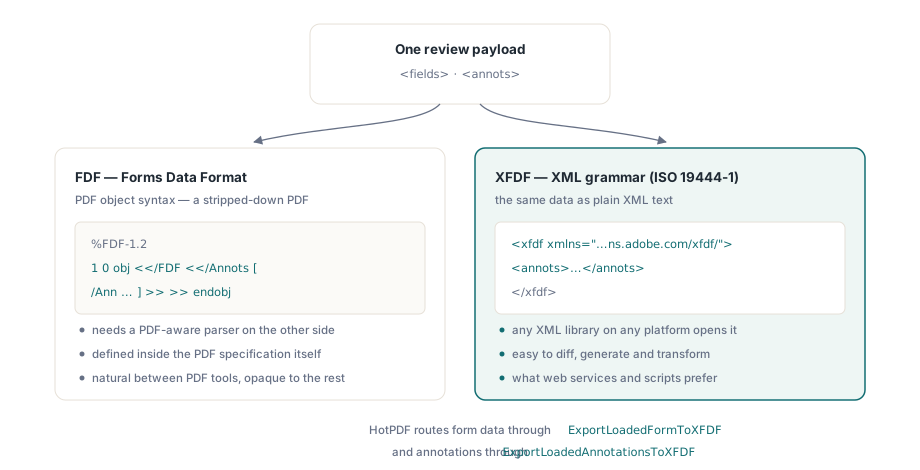
FDF and XFDF carry the same payload in two different syntaxes, and the distinction matters the moment you decide which file to hand another tool. FDF is the older Forms Data Format defined inside the PDF specification itself: it uses PDF object syntax, so an FDF file looks like a stripped-down PDF and needs a PDF-aware parser to read. XFDF is the XML expression of that same data, standardized independently as ISO 19444-1, which means any XML library on any platform can open it, diff it or generate it. Both formats can carry form field values in a <fields> tree, which ISO 19444-1 clause 6.3 governs, and annotations in an <annots> tree; HotPDF splits those responsibilities, routing form data through ExportLoadedFormToXFDF and reserving ExportLoadedAnnotationsToXFDF for the <annots> side. When you exchange comments with a web service, a Java review server or a script, XFDF is the format that does not force the other side to embed a PDF parser
How do you export PDF annotations as XFDF in Delphi?
HotPDF exports annotations by walking every page of the loaded document, emitting one XFDF element for each supported annotation, and returning the number of annotations written. Load the PDF first, then call ExportLoadedAnnotationsToXFDF with a target path. The integer result is the count of annotations serialized; a result of zero or below means nothing was exported and no file was written, which is your signal that the document carried no annotations of a supported subtype
var
  Pdf: THotPDF;
  Written: Integer;
begin
  Pdf := THotPDF.Create(nil);
  try
    if Pdf.LoadFromFile('report-reviewed.pdf', '') > 0 then
    begin
      // Write one XFDF element per supported annotation on every page
      Written := Pdf.ExportLoadedAnnotationsToXFDF('comments.xfdf');
      if Written <= 0 then
        ShowMessage('No supported annotations were found');
    end;
  finally
    Pdf.Free;
  end;
end;
The XFDF that comes out is plain, readable XML. HotPDF writes an <xfdf> root in the ISO 19444-1 namespace, an <annots> container, and one child per annotation with its zero-based page index, color and geometry as attributes or child elements. A line with a yellow fill and an open arrowhead, sitting next to a filled polygon, serializes like this
<?xml version="1.0" encoding="UTF-8"?>
<xfdf xmlns="http://ns.adobe.com/xfdf/">
  <annots>
    <line page="0" start="72,700" end="220,700"
          color="#FF0000" interior-color="#FFFF00"
          head="OpenArrow" tail="None">
      <contents-richtext>Baseline looks off</contents-richtext>
    </line>
    <polygon page="0" color="#0000FF" interior-color="#CCE5FF">
      <vertices>72,120;180,120;180,200;72,200</vertices>
    </polygon>
  </annots>
</xfdf>
How annotation subtypes map to XFDF elements
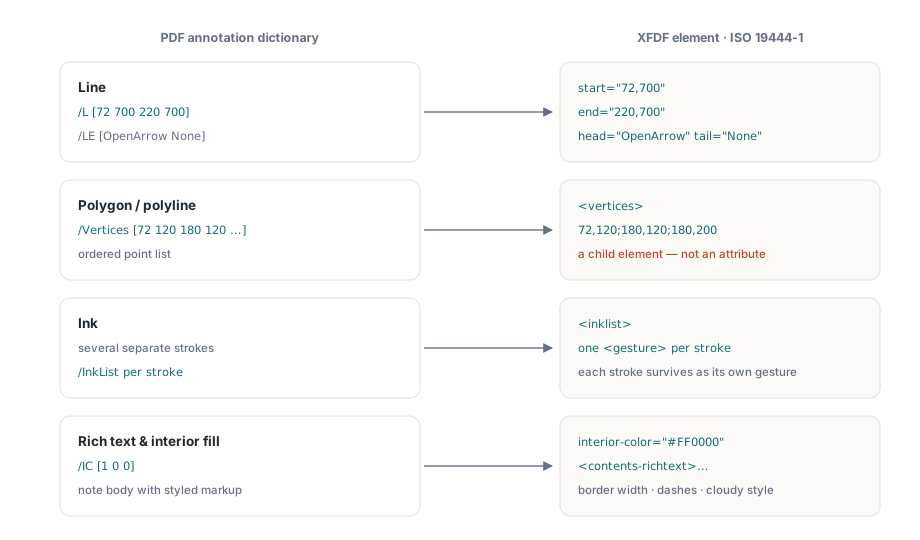
Each annotation subtype maps to a specific ISO 19444-1 element with its own geometry convention, and HotPDF follows those structures rather than inventing its own. Line annotations carry a start and an end attribute holding the two endpoint coordinate pairs, taken straight from the annotation's L array, while the LE line-ending styles become head and tail attributes. Polygon and polyline annotations move their point list into a <vertices> child element as semicolon-separated x,y pairs, not an attribute, because a reader that expects the child element will silently drop points hidden anywhere else. Ink annotations, which can hold several separate strokes, nest an <inklist> element with one <gesture> child per stroke, so a multi-stroke signature survives the trip as distinct gestures rather than one merged blob
Rich text, color and border styling survive alongside the geometry. A note's rich-text body is written as a <contents-richtext> child; the interior fill that PDF stores in the IC array, the paint inside a circle, square, polygon or line arrowhead and the fill of a redaction box, comes across as an interior-color attribute in #RRGGBB form; and border width, dash pattern and a cloudy border effect map to width, dashes, style and intensity attributes, so a cloud-outlined callout still reads as cloudy on the far end. HotPDF also preserves the popup window attached to a markup annotation, importing the popup child geometry and its open or closed state into the annotation's Popup dictionary, and it carries the text annotation open and review states, so a reviewed document keeps not just its shapes but the workflow metadata reviewers rely on
Importing XFDF back onto a loaded document
HotPDF imports XFDF by parsing the XML, creating a fresh annotation for each element through NewLoadedAnnotation, attaching it to the page the element names, and returning how many annotations it added. The workflow is symmetric with export: load the base PDF, call ImportLoadedAnnotationsFromXFDF with the reviewer's file, then save the loaded document to persist the new markups. If the file is missing or the XML will not parse, the function returns zero and the loaded document is left untouched
var
  Pdf: THotPDF;
  Added: Integer;
begin
  Pdf := THotPDF.Create(nil);
  try
    if Pdf.LoadFromFile('report.pdf', '') > 0 then
    begin
      Added := Pdf.ImportLoadedAnnotationsFromXFDF('comments.xfdf');
      if Added > 0 then
        Pdf.SaveLoadedDocument('report-annotated.pdf');
    end;
  finally
    Pdf.Free;
  end;
end;
Because each XFDF element names its own page index, annotations land on the pages they were authored against even when you import several files in sequence, which makes it safe to gather comments from more than one reviewer onto the same loaded document before a single save. The example below folds two reviewers into one merged copy. For building and editing the annotation objects themselves in code rather than exchanging them as files, see how HotPDF creates and edits PDF annotation objects directly from Delphi
var
  Pdf: THotPDF;
  Total, I: Integer;
  Files: array[0..1] of string;
begin
  Files[0] := 'alice-comments.xfdf';
  Files[1] := 'bob-comments.xfdf';
  Pdf := THotPDF.Create(nil);
  try
    if Pdf.LoadFromFile('master.pdf', '') > 0 then
    begin
      Total := 0;
      for I := Low(Files) to High(Files) do
        Inc(Total, Pdf.ImportLoadedAnnotationsFromXFDF(Files[I]));
      if Total > 0 then
        Pdf.SaveLoadedDocument('master-merged.pdf');
    end;
  finally
    Pdf.Free;
  end;
end;
What round-trips cleanly, and what does not
HotPDF round-trips the annotation subtypes that ISO 19444-1 gives a home, and it deliberately skips the rest rather than emitting something a reader would misinterpret. The supported set spans the markup types that dominate real review work: text notes, free text, line, square, circle, polygon, polyline, the four text-markup types (highlight, underline, strikeout and squiggly), stamp, ink and caret, plus file attachment, sound, redaction and link, eighteen subtypes in all. An annotation whose subtype falls outside that list is passed over on export, and because it is skipped rather than written empty, it does not inflate the count the function returns
Rich text is the honest caveat. HotPDF preserves the <contents-richtext> body so the styled text and the plain contents make the trip, but XFDF carries a comment's text and style markup, not a rendered appearance stream, so the receiving application redraws the popup with its own fonts and layout rather than reproducing HotPDF's exact pixels. Treat the round-trip as faithful to content and intent, not to on-screen rendering down to the pixel. If your styled content lives in XFA form data rather than annotation streams, the rules differ, and how HotPDF handles XFA exData, rich text and hyperlinks covers that separate path
The character-level handling is stricter than it looks, which is exactly what you want. HotPDF applies the ISO 19444-1 clause 5.8.2 escaping rules when it writes text, encoding the XML-significant characters and control bytes so a comment containing an ampersand, an angle bracket or a line break produces well-formed XML that any conforming parser accepts, and it reverses the same rules on import. That is why a note pasted from a spreadsheet, punctuation and all, comes back intact instead of corrupting the file
Annotation exchange is one slice of what the loaded-document API does, and it composes with the rest: import a reviewer's XFDF, adjust the pages or edit the document metadata, flatten or re-permission the file, then export a fresh XFDF for the next round. All of it ships in the standard HotPDF Delphi Component for Delphi and C++Builder, whose reference documents the full annotation subtype coverage and the companion form-data XFDF functions