XFA, the XML Forms Architecture, is deprecated. ISO 32000-1 carries it in §12.7 with the note that it is removed from PDF 2.0, and modern viewers are dropping their XFA engines one by one. None of that has emptied the archives. Government intake forms, insurance applications, and banking statements were authored as XFA for the better part of two decades, and those files are still arriving in inboxes and document pipelines today. When the viewer that used to render them stops doing so, the form turns into a blank page with a "please open in a different reader" placeholder. The durable fix is to flatten the XFA into static PDF content that any reader can paint
The hard part of that flattening is not the fields. Text boxes and check boxes map onto AcroForm widgets cleanly enough. The hard part is the rich text that XFA stores inside a draw element, in an <exData contentType="text/html"> block. That block is an HTML subset with inline styling and, often, anchors. Getting it onto the page means reproducing both the styled text and the live hyperlinks, and the hyperlinks are where most implementations quietly give up
What XFA rich text actually looks like
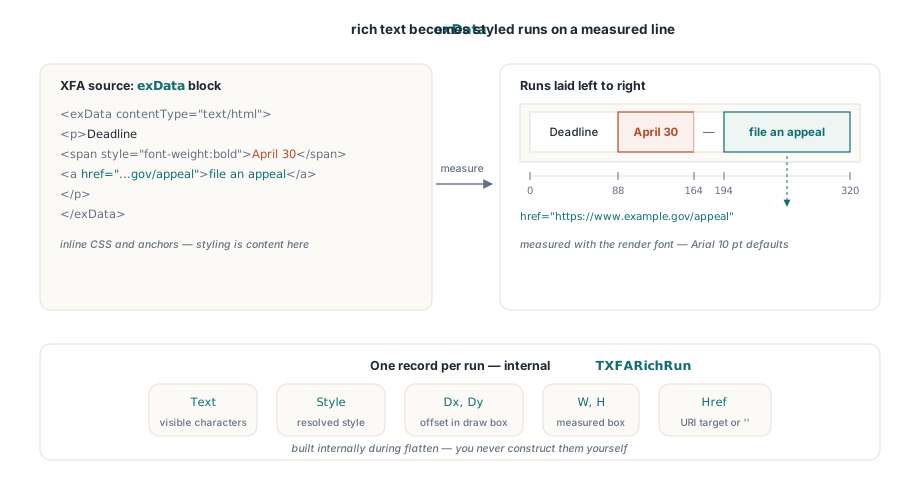
An exData body is a small slice of XHTML. A paragraph is a <p>; a styled span of characters is a <span> with its own inline CSS for weight, posture, color, and size; and a hyperlink is an <a href="..."> wrapping its visible text. A single line can hold several spans in a row, each with different styling, and one of them can be an anchor. The styling is not decoration that can be dropped. A clause rendered in bold red because it is a legal warning has to stay bold and red after flattening, or the flattened document misrepresents the original
So the flatten engine cannot treat the block as one string. It has to walk the inline structure, resolve each run's effective style by layering the span's inline CSS over the draw element's base font, and lay the runs out one after another across the line. HotPDF models each of these laid-out fragments as an internal TXFARichRun record. The record carries the run's text, its resolved style, its measured box, and, for an anchor, the Href it points at
Laying out the runs left to right
Positioning is where rich text stops being a parsing problem and becomes a typesetting problem. The runs share a line, so each run begins where the previous one ended. There is no markup that records those positions; they have to be measured. The engine's internal LayoutRichText routine measures every run with the same font metrics that will later paint it, then sets the run's horizontal offset to the running sum of all prior run widths. Run one starts at the draw box origin, run two starts at the width of run one, run three at the combined width of the first two, and so on across the line
This is why measurement font alignment matters so much. The layout pass measures advances; a separate render pass draws glyphs. If those two passes disagree about the font, the boxes the layout computed will not sit under the glyphs the renderer paints. HotPDF keeps them in step by mapping each run's resolved style onto a font specification, through the internal RunStyleToFontSpec helper, that matches the renderer's own defaults of Arial at 10 points. The measured advance and the drawn text then agree, and a run's computed box genuinely covers the characters a reader sees
// Conceptual shape of one laid-out run. The engine builds an array of these
// internally; you never construct them yourself, but the fields explain how a
// link's hit box is derived from measured geometry rather than from text.
type
  TRichRunInfo = record
    Dx, Dy : Double;       // top-left, relative to the draw-box origin
    W, H   : Double;       // measured run box (width from the layout pass)
    Text   : AnsiString;   // the run's visible characters
    Href   : AnsiString;   // URI target for an <a> run, '' otherwise
  end;
From an anchor run to a PDF Link annotation
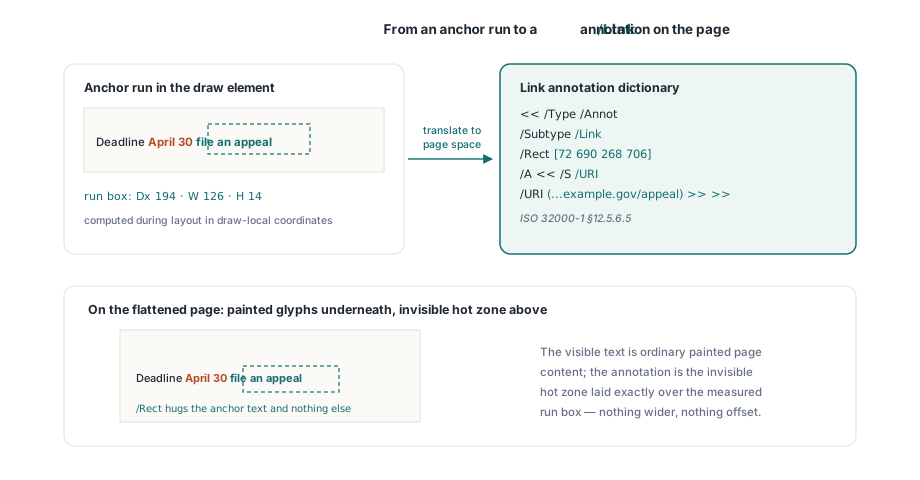
A hyperlink in a finished PDF is not part of the page content. It is a separate object, a Link annotation, described in ISO 32000-1 §12.5.6.5. The annotation has a /Rect that defines the clickable rectangle on the page and an action that fires when the rectangle is clicked. For an external link the action is a URI action: /S /URI with the target address as its /URI string. The visible text underneath is ordinary page content; the annotation is the invisible hot zone laid over it
The flatten path follows exactly this model. When a run carries an Href, HotPDF first draws the styled text, then builds a Link annotation over the run's box. The public entry point for that annotation is the page method AddURILink, which creates the /Type /Annot /Subtype /Link object with a /URI action and returns the annotation dictionary. Its rectangle is the run's measured box, translated from the draw element's local coordinates into page coordinates. The result is a link that lands precisely on the anchor text and nowhere else
// The same public API the flatten path uses for each anchor run. It produces
// an ISO 32000-1 12.5.6.5 Link annotation: /Subtype /Link with a /URI action
// over the given rectangle. The optional description fills /Contents so a
// screen reader can announce the target.
var
  LinkRect: TRect;
  Annot: THPDFDictionaryObject;
begin
  LinkRect := Rect(72, 690, 268, 706);  // page-space hit box for the run
  Annot := Pdf.CurrentPage.AddURILink(LinkRect,
    'https://www.example.gov/appeal', 'File an appeal online');
end;
Why the hit box has to come from measured widths
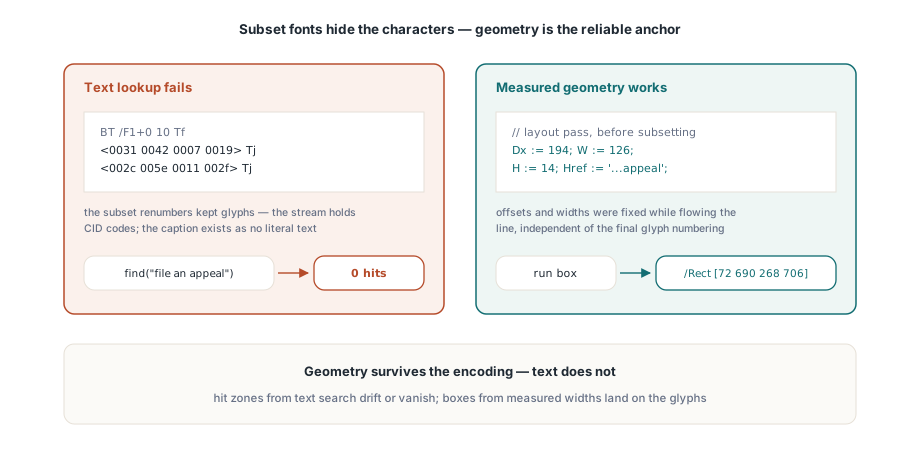
It is tempting to imagine locating the link by searching the page for its visible text and drawing the rectangle around whatever is found. That does not work, and the reason is fundamental to how flattened text is stored. The styled runs are painted with embedded subset fonts. A subset font renumbers the glyphs it keeps, so the page content stream holds hexadecimal CID codes, not the original character codes. The bytes on the page are not the letters a human reads, and they are not searchable as text. A search for the anchor's caption finds nothing, because that caption does not exist as literal text anywhere in the stream
The only reliable anchor for the rectangle is the geometry the layout pass already produced. Each run's offset and measured width were computed while flowing the line, before any glyph was renumbered, and they describe where the text will physically appear. HotPDF therefore takes the link rectangle straight from the run's laid-down box rather than from any text lookup. Because the measurement used the render font, the box is correct regardless of subsetting. Geometry survives the encoding; text does not. That is the whole argument for measured-width positioning, and it is why a flattener that tries to retrofit links by text search produces hit zones that drift or vanish
Driving the flatten from your code
For a PDF that already contains an XFA packet, the entry point is FlattenLoadedXFA. Load the document, call the method, and save the result. The Editable parameter decides what happens to the form fields: pass True to keep them as fillable AcroForm widgets, or False to mark every widget read-only so the output is a frozen record. The rich-text draw blocks, with their styled runs and link annotations, are produced either way. The function returns the count of widgets it emitted
var
  Pdf: THotPDF;
  Emitted, i: Integer;
begin
  Pdf := THotPDF.Create(nil);
  try
    Pdf.LoadFromFile('xfa_appeal_form.pdf');
    // True keeps fields fillable; False freezes them read-only.
    Emitted := Pdf.FlattenLoadedXFA(True);

    // Anything the engine could not map is reported, not raised.
    for i := 0 to Pdf.XFAFlattenWarnings.Count - 1 do
      Writeln('XFA warning: ', Pdf.XFAFlattenWarnings[i]);

    Pdf.SaveLoadedDocument('appeal_form_flat.pdf');
    Writeln('Widgets emitted: ', Emitted);
  finally
    Pdf.Free;
  end;
end;
Always read XFAFlattenWarnings after the call. The list is cleared at the start of each flatten and accumulates a line for every element the engine declined to render: an unsupported field kind, a draw image that would not decode, an exData block with no usable spans. None of those raise an exception, so an empty warnings list is your evidence that everything mapped, and a non-empty one tells you exactly which originals to inspect. When you hold the raw XFA as XDP bytes rather than a loaded PDF, the sibling method ApplyXFAAsAcroForm takes those bytes directly and shares the same code path and the same warnings behavior. The complementary AddXFAPacket method goes the other way, embedding an XFA packet into a document you are building
Confirming the result in a reader
Open the flattened file in Acrobat, or any current viewer, and check two things. First, the rich text rendered with its styling intact: the bold runs are bold, the colored runs carry their color, and the spans sit in the right order on the line rather than overlapping or running off the box. Second, the hyperlinks are live. Hover over an anchor and the status bar should show the target address; click it and the URI action should open it. Use the viewer's annotation inspector to confirm each one is a genuine /Link annotation whose /Rect hugs the anchor text, sitting over content that is now plain painted glyphs rather than form-rendered XFA. That combination, styled static text plus real Link annotations on the right rectangles, is what makes the flattened document outlive the XFA engines it no longer needs
Flattening the fields themselves, the text boxes, check boxes, and choice lists that surround this rich text, is covered in our walkthrough on flattening XFA forms into AcroForm widgets. For the wider story of building and placing Link annotations by hand, beyond the ones the flatten path generates, see working with PDF annotations in HotPDF. Both build on the same annotation and forms model that ships with the HotPDF Delphi Component for Delphi and C++Builder