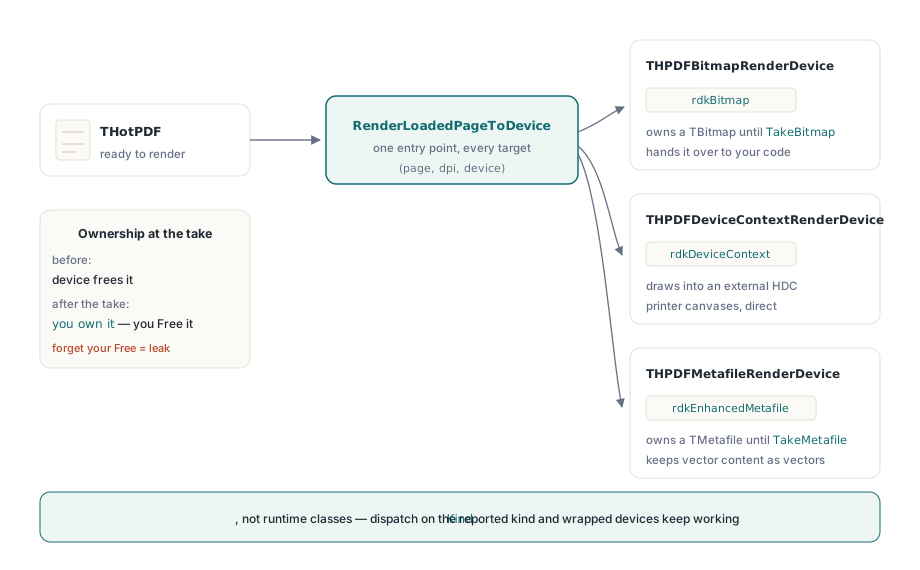
HotPDF renders a loaded PDF page through one entry point, RenderLoadedPageToDevice, and the device you hand it decides whether the result is a bitmap, a drawing on an external device context such as a printer canvas, or a vector enhanced metafile. Set RenderOverprintPreview to True and the same call simulates CMYK process-ink overprint, so an operator sees on screen the ink interaction that would otherwise only appear on the press sheet
Those two features solve different problems that happen to meet in the same code path. The device abstraction removes the branch where preview, print and export each had their own rendering call with their own drift. Overprint proofing removes the class of production error where a document looks correct in every viewer and comes off the press wrong
Why does a page print differently from how it previews?
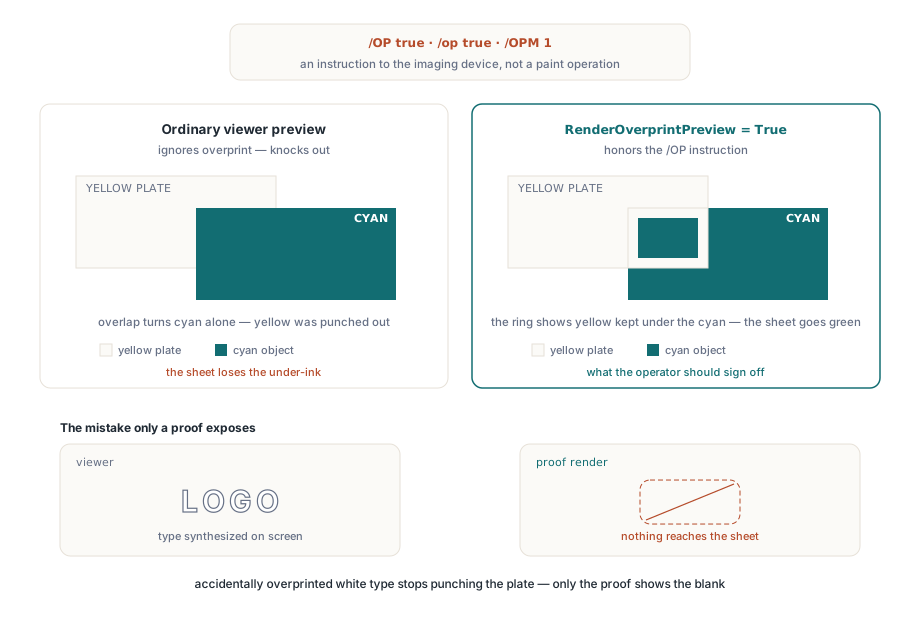
Because overprint is an instruction to the imaging device, not a paint operation. When a page sets /OP or /op true in the graphics state, it is telling the RIP not to knock out the inks underneath — a cyan object drawn over yellow leaves the yellow in place, and the sheet shows green. A viewer that ignores overprint knocks out normally and shows cyan. Neither is wrong on its own terms, and that is exactly the problem: the screen and the press disagree, and nobody finds out until proofs come back
RenderOverprintPreview makes HotPDF take the instruction seriously for DeviceCMYK paints governed by /OP, /op and /OPM 1. The result is a proof preview rather than a viewer preview: black overprinting a tint stays a rich overlay instead of punching a hole, and a designer's accidental overprint on white text becomes visible as the disappearing text it will be
var
  Pdf: THotPDF;
  Device: THPDFBitmapRenderDevice;
  Proof: TBitmap;
begin
  Pdf := THotPDF.Create(nil);
  try
    Pdf.LoadFromFile('cover-cmyk.pdf');
    Pdf.RenderOverprintPreview := True;    // proof, not plain preview
    Device := THPDFBitmapRenderDevice.Create;
    try
      if Pdf.RenderLoadedPageToDevice(0, 150, Device) then
      begin
        Proof := Device.TakeBitmap;        // ownership moves to the caller
        try
          Image1.Picture.Assign(Proof);
        finally
          Proof.Free;
        end;
      end;
    finally
      Device.Free;
    end;
  finally
    Pdf.Free;
  end;
end;
The setting participates in render-cache identity, in memory and on disk, so a normal preview and a proof preview never share a bitmap. Toggling the property does not require you to invalidate anything by hand — a cache that returned the wrong one of these two would be worse than no cache at all
Three devices, one rendering call
THPDFRenderDevice is an abstract class with two members that matter: Kind, which reports the target as rdkBitmap, rdkDeviceContext or rdkEnhancedMetafile, and Execute, which the library calls. Three concrete devices ship with HotPDF, and each owns its output differently
THPDFBitmapRenderDevice owns a TBitmap until TakeBitmap transfers ownership to you. THPDFDeviceContextRenderDevice takes an existing HDC plus width and height and draws straight into it, which is how you render onto a printer canvas without a bitmap round trip. THPDFMetafileRenderDevice owns a TMetafile until TakeMetafile transfers it, which keeps vector content as vectors for the consumers that need it
var
  Device: THPDFDeviceContextRenderDevice;
begin
  Printer.BeginDoc;
  try
    Device := THPDFDeviceContextRenderDevice.Create(
      Printer.Canvas.Handle, Printer.PageWidth, Printer.PageHeight);
    try
      Pdf.RenderLoadedPageToDevice(PageIndex, 300, Device);
    finally
      Device.Free;
    end;
  finally
    Printer.EndDoc;
  end;
end;
Reading Kind rather than testing the runtime class is deliberate. Application code that dispatches on device kind keeps working when a device is wrapped, decorated or replaced, and code that tests is THPDFBitmapRenderDevice does not
What ownership transfer means in practice
Before TakeBitmap or TakeMetafile, the device owns the object and frees it in its destructor. After the call, you own it and the device no longer does. Both patterns are legitimate: use the Bitmap or Metafile property when the object only has to outlive the rendering call, and take ownership when the object outlives the device
The failure mode is the ordinary Delphi one. Take the bitmap, free the device, forget to free the bitmap, and you have a leak that grows with page count — invisible on a five-page test and obvious on a five-hundred-page batch. Wrap both objects in their own try/finally rather than sharing one, and the ownership question answers itself
Overprint proofing and transparency in the same page
Transparency-group knockout stays active when overprint preview is on, and both are composited in the same bounded paint snapshot path. This matters because real print-ready files mix the two constantly: a transparency group holding artwork sits on a background whose black is set to overprint, and simulating one without the other produces a proof that is wrong in a new way rather than right
Do keep the limits in view. Overprint preview simulates process-ink behavior for DeviceCMYK paints under the overprint controls named above. It is a proof of ink interaction, not a color-managed contract proof: it does not replace an ICC workflow, and it does not tell you what a specific press and stock will yield. Treat it the way a prepress operator treats an overprint preview in a professional viewer — as the check that catches the errors nobody catches by looking at a normal preview
Fitting proofing into a preflight step
The useful place for this is next to the checks you already run. A preflight pass reports that black text is set to overprint; a proof render shows an operator what that means on the page; and both go into the same report. For spot colors, which frequently accompany overprint in packaging work, the walkthrough of Separation and DeviceN spot color rendering covers the colorant side of the same page, while the notes on rendering a PDF page to a bitmap and on printing a loaded PDF through TPrinter cover the two device targets in their plain, non-proof form
HotPDF renders, proofs and prints loaded PDF pages from native VCL code for Delphi and C++Builder, with no external rendering DLL to deploy alongside the application — the HotPDF Delphi component page has the rendering feature list and a trial build