HotPDF prints a loaded PDF to a physical printer, any Windows device context, or the clipboard through three calls: PrintLoadedDocument drives a VCL TPrinter, RenderLoadedPageToDC paints a page straight into any HDC, and RenderLoadedPageToClipboard copies a page as a bitmap or a vector metafile. HotPDF is a native VCL PDF component for Delphi and C++Builder, and it added this first-class print path in v2.331.0, refining it in v2.348.0, so you no longer hand-wire a TPrinter loop around a bitmap renderer yourself. All three calls draw the page's vector content directly where it counts, so a printout stays as sharp as the printer can render it
Why draw a PDF page straight into the printer instead of a bitmap?
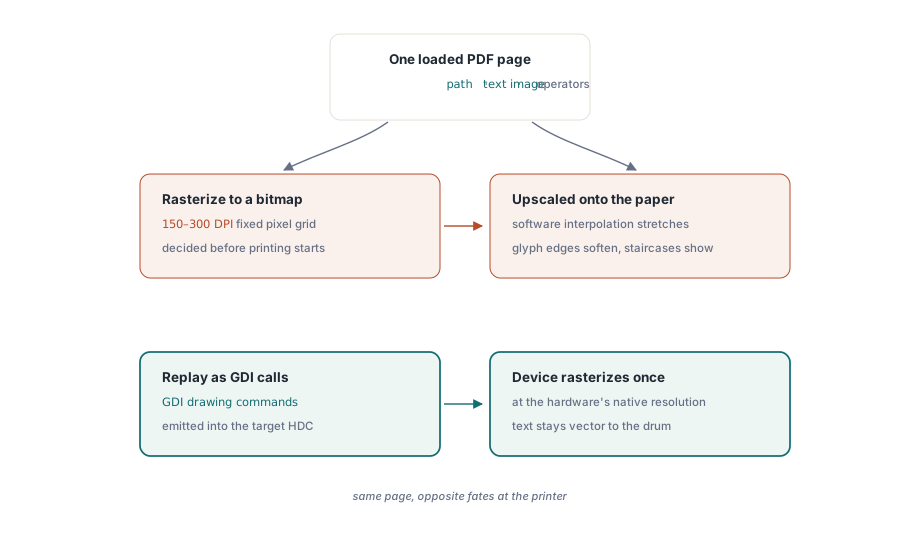
A PDF page is a program of vector drawing operators — paths, text, and images executed against the ISO 32000-1 graphics model — not a grid of pixels. The obvious way to print one is to rasterize the page to a bitmap and blit that bitmap onto the printer canvas, and it works, but it throws away the one thing a printer is good at. A modern laser printer resolves 600 or 1200 DPI; a bitmap rasterized at 150 or 300 DPI and then stretched to fit arrives soft, with jagged text edges and visible interpolation. RenderLoadedPageToDC takes the better path: it replays the page's content stream as GDI calls emitted directly into the target device context, so vector text and line art reach the printer as vectors and get rasterized once, by the printer, at the printer's own resolution
How do you print a loaded PDF to a physical printer in Delphi?
HotPDF prints a loaded document with PrintLoadedDocument(Printer, Options), which takes an assigned VCL TPrinter and a THPDFPrintOptions record, prints the selected pages, and returns the count of pages sent. Set Printer.PrinterIndex first so a device is chosen, fill an options record — the THPDFPrintOptions.Default class function gives you sensible values — and call it once. The library opens the job with Printer.BeginDoc, walks the page range emitting a Printer.NewPage between pages, and closes it with Printer.EndDoc, so you never manage the print-job lifecycle by hand
uses Printers;

var
  Pdf: THotPDF;
  Opts: THPDFPrintOptions;
begin
  Pdf := THotPDF.Create(nil);
  try
    if Pdf.LoadFromFile('invoice.pdf') > 0 then
    begin
      Printer.PrinterIndex := -1;         // -1 selects the default printer
      Opts := THPDFPrintOptions.Default;  // all pages, 300 DPI, FitPage, colour
      Opts.PageRange := '1,3-5';          // one-based; empty prints every page
      Opts.Copies := 2;
      Pdf.PrintLoadedDocument(Printer, Opts);
    end;
  finally
    Pdf.Free;
  end;
end;
The PageRange string is one-based and reads the way a print dialog does: '1,3-5' prints page 1 and pages 3 through 5, and an empty string prints the whole document. Copies maps straight to Printer.Copies. Be honest with yourself about Collate, though: because VCL exposes collation inconsistently across Delphi versions, HotPDF sets the copy count and leaves collation to the printer driver default, so when you need a guaranteed collation order, set it on the driver through TPrinterSetupDialog rather than trusting the flag to carry it
How do DPI and FitPage decide the print scale?
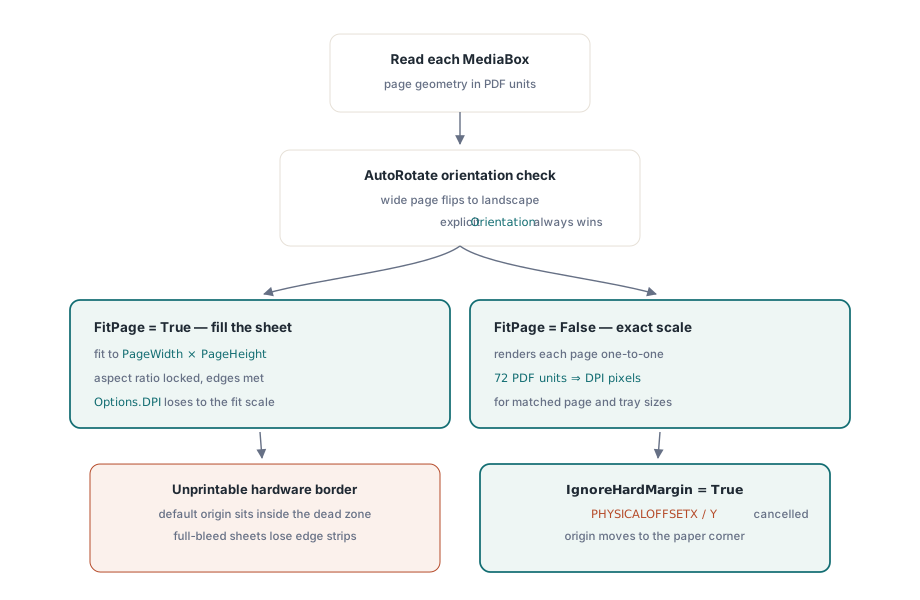
FitPage and DPI interact in a way worth understanding before you ship. With FitPage True — the default — HotPDF reads each page's MediaBox, scales it to Printer.PageWidth and Printer.PageHeight preserving aspect ratio, and renders at the scale that makes the page fill the paper. In that mode Options.DPI is effectively overridden by the fit scale, because the output has to match the printer's physical page dimensions. With FitPage False, HotPDF renders each page 1:1 at exactly Options.DPI, mapping 72 PDF units to DPI device pixels, which is what you want when the source page and the paper are already the same size and you care about an exact resolution. Reach for FitPage when the source page size and the tray size differ; reach for 1:1 when they match and you want deterministic scaling
Two options added in v2.348.0 fix the printouts that look almost right. Every physical printer has a hard margin — a non-printable border the hardware cannot reach — and by default the page origin lands inside it, so a full-bleed page loses a strip off two edges. Set IgnoreHardMargin True and HotPDF queries the printer's PHYSICALOFFSETX and PHYSICALOFFSETY, then shifts the device origin to cancel that offset so the page origin maps to the true paper corner. The second option, AutoRotate, is on by default: it reads each page's MediaBox and, when a page is wider than it is tall, flips the printer to landscape so a wide page prints unclipped instead of being cropped to portrait. AutoRotate steps aside the moment you set Orientation explicitly, so a deliberate orientation choice always wins
How do you render a PDF page into any device context?
RenderLoadedPageToDC(PageIndex, DC, DPI, W, H) is the primitive underneath the print loop, and it is useful on its own. PrintLoadedDocument calls it once per page against the printer canvas, but the target can be any Windows HDC: an off-screen memory DC, a control's canvas in a custom viewer, or a print-preview surface. PageIndex is zero-based, W and H are the device units of the target surface, and the renderer walks the page's /Contents and emits GDI calls into your DC. One deliberate behavior is worth knowing: it draws no background fill. The caller owns the surface, so if you want white paper behind the page you fill the DC yourself before rendering, which is exactly what lets you composite a page over an existing canvas when you want to
// Draw page 1 into an off-screen 24-bit surface at 150 DPI
var
  Surface: TBitmap;
begin
  Surface := TBitmap.Create;
  try
    Surface.PixelFormat := pf24bit;
    Surface.SetSize(1275, 1650);           // 8.5 x 11 in at 150 DPI
    Surface.Canvas.Brush.Color := clWhite;
    Surface.Canvas.FillRect(Surface.Canvas.ClipRect);  // caller paints the background
    Pdf.RenderLoadedPageToDC(0, Surface.Canvas.Handle, 150, Surface.Width, Surface.Height);
    // Surface now holds the composited page, ready to blit or save
  finally
    Surface.Free;
  end;
end;
When you just need a finished TBitmap — a thumbnail, an image export, a preview you will cache — reach for RenderLoadedPageToBitmap instead, covered in the companion article on rendering PDF pages to a bitmap. The difference is who owns the surface: the bitmap call allocates and returns a pixel buffer, while RenderLoadedPageToDC draws into a device context you already hold, which is exactly what a printer canvas or a paint handler hands you. Both share the same content-stream interpreter and embedded-glyph engine, so text comes out with the exact embedded outlines either way
How do you paste a PDF page into Word or an image editor?
RenderLoadedPageToClipboard(PageIndex, DPI, AsMetafile) puts one page on the Windows clipboard, ready to paste into Word, PowerPoint, an email, or an image editor. The AsMetafile flag chooses the format, and the choice matters more than it looks. Pass False and HotPDF places a 24-bit device bitmap (CF_BITMAP) rendered at your DPI — a fixed grid of pixels that pastes anywhere but pixelates when the recipient scales it up. Pass True and it places an enhanced metafile (CF_ENHMETAFILE) in which the page's text and vector art travel as GDI drawing commands, so the pasted result stays crisp at any zoom and reflows to whatever size the destination document gives it
// Copy page 2 as a scalable vector metafile for pasting into Word
Pdf.RenderLoadedPageToClipboard(1, 300, True);

// Copy the same page as a fixed 300-DPI bitmap instead
Pdf.RenderLoadedPageToClipboard(1, 300, False);
The rule of thumb is simple. If a human will paste the page into a document and might resize it — a figure in a report, a clause dropped into a contract draft — use the metafile, because vector text prints and zooms cleanly. If the destination only understands raster data, or you specifically want a frozen snapshot at a known resolution, use the bitmap. For pulling the words out of a page rather than a picture of them, that is a different job entirely, handled by the text extraction API, which returns the characters and their positions instead of a rendered image
Where the print path stops
Everything on this page is Windows-only, and it is worth stating plainly. PrintLoadedDocument, RenderLoadedPageToDC, and RenderLoadedPageToClipboard are built on TPrinter, the GDI device-context model, the Windows clipboard, and enhanced metafiles — all Win32 and Win64 constructs. On other targets the rest of HotPDF still creates, edits, and reads PDF, but this GDI-backed print and clipboard surface is not available. The renderer also targets the common document subset of text, paths, and images, so gradient-heavy design proofs and ICC-managed color print as a faithful preview rather than a colorimetric proof, the same boundary the bitmap renderer carries
For batch printing across many files, load and print each document in turn and watch the memory bill: PrintLoadedDocument renders one page at a time, but the loaded document graph itself lives in memory for the whole job. When you are driving a print queue over hundreds of large files, the streaming Direct File API for large-PDF workflows pairs well with the print path — split, merge, or select the pages you need on disk first, then load only the slim result to print. That is how PrintLoadedDocument, RenderLoadedPageToDC, and RenderLoadedPageToClipboard ship as part of the HotPDF Delphi Component for Delphi and C++Builder — a native VCL library with no external DLL dependencies that covers PDF creation, editing, text extraction, rendering, and now printing straight to TPrinter, any device context, or the clipboard