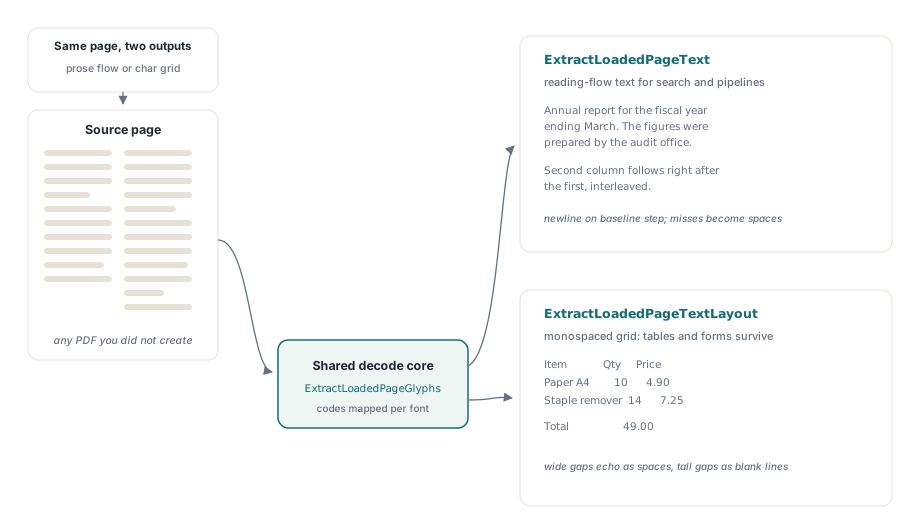
HotPDF Delphi Component extracts Unicode text from any PDF you load in Delphi through two calls: ExtractLoadedPageText returns the reading-flow text of a page, and ExtractLoadedPageTextLayout (added in v2.263.0) reconstructs the page's visual arrangement as plain text, so columns, indentation, and table alignment survive in the output. Both work on documents HotPDF did not create, which is the case that actually matters: the invoice a customer emailed you, the report a scanner bureau delivered, the contract generated by software nobody can name anymore
Getting there took more machinery than the two signatures suggest, because a PDF does not store text the way a text file does. This article walks through both extraction modes, then opens the hood on the three pieces underneath — the CMap reader, the content stream interpreter, and the font decode fallback chain — because knowing how the mapping works is the difference between shrugging at garbage output and diagnosing it
Why is text extraction harder than reading strings out of the file?
A PDF content stream records character codes, not characters. The Tj and TJ operators (ISO 32000-1 §9.4.3) carry strings of bytes whose meaning depends entirely on the font selected by the preceding Tf: byte 0x41 might be the letter A under WinAnsi, an arbitrary glyph in a subset font, or half of a two-byte CID in a composite CJK font. ISO 32000-1 §9.10 defines text extraction as exactly this decoding problem — mapping each code back to Unicode using whatever information the font dictionary provides — and the standard is explicit that a conforming file is not required to provide enough information to do it
That last clause explains every "why does copy-paste from this PDF produce gibberish" bug report you have ever seen. A producer that embeds a subset font with no /ToUnicode table has written a file that renders perfectly and extracts as nonsense, because the code-to-glyph mapping exists but the code-to-Unicode mapping was never shipped. Any honest extraction API is therefore a best-effort chain of fallbacks, and the useful question is how deep the chain goes
Reading-flow extraction with ExtractLoadedPageText
For search indexing, keyword matching, or feeding text to an analysis pipeline, ExtractLoadedPageText is the call you want. The signature is function ExtractLoadedPageText(PageIndex: Integer; out AText: UnicodeString): boolean — page indexes are zero-based, the result arrives as a native Delphi UnicodeString, and the function returns False when the page has no readable content stream rather than raising
var
  Pdf: THotPDF;
  PageCount, I: Integer;
  PageText, AllText: UnicodeString;
begin
  Pdf := THotPDF.Create(nil);
  try
    PageCount := Pdf.LoadFromFile('invoice.pdf');
    AllText := '';
    for I := 0 to PageCount - 1 do
      if Pdf.ExtractLoadedPageText(I, PageText) then
        AllText := AllText + PageText + #13#10;
    // AllText now holds the reading-flow text of the document
  finally
    Pdf.Free;
  end;
end;
Line breaks in the output come from a deliberately simple heuristic: when a glyph's vertical origin moves by more than half the current font size — the signature of a Td or T* step in the content stream — a newline is inserted. Characters the decoder cannot resolve become spaces instead of disappearing, so word boundaries survive even when individual glyphs do not. What this mode does not attempt is reading-order clustering or multi-column detection: a two-column page comes out interleaved in content-stream order, which is usually but not always visual order
When should you use layout-preserving extraction instead?
ExtractLoadedPageTextLayout is the right call whenever position carries meaning: tables, forms, code listings, anything you intend to diff, grep, or parse by column. Instead of flattening glyphs into a stream, it clusters them into baselines, sorts each baseline by X, and reproduces horizontal and vertical whitespace on a monospaced character grid sized from the median glyph advance and font size. Wide gaps between runs on the same baseline become runs of spaces; large gaps between baselines become blank lines. The result reads like the page looks
var
  Grid: UnicodeString;
begin
  if Pdf.ExtractLoadedPageTextLayout(0, Grid) then
    TFile.WriteAllText('page1.txt', Grid, TEncoding.UTF8);
  // Columns, indentation and table alignment survive as
  // spaces and blank lines on a character grid
end;
The two modes share every byte of the decoding machinery and differ only in how they arrange the decoded glyphs, so the choice costs nothing in fidelity. Pick ExtractLoadedPageText when only the words matter and ExtractLoadedPageTextLayout when the arrangement does. Multi-column reading-order detection remains out of scope for both — a grid rendering of a two-column page shows you both columns side by side, faithfully, which for diffing is exactly right and for prose re-flow is not
How does HotPDF decode character codes to Unicode?
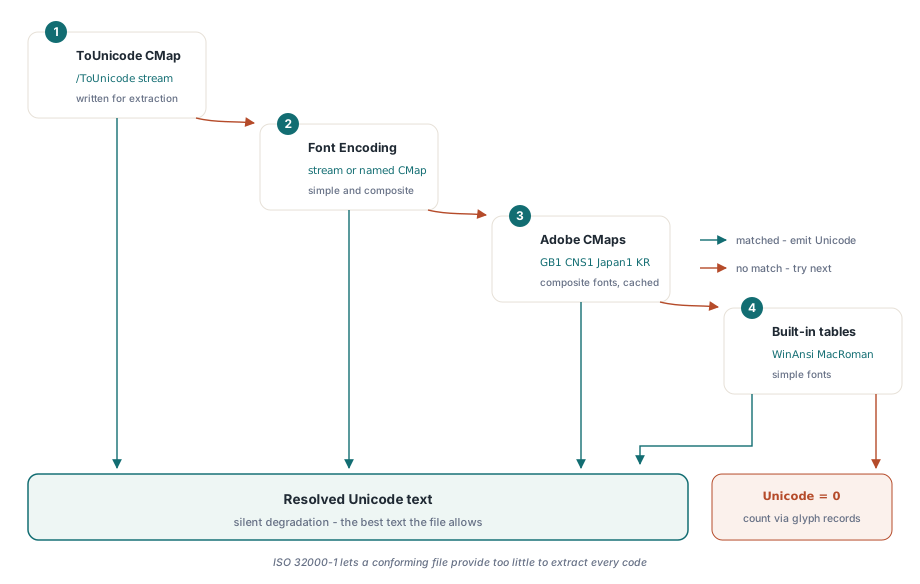
HotPDF Delphi Component resolves each character code through a priority-ordered fallback chain: the font's embedded /ToUnicode CMap first, then the /Encoding entry (stream or named CMap), then — for composite fonts — the Adobe standard CMap files for character collections such as Adobe-GB1, Adobe-CNS1, Adobe-Japan1, and Adobe-KR, and finally the built-in WinAnsi and MacRoman tables for simple fonts. A strategy that cannot deliver an answer degrades silently to the next one rather than raising, and a code that exhausts the whole chain resolves to 0 so the caller can count misses instead of guessing
The /ToUnicode CMap (ISO 32000-1 §9.10.3) sits first because it is the one mapping the producer wrote specifically for extraction. The Adobe standard CMap path matters for CJK documents that use predefined CMaps like UniGB-UTF16-H instead of embedding anything: HotPDF ships the collection files under its resources\CMap directory, locates them relative to the executable at runtime, and caches each parsed map per process — worth knowing because the largest of them, the Adobe-GB1 map, is roughly 2 MB of source text you do not want to re-parse per page. If the directory is absent the decoder simply skips disk-backed CMaps and works with embedded tables plus the built-in encodings. This is the reading-side mirror of the shaping problem covered in complex script text shaping with HotPDF, where the same code-versus-glyph distinction is faced at writing time
Two CMap syntax traps worth knowing
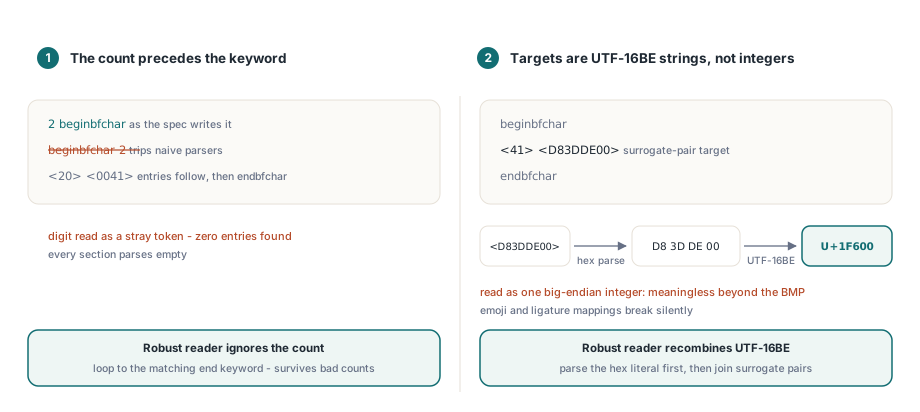
CMap files look trivially parseable and are not, and two details account for most first-attempt parser failures. The first is that the record count comes before the section keyword: a section reads 2 beginbfchar, not beginbfchar 2. A parser that expects the count after the keyword consumes the number as a stray token, then finds zero entries in every section. The robust approach — the one HotPDF's reader settled on — is to ignore the count entirely and loop until the matching endbfchar / endbfrange keyword, which has the bonus of tolerating real-world files whose counts are simply wrong
The second trap is that bfchar and bfrange targets are UTF-16BE strings, not integers. The destination <D83DDE00> means U+1F600 — a surrogate pair that must be recombined into one code point — and reading those four bytes as a big-endian integer produces a meaningless value on every code point outside the Basic Multilingual Plane. Emoji in PDFs are no longer exotic, so a decoder that skips surrogate recombination fails on files your users actually have. HotPDF parses the hex literal to raw bytes first, then recombines UTF-16BE code units, which also covers the multi-character targets that ligature mappings produce
Dropping down to glyph level with ExtractLoadedPageGlyphs
Both text calls are built on ExtractLoadedPageGlyphs, and the underlying THPDFGlyphArray is available to your code too. Each THPDFGlyphRecord carries the resolved Unicode code point alongside the raw character code, the code's byte width (1, 2, or 4, decided by the CMap's codespacerange), the active font resource key and size, the user-space X and Y origin, and the horizontal advance. That is enough to build word-boundary detection, positioned highlighting, or a custom layout algorithm without touching the content stream yourself
var
  Glyphs: THPDFGlyphArray;
  I, Unresolved: Integer;
begin
  if Pdf.ExtractLoadedPageGlyphs(0, Glyphs) then
  begin
    Unresolved := 0;
    for I := 0 to High(Glyphs) do
      if Glyphs[I].Unicode = 0 then
        Inc(Unresolved);
    if Unresolved > 0 then
      ShowMessageFmt('%d of %d glyphs have no Unicode mapping',
        [Unresolved, Length(Glyphs)]);
  end;
end;
Counting Unicode = 0 records, as above, is the honest way to measure extraction quality on a given document before you trust the text downstream. The glyph records also anchor each character to the source operand in the content stream, which is what makes HotPDF's loaded-document text search and replace possible on top of the same foundation
Which PDFs will not give up their text?
Some files defeat any extractor, and it is better to detect them than to ship their output. Scanned documents are the plainest case: a page that is one large image contains no text operators at all, so extraction correctly returns an empty string — the fix is OCR, and extracting the page images from the loaded PDF is the first step of that pipeline. Subset fonts without a /ToUnicode table are the harder case: if the /Encoding path and the standard CMaps also come up empty, those glyphs resolve to 0 and surface as spaces in the text calls. Encrypted documents extract normally provided you load them with their password via the LoadFromFile overload, so the streams are decrypted before the interpreter ever sees them
One narrower limit is worth stating plainly: the decode chain reads CMap and content streams through HotPDF's Flate path, so a font whose ToUnicode stream uses an unusual filter degrades to the next strategy instead of failing the page. In practice FlateDecode covers nearly everything produced in the last two decades, and the degradation is silent by design — you get the best text the file allows rather than an exception. The same read-side object machinery that resolves font dictionaries here also powers editing metadata on loaded documents, so a document intake pipeline can extract, inspect, and annotate in one pass
Text extraction, layout-preserving rendering, glyph-level access, and the search and replace features built on them are all part of the standard HotPDF Delphi Component for Delphi and C++Builder — no external DLLs, no OS text services, just Object Pascal you can step through when a strange file lands in your queue