OCR text layers, barcode bounds and face redaction boxes drift on cropped PDF pages when bitmap pixels are mapped back through the MediaBox instead of the box the renderer actually rasterized: the CropBox clipped to the MediaBox (ISO 32000-1 §14.11.2). HotPDF fixed this for ApplyLoadedOCRTextLayer in v2.770.153, and for DecodeLoadedPageBarcodes and DetectLoadedRedactionFindings in v2.770.154
The bug report that usually arrives looks like this. A scanned contract archive goes through OCR, the output is searchable, and the search hit for a clause number is highlighted half an inch below and to the left of the printed number. Most files in the batch are fine. The broken ones all came from one scanning station that writes a /CropBox to trim the platen margin. That one detail separates the picture the OCR engine saw from the frame the text layer was placed in, and the same mismatch moves barcode bounds and, more seriously, face redaction boxes
Why does the OCR text layer drift away from the scanned words?
The text layer drifts because two halves of the pipeline disagreed about which rectangle the bitmap covers. In v2.766.64, HotPDF changed rendering, SVG export, the viewer and printing to honor the CropBox: a page is displayed through its CropBox clipped to its MediaBox, which is what ISO 32000-1 §14.11.2 prescribes, and GetLoadedPageVisibleBox was added to return that visible box. The recognition features kept building their device-to-page transform from GetLoadedPageBox(PageIndex, pbMediaBox, ...). The raster now covered the visible box, the transform still assumed the MediaBox, and every recognized position came back offset by the gap between the two
The affected window is therefore precise. ApplyLoadedOCRTextLayer misplaced text from v2.766.64 through v2.770.152. Whole-page DecodeLoadedPageBarcodes and the face detection inside DetectLoadedRedactionFindings stayed wrong one build longer, through v2.770.153. Before v2.766.64 the renderer drew the whole MediaBox, so mapping and raster agreed, at the cost of recognizing content that viewers never show. The fixes changed three things together for each feature: the transform, the pixel budget estimate, and the page box handed to a custom engine in the request record
Several cases were never affected:
- Pages without a
/CropBox, or whose CropBox equals the MediaBox, map identically before and after the fix DecodeLoadedPageBarcodeswithHasRegionset renders exactly the region you pass and maps through that same region, so explicit-region decoding was correct throughout; the check that the region lies inside the page still uses the MediaBox- Pattern-based redaction findings (emails, card numbers and so on) come from text extraction in user space, not from a raster, so only the face-detection findings moved
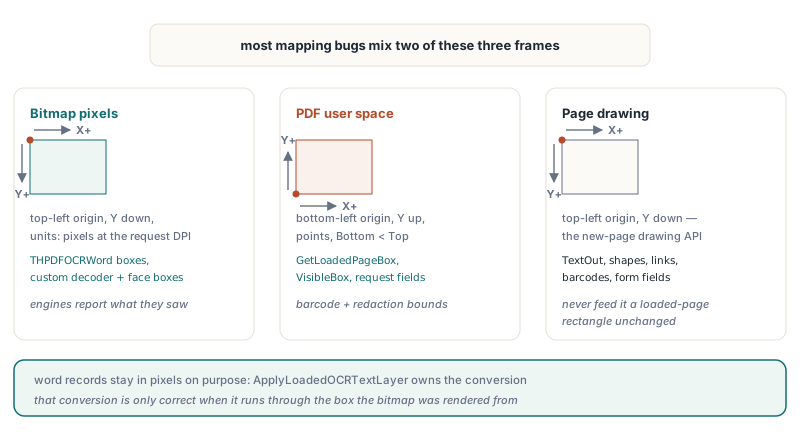
Three coordinate frames, and which HotPDF APIs use each
HotPDF code that touches recognition deals with three frames, and most mapping bugs come from mixing two of them
- Bitmap pixels: top-left origin, Y grows downward, units are pixels at the request DPI.
THPDFOCRWord.Left,Top,RightandBottomare in this frame, as are the optional baseline points, the results a customIHPDFBarcodeDecoderreturns, and the boxes from a customIHPDFFaceDetector - PDF user space of a loaded page: bottom-left origin, Y grows upward, units are points, with
Bottom < Top.GetLoadedPageBoxandGetLoadedPageVisibleBoxreturn Left, Bottom, Right, Top in this frame, and so do thePageLeft,PageBottom,PageRightandPageTopfields ofTHPDFOCRRequest, the bounds inTHPDFDecodedBarcodeand the rectangles inTHPDFRedactionFinding - HotPDF page-drawing coordinates: the API you use to build new pages (text output, shapes, barcodes, links, form fields) works with a top-left origin and Y growing downward. That frame belongs to document generation and has nothing to do with the loaded-document APIs above, so never feed a loaded-page user-space rectangle into it unchanged
The OCR word record is deliberately pixel-based: an engine reports what it saw in the image, and ApplyLoadedOCRTextLayer owns the conversion. That division only works when the conversion uses the right box, which is what v2.770.153 restored
The device-to-page transform behind OCR, barcodes and faces
HotPDF maps bitmap pixels to the page with a single affine matrix built from five inputs: the rotation, the scale DPI / 72, the bitmap height, and the Left, Bottom, Right and Top of the rendered box. OCR, barcode decoding and face detection all share one routine for it, which is why one wrong box input broke all three in the same way. For an unrotated page the page-to-device matrix [A B C D E F] is:
A = ScaleandD = -Scale, whereScale = DPI / 72; the negativeDflips user space (Y up) into bitmap space (Y down)B = C = 0, because an unrotated page has no shear or swap between axesE = -Left * Scale, which moves the box's left edge to pixel column 0F = BitmapHeight + Bottom * Scale, which maps the box's bottom edge to y = BitmapHeight, the lower edge of the bitmap, so the top edge lands on row 0
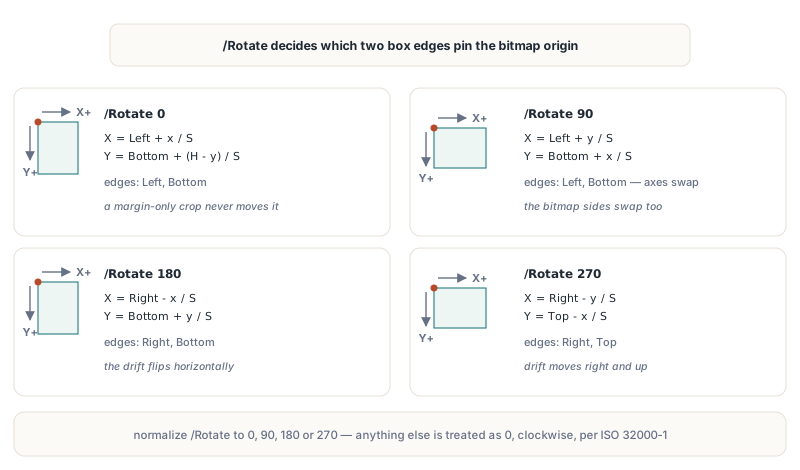
Pixels go back to the page through the inverse of that matrix. Request.PageRotation carries the page's /Rotate normalized to 0, 90, 180 or 270 (any value that is not a multiple of 90 is treated as 0), and the renderer turns the page clockwise as ISO 32000-1 §7.7.3.3 requires. Under rotation the axes swap and a different pair of box edges is pinned to the bitmap origin. Written out as inverse formulas, with S = DPI / 72, x and y in pixels and H the bitmap height:
| /Rotate | Page X | Page Y | Box edges the mapping depends on |
|---|---|---|---|
| 0 | Left + x / S | Bottom + (H - y) / S | Left, Bottom |
| 90 | Left + y / S | Bottom + x / S | Left, Bottom |
| 180 | Right - x / S | Bottom + y / S | Right, Bottom |
| 270 | Right - y / S | Top - x / S | Right, Top |
The last column explains why the bug looked random in production. A CropBox that trims only the top of the page leaves Left and Bottom untouched, so upright pages came out perfectly and only pages carrying /Rotate 270 drifted. Rotation also swaps the bitmap dimensions: at 90 and 270 the bitmap is (Top - Bottom) * S pixels wide and (Right - Left) * S pixels tall
What goes wrong with MediaBox [0 0 612 792] and CropBox [36 36 576 756]?
With a half-inch crop on every side, an unrotated page's text layer lands exactly 36 points left of and 36 points below the scanned words when the MediaBox is used. Take a US Letter page whose CropBox trims 36 points (0.5 inch) from each edge. The visible box is 540 by 720 points, so at the default OCR resolution of 300 DPI the scale is 300 / 72 ≈ 4.1667 and the bitmap is 2250 by 3000 pixels
Suppose the engine reports a word with pixel box Left 450, Top 600, Right 900, Bottom 660 and no baseline. HotPDF then places the baseline 20 percent of the word height above the bottom edge, at pixel row 648, and maps the start point (450, 648):
- Through the visible box: x = 36 + 450 / 4.1667 = 144.0 and y = 36 + (3000 - 648) / 4.1667 = 600.48, which is where the word is printed
- Through the MediaBox: x = 0 + 108.0 = 108.0 and y = 0 + 564.48 = 564.48, a uniform shift of (-36, -36) points
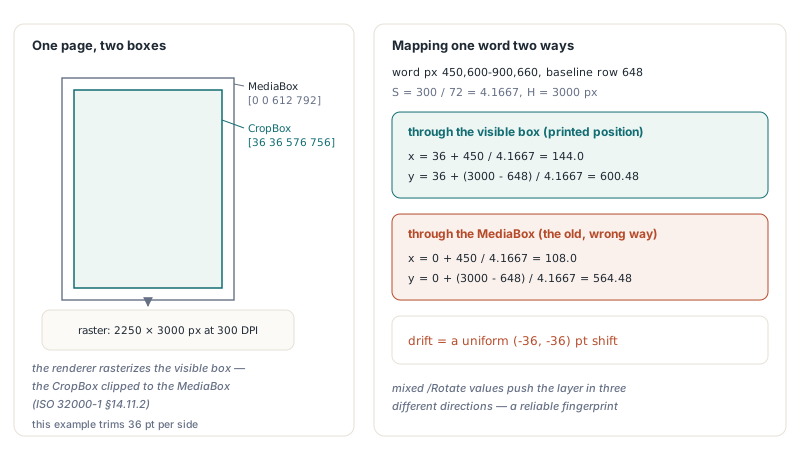
Rotate the same page and the direction of the error changes, because different edges are involved. At /Rotate 180 the X term uses Right, and 612 instead of 576 pushes the layer 36 points to the right while Bottom still pulls it 36 points down. At /Rotate 270 both Right and Top are too large, so the layer moves 36 points right and 36 points up. A document with mixed orientations can show the drift in three directions, a reliable fingerprint for this bug. Hand-written code that derives the scale from the box, such as Bitmap.Width / (Right - Left), also stretches every coordinate by 612 / 540, roughly 13 percent, on top of the offset
Which of your PDF documents are affected?
A PDF document is exposed when at least one page has a visible box that differs from its MediaBox, and HotPDF can tell you that in a few lines. Compare GetLoadedPageBox with pbMediaBox against GetLoadedPageVisibleBox for every page, and print GetLoadedPageRotation alongside so you can predict the drift direction from the table above. THPDFPageBoundary also offers pbCropBox, pbBleedBox, pbTrimBox and pbArtBox, but GetLoadedPageBox(pbCropBox) falls back to the MediaBox when no crop box exists and does not clip, so the visible box is the right thing to compare against
uses
  System.SysUtils, HPDFDoc;

procedure ReportCroppedPages(const FileName: string);
var
  Pdf: THotPDF;
  I: Integer;
  ML, MB, MR, MT, VL, VB, VR, VT, Tmp: Single;
begin
  Pdf := THotPDF.Create(nil);
  try
    if Pdf.LoadFromFile(FileName) < 1 then
      raise Exception.Create('Cannot load ' + FileName);
    for I := 0 to Pdf.LoadedPageCount - 1 do
    begin
      if not Pdf.GetLoadedPageBox(I, pbMediaBox, ML, MB, MR, MT) then
        Continue;
      // the stored array may list its corners in any order
      if MR < ML then begin Tmp := ML; ML := MR; MR := Tmp; end;
      if MT < MB then begin Tmp := MB; MB := MT; MT := Tmp; end;
      // already normalized and clipped to the MediaBox
      if not Pdf.GetLoadedPageVisibleBox(I, VL, VB, VR, VT) then
        Continue;
      if (Abs(VL - ML) > 0.01) or (Abs(VB - MB) > 0.01) or
         (Abs(VR - MR) > 0.01) or (Abs(VT - MT) > 0.01) then
        Writeln(Format('Page %d  MediaBox [%g %g %g %g]  visible [%g %g %g %g]  /Rotate %d',
          [I + 1, ML, MB, MR, MT, VL, VB, VR, VT,
           Pdf.GetLoadedPageRotation(I)]));
    end;
  finally
    Pdf.Free;
  end;
end;
Two details of GetLoadedPageVisibleBox matter for scripts like this. The function leaves its out parameters untouched when it fails, so presetting a default page size before the call is a safe pattern. And when a malformed CropBox does not intersect the MediaBox at all, the function returns the MediaBox rather than an empty rectangle. If the report lists pages and your deployed build is older than v2.770.153 for OCR, or v2.770.154 for barcodes and faces, re-run recognition on those pages after upgrading. An OCR layer committed by an affected build stays in the saved file, and the default SkipPagesWithText option will skip those pages on a second pass unless you turn it off or remove the old layer first
How should a custom IHPDFOCREngine map pixels back to PDF space?
A custom IHPDFOCREngine should return word boxes in bitmap pixels and let HotPDF do the mapping; convert to user space only for your own decisions, and then use the box from the request, never the MediaBox. Since v2.770.153 the request's PageLeft, PageBottom, PageRight and PageTop describe the rendered visible box, so they match Request.Bitmap exactly. The helper below is the inverse of the library's transform, including its use of the actual bitmap height for upright pages, so it agrees with HotPDF to the pixel
uses
  System.SysUtils, System.Math, Vcl.Graphics, HPDFDoc;

// Bitmap pixel (top-left origin, Y down) to PDF user space
// (bottom-left origin, Y up), through the box the bitmap was rendered from
procedure HotPixelToPage(Rotation, DPI, BitmapHeight: Integer;
  Left, Bottom, Right, Top: Single; X, Y: Double;
  out PageX, PageY: Double);
var
  S: Double;
begin
  S := DPI / 72.0;
  case Rotation of
    90:  begin PageX := Left + Y / S;  PageY := Bottom + X / S; end;
    180: begin PageX := Right - X / S; PageY := Bottom + Y / S; end;
    270: begin PageX := Right - Y / S; PageY := Top - X / S; end;
  else
    PageX := Left + X / S;
    PageY := Bottom + (BitmapHeight - Y) / S;
  end;
end;
A realistic reason to need user space inside an engine is a zone rule: invoices whose letterhead you never want searchable, or a stamp area that confuses the recognizer. The engine below, written with TInterfacedObject so reference counting handles its lifetime, filters words by where their centers fall on the page, then returns the survivors untouched in pixel coordinates. RunRecognizer stands in for your own recognizer call
type
  TZoneFilterOCREngine = class(TInterfacedObject, IHPDFOCREngine)
  private
    FSkipLeft, FSkipBottom, FSkipRight, FSkipTop: Single;  // user space
    function RunRecognizer(Bitmap: TBitmap; MaxWords: Integer;
      out Words: THPDFOCRWords): boolean;  // your recognizer, pixel boxes
  public
    constructor Create(SkipLeft, SkipBottom, SkipRight, SkipTop: Single);
    function GetName: AnsiString;
    function Recognize(const Request: THPDFOCRRequest;
      out Words: THPDFOCRWords; out Diagnostic: AnsiString): boolean;
  end;

function TZoneFilterOCREngine.Recognize(const Request: THPDFOCRRequest;
  out Words: THPDFOCRWords; out Diagnostic: AnsiString): boolean;
var
  Raw: THPDFOCRWords;
  I, Count: Integer;
  CX, CY: Double;
begin
  Diagnostic := '';
  SetLength(Words, 0);
  if not RunRecognizer(Request.Bitmap, Request.MaxWords, Raw) then
  begin
    Diagnostic := 'recognizer failed';
    Exit(False);
  end;
  SetLength(Words, Length(Raw));
  Count := 0;
  for I := 0 to High(Raw) do
  begin
    HotPixelToPage(Request.PageRotation, Request.DPI,
      Request.Bitmap.Height, Request.PageLeft, Request.PageBottom,
      Request.PageRight, Request.PageTop,
      (Raw[I].Left + Raw[I].Right) / 2, (Raw[I].Top + Raw[I].Bottom) / 2,
      CX, CY);
    if (CX >= FSkipLeft) and (CX <= FSkipRight) and
       (CY >= FSkipBottom) and (CY <= FSkipTop) then
      Continue;
    Words[Count] := Raw[I];  // still pixels: HotPDF maps them itself
    Inc(Count);
  end;
  SetLength(Words, Count);
  Result := True;
end;
Hand the engine to ApplyLoadedOCRTextLayer(PageIndices, Engine, Options, Info) as with any other engine. The library validates what comes back before it trusts it: a word is dropped and counted in Info.DroppedWordCount when its box leaves the bitmap, when Right <= Left or Bottom <= Top, or when Confidence is outside 0..1 or below MinimumConfidence. Returning more words than MaxWordsPerPage, or pushing the running total past MaxTotalWords, fails the whole call with a budget error, so honor Request.MaxWords in the engine. Do not convert word boxes to user space before returning them; HotPDF would treat the point values as pixels and the layer would collapse toward the bitmap origin
Mapping your own detector output
The same helper serves a home-grown pipeline built on RenderLoadedPageToBitmap, which renders the visible box and applies /Rotate just as the recognition features do. Read the box with GetLoadedPageVisibleBox, normalize the rotation the same way HotPDF does, and map two opposite corners of each pixel box. The Y axis flips and, at 90 and 270 degrees, the axes swap, so the mapped corners come out in no fixed order; take the minimum and maximum of the mapped points, which is also how HotPDF builds barcode bounds
const
  DPI = 200;
var
  Pdf: THotPDF;
  Bmp: TBitmap;
  VL, VB, VR, VT: Single;
  Rotation: Integer;
  PxL, PxT, PxR, PxB, X1, Y1, X2, Y2: Double;
begin
  Pdf := THotPDF.Create(nil);
  try
    Pdf.LoadFromFile('scanned-ids.pdf');
    if not Pdf.GetLoadedPageVisibleBox(0, VL, VB, VR, VT) then Exit;
    Rotation := Pdf.GetLoadedPageRotation(0) mod 360;
    if Rotation < 0 then Inc(Rotation, 360);
    if (Rotation <> 90) and (Rotation <> 180) and (Rotation <> 270) then
      Rotation := 0;
    Bmp := Pdf.RenderLoadedPageToBitmap(0, DPI);
    if Bmp = nil then Exit;
    try
      MyDetector(Bmp, PxL, PxT, PxR, PxB);  // your code, pixel box
      HotPixelToPage(Rotation, DPI, Bmp.Height, VL, VB, VR, VT,
        PxL, PxT, X1, Y1);
      HotPixelToPage(Rotation, DPI, Bmp.Height, VL, VB, VR, VT,
        PxR, PxB, X2, Y2);
      Writeln(Format('User-space box [%.2f %.2f %.2f %.2f]',
        [Min(X1, X2), Min(Y1, Y2), Max(X1, X2), Max(Y1, Y2)]));
    finally
      Bmp.Free;
    end;
  finally
    Pdf.Free;
  end;
end;
The rotation behavior is covered in more depth in flattening page rotation without breaking the page boxes, and the barcode decoding pipeline that consumes the same transform in decoding rotated QR codes from PDF pages. If your engine wraps an external recognizer, the Tesseract OCR adapter for searchable PDF shows the process isolation and cancellation side of the same interface
Quick reference: CropBox-safe coordinate mapping
- The renderer rasterizes the visible box, the CropBox clipped to the MediaBox (ISO 32000-1 §14.11.2); every pixel-to-page mapping must use that box, read with
GetLoadedPageVisibleBox - HotPDF v2.770.153 fixed
ApplyLoadedOCRTextLayer; v2.770.154 fixed whole-pageDecodeLoadedPageBarcodesand face findings fromDetectLoadedRedactionFindings; builds from v2.766.64 up to those versions are affected THPDFOCRWordboxes are bitmap pixels with a top-left origin;GetLoadedPageBoxandGetLoadedPageVisibleBoxreturn PDF user space with a bottom-left origin andBottom < Top- Scale is
DPI / 72; derive it from the DPI, never from a page box divided into the bitmap width - /Rotate decides which edges matter: Left and Bottom at 0 and 90, Right and Bottom at 180, Right and Top at 270
- Return OCR words in pixels and let HotPDF map them; convert only for your own filtering logic
- Re-run OCR on cropped pages processed by an affected build, and remember that
SkipPagesWithTextskips pages that already carry the old layer
The recognition features, page-box queries and loaded-document rendering used here all ship in the HotPDF component for Delphi and C++Builder; licensing, trial downloads and the full feature list are on the HotPDF Delphi PDF component page