HotPDF decodes rotated QR symbols in a loaded PDF page by normalizing the sampled module matrix through all eight D4 orientations inside the decoder itself. The outer rotation retry that works for linear symbologies cannot work for QR, and understanding why saves you a day of chasing a decoder that looks broken but is not
The scenario is ordinary enough. Scanned delivery notes arrive as PDFs, each page carries a QR label, and the scanner operator fed a stack of sheets in whatever direction the tray accepted. Some labels are upright, some are a quarter turn off, a few are upside down. You call the barcode decoder, half the pages resolve, and the other half come back empty with no error at all
Why does rotating the scan mask never fix a rotated QR?
Because a QR finder pattern layout is deliberately asymmetric, and a whole-image rotation preserves that asymmetry instead of removing it. QR Code places three finder squares at the top-left, top-right and bottom-left corners, and leaves the bottom-right corner empty (ISO/IEC 18004:2015 §6.3.3). That missing corner is the orientation cue. Rotate the page bitmap by ninety degrees and the gap simply moves to a different corner. There is no non-trivial rotation of the plane that maps a three-corner layout back onto itself, so a decoder that only accepts the canonical arrangement will reject every attempt in turn
This matters because the obvious fix is the wrong one. The natural instinct is to hang the retry on the outside: render the page, hand the mask to the decoder, and if that fails, rotate the mask and try again for 90, 180 and 270 degrees. For Code 39 that policy is exactly right, because a linear symbology has a start and stop pattern the scanner can find once the bars run horizontally. For QR it is four guaranteed failures followed by a report of nothing found
The D4 group, applied to the module matrix
The correct place for the normalization is after sampling, on the boolean module grid rather than on the pixel mask. Once the decoder has resolved the symbol into an n by n matrix of dark and light modules, it can enumerate the dihedral group of the square: four rotations times two reflections, eight candidate orientations in total. For each candidate it checks the finder triangle, and the first candidate whose three finders land in the top-left, top-right and bottom-left positions is the true orientation. From there the existing pipeline runs unchanged, because the format information bits, the zigzag data placement and Reed-Solomon correction all assume a canonical matrix and now get one
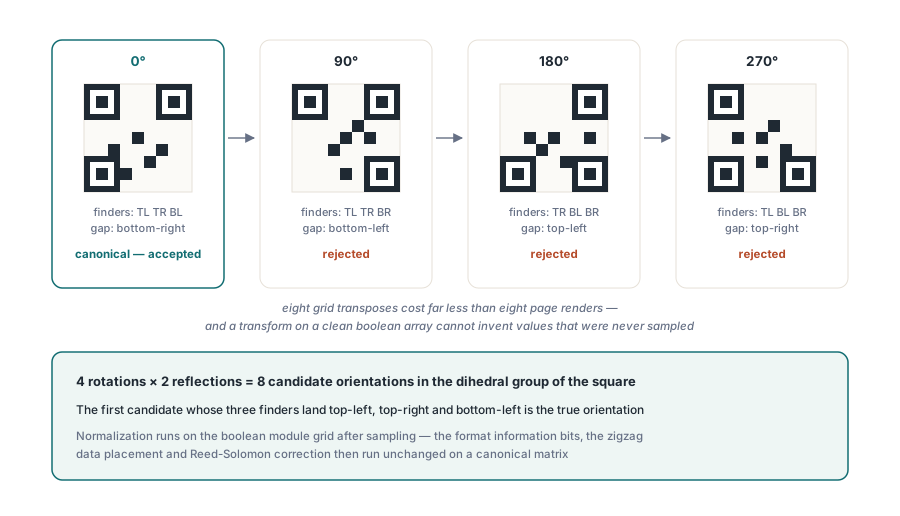
Two properties make this cheap. The matrix is small compared to the rendered bitmap, so eight transposes cost far less than eight page renders. And the matrix is a clean boolean array built by the sampler, so no transform along the way can introduce values that were never sampled
Version detection is a divisibility search, not a division
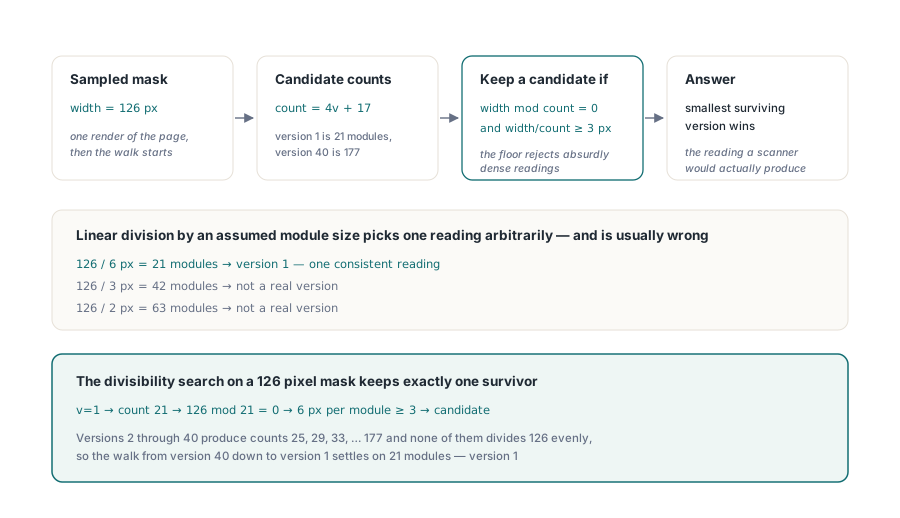
The module count cannot be derived by dividing the sampled width by an assumed module size, and getting this wrong is a subtle source of decode failures on high-resolution renders. A QR symbol of version v is 4v + 17 modules across, so version 1 is 21 modules and version 40 is 177. A mask that measures 126 pixels wide is equally consistent with version 1 at six pixels per module and with several higher versions at smaller module sizes. Linear division picks one of them and is usually wrong
What works is a divisibility search over the candidate versions. Walk from version 40 down to version 1, keep the candidates whose module count divides the sampled width evenly and leaves at least three pixels per module, and take the smallest surviving version. The three-pixel floor is what stops the search from accepting an absurdly dense reading of a coarse symbol, and the smallest-version rule resolves the remaining ambiguity in favor of the reading a scanner would actually produce
var
  Pdf: THotPDF;
  Options: THPDFBarcodeDecodeOptions;
  Codes: THPDFDecodedBarcodes;
  Info: THPDFBarcodeDecodeInfo;
  I: Integer;
begin
  Pdf := THotPDF.Create(nil);
  try
    Pdf.LoadFromFile('delivery-notes.pdf');
    Options := THPDFBarcodeDecodeOptions.Default;
    Options.DPI := 300;
    Options.RotationPolicy := bdrpFallback;
    Options.MinimumConfidence := 0.5;
    Options.MaxResults := 16;
    if Pdf.DecodeLoadedPageBarcodes(0, Options, Codes, Info) then
      for I := 0 to High(Codes) do
        if Codes[I].Symbology = bsyQRCode then
          Writeln(Codes[I].Text, '  at ',
            Format('%.0f', [Codes[I].OrientationDegrees]), ' degrees');
  finally
    Pdf.Free;
  end;
end;
THPDFBarcodeDecodeOptions.Default hands back a populated record rather than a zeroed one, which matters because a DPI of zero or a result cap of zero is a valid-looking way to get nothing back. RotationPolicy controls the outer retry only: bdrpNone renders once, bdrpFallback retries the other orientations after a failed first pass, and bdrpAll renders every orientation unconditionally. Because QR normalization happens inside the decoder, QR pages resolve on the first attempt under any of the three policies. The policy is there for the linear symbologies that genuinely need it
How do you prove a bitmap transform is not inventing pixels?
Count the ink on both sides and require the totals to match. A rotation is a permutation of pixels, nothing more, so the number of non-zero cells in the output must equal the number in the input. When a mask rotation in the outer retry path reported 4800 set cells going in and 7439 coming out, that single comparison was enough to convict the transform without reading a line of its geometry
The cause was mundane and worth carrying away as a rule. A dynamic array sized with SetLength is not guaranteed to arrive zeroed when it is a function result travelling a path the runtime does not clear, and cells the rotation never writes then carry whatever bytes were there before. Some of those stale bytes are non-zero, and non-zero means ink. The fix is one line, FillChar(Result[0], N, 0) before the permutation loop runs, and the discipline it implies is broader: any function returning a mask or bitmap buffer should clear its output explicitly instead of relying on allocation semantics
What made the defect survive three releases is more interesting than the defect. Once QR moved its orientation handling into the decoder, QR stopped exercising the outer mask rotation entirely, and the only remaining consumer of that code path was Code 39. Shared infrastructure hides bugs like this all the time: coverage from one feature makes a path look tested while the feature that actually depends on it has none of its own. Every path a new feature stops using needs a test that still uses it
Reading the results back in page coordinates
Every geometric value the decoder produces is expressed in the coordinate frame of the attempt bitmap, and the caller needs it in PDF user space. That conversion runs in two stages: undo the quarter turn the retry applied, then undo the render transform that mapped user space onto the bitmap. What arrives in THPDFDecodedBarcode is an axis-aligned bounding box in user space, with Left, Bottom, Right and Top following the PDF convention that Y grows upward, plus a counter-clockwise OrientationDegrees
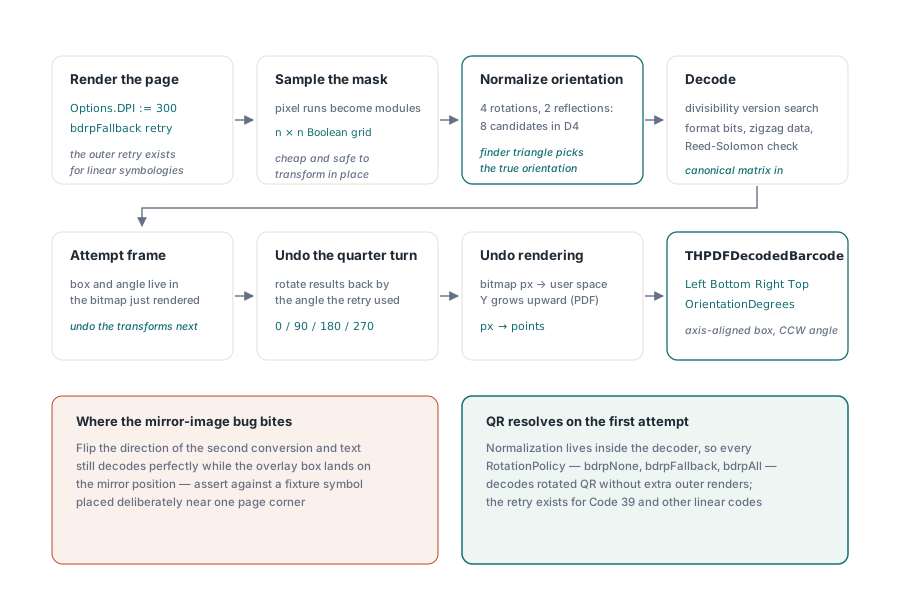
Get the direction of that second conversion wrong and the symptom is nasty: text decodes perfectly, but the box you draw for a review overlay lands on the mirror image of the right position. Anyone building a review interface on top of the decoder should assert against a known fixture, with a symbol placed deliberately near one page corner so a flipped Y axis is visible at a glance. The same reasoning applies to any coordinate crossing the rendering boundary, which is why rendering a PDF page to a bitmap in Delphi is worth understanding before you build on top of the decoder
What the built-in decoder will and will not do
The built-in decoder is a bounded, dependency-free implementation, and it is honest about its limits rather than degrading quietly. It recognizes Code 39 and QR, validates the BCH-protected format bits and the mask pattern before it publishes any data, and it does not attempt error recovery on damaged symbols. If your input is a photograph of a curved label under uneven light, that is a different problem class and wants a specialized engine
// Swap in your own engine: implement IHPDFBarcodeDecoder and pass it
// to the decoder-aware overload. HotPDF still owns page rendering,
// budgets, coordinate mapping and de-duplication
if not Pdf.DecodeLoadedPageBarcodes(PageIndex, MyDecoder, Options,
     Codes, Info) then
  case Info.Status of
    bdsBudgetExceeded:
      Log('raise MaxPixels or lower DPI: ' + string(Info.Diagnostic));
    bdsRenderError:
      Log('page did not render: ' + string(Info.Diagnostic));
    bdsDecoderError:
      Log(string(Info.DecoderName) + ' failed: ' + string(Info.Diagnostic));
  end;
THPDFBarcodeDecodeInfo is where a production pipeline earns its keep. RotationAttemptCount and DecoderCallCount tell you whether the outer retry ran at all, ReceivedResultCount against AcceptedResultCount separates a decoder that found nothing from a confidence threshold that rejected everything it found, and RenderedPixels with PeakWorkingBytes is what you graph when a batch job starts thrashing. An empty result set plus bdsSucceeded means the page really has no readable symbol, which is a different operational fact from bdsBudgetExceeded
The budget fields deserve a deliberate decision rather than a default. MaxPixels and MaxWorkingBytes exist because DPI multiplies quadratically: moving from 300 to 600 DPI on an A4 page quadruples both the render cost and the peak allocation, and an untrusted input declaring an enormous page box can turn a scan job into an out-of-memory incident. Set the caps to what your worst legitimate document needs, then let bdsBudgetExceeded route the outliers to a slower, isolated path
If your documents mix machine-readable labels with printed text you plan to index, the barcode decoder pairs naturally with the recognition engine covered in template-matching OCR inside HotPDF, and the generation side of the same story is in drawing barcodes into a PDF with HotPDF. Both run on the same rendering and budget infrastructure, so a pipeline that already sets sane limits for one gets the other almost free
Rotation tolerance is one of those features that is invisible when it works and infuriating when it does not, and the engineering lesson generalizes past QR: normalize as close to the semantic representation as you can get, not at the pixel layer where the data still carries every accident of how it was captured. HotPDF ships this as part of the HotPDF Delphi PDF component, alongside the rendering, OCR and page-analysis pieces the same intake pipelines usually need