A barcode is not a picture you decorate a document with. It is a measurement, and the scanner is the instrument that reads it. That reframing decides almost everything about how you should draw one into a PDF. The bars carry no information by their blackness; the information lives in the ratio of bar widths to space widths, and a reader recovers it by timing the transitions as a laser or sensor sweeps across. Squeeze that geometry, blur it, or crowd its margins, and you produce something that looks exactly like a barcode and scans like a smudge. HotPDF gives you two ways to put one on a page, and the difference between them is precisely the difference between controlling that geometry and surrendering it
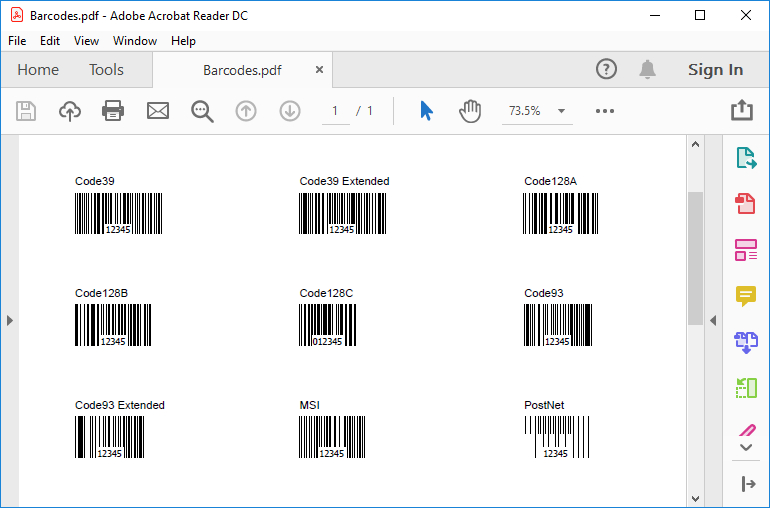
What HotPDF can encode
HotPDF draws linear (one-dimensional) symbologies, and the set is wider than most projects need. The THPDFBarcodeType enumeration covers the Code 2 of 5 family in its interleaved, industrial, and matrix forms; Code 39 and its extended variant; the three Code 128 subsets A, B, and C; Code 93 plain and extended; MSI; PostNet; Codabar; the retail UPC and EAN group, namely EAN-8, EAN-13, UPC-A, the compressed UPC-E0 and UPC-E1, and the UPC supplemental 2- and 5-digit add-ons; and the GS1-128 (EAN-128) subsets. That is enough to cover supply-chain labels, retail point of sale, and the older industrial codes still alive in warehouses
What it does not draw is the two-dimensional family. There is no QR, Data Matrix, or PDF417 here. Those encode bytes in a grid with their own error-correction math, and if a requirement names one of them, this is the wrong tool and you should know that before you build around it rather than after. For one-dimensional codes the practical question is narrower: which symbology accepts the data you actually have, because the encodings are not interchangeable
The data constraints are real and they bite at generation time. The Code 2 of 5 variants and MSI take digits only. Code 39 carries uppercase letters, digits, and a handful of punctuation marks; if you need lowercase or the full ASCII range, that is Code 39 Extended or a Code 128 subset. Code 128C packs two digits into each symbol for density, so it wants an even-length numeric string and nothing else. EAN-13 expects twelve digits and computes the thirteenth as a check; EAN-8 expects seven and computes the eighth; UPC-A takes twelve. Hand a symbology data it cannot represent and you do not get a helpful exception, you get a barcode that encodes garbage, which is worse, because it looks fine until someone scans it at a register
Two drawing paths, two levels of control
The method to reach for in production is DrawBarcode, on the page object. It takes the symbology, a position, a height, and one parameter that matters more than the rest: MUnit, the module width. The module is the width of the narrowest bar, the atom every other measure in the code is a multiple of, and it is expressed here in points. Everything about whether the printed result scans traces back to that single integer
var
  Pdf: THotPDF;
begin
  Pdf := THotPDF.Create(nil);
  try
    Pdf.FileName := 'label.pdf';
    Pdf.BeginDoc;

    // BCType, X, Y, Height, MUnit (module width in points), angle,
    // data, UseCheckSum, bar color, background color.
    Pdf.CurrentPage.DrawBarcode(
      bcCodeEAN13,           // symbology
      72, 680,               // X, Y in points from the bottom-left
      60,                    // bar height
      1,                     // MUnit: 1pt narrowest bar
      0,                     // no rotation
      '123456789012',        // 12 digits; the 13th is the check
      True,                  // append the modulo-10 check digit
      clBlack, clWhite);     // bars black, background white

    Pdf.EndDoc;
  finally
    Pdf.Free;
  end;
end;
Two arguments deserve a closer look. UseCheckSum appends the modulo-10 check digit the symbology expects, and for the retail codes you almost always want it True; turn it off only when your data already carries a precomputed check, or you will get a doubled digit. The bar and background colors are the last two parameters, and the temptation to be creative there is a trap discussed below. Note also the coordinate origin: like every other drawing call in HotPDF, the X and Y measure from the bottom-left corner of the page in points, with Y growing upward, the same convention the Hello World example walks through
The second path is DirectDrawBarcode, which takes the data and a bounding box, X, Y, Width, Height, and scales the bar pattern to fill that width. It is convenient for laying codes out on a grid because you name the footprint and the method fits the bars to it. That convenience is also its hazard. When you give it a width, you are no longer setting the module size; the method divides whatever space you allow among however many bars the data needs, and the narrowest bar becomes whatever falls out of that division. Ask for a dense Code 128 string inside a box too narrow and the modules shrink below what any scanner can resolve, silently. For anything that has to scan reliably, prefer DrawBarcode and set MUnit deliberately. Reserve DirectDrawBarcode for previews and for arrangements where you have measured that the resulting bars stay legible
Module width is a resolution decision
Here is the arithmetic that determines whether your label works. A laser scanner and a camera both have a smallest feature they can distinguish, and the narrow bar has to land comfortably above it after printing. The widely cited floor for general-purpose linear codes is a 13 mil narrow bar, about 0.33 mm, and many retail and industrial guides treat that as a minimum rather than a target. Translate that into PDF units: one point is 1/72 inch, roughly 0.353 mm, so a single point of module width sits right at that floor. That is why MUnit := 1 is the smallest value you should trust for a code destined for a real scanner, and why doubling it to 2 buys margin that costs almost nothing on a label with room to spare
Now connect that to output resolution, because the module also has to survive the printer. On a 300 DPI laser printer one device dot is 1/300 inch, so a one-point module is about four dots wide. Four dots is barely enough to render a clean edge; toner spread and slight registration error eat into it, and the bar that measured one point in your PDF prints fatter or thinner than the spec allows. Bump the module to 2 points and you have eight dots to work with, which absorbs that noise. The rule worth internalizing: the module width you set in points must map to a whole, comfortable number of device dots at your real print resolution, not the resolution you wish you had. A code that scans flawlessly off the screen and fails off the warehouse printer almost always failed this check
The quiet zone is part of the symbol
The single most common reason a correctly encoded barcode will not scan is the quiet zone, the blank margin on each side of the bars. Scanners use that emptiness to find where the code begins and ends; without it, the reader cannot tell the first bar from whatever sits next to it on the page. The standards are specific. Most linear symbologies want a quiet zone of at least ten times the module width on each side, and the UPC and EAN retail codes call for nine modules on the left and seven on the right. With a one-point module that is roughly ten points, about a seventh of an inch, of guaranteed white space flanking the bars
HotPDF draws the bars and nothing else. It does not reserve the quiet zone for you, which means the responsibility is yours and it is easy to forget. The failure mode is subtle: you place a barcode flush against a table cell border, or you let the page layout crowd a logo up beside it, and the code that passed every test on a blank page stops scanning the moment it ships inside a real document. Budget the margin explicitly. Before you call DrawBarcode, leave at least ten module widths of clear space on both sides, and treat any graphic, rule, or text that intrudes into that band as a defect, not a cosmetic choice
Color, contrast, and the human-readable line
The bar and background colors exist so you can match a brand palette, and they are the fastest way to break a working code. Scanners read contrast, classically with red light, and they expect dark bars on a light field. Black on white is the only combination you should reach for without testing. Dark blue or dark green on white can pass; anything with low luminance contrast, and in particular red bars, which a red-light scanner sees as background, will not. If a designer asks for colored barcodes, the honest answer is that the bars stay black and the color goes somewhere else on the label
The DrawBarcode path can also render the human-readable text below the bars, the digits a clerk keys in when a scan fails. That text is a fallback, not decoration, so when you place your own caption keep it clear of the quiet zone; a label of the symbology crammed into the side margin defeats the same blank space the scanner depends on. The fields in the example here, including TextOut for any surrounding labels, are the same drawing calls covered in the report output guide, which is the place to go when the barcode is one element in a larger composed page
A short verification habit
Vector bars are an advantage worth naming. Because DrawBarcode writes the code as PDF drawing operators rather than a rasterized image, the bars stay crisp at any zoom and the file carries no resolution of its own; the only resolution that matters is the printer's. That does not excuse you from testing, it just means the test has to happen on paper. Generate a sample, print it on the lowest-resolution device your codes will actually meet, and scan it with the same class of reader your users hold, not the high-end imager on your desk. Check the quiet zones with a ruler on the printout, confirm the module width survived the trip from points to dots, and verify the decoded value matches what you encoded, check digit and all. Five minutes with a real scanner catches every failure described above, and it catches them before a pallet of mislabeled stock does
The DrawBarcode and DirectDrawBarcode methods shown here are part of the HotPDF Delphi Component for Delphi and C++Builder