Every PDF library ships a "hello world," and HotPDF's is worth slowing down on, because the smallest program that does anything already forces two decisions you will repeat in every document afterward: which font to set, and where on the page the text lands. Get those two right and the rest of the API is variations on a theme. Here is the whole thing, a console program that writes a single page greeting the reader in nearly a dozen languages:
program HelloWorld;

{$APPTYPE CONSOLE}

uses
  Winapi.Windows,   // for DEFAULT_CHARSET; on pre-XE2 Delphi use plain Windows
  HPDFDoc;          // HotPDF main unit

procedure CreateHelloWorld(const FileName: string);
var
  Pdf: THotPDF;
begin
  Pdf := THotPDF.Create(nil);
  try
    Pdf.FileName := FileName;
    Pdf.Compression := cmFlateDecode;   // shrink the content streams
    Pdf.FontEmbedding := True;          // embed the face so it renders anywhere
    Pdf.BeginDoc;

    // One face covering many scripts. The 4th argument is the Windows charset;
    // DEFAULT_CHARSET lets the system pick glyphs per string.
    Pdf.CurrentPage.SetFont('Arial Unicode MS', [], 14, DEFAULT_CHARSET);

    // TextOut measures from the BOTTOM-LEFT corner, in points, Y growing upward.
    Pdf.CurrentPage.TextOut(72, 760, 0, 'Hello, Delphi PDF world!');     // English
    Pdf.CurrentPage.TextOut(72, 730, 0, 'Hola, mundo Delphi PDF!');      // Spanish
    Pdf.CurrentPage.TextOut(72, 700, 0, 'Hallo, Delphi PDF Welt!');      // German
    Pdf.CurrentPage.TextOut(72, 670, 0, 'Bonjour, monde PDF Delphi!');   // French
    Pdf.CurrentPage.TextOut(72, 640, 0, 'Ciao, mondo Delphi PDF!');      // Italian
    Pdf.CurrentPage.TextOut(72, 610, 0, 'Olá, mundo Delphi PDF!');       // Portuguese
    Pdf.CurrentPage.TextOut(72, 580, 0, 'Здравствуйте, Delphi PDF мир!'); // Russian
    Pdf.CurrentPage.TextOut(72, 550, 0, 'こんにちは、Delphi PDFの世界!');    // Japanese
    Pdf.CurrentPage.TextOut(72, 520, 0, 'Merhaba, Delphi PDF dünyası!');  // Turkish
    Pdf.CurrentPage.TextOut(72, 490, 0, '你好,Delphi PDF世界');           // Chinese
    Pdf.CurrentPage.TextOut(72, 460, 0, '여보세요, Delphi PDF 세계!');      // Korean

    Pdf.EndDoc;
  finally
    Pdf.Free;
  end;
end;

begin
  CreateHelloWorld('HelloWorld.pdf');
  Writeln('Wrote HelloWorld.pdf');
end.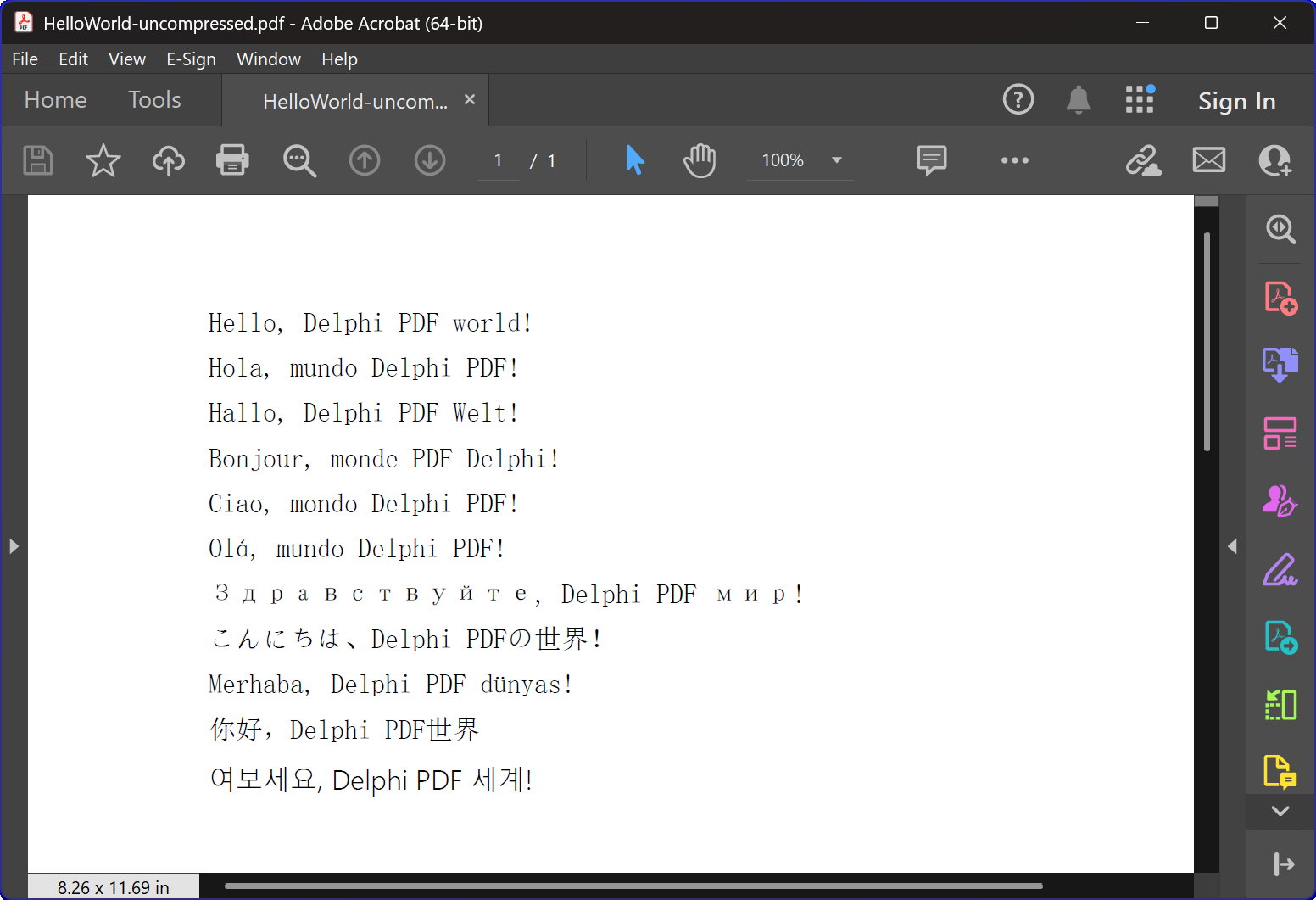
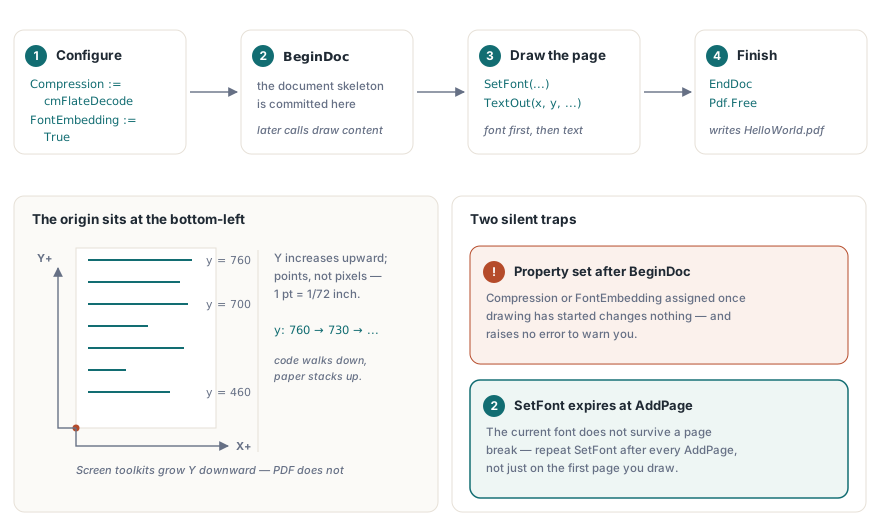
That is the entire example. The THotPDF.Create(nil) paired with try/finally ... Free is the ordinary Delphi ownership pattern, and PDF does not change it. What deserves attention is the four-step spine inside: set properties, BeginDoc, draw, EndDoc. The order is not interchangeable
Set document properties before BeginDoc
BeginDoc is the moment HotPDF commits the document's structure, so anything that affects the whole file has to be set ahead of it. Compression := cmFlateDecode turns on FlateDecode for the content streams, which is the difference between a compact file and a needlessly bloated one. FontEmbedding := True packs the font you draw with into the file, so it looks the same on a machine that has never had Arial Unicode MS installed as it does on yours. Assign either one after BeginDoc and it silently does nothing to the document already in progress, with no error to warn you
SetFont, then TextOut, and watch the origin
Two things about the drawing calls catch everyone on their first page. The first is order: SetFont has to run before any TextOut that depends on it, and it has to be repeated after every AddPage, because the current font does not survive a page break. The second is the coordinate system. TextOut measures from the bottom-left corner of the page, not the top-left, with Y increasing as you move up, in points (1/72 inch). That is why the lines here march downward from 760, each one 30 points below the last. Anyone arriving from screen graphics assumes the opposite and writes the first line straight off the bottom edge
One font, many scripts
The reason a single SetFont can carry Latin, Cyrillic, Japanese, and Chinese on the same page is the face itself: Arial Unicode MS bundles glyphs for nearly every script into one file. The fourth argument to SetFont is the Windows character set, and passing DEFAULT_CHARSET lets the system choose glyphs per string instead of pinning everything to one legacy code page. Two caveats ride along with that convenience. The font has to be present on the machine that builds the PDF, because HotPDF embeds whatever the OS resolves the name to; if Arial Unicode MS is missing, Windows quietly swaps in a substitute and your CJK text can come out as empty boxes. And it does not cover every script equally: for right-to-left writing like Arabic and Hebrew, or anything that needs complex shaping, you reach for a dedicated font loaded with RegisterUnicodeTTF and the right-to-left text calls, which is a topic of its own
Run it and you get HelloWorld.pdf in the working directory: one page, a few lines of multilingual text, compressed, with the font embedded. The obvious next steps are giving that text size, style, and rotation, and placing more than one block of it deliberately, both of which the TextOut sample works through. When you want to draw rules, boxes, and images rather than just text, the same page object holds those calls too
The TextOut, SetFont, and document calls shown here are part of the HotPDF Delphi Component for Delphi and C++Builder