HotPDF flattens PDF page rotation with THotPDF.FlattenLoadedPageRotation: the method wraps each rotated page's content in a clockwise cm transform, rewrites every page box the page actually has, turns annotation geometry, appearance matrices, explicit destinations and tagged structure geometry by the same angle, and then sets /Rotate to 0. The page looks identical in a viewer, but its coordinate system is now upright. That matters the moment a downstream tool, a print RIP or your own stamping code ignores /Rotate and places things in raw user space
The typical trigger is a scanner or a mobile capture app that writes landscape pages as portrait media with /Rotate 90. Every viewer shows them correctly, so nobody notices until someone stamps a page number at the "bottom right" and it lands sideways along the left edge, or an imposition step that only reads /MediaBox lays out a portrait slot for a landscape page. Flattening sounds like a one-line matrix job. In practice it touches five page boxes, three kinds of annotation geometry, the document's link targets and the structure tree, and each of those has its own rule in ISO 32000-1
Which way does /Rotate turn a PDF page?
/Rotate turns the page clockwise for display and printing, in multiples of 90 degrees (ISO 32000-1 §7.7.3.3, Table 30). At 90 degrees the left edge of the media becomes the top and the top edge becomes the right-hand side, so in a y-down device space the mapping is X = (y - Bottom) * Scale and Y = (x - Left) * Scale. At 270 degrees the right edge becomes the top. /Rotate is also one of only four inheritable page attributes, together with /Resources, /MediaBox and /CropBox (§7.7.3.4), so a page dictionary without its own /Rotate can still be turned by a /Pages ancestor. THotPDF.GetLoadedPageRotation walks the /Parent chain and normalizes the result into 0–359, which is the value you want, not the raw key on the page
The direction is easy to get wrong in a way that survives testing, and earlier HotPDF builds did exactly that. The old page-to-device matrix swapped the y components for 90 and 270, which produces a reflection across the diagonal instead of a rotation: the orientation of the matrix flips relative to the unrotated case. Both angles still "look rotated", the bitmap has the swapped width and height, and a round trip from page to view and back returns the starting point, so dimension checks and round-trip tests all pass. The only reliable check is where a corner marker ends up, compared pixel by pixel against a reference renderer. Because the viewer model, the SIMD render backend and the highlight mapping had copied the same matrix, all of them were corrected together, and the flattening code now uses the same clockwise convention as the renderer
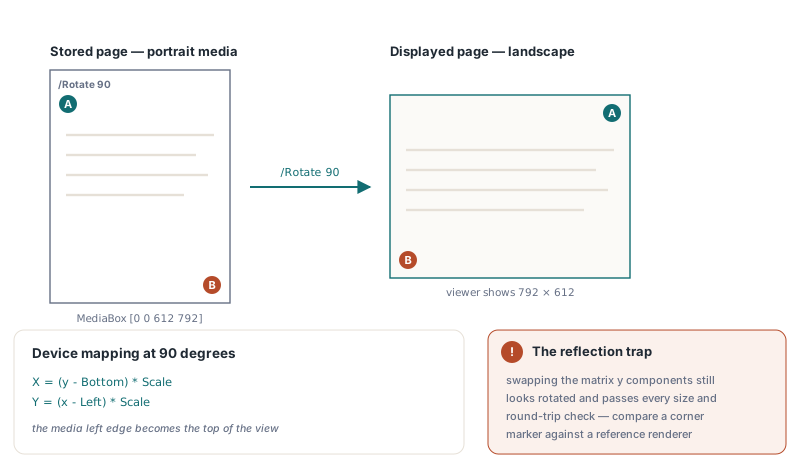
How FlattenLoadedPageRotation rewrites a page
FlattenLoadedPageRotation(PageRange, Info) processes every page in PageRange whose effective rotation is 90, 180 or 270, and returns the number of pages it flattened. An empty PageRange means all pages; otherwise the string uses the usual one-based '1-3,7' syntax, and an out-of-range page number raises an exception rather than being skipped. The original content streams are never re-encoded. The method prepends a new stream containing q 0 -1 1 0 -Bottom Width+Left cm (for 90 degrees) to the page's /Contents, appends a stream containing Q, and finally writes an explicit /Rotate 0 into the page dictionary so an inherited value on a /Pages node cannot turn the page a second time
var
  Pdf: THotPDF;
  Info: THPDFRotationFlattenInfo;
  Flattened: Integer;
begin
  Pdf := THotPDF.Create(nil);
  try
    if Pdf.LoadFromFile('scanned-batch.pdf') > 0 then
    begin
      // '' = every page; pages at 0 degrees are scanned but left alone
      Flattened := Pdf.FlattenLoadedPageRotation('', Info);
      Writeln(Format('Scanned %d, flattened %d pages', [Info.ScannedPageCount, Info.FlattenedPageCount]));
      Writeln(Format('Turned %d annotations, %d destinations, %d tagged geometry entries',
        [Info.TransformedAnnotationCount, Info.TransformedDestinationCount,
         Info.TransformedStructureGeometryCount]));
      if Flattened > 0 then
        Pdf.SaveLoadedDocument('scanned-batch-upright.pdf');
    end;
  finally
    Pdf.Free;
  end;
end;
The THPDFRotationFlattenInfo record is worth logging rather than discarding. ScannedPageCount is the size of the range, FlattenedPageCount equals the return value, and the three Transformed... counters tell you whether the document had links, bookmarks or tagged geometry pointing at the turned pages. A batch where every file reports zero destinations is fine; a tagged PDF/UA file that reports zero structure geometry when you expected figure bounding boxes is a signal to inspect it by hand
Which page boxes does flattening rewrite, and in what order?
Flattening rewrites only the boxes the page already has, and it reads every box before it writes any of them. The order matters because of the default chain: GetLoadedPageBox(PageIndex, pbCropBox, ...) returns the /MediaBox when the page has no /CropBox, and /BleedBox, /TrimBox and /ArtBox default to the CropBox (§14.11.2). An earlier version did read, transform and write one box at a time. It rewrote the MediaBox first, then read the "CropBox", got the already-turned MediaBox back, turned it a second time and wrote a CropBox the page never had, which cropped a landscape page down to a square. The inheritance rules split the same way: MediaBox and CropBox are looked up along the /Parent chain, while Bleed, Trim and ArtBox count only if they sit on the page dictionary itself, so a stray /TrimBox on a /Pages node is treated as absent and never copied onto the page
procedure DumpPageGeometry(Pdf: THotPDF; PageIndex: Integer);
var
  L, B, R, T: Single;
begin
  Writeln('Effective /Rotate: ', Pdf.GetLoadedPageRotation(PageIndex));
  if Pdf.GetLoadedPageBox(PageIndex, pbMediaBox, L, B, R, T) then
    Writeln(Format('MediaBox [%g %g %g %g]', [L, B, R, T]));
  // True even without a /TrimBox key: the value falls back to CropBox, then MediaBox
  if Pdf.GetLoadedPageBox(PageIndex, pbTrimBox, L, B, R, T) then
    Writeln(Format('TrimBox  [%g %g %g %g]', [L, B, R, T]));
  // Preset Letter; GetLoadedPageVisibleBox leaves the outputs untouched on failure
  L := 0; B := 0; R := 612; T := 792;
  Pdf.GetLoadedPageVisibleBox(PageIndex, L, B, R, T);
  Writeln(Format('Visible  [%g %g %g %g]', [L, B, R, T]));
end;
Run that helper before and after flattening and the numbers explain themselves. For a 90-degree page with MediaBox [0 0 612 792], the flattened MediaBox becomes [0 0 792 612]; every rewritten box is mapped through the same clockwise turn, relative to the original MediaBox origin, so the new MediaBox always starts at the origin and the other boxes keep their position inside it. GetLoadedPageVisibleBox returns what viewers display and printers print, the CropBox clipped to the MediaBox and normalized so Left is less than Right, and HotPDF's renderer, SVG export, viewer and print path all use that same box. When you need the page size a human sees, call GetLoadedPageVisibleBox rather than reading /MediaBox
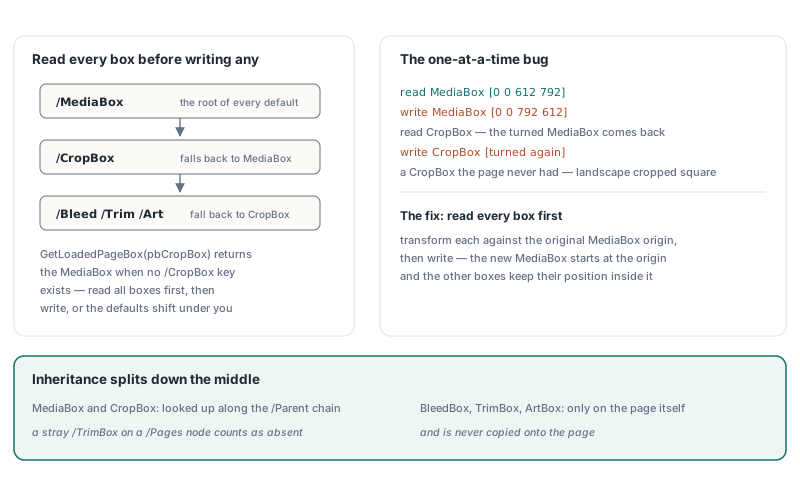
Why do annotations break when you only rotate /Rect?
Annotations break because an appearance stream is not drawn straight into /Rect. Under §12.5.5 the viewer first transforms the form's /BBox by its /Matrix, then scales and translates the bounding box of that result into /Rect. Turn only /Rect and a 200 × 40 stamp gets squeezed into a 40 × 200 slot, unreadable and on its side. FlattenLoadedPageRotation therefore right-multiplies the page's clockwise turn onto each appearance /Matrix (for 90 degrees, [0 -1 1 0 0 0] in the row-vector convention), across the /N, /R and /D appearances and every state inside them. One appearance stream can be shared by several annotations or states, so each stream is turned exactly once per call. The one case without a clean answer is a stream shared across pages with different rotations; it follows the first page that reaches it
Two more rules keep form fields and sticky notes in place. A widget's /MK /R entry (§12.5.6.19) is a counterclockwise angle, so the page's clockwise angle is subtracted from it, modulo 360; skip that and the next appearance regeneration draws the field text in the wrong direction. Annotations with the NoRotate flag (bit position 5, value 16, §12.5.3) stay upright on a rotated page and pivot around the upper-left corner of their /Rect, so flattening keeps their width, height and upright appearance and only moves that corner to where the turn puts it. Beyond annotations, the method also turns /QuadPoints, /Vertices, /L and /InkList, rewrites explicit destinations that name the page (/XYZ points, /FitR rectangles, and /FitH / /FitV swapped at 90 and 270 degrees, §12.3.2.2), and transforms tagged geometry such as attribute /BBox entries for structure elements whose /Pg is the page
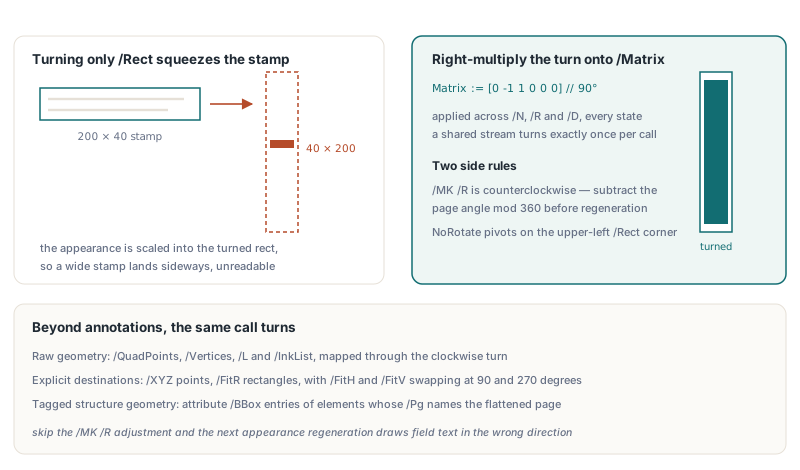
What does flattening not cover?
Flattening is a geometric rewrite of one page's own objects, and several situations fall outside it quietly rather than loudly
- Pages whose effective rotation is already 0, or whose MediaBox is missing or has zero width or height, are skipped without an error; compare the return value with the number of pages you expected to change
- Form XObjects referenced from the page resources keep their own
/BBoxin form space, because the outercmalready turns them; the structure-tree scan follows only/Kand/Aso it never walks into the page's resources or annotations a second time - Destinations are found by scanning every indirect object once per flattened page, so a large document with hundreds of rotated pages pays for that walk on each one
- HotPDF's page renderer does not draw annotations, so a visual check of turned stamps needs
FlattenLoadedAnnotationsfirst
// Bake appearances into content so the renderer can show them,
// then render page 1 before and after removing its /Rotate
Pdf.FlattenLoadedAnnotations('1');
Before := Pdf.RenderLoadedPageToBitmap(0, 96);
try
  Pdf.FlattenLoadedPageRotation('1', Info);
  After := Pdf.RenderLoadedPageToBitmap(0, 96);
  try
    Assert((Before.Width = After.Width) and (Before.Height = After.Height));
    // Compare corner marker pixels here, not just the dimensions
  finally
    After.Free;
  end;
finally
  Before.Free;
end;
For deeper background, the annotation side of this story continues in synthesizing annotation appearances before flattening them, the renderer behind the before-and-after comparison is covered in rendering a loaded PDF page to a bitmap, and redaction and N-up stitching on loaded PDFs shows the same content-stream append technique the rotation prefix and suffix rely on. HotPDF, including FlattenLoadedPageRotation and the page-box readers, is available for Delphi and C++Builder on the HotPDF Delphi PDF component page