HotPDF turns scanned PDF pages into searchable PDF with Tesseract through HPDFCreateTesseractOCREngine, a factory that wraps a locally installed Tesseract executable as an IHPDFOCREngine. You pass that engine to ApplyLoadedOCRTextLayer, which renders each page, runs Tesseract once per page, parses its word-level TSV output, and commits an invisible Unicode text layer for all requested pages in one transaction, or for none of them
The reason this adapter exists is scope. The built-in template-matching OCR engine is deliberately narrow: machine-printed ASCII letters and digits, nothing else. Invoices with accented names, Chinese contracts, and multi-language archives need a real recognizer with trained language models, and Tesseract is the obvious candidate because it is a command-line program you can provision next to your application. Calling an external program from a document library sounds trivial. It is not, and most of the interesting code in the adapter is about what happens when the program misbehaves, hangs, gets cancelled, or inherits things it should never see
How does HotPDF drive Tesseract from a Delphi application?
HotPDF runs Tesseract as a hidden child process per page, feeding it a rendered bitmap and reading back a TSV file, and exposes the result through the same IHPDFOCREngine seam the built-in engine uses. Nothing downstream changes: coordinate mapping, rotation handling, Unicode validation, confidence filtering, and the atomic commit are the text-layer pipeline you already have. The factory lives in the HPDFTesseractRecognition unit and validates eagerly: the executable must exist, the tessdata directory must exist, the timeout must be between 1 and 3,600,000 milliseconds, and the language identifier may only contain ASCII letters, digits, _, and +. That last check matters because the language string ends up on a command line, and eng+chi_sim is a legitimate Tesseract value while anything with quotes or spaces is not
uses
  SysUtils, HPDFTypes, HPDFDoc, HPDFTesseractRecognition;

procedure MakeSearchable(const SourceFile, TargetFile: string;
  Token: THPDFCancellationToken);
var
  Doc: THotPDF;
  Engine: IHPDFOCREngine;
  Options: THPDFOCRTextLayerOptions;
  Info: THPDFOCRTextLayerInfo;
begin
  // raises EArgumentException for a missing executable, missing tessdata,
  // a bad language identifier, or a timeout outside 1..3600000 ms
  Engine := HPDFCreateTesseractOCREngine(
    'C:\OCR\Tesseract\tesseract.exe',
    'C:\OCR\Tesseract\tessdata',
    'eng+chi_sim',      // several models joined with '+'
    120000);            // per-page limit, default is 60000
  Doc := THotPDF.Create(nil);
  try
    Doc.AutoLaunch := False;
    if Doc.LoadFromFile(SourceFile) < 1 then
      raise Exception.Create('Cannot load ' + SourceFile);
    Options := THPDFOCRTextLayerOptions.Default;  // 300 DPI, MinimumConfidence 0.5
    Options.CancellationToken := Token;
    // an empty page list means every page; pages with text are skipped by default
    if Doc.ApplyLoadedOCRTextLayer([], Engine, Options, Info) then
    begin
      Writeln(string(Info.EngineName), ': ', Info.AcceptedWordCount,
        ' words accepted, ', Info.DroppedWordCount, ' dropped');
      Doc.SaveLoadedDocument(TargetFile);
    end
    else
      case Info.Status of
        otlsCancelled:      Writeln('Cancelled, document unchanged');
        otlsEngineError:    Writeln('Engine: ', string(Info.Diagnostic));
        otlsBudgetExceeded: Writeln('Budget: ', string(Info.Diagnostic));
      else
        Writeln(string(Info.Diagnostic));
      end;
  finally
    Doc.Free;
  end;
end;
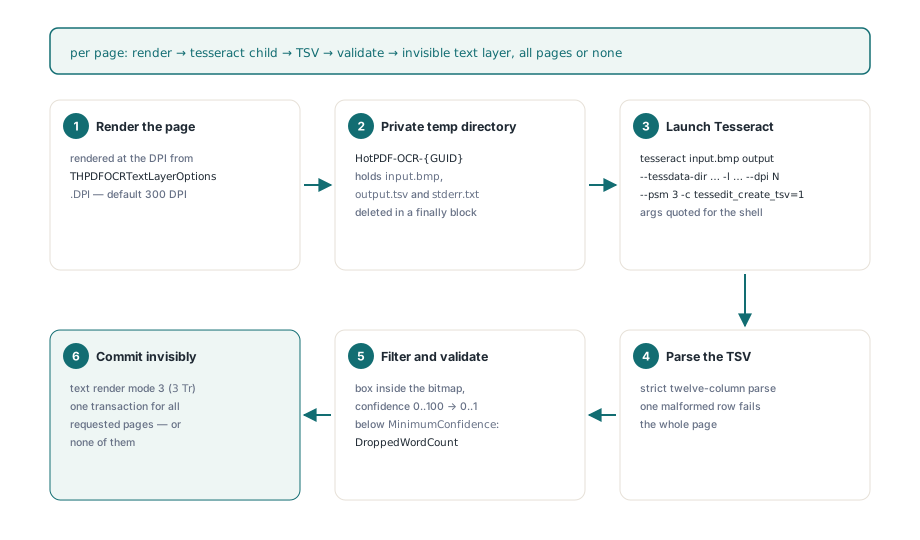
For each page, Recognize creates a private directory under the temp path named HotPDF-OCR-{GUID}, saves the rendered bitmap as input.bmp, and launches tesseract input.bmp output --tessdata-dir … -l … --dpi N --psm 3 -c tessedit_create_tsv=1, with every path argument quoted using the Windows command-line escaping rules for backslashes and embedded quotes. The --dpi value is the render DPI from THPDFOCRTextLayerOptions.DPI, so Tesseract never has to guess the resolution from image metadata, and --psm 3 asks for fully automatic page segmentation. The engine reports itself as Tesseract (local CLI), which is what lands in Info.EngineName. Tesseract and its language models are not bundled with HotPDF; installing them is the application's job
Why is the TSV parser so strict?
The TSV parser in HotPDF fails the whole page on any malformed row, because a partially parsed word list produces a text layer that silently disagrees with the image. Tesseract's TSV output has a fixed twelve-column header, from level through text, and HotPDF compares the first line against that exact header after stripping an optional byte order mark. Every following row must split into exactly twelve fields, and the split stops after the eleventh tab so that a tab inside the recognized text stays part of the word instead of creating a thirteenth column. Only level 5 rows are words; levels 1 through 4 describe pages, blocks, paragraphs, and lines, and they are skipped. Level 5 rows whose text is empty or pure whitespace are skipped too, because a blank word has a box but nothing to locate or search. Everything else is checked hard: integer geometry, a confidence parsed with an invariant en-US format so a German locale does not read 93.5 as garbage, a box that lies fully inside the bitmap, and a confidence between 0 and 100. A single failure raises, the engine returns False, and the word array is cleared. The regression tests include exactly that case: one valid word followed by a broken row must yield zero words, not one
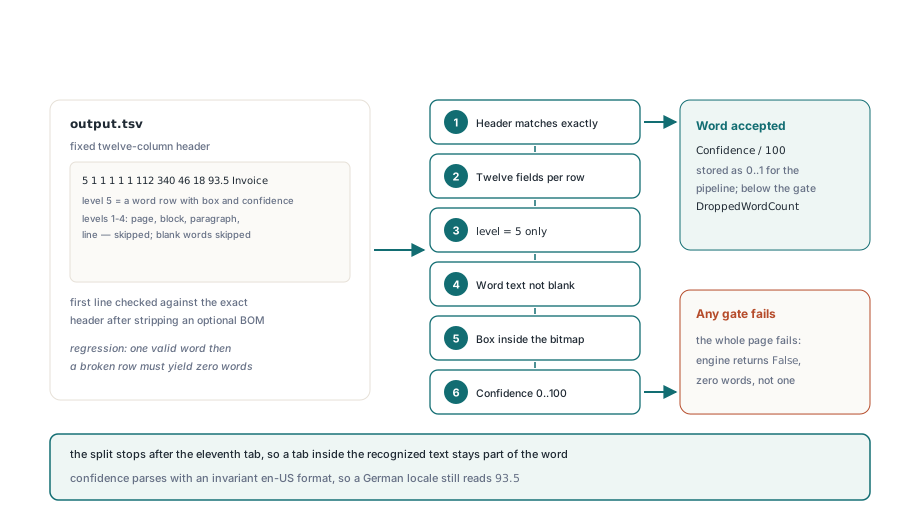
// condensed from the level-5 loop in HPDFLocalTSVRecognition
if (Fields.Count <> 12) or not TryStrToInt(Fields[0], Level) then
  raise EConvertError.Create('Invalid Local OCR TSV row');
if Level <> 5 then Continue;                 // page/block/paragraph/line rows
WordText := Fields[11];
if Trim(WordText) = '' then Continue;        // whitespace words have no position
if not TryStrToInt(Fields[6], X) or not TryStrToInt(Fields[7], Y) or
  not TryStrToInt(Fields[8], W) or not TryStrToInt(Fields[9], H) or
  not TryStrToFloat(Fields[10], Confidence, Settings) then
  raise EConvertError.Create('Invalid Local OCR word geometry');
if (X < 0) or (Y < 0) or (W <= 0) or (H <= 0) or
  (Int64(X) + W > Request.Bitmap.Width) or
  (Int64(Y) + H > Request.Bitmap.Height) or
  not ((Confidence >= 0) and (Confidence <= 100)) then
  raise EConvertError.Create('Local OCR word is outside the image');
Words[Count].Confidence := Confidence / 100;  // pipeline expects 0..1
That last line interacts with a default you might not expect. Tesseract confidence runs from 0 to 100, the pipeline works in 0 to 1, and THPDFOCRTextLayerOptions.MinimumConfidence defaults to 0.5, so any Tesseract word below 50 is counted in Info.DroppedWordCount and never reaches the page. On a clean 300 DPI scan that is a reasonable floor. On a noisy fax it can drop a surprising share of the page, and the right move is to look at the dropped count before lowering the threshold, because low-confidence words are exactly the ones most likely to be wrong
What does the Tesseract child process inherit?
The Tesseract child process inherits exactly two handles from HotPDF: a NUL handle for standard input and output, and a file handle for standard error. That precision is the point. CreateProcess with bInheritHandles = True is how you pass standard handles to a child, but on its own it passes every inheritable handle in the host process, including files, pipes, and events opened by unrelated code in your application. The child then keeps those objects alive until it exits, so a file stays locked or a pipe never sees its end while Tesseract grinds through a page. HotPDF closes that gap with an extended startup record: STARTUPINFOEX, an attribute list carrying PROC_THREAD_ATTRIBUTE_HANDLE_LIST, and the EXTENDED_STARTUPINFO_PRESENT creation flag. With the handle list in place, bInheritHandles still has to be True, but only the listed handles cross the boundary. The same containment thinking drives isolating PDF image codecs in worker processes, where the child is untrusted code; here the child is trusted, but the host is not the only owner of its own handle table
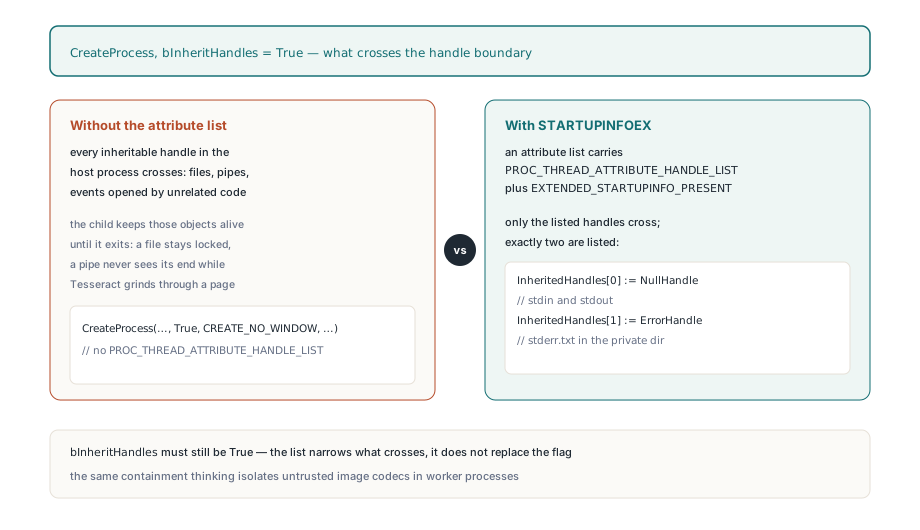
// constants shown by name; the source passes their numeric values
// both handles are created with bInheritHandle = True
InheritedHandles[0] := NullHandle;    // stdin and stdout
InheritedHandles[1] := ErrorHandle;   // stderr.txt in the private directory
InitializeProcThreadAttributeList(Startup.AttributeList, 1, 0, AttributeBytes);
UpdateProcThreadAttribute(Startup.AttributeList, 0,
  PROC_THREAD_ATTRIBUTE_HANDLE_LIST,
  @InheritedHandles[0], SizeOf(InheritedHandles), nil, nil);
CreateProcess(PChar(Executable), PChar(Command), nil, nil,
  True,                                        // required by the handle list
  CREATE_NO_WINDOW or EXTENDED_STARTUPINFO_PRESENT,
  nil, PChar(DirectoryName), Startup.StartupInfo, ProcessInfo);
Why can a cancelled OCR run look like an engine failure?
A cancelled OCR run looks like an engine failure because IHPDFOCREngine.Recognize returns a single Boolean, and False means both "Tesseract failed" and "the user pressed Cancel". The adapter polls the cancellation token and the timeout every 25 milliseconds while the child runs, and when the token fires it raises inside Recognize, catches its own exception, cleans up, and returns False with a diagnostic. If the pipeline treated that as an engine error, the caller would see otlsEngineError for a job the user deliberately stopped. ApplyLoadedOCRTextLayer therefore checks the token first whenever Recognize returns False, and only converts the result into an engine failure if the token was not set. That ordering preserves the multi-page contract: recognition, validation, budget accounting, and content construction run for every requested page before the graph transaction opens, so a cancellation on page 40 of 50 reports otlsCancelled and leaves the document, including the first 39 pages, untouched. There is no partially searchable file to explain later, and the rest of the failure handling follows the same bounded style:
- The timeout is per
Recognizecall, measured from its start, so the default 60,000 ms applies to each page rather than to the whole document - A child that is still running on timeout or cancellation is terminated, waited on for up to 5 seconds, and its private directory is deleted in a
finallyblock output.tsvis capped at 64 MiB andstderr.txtat 1 MiB, checked while the child runs as well as after it exits- Word count and UTF-16 code units are capped per page by the remaining
MaxWordsPerPage,MaxTotalWords, andMaxTextCodeUnitsbudgets, and exceeding them fails the run rather than truncating the word list - Standard output goes to
NULbecause Tesseract writesoutput.tsv, while standard error goes to a file so a non-zero exit code is reported with up to 4,096 characters of the engine's own complaint, usually the fastest way to learn that a.traineddatafile is missing
How the recognized words become an invisible text layer
HotPDF writes Tesseract words as invisible text using text rendering mode 3, the neither-fill-nor-stroke mode defined in ISO 32000-1 §9.3.6, so the page still shows the scanned image while search and copy work on the recognized words. The content stream opens BT with 3 Tr, and each word gets a Tm matrix at its baseline, a font size derived from the box height in pixels at the render DPI, and a Tz horizontal scale that stretches the glyph run to the measured box width, which is why a search highlight lands on the word in the image rather than drifting across it
Tesseract's TSV has boxes but no baselines, so the adapter reports every word without one and the pipeline estimates the baseline at one fifth of the box height above the bottom edge. The text itself goes through a shared unembedded Type0 font with Identity-H encoding and a generated ToUnicode CMap, one CID per distinct Unicode scalar across the whole run, which is how Chinese, accented Latin, and supplementary-plane characters all survive copy and search. That design has two limits worth stating upfront: one run can carry at most 65,535 distinct scalars, and the unembedded font does not satisfy the font-embedding requirement of ISO 19005, so PDF/A output needs a separately embedded conforming font. Checking the result is simple and worth automating: save, reload, and run the ordinary loaded-document text path from extracting text from a loaded PDF in Delphi; if the words come back in the expected pages, the layer is real
RapidOCR and other engines on the same TSV protocol
HotPDF reuses the same process runner and TSV parser for RapidOCR through HPDFCreateRapidOCREngine(PythonExecutable, BridgeScript, ModelDirectory, TimeoutMilliseconds), which is the more useful choice for Simplified Chinese scans. The command line is identical except that the bridge script path is inserted after the Python executable, and the language is fixed to chi_sim. HotPDF ships the bridge as tools/OCR/rapidocr_tsv.py; it expects the rapidocr and onnxruntime packages plus three local ONNX models, disables automatic model downloads, and writes Tesseract-shaped TSV so the Delphi side does not need a second parser. The engine name reported in Info.EngineName is RapidOCR (local ONNX). That shape suggests the general recipe: Any recognizer you can wrap in a small script that accepts the Tesseract-style argument list and emits the twelve-column TSV inherits handle isolation, the timeout, cancellation, output budgets, and the all-or-nothing commit for free. The adapters are Windows-only, run one page at a time synchronously, and do not deskew or preprocess the image beyond what the renderer produces, so image quality going in still sets the ceiling on what comes out
The Tesseract and RapidOCR adapters, the invisible text-layer writer, the page renderer that feeds them, and the text extraction that verifies the result all ship in the same native VCL component for Delphi and C++Builder. If you are adding OCR to a document capture or archival application, the HotPDF Delphi PDF component gives you the pipeline with only the OCR engine itself left to install