The first object in a linearized PDF has to state the exact length of the file it sits in, down to the byte, and it has to appear within the first 1024 bytes. ISO 32000-1 Annex F calls that entry /L, and a reader that finds it disagreeing with the real file size is told to treat the document as an ordinary PDF and ignore every linearization hint inside it. So the writer must print the length of a file it has not finished writing, next to the offset of a hint stream, the end of the first page and the position of a cross-reference table near the end of the file. All four numbers move whenever anything in front of them changes size
The payoff is Fast Web View. An ordinary PDF keeps its cross-reference table at the end, so a browser handed a 200-page scanned report cannot locate page 1 until the last byte arrives; a linearized file moves page 1 and a small cross-reference section to the front, so a client using HTTP range requests paints the first page early. What follows is the writing side. The reader-side picture is in the explanation of PDF linearization and Fast Web View
How HotPDF lays out a linearized file
HotPDF writes linearized output when THotPDF.LinearizeOutput is True, and the file follows the physical order Annex F prescribes, part by part. After the header comes the linearization parameter dictionary, then the first-page cross-reference section and its trailer, the catalog with the other document-level objects, the primary hint stream, the first page with every object it needs, the remaining pages in order, the objects shared between later pages, everything else, and finally the main cross-reference table
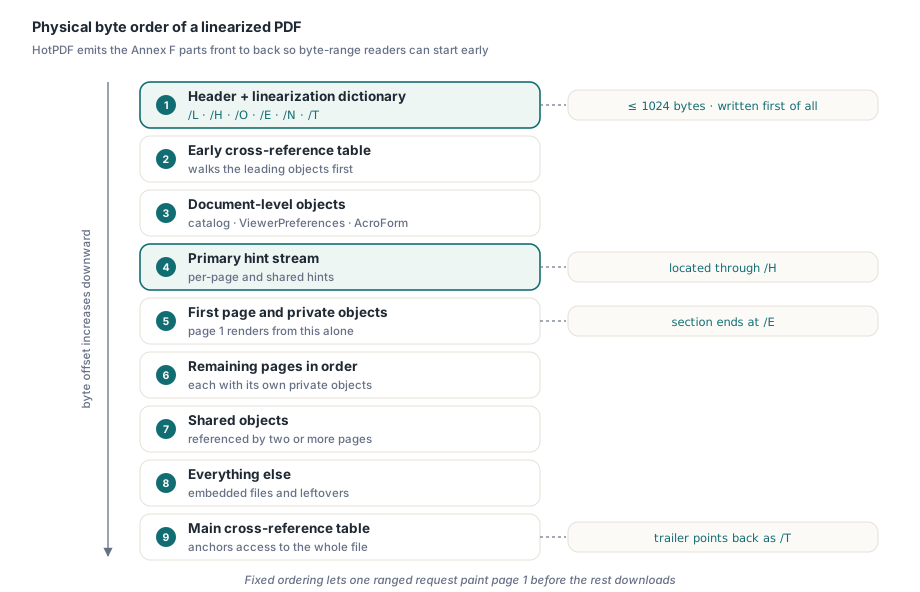
Nothing in the document model says which part an object belongs to. The writer works that out from the reference graph when EndDoc saves, walking from each page object and counting how many pages reach every indirect object. An object reached from one page goes into that page's section. An object reached from several pages is shared, with one twist that a quick reading of the spec misses: when page 1 is among the pages using it, the object goes into the first-page section anyway, because page 1 must render from the leading bytes alone. Only objects shared purely among later pages wait in the shared part. The catalog, whatever its /ViewerPreferences, /OpenAction, /Threads and /AcroForm entries point to, and the encryption dictionary of a protected document make up the document-level group. Page tree nodes are pushed into the trailing part so they never inflate the first page
Open the output in a hex editor and the numbering looks backwards. The front block, from the linearization dictionary through the hint stream, carries the highest object numbers in the file, while everything after it is numbered from 1. The small cross-reference section at the front covers exactly that high block, and the main table covers 1 through N
A record-initialization trap in partition lists
Lists like these are naturally written as a record holding a dynamic array plus a separate count, and that shape hides a Delphi trap. The compiler initializes a local record's managed fields. The plain Integer sitting beside them gets nothing. Under Win32 the stack slot often happens to hold zero, so the first append lands at index 0 and every test passes; under Win64 the slot can hold leftovers and the first append writes to an arbitrary index
type
  TPartList = record
    Values: TArray<Integer>;  // managed: cleared by the compiler
    Count: Integer;           // unmanaged: whatever the stack held
  end;

procedure Append(var List: TPartList; Value: Integer);
begin
  if List.Count = Length(List.Values) then
    SetLength(List.Values, List.Count * 2 + 16);
  List.Values[List.Count] := Value;
  Inc(List.Count);
end;

procedure BuildParts;
var
  FirstPage, Shared: TPartList;
begin
  FirstPage := Default(TPartList);   // required, not cosmetic
  Shared := Default(TPartList);
  Append(FirstPage, 12);
  Append(Shared, 40);
end;
HotPDF's writer assigns Default to every partition list before touching it. A green Win32 run says nothing about whether such a record was initialized
Why must the layout converge before the first byte is written?
Because the front of the file holds offsets that point toward the back, and the number of digits in those offsets shifts everything behind them. The first-page trailer carries a /Prev entry with the byte offset of the main cross-reference table. Write that offset as 99998, then discover the table really lands at 100003, and the trailer grows by one digit. The first-page cross-reference section grows with it, every object behind it moves one byte, and the main table now sits at 100004. A single pass gets this right only by luck
HotPDF breaks the cycle in two moves. The parameter dictionary goes into a fixed 384-byte slot padded with spaces, so /L, /H, /E and /T can take whatever digits they need without moving a single object; if the dictionary text ever needed more than 384 bytes, the write would raise rather than shift the file. That leaves /Prev as the only free variable, and it goes through a fixed-point loop. Every object is first serialized into a counting stream that records lengths and keeps no bytes. A layout pass then assigns offsets section by section and reports where the main table would land, and that answer becomes the input to the next pass. The loop stops when the proposed offset stops moving and gives up with an exception after eight attempts
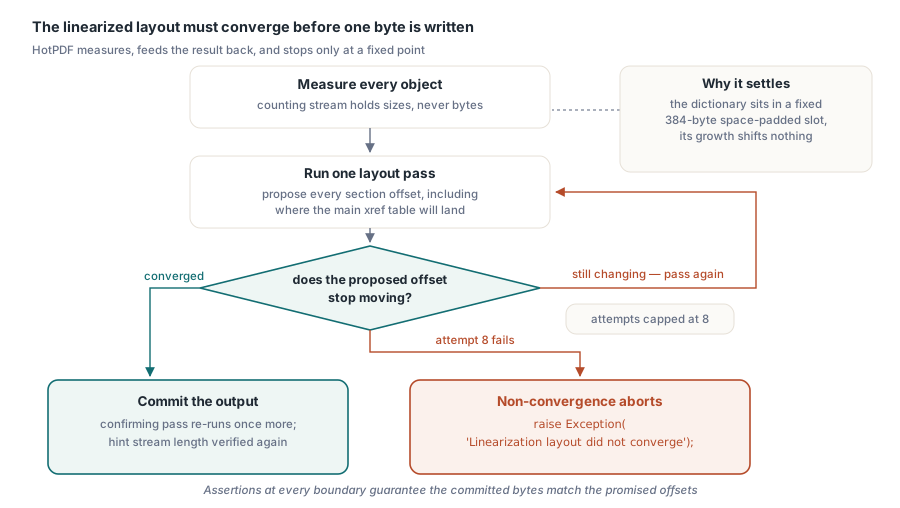
Only a change in digit count moves anything, so a third pass is needed only near a power-of-ten boundary, as in the 99998 case. After convergence the writer runs one confirming pass, rebuilds the hint stream with real offsets and checks that its length did not change; the offsets sit in fixed-width fields, so the placeholder version and the final one must match. Then output goes straight into the destination stream with no buffered second copy, and at each section boundary the bytes written are compared with the promised offset. A mismatch raises from EndDoc
Hint tables, and where Annex F reads two ways
The primary hint stream carries two tables. The page offset hint table records, for every page, how many objects its section holds, how long that section is in bytes, and which shared objects it depends on. The shared object hint table lists the length of each shared object group. With both, a reader can request page 37 directly, and the stream's /S entry gives the position inside the stream where the shared table starts
Two details in Annex F F.4 are easy to get wrong. The first is that offsets stored in the hint tables are logical offsets, computed as if the primary hint stream did not exist. The first page object and the first shared object both sit physically after the hint stream, so the writer subtracts the hint object's length before recording their offsets. A writer that records physical offsets instead lands every resulting range request off by exactly the size of the hint object
The second is a genuine ambiguity. The text of F.4 describes each table as one continuous bit stream, most significant bit first, and lists the first-page shared groups and the later shared groups as two separate sequences. Hint streams in circulation pad every column to a byte boundary and treat the shared groups as one combined list, and that is the form hint-consuming readers are known to accept. HotPDF writes the byte-aligned, combined layout. That is the right side to pick: a table that satisfies the letter of F.4 but misaligns for the clients reading it fails exactly where linearization was supposed to pay off, and a whole-file download never exposes the problem
Turning on linearized output from Delphi
On the API side the switch is one Boolean. LinearizeOutput defaults to False, and the writer consults it when EndDoc serializes the document, so set it with the other output options before BeginDoc and leave it alone. Every failure described above (non-convergence, an oversized parameter dictionary, a boundary mismatch, the 4 GiB ceiling covered below) surfaces as an exception from EndDoc, which makes a fallback straightforward
procedure WriteReport(const FileName: string; Linearize: Boolean);
var
  PDF: THotPDF;
begin
  PDF := THotPDF.Create(nil);
  try
    PDF.FileName := FileName;
    PDF.Version := pdf17;
    PDF.LinearizeOutput := Linearize;   // set before BeginDoc
    PDF.BeginDoc;                       // creates page 1
    PDF.CurrentPage.TextOut(72, 72, 0, 'Quarterly summary');
    PDF.AddPage;
    PDF.CurrentPage.TextOut(72, 72, 0, 'Details');
    PDF.EndDoc;                         // layout and write happen here
  finally
    PDF.Free;
  end;
end;

procedure PublishReport(const FileName: string);
begin
  try
    WriteReport(FileName, True);
  except
    on E: Exception do
    begin
      LogWarning('Linearization failed: ' + E.Message);  // your own logger
      WriteReport(FileName, False);                       // plain PDF instead
    end;
  end;
end;
The fallback produces an ordinary PDF that any viewer opens; it only loses the fast first page. For a report pipeline that trade is easy, since a slow first paint is an annoyance and a missing report is an incident
The deployment side outranks the code. Linearization pays off only when the server honors HTTP Range requests; an endpoint that streams the file whole buys you a slower write and a larger file for nothing. Leave LinearizeOutput off for files that get emailed, attached or downloaded before anyone views them. Switch it on for documents a browser opens straight from a URL, after confirming the response carries Accept-Ranges: bytes
Why does LinearizeOutput switch off object streams?
Because every hint table entry describes a byte range, and an object packed into an /ObjStm container has no byte range of its own; it exists only as a slice of another compressed stream that must be fetched and inflated whole. With LinearizeOutput enabled, HotPDF writes traditional text cross-reference tables and unpacked indirect objects even when UseXRefStream or UseObjectStreams is also set. The linearized path takes precedence at save time, so your code has no conflict to resolve
The cost is file size, since the small dictionaries an object stream would compress together now stay loose. If compact output matters more than first-page latency, the trade-off is laid out in object streams and incremental updates in HotPDF. Office exporters run into the same tension from the other side, which is why some of them emit the layout described in hybrid cross-reference streams in Office-generated PDFs
Linearization also needs PDF 1.2 or later. With a lower Version, HotPDF promotes the document to 1.2 on save. With StrictVersionLock set it raises an exception instead, because a version you pinned on purpose should not change behind your back
The 4 GiB ceiling on linearized output
Hint tables store offsets and lengths in 32-bit fields, so a linearized file cannot address anything beyond 4 GiB, and HotPDF refuses to produce one rather than write offsets that wrap around. The ceiling comes from the field widths Annex F defines
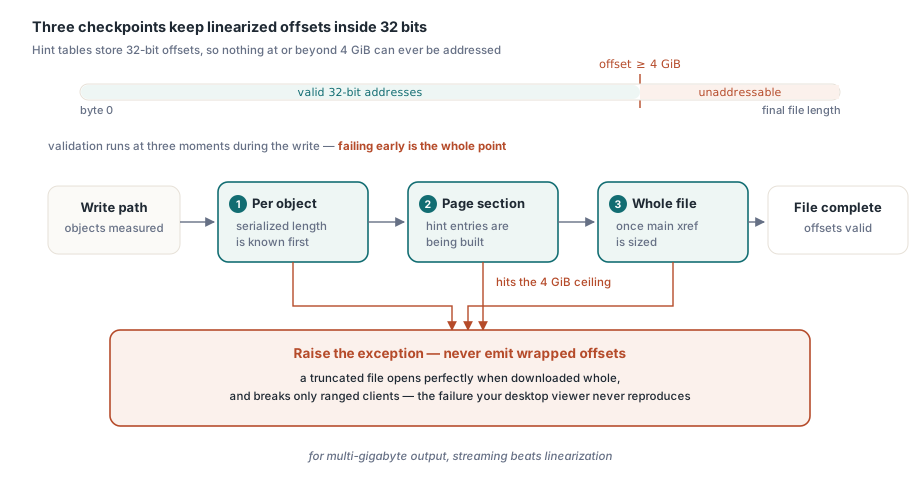
The check runs at three points, all before the first byte reaches the destination: on each object once its serialized length is known, on each page section length while the hint entries are built, and on the final file length once the main cross-reference table has been sized. Wrapped offsets would be the worst way to fail: a viewer that downloads the whole file can ignore the hints, while the byte-range client jumps to the wrong bytes, so desktop testing never reproduces the fault. For multi-gigabyte output, the streaming route in the Direct File API for large PDF workflows is where to look
Checking whether an incoming file is linearized
THotPDF.IsLoadedLinearized reports whether the loaded document declares itself linearized. The check happens before parsing: HotPDF reads up to 1024 bytes from position zero of the source, finds the first object, and looks inside that object for /Linearized with the value 1. Comments, literal strings and hex strings are skipped, so the name appearing inside a string does not count, and the scan stops at stream or endobj. Only 1 or an equivalent such as 1.0 is accepted
The answer is cached at load time because by the time application code asks, the parser has moved the stream position and LoadFromFile has already released its source stream
The flag reports what the file claims. Annex F adds a second condition: /L must match the actual file length, and an incremental update appended after linearization breaks that match, so readers fall back to treating the file as ordinary. A pipeline that accepts files from editors that append their saves can compare the two numbers itself
// Your own helper, not part of HotPDF: compares /L with the real size
// Simplified parse; it assumes a single space after /L
function DeclaredLengthMatches(const FileName: string): Boolean;
var
  FS: TFileStream;
  Head: AnsiString;
  ActualSize: Int64;
  P, Q: Integer;
begin
  FS := TFileStream.Create(FileName, fmOpenRead or fmShareDenyWrite);
  try
    ActualSize := FS.Size;
    SetLength(Head, 1024);
    SetLength(Head, FS.Read(Head[1], 1024));
  finally
    FS.Free;
  end;
  P := Pos(AnsiString('/L '), Head);
  Result := P > 0;
  if not Result then
    Exit;
  Inc(P, 3);
  Q := P;
  while (Q <= Length(Head)) and (Head[Q] in ['0'..'9']) do
    Inc(Q);
  Result := StrToInt64Def(string(Copy(Head, P, Q - P)), -1) = ActualSize;
end;

procedure InspectUpload(const FileName: string);
var
  PDF: THotPDF;
begin
  PDF := THotPDF.Create(nil);
  try
    if PDF.LoadFromFile(FileName) <= 0 then
      Exit;
    if not PDF.IsLoadedLinearized then
      Writeln('Not linearized')
    else if not DeclaredLengthMatches(FileName) then
      Writeln('Linearized, but modified after linearization')
    else
      Writeln('Ready for Fast Web View');
  finally
    PDF.Free;
  end;
end;
LinearizeOutput and IsLoadedLinearized are part of the HotPDF Delphi Component for Delphi and C++Builder, and its product page documents how they interact with cross-reference streams, object streams and version locking