Put an 80 MB scanned report behind a link, open it in a browser, and watch what happens: the viewer sits on a blank pane until a large fraction of those bytes have arrived, then paints page one all at once. Jump to page 40 and, on a badly built file, the whole download may restart. The frustrating part is that the reader only ever wanted the first page. Linearization is the structural answer to that problem. It rearranges a PDF so a viewer can render the opening page from a small prefix of the file and fetch the rest on demand, which is why Adobe markets the feature as "Fast Web View."
None of this is a different file format. A linearized PDF is an ordinary PDF that a conforming reader will open with no special handling. The trick is entirely in how the bytes are ordered and in two extra structures the file carries. ISO 32000-1 specifies the whole arrangement in Annex F, and once you have seen the layout, the behavior stops looking like magic and starts looking like a deliberate trade of file order for first-paint latency
What linearization actually rearranges
A normal PDF can scatter its objects in almost any order. The cross-reference table at the end of the file is what makes that work: a reader seeks to the end, reads the startxref pointer, loads the xref, and from there can locate every object by its offset. That design is excellent for local files, where seeking to the end costs nothing, and poor for a file streaming in over a network, where the end is exactly the part that arrives last. To render page one a conventional reader needs the page object, its content stream, the fonts it references, and any images it draws, and in an unordered file those can sit anywhere, including the final megabyte
Linearization fixes the order. The objects needed to display the first page are gathered into a contiguous block near the front, right after a small header section, so they arrive early in the byte stream. Everything else, the remaining pages and the resources they share, follows in a predictable sequence. A second, complete cross-reference table still lives at the end for readers that ignore the optimization, but a linearized file also places a first-page cross-reference and the parameters a streaming reader needs up front. The reader no longer has to reach the tail before it can draw anything
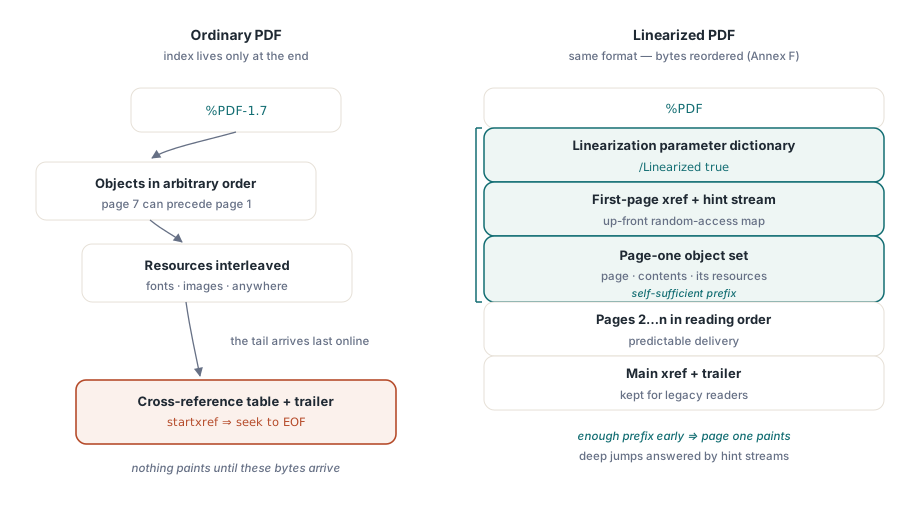
The first-page object set and the linearization parameter dictionary
The very first object in a linearized file, after the %PDF header, is the linearization parameter dictionary. It is what a streaming reader looks for to decide whether the optimization is present and how to use it. The dictionary records the length of the whole file, the byte offset where the main cross-reference section begins, the object number of the first page, and the location and length of the hint stream that follows. With those numbers a reader knows, from the opening kilobytes alone, how much it must fetch to show page one and where to look for the index that lets it jump elsewhere
Annex F is strict about what "first page" means here. The first-page section has to contain the page object itself, its content streams, and the resources those streams reference, so that the page is self-sufficient once that prefix has downloaded. Shared resources, a font used on every page, a logo that repeats in a header, are handled specially: they appear early enough to serve the first page but are flagged as shared so the reader does not re-fetch them when it later renders page 30. That distinction between page-private and shared objects is the part most home-grown "optimizers" get wrong, and getting it wrong is what produces a file that claims to be linearized but still stalls
Hint streams: the index that makes page jumps cheap
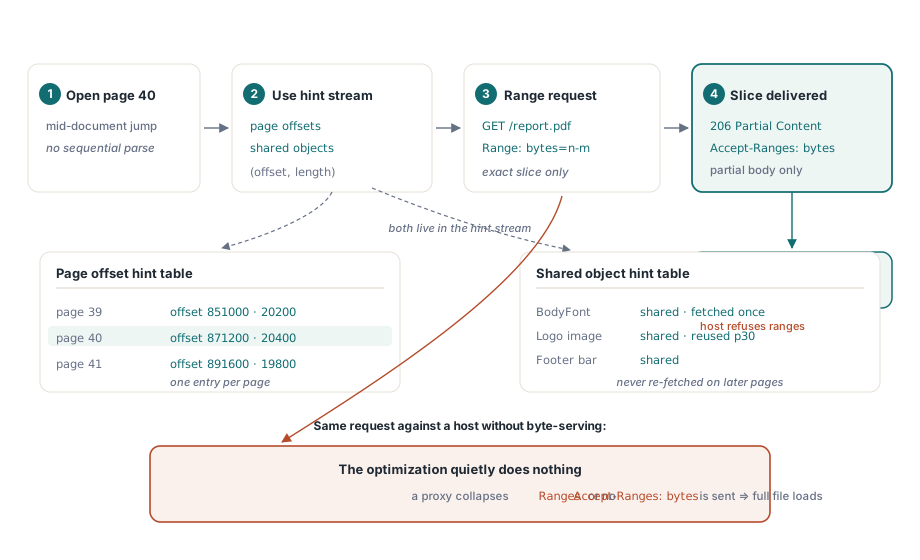
Showing page one quickly is only half the value. The other half is jumping to an arbitrary page without downloading everything in between, and that is what the hint streams provide. A linearized file carries a page offset hint table and a shared object hint table, stored as a stream referenced from the parameter dictionary. The page offset table records, for every page, where its objects begin in the file and how long they run. The shared object table does the same for resources used across multiple pages
Given those tables, a reader that wants page 40 does not parse the file sequentially. It consults the hint table to learn the byte range page 40 occupies, asks the server for exactly that range, and renders the page once those bytes arrive, pulling any shared resources it does not already hold through the same mechanism. The hint stream is, in effect, a random-access map laid over the document, and it is the reason a well-linearized 500-page file feels responsive over a slow link while an unoptimized one of the same size does not
Why the server has to cooperate
Linearization assumes the transport can deliver arbitrary slices of the file, and that assumption is worth checking before you credit the format for poor results. The mechanism is HTTP byte-serving: the reader issues range requests, and the server answers them with 206 Partial Content responses. If the server does not advertise Accept-Ranges: bytes, or if a proxy or CDN in front of it collapses range requests into full transfers, the reader has no way to fetch page 40 in isolation and falls back to downloading the whole file. The structure inside the PDF is then perfectly correct and entirely wasted
This is the failure that most often gets misdiagnosed as "linearization does not work." The file is fine; the delivery path is not. Before you rebuild a document, confirm with a conditional request that the host actually returns partial content for the URL the reader hits. Many static hosts do this by default, and many misconfigured application servers and caching layers do not
Incremental updates quietly break linearization
Here is the constraint that surprises people who generate linearized files correctly and then wonder why the optimization evaporates. Linearization depends on a single, carefully ordered layout with its index at the front. An incremental update violates that by design. When a tool adds a signature, fills a form field, or appends an annotation through an incremental save, it does not rewrite the file. It appends the changed objects, a new cross-reference section, and a new trailer to the end, leaving the original bytes untouched. That append is the whole point of incremental updates: it is fast, and it preserves the earlier revision for audit or signature validation
The side effect is that the file now has its newest cross-reference data at the tail, after the carefully placed first-page block, and the linearization parameter dictionary at the front describes a layout that no longer matches the file. A conforming reader detects the mismatch and treats the document as a normal, non-linearized PDF. Fast Web View is gone, even though the original linearized structure is still sitting there in the first half of the file. If you append several updates, each one stacks another revision on the end and the gap between the stale front index and the real state widens
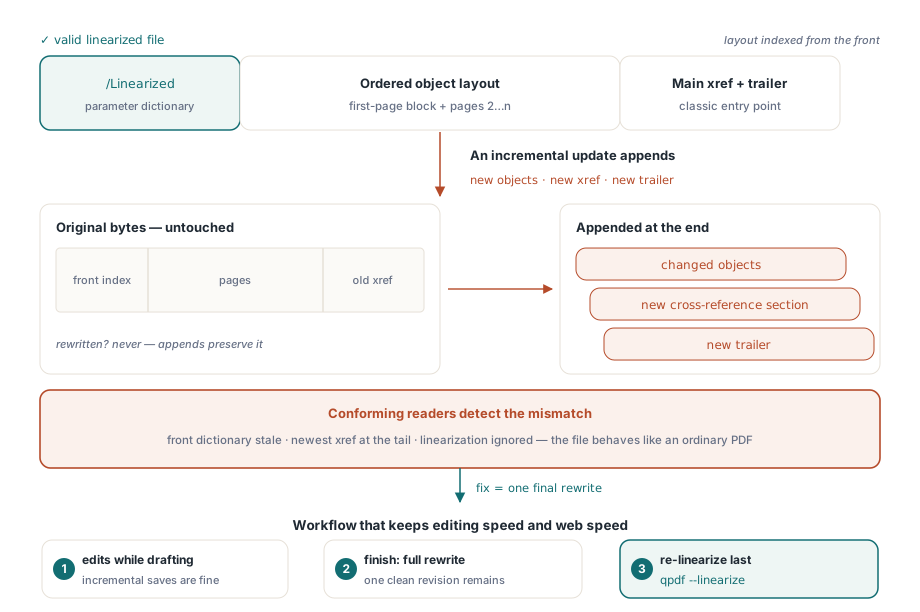
If your workflow needs both edits and Fast Web View, the rule follows directly from the structure: edit incrementally while the document is in flux, then re-linearize once at the end. A full rewrite is what restores the layout. In HotPDF terms, that means an in-progress edit goes through BeginIncrementalUpdate and SaveIncrementalUpdate, which append a delta, while the finishing step loads the whole document and serializes it fresh with LoadFromFile followed by SaveLoadedDocument, which drops the accumulated old revisions and emits one clean layout. The same trade shows up with object streams: enabling UseObjectStreams together with UseXRefStream compresses the cross-reference and packs objects tightly, which helps file size but, like any structural choice, has to be applied during that final rewrite rather than bolted onto an appended revision
// In-flight edits: append a delta, keep prior revisions intact.
// This leaves the file NOT linearized.
Pdf.BeginIncrementalUpdate('report.pdf');
Pdf.AddPage;
Pdf.CurrentPage.TextOut(72, 760, 0, 'Addendum');
Pdf.SaveIncrementalUpdate('report.pdf');

// Finishing step: full re-serialization produces one clean layout,
// dropping the stacked revisions. Re-run your linearizer on the output.
Pdf.LoadFromFile('report.pdf');
Pdf.SaveLoadedDocument('report-final.pdf');
HotPDF does not expose a one-call "linearize" routine, so the practical pattern is to produce a clean, fully rewritten file and run a dedicated optimizer over it. Command-line tools handle the rearrangement directly. qpdf rewrites a file into linearized form with a single flag:
qpdf --linearize report-final.pdf report-web.pdfHow to tell whether a file is linearized
Do not trust the file name or the tool that claims to have produced it; verify the bytes. The most direct check is the head of the file: open it and look for the linearization parameter dictionary as the first object after the header, carrying the /Linearized key. A reader-facing shortcut is Acrobat's Document Properties dialog, which reports "Fast Web View: Yes" only when the structure is genuinely present and current
For scripted checks, qpdf reports both the presence and the integrity of the structure, which matters because a file can carry a linearization dictionary that no longer reflects its layout, exactly the state an incremental update leaves behind:
# Reports "File is linearized" and validates hint tables against the layout
qpdf --check report-web.pdf

# Dumps the linearization parameters and hint data in detail
qpdf --show-linearization report-web.pdf
The validation step is the one that earns its keep. A pass that only confirms the dictionary exists will happily bless a file whose index points at the wrong offsets; a check that reconciles the hint tables against the actual object positions is what tells you the optimization will hold up under a real reader's range requests
Linearization remains worth applying to any large document served over the web, especially to mobile readers on uneven connections, and it costs a few percent of file size for the front-loaded index. The two things to keep straight are that the structure inside the PDF and the byte-serving outside it both have to be right, and that any edit after the fact undoes the optimization until you rewrite the file. Treat re-linearization as the last step in the pipeline, after every other change is settled. The cross-reference, object-stream, and incremental-update behavior described here is part of the structural model the HotPDF Delphi Component for Delphi and C++Builder implements; for the broader file-layout background see how a PDF is structured, and for the incremental-update and large-file workflow in code see processing large PDFs from Delphi