Open a PDF that Microsoft Word or Excel produced, page through it, and nothing looks unusual. Load it into a Delphi program, read the page count back, and the number is right. Then re-save it with encryption turned on and the job fails with an EListError, or the output opens to a damaged cross-reference warning. The file was never corrupt. It is a hybrid-reference file, and the very structure that lets a fifteen-year-old viewer open it is the structure that defeats a loader which stops reading too early
This is one of the most common ways a PDF pipeline that passed every internal test meets a file it cannot round-trip. The inputs were all generated in-house, so they were never hybrid. The first hybrid file arrives the day a customer forwards an invoice exported from a spreadsheet
What Word and Excel actually write
ISO 32000-1 describes the hybrid-reference layout in §7.5.8.4. An application that wants PDF 1.5 features such as object streams, while still letting a PDF 1.4 reader open the file, writes the cross-reference information twice. There is a classic cross-reference table, the fixed-width ASCII rows that ended every PDF up to version 1.4, and there is a cross-reference stream that indexes the rest. The trailer of the classic section carries a /XRefStm entry whose value is the byte offset of that stream
The division of labor is deliberate. Objects an old reader has to reach, the catalog and the page tree among them, are addressable from the classic table. Objects that were folded into compressed object streams are marked free in the classic table, with a type f entry, so a 1.4 reader skips straight past them and never trips over a structure it cannot parse. Their real locations live only in the cross-reference stream. The signature of such a file is its tail: a short classic section, frequently nothing more than xref followed by a 0 0 subsection header, whose trailer points at the /XRefStm where the actual recovery data sits
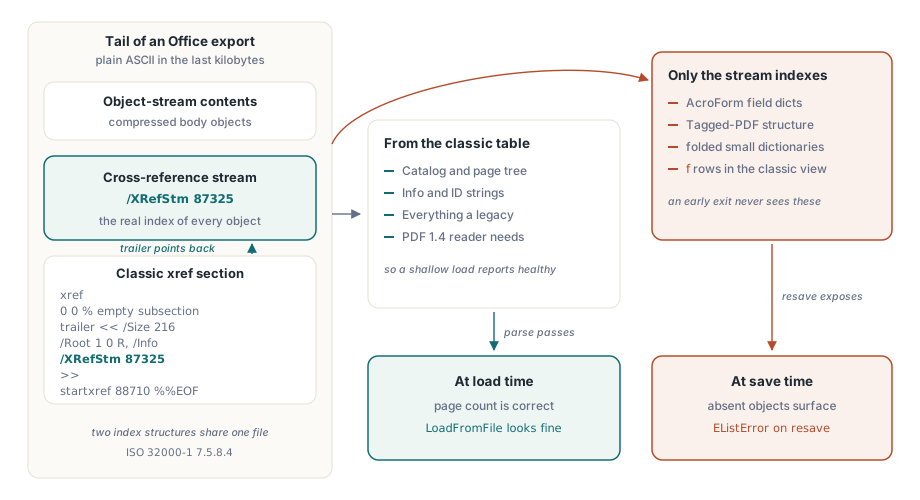
/XRefStm offset while the stream side holds the real object indexWhy a correct page count proves nothing
Because the catalog and page tree are reachable from the classic table on purpose, a loader that reads only that table finds /Root, walks the page tree, and reports the right number of pages. Everything an old reader needs is present, so the file appears healthy. The objects that went missing are the ones packed into object streams: AcroForm field dictionaries, tagged-PDF structure elements, the long tail of small dictionaries that never had to be visible to a legacy viewer
You do not notice the gap until something touches those objects, and a full resave touches all of them. Walking the document to re-encrypt or rewrite it is precisely the operation that asks for every object number in turn, which is why the symptom surfaces at save time rather than load time, far from its cause
The trap is a detector that sees xref and stops
The cheap way to decide how a file is indexed is to follow startxref and inspect the first bytes it points at. The keyword xref means a classic table; a stream object means a cross-reference stream. That test is correct for any file that commits to one scheme. It is wrong for a hybrid file, whose startxref aims at a classic section for the sole purpose of satisfying old readers, while the /XRefStm in that section's trailer is where most of the document is actually indexed. A detector that returns "classic" on the first xref it meets never reads /XRefStm, and every object that lives only in the stream becomes invisible
var
  Pdf: THotPDF;
  PageCount: Integer;
begin
  Pdf := THotPDF.Create(nil);
  try
    PageCount := Pdf.LoadFromFile('Invoice_XLS.pdf');  // count is correct
    // inspect or edit the loaded document here
    Pdf.SaveLoadedDocument('Invoice_secured.pdf');     // walks every object
  finally
    Pdf.Free;
  end;
end;
With the early-exit detector in place, the load looks fine and the resave is where the absent objects announce themselves. The fix is not to read more bytes at the start; it is to recognize the hybrid trailer and follow /XRefStm before deciding the file is done
Merge order is not negotiable
Once both indexes have been read, they can be combined in one direction only. The cross-reference stream has to be merged first, with the classic entries filled in around it. The reason is the small deception at the heart of the format. A hybrid file marks its compressed objects as free in the classic table so that old readers ignore them. A loader that honors a first-seen-wins policy and reads the classic table first will record those object numbers as free, then discard the stream entries that actually locate them, because the slots are already taken. Reverse the order and the type 2 entries from the stream, each one an object-stream number plus an index, win the slots they are meant to own, and the classic entries settle around them
The same discipline guards against an older revision resurrecting a deleted object. Incremental updates chain backward through /Prev, and a type 0 free entry is a sentinel that a more recent section has retired an object number. A later, older section in the chain must not be allowed to overwrite that sentinel with a stale location. Treat first-seen as authoritative for free markers and the deleted object stays deleted; treat it carelessly and a file's own history reanimates content the latest revision removed
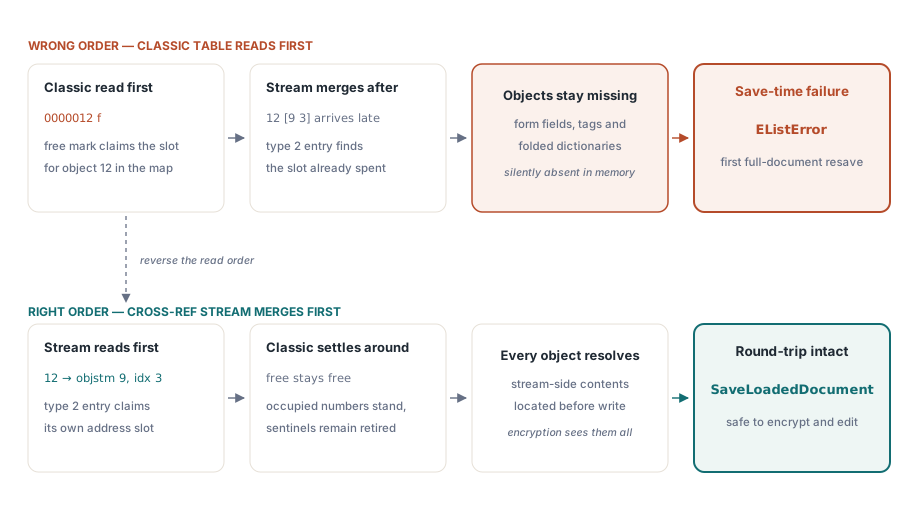
What this means in HotPDF
The engine resolves hybrid-reference files for you, and it does so on every path that has to parse the cross-reference data. Load a document with LoadFromFile or LoadFromStream, make your changes, and call SaveLoadedDocument; or run a one-shot operation such as EncryptFile that reads an input and writes an output. Either way the recovery reads /XRefStm, merges the stream section ahead of the classic entries, and resolves the objects that live in streams before the write enumerates them. The AES-256 encryption path is where the problem first showed itself, because encrypting a document rewrites every object and so demands that every object has already been located
// One-shot: read the hybrid input, write an AES-256 encrypted copy
Pdf.EncryptFile('Letter_DOC.pdf', 'Letter_secured.pdf',
  'owner-secret', '', aes256, [prPrint, prFillAnnotations]);
The detail worth carrying away sits upstream of the API. Files that arrive from Word, Excel, PowerPoint, and a long list of "Save as PDF" pipelines are routinely hybrid, so a loader you exercise only against your own generator output may never meet one in testing. Seed your fixtures with documents exported from real Office applications, not only with files your own code produced
Checking a file you suspect
Two inspections settle the question quickly. Open the file in a hex view and read the bytes after the final startxref; a hybrid file shows a short classic section whose trailer dictionary contains /XRefStm. Or compare the object count a full parse reports against the highest object number that /Size declares in the trailer. A large gap means objects are hiding in streams the loader has not opened, which is the same shortfall that turns into a save-time failure later
The tail of a typical Excel export makes the first check concrete. Everything after the final xref keyword is plain ASCII, so the signature is readable straight out of a hex view (offsets illustrative, annotations added)
xref
0 0                          % empty classic subsection: no rows at all
trailer
<< /Size 216                 % one past the highest object number in use
   /Root 1 0 R
   /Info 15 0 R
   /ID [<5C9A...> <5C9A...>]
   /XRefStm 87325            % byte offset of the cross-reference stream
>>
startxref
88710                        % points at the classic section above
%%EOF
The 0 0 subsection is the tell: a classic table with zero entries exists only to carry the trailer, and the trailer exists mainly to say /XRefStm 87325. A detector that stops at the xref keyword has, at this point, seen an index of nothing. When you would rather script the check than eyeball it, the marker always sits within the last couple of kilobytes of the file, so a bounded backward read is enough
// Returns the /XRefStm offset from the file's tail, or -1 if the
// marker is absent (the file is not hybrid, or not a PDF at all)
function FindXRefStm(const FileName: string): Int64;
var
  FS: TFileStream;
  Tail: AnsiString;
  Len, P: Integer;
begin
  Result := -1;
  FS := TFileStream.Create(FileName, fmOpenRead or fmShareDenyWrite);
  try
    Len := 2048;                        // the trailer lives in the tail
    if FS.Size < Len then
      Len := Integer(FS.Size);
    FS.Position := FS.Size - Len;       // bounded backward read: 2 KB max
    SetLength(Tail, Len);
    FS.ReadBuffer(Tail[1], Len);
  finally
    FS.Free;
  end;
  P := Pos(AnsiString('/XRefStm'), Tail);
  if P = 0 then
    Exit;                               // no hybrid marker in the tail
  Inc(P, Length('/XRefStm'));
  while (P <= Len) and (Tail[P] in [' ', #9, #13, #10]) do
    Inc(P);                             // skip whitespace after the key
  Result := 0;
  while (P <= Len) and (Tail[P] in ['0'..'9']) do
  begin
    Result := Result * 10 + Ord(Tail[P]) - Ord('0');
    Inc(P);
  end;
end;

// Usage: a non-negative result names the byte where the stream starts
if FindXRefStm('Invoice_XLS.pdf') >= 0 then
  Writeln('hybrid-reference file: resave will need the /XRefStm section');
Treat the probe as triage, not as a parser: it tells you which files in a batch deserve attention before a resave job runs, and nothing more. What a loader must then do with the offset it finds, following the section chain, merging the stream entries ahead of the classic ones, respecting free-entry sentinels, is walked through step by step in our companion article on handling hybrid-reference PDFs from Office applications
The writer's side of this story, how object streams and compressed cross-references are produced in the first place, is covered in our article on object streams and incremental updates. When the hybrid file in question is also very large, the loading techniques in the Direct File API walkthrough for large PDF workflows let you inspect it without reading the whole thing into memory. Both pair naturally with the recovery described here, which ships as part of the HotPDF Delphi Component for Delphi and C++Builder alongside the loading, editing, encryption, and signing APIs covered elsewhere on this blog