Export a document from Microsoft Word or Excel with Save as PDF and the file on disk is, more often than not, a hybrid-reference file. It carries its cross-reference information twice: once as the classic fixed-width table that ended every PDF up to version 1.4, and once as a compressed cross-reference stream that most of the document actually depends on. A single trailer key, /XRefStm, stitches the two views together, and whether a tool sees the whole document comes down to whether it follows that key
This article looks at hybrid files from the consuming side: what the bytes at the end of the file look like, how the two views drift apart under editing, and how a Delphi pipeline can detect and route hybrid inputs. How a loader merges the views, and why the order is not negotiable, is the subject of our HotPDF article on loading hybrid-reference files; this one is about recognizing the layout in the first place
Why Office exports write the index twice
PDF 1.5 introduced two features that changed the shape of the file: cross-reference streams, which store the object index as compressed binary data instead of a plaintext table, and object streams, which pack many small objects into one Flate-compressed container. A writer that uses them produces smaller files, but a PDF 1.4 reader cannot open the result, because the structures it keys on, the xref keyword and the trailer dictionary, are gone
ISO 32000-1 §7.5.8.4 defines the compromise. A hybrid-reference file writes both: a classic cross-reference table addressing the objects an old reader must reach, the catalog and the page tree among them, and a cross-reference stream that indexes everything else. Objects folded into object streams are marked free in the classic table, so a 1.4 reader skips them without complaint; their real locations exist only in the stream. The classic trailer then carries an /XRefStm key holding the byte offset of that stream. An old viewer never reads the key and renders the file from the table view. A modern viewer follows it and sees the complete document. Word and Excel have emitted exactly this layout for years, which is why hybrid files are not an exotic corner case but a large share of what business pipelines receive
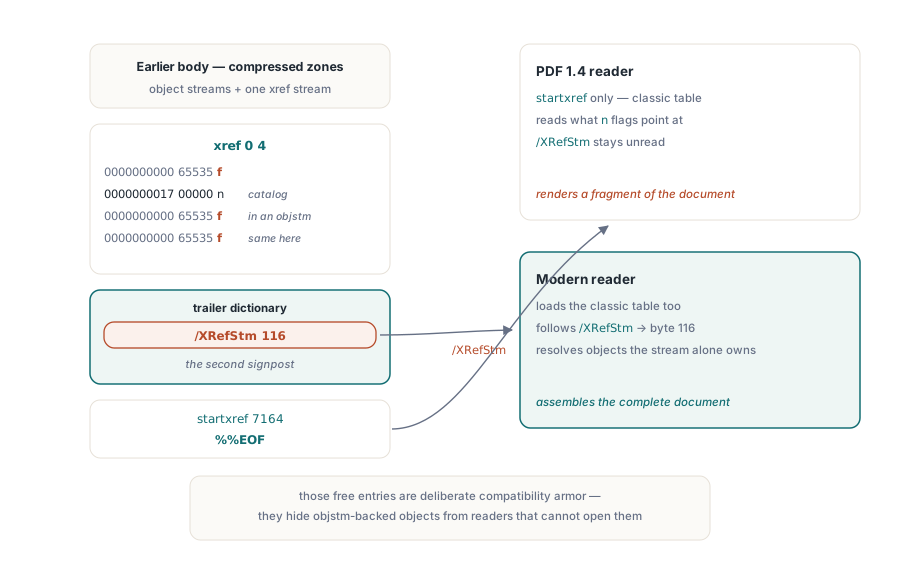
What the tail of a hybrid file looks like
The layout is easiest to understand from the bytes. Here is the tail of a small hybrid file, offsets shortened; in a real Office export the /XRefStm value is typically a large offset near the end of the file. The reading order is the tail-first walk described in our overview of PDF file structure: find %%EOF, read startxref, jump to the table
% ... body objects, including object streams and, at byte 116,
% the cross-reference stream (a stream object with /Type /XRef) ...

xref                    % classic section: what startxref points at
0 4
0000000000 65535 f      % slot 0: head of the free list, always present
0000000017 00000 n      % object 1: the catalog, visible to any reader
0000000000 65535 f      % object 2: marked free -- lives in an object stream
0000000000 65535 f      % object 3: same; only the stream view locates it
trailer
<<
  /Size 4
  /Root 1 0 R
  /XRefStm 116          % byte offset of the cross-reference stream
>>
startxref
7164                    % byte offset of the 'xref' keyword above
%%EOF
Two details in this dump carry the whole mechanism. First, startxref points at the classic section, on purpose: that is the address an old reader must land on. The cross-reference stream is reachable only through the /XRefStm key inside the trailer dictionary, so a parser that never looks for that key never learns the stream exists. Second, objects 2 and 3 are lies of a benign kind. The classic table declares them free, but they are real objects sitting inside a compressed container; the free marking is what keeps a 1.4 reader from tripping over entries it cannot use. A consumer that trusts the classic view alone concludes that most of this document does not exist
How the two views drift apart
A hybrid file fresh out of Word is internally consistent: both views describe the same document, each within its declared scope. The trouble starts when the file is edited by a tool that understands only one of the views. Consider a stamping utility that appends a classic-style incremental update: new objects, a new xref section, a /Prev chain to the previous section, and a new trailer. If that trailer drops the /XRefStm key, the stream view is orphaned; if it copies the old value forward, the stream view still describes the document as it was before the edit. Either way, the two indexes now disagree about what the file contains
The resulting file has a distinctive failure signature: objects visible in one view are missing or stale in the other. A reader that resolves through the stream view finds the pre-edit version of an updated object, or no entry at all for an appended one. A reader on the table view sees the edit but loses track of the compressed objects the stream alone locates. In practice this surfaces as form fields that survive in one viewer and vanish in another, annotations a stamping pass appears to have deleted, or lookups that land on the wrong object entirely
What makes these files expensive to debug is that Adobe Acrobat usually opens them without complaint: when the index disagrees with the bytes, it quietly rebuilds the cross-reference data by scanning for object headers, so whoever produced the broken file sees nothing wrong. The failure surfaces later, when the file reaches a strict consumer, a preflight validator, a signing service, an archival ingest job, that trusts the declared structure and reports missing objects or a cross-reference mismatch. "It opens fine in Acrobat" is how nearly every hybrid desynchronization ticket begins
Detecting a hybrid file in plain Delphi
Classifying inputs does not require a PDF library. The /XRefStm key can only occur inside a classic trailer dictionary, and the active trailer sits within the last couple of kilobytes of the file, because the specification requires %%EOF to appear near the physical end. Reading a bounded tail window and searching it is enough for triage:
uses
  System.SysUtils, System.Classes, System.StrUtils, System.Math;

function IsHybridReferencePdf(const FileName: string): Boolean;
const
  TailWindow = 2048;
var
  Stream: TFileStream;
  Buf: TBytes;
  Tail: string;
  Len, TrailerPos, NextPos, KeyPos, StartXrefPos: Integer;
begin
  Result := False;
  Stream := TFileStream.Create(FileName, fmOpenRead or fmShareDenyWrite);
  try
    if Stream.Size < 48 then
      Exit;
    Len := Min(TailWindow, Integer(Stream.Size));
    SetLength(Buf, Len);
    Stream.Position := Stream.Size - Len;
    Stream.ReadBuffer(Buf[0], Len);
  finally
    Stream.Free;
  end;

  // Every keyword involved is 7-bit ASCII, so a byte-wise decode is safe
  Tail := TEncoding.ANSI.GetString(Buf);

  // Find the LAST 'trailer' keyword: with incremental updates,
  // the newest trailer is the one that governs the file
  TrailerPos := 0;
  NextPos := Pos('trailer', Tail);
  while NextPos > 0 do
  begin
    TrailerPos := NextPos;
    NextPos := PosEx('trailer', Tail, NextPos + 1);
  end;
  if TrailerPos = 0 then
    Exit;  // no classic trailer: a pure xref-stream file, not hybrid

  // A hybrid trailer carries /XRefStm between 'trailer' and 'startxref'
  KeyPos := PosEx('/XRefStm', Tail, TrailerPos);
  StartXrefPos := PosEx('startxref', Tail, TrailerPos);
  Result := (KeyPos > 0) and
    ((StartXrefPos = 0) or (KeyPos < StartXrefPos));
end;
The three outcomes line up with the three layouts. A classic-only file has a trailer but no /XRefStm: False. A file that commits fully to cross-reference streams has no trailer keyword at all, its trailer keys live in the stream dictionary: also False, correctly, because such a file is compressed, not hybrid. Only the double-indexed layout returns True
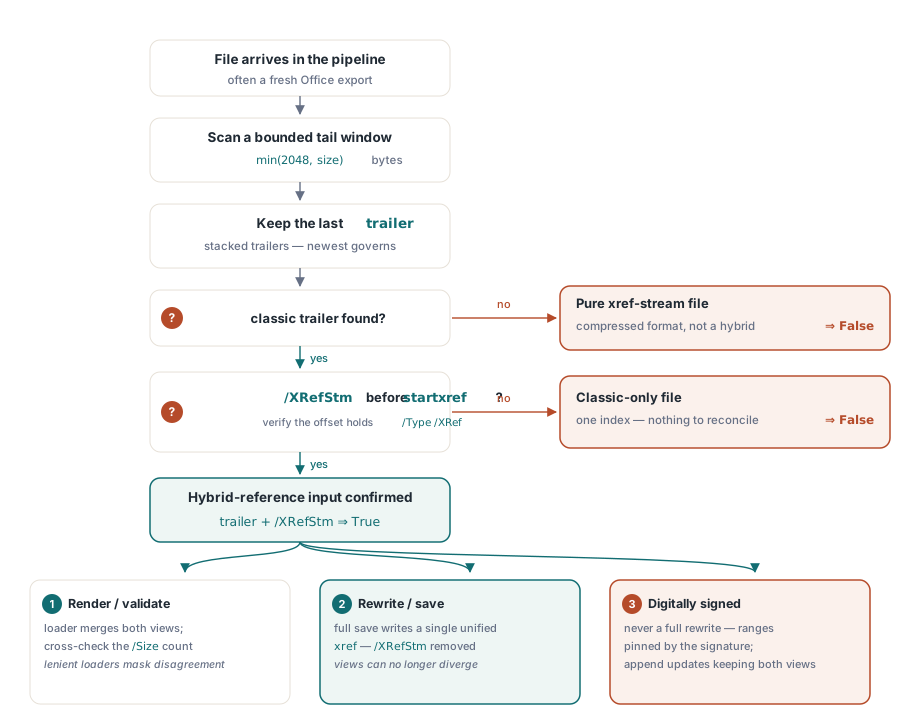
For production use, two hardenings are worth the extra lines. Parse the integer after /XRefStm, seek to that offset, and confirm that a stream object with /Type /XRef actually sits there; a truncated file can carry the key while the stream is gone, which belongs in a different bucket than a healthy hybrid. And treat the window size as a parameter: 2 KB covers ordinary Office output, but an unusually large trailer dictionary can push the keyword out of range, and widening the window beats declaring the file classic by accident
Routing hybrid files through a Delphi pipeline
Detection buys you a routing decision. For files that are only read, rendered, or validated, use a loader that resolves both views, then verify behavior rather than bytes. The PDFium Component parses the /XRefStm chain during load, so the object table your code sees is the merged one, and the checks described in our article on validating object and cross-reference streams apply unchanged. If a desynchronized hybrid is damaged badly enough to refuse loading, the engine reports it through its error set, FPDF_ERR_SUCCESS, FPDF_ERR_UNKNOWN, FPDF_ERR_FILE, FPDF_ERR_FORMAT, FPDF_ERR_PASSWORD, FPDF_ERR_SECURITY and FPDF_ERR_PAGE, with FPDF_ERR_FORMAT the one structural damage produces. Do not lean on that signal, though: PDFium is lenient by design and rebuilds most inconsistent files silently, so a successful load proves the file was recoverable, not that its two views agree. The meaningful consistency check is comparing what a full object walk finds against what the trailer's /Size declares
For files your pipeline modifies, the safest policy is to stop them being hybrid at all. A load followed by a full save through HotPDF rewrites the document with a single, self-consistent cross-reference in one form: no /XRefStm, no second view to fall out of sync, every object owned by exactly one index entry. That normalization is what you want before archival ingest, before a strict downstream RIP or signing service, and after any edit applied to a hybrid input. It works because the loader merged the views correctly on the way in, the mechanism the HotPDF hybrid-reference article walks through in detail
The one class of files to leave alone is digitally signed documents. A full rewrite moves every byte, which invalidates any signature computed over the original ranges. A change to a signed hybrid must go in as a proper incremental update that maintains both views; a file that only needs reading should pass through untouched. Normalization is for files you own; signed files you only ever append to
Hybrid-reference PDFs are not malformed; they are the format's own compatibility bridge, and Office applications will keep producing them as long as PDF 1.4 readers survive in the install base. A pipeline that can spot the /XRefStm key, validate the merged document with the PDFium Component, and regenerate clean single-index output with the HotPDF Delphi Component treats them as what they are: ordinary inputs with one extra signpost in the trailer