HotPDF Delphi Component treats /FT, /Ff, /V and /DV on a loaded AcroForm field as inheritable attributes, resolved by walking the /Parent chain. Since v2.754.3 and v2.754.4, a named child whose type comes from its parent stays individually addressable, RemoveFormField leaves its siblings alone, and ResetLoadedFormField copies the inherited default with its original PDF object type. Before that, a surprising number of ordinary forms were being misread
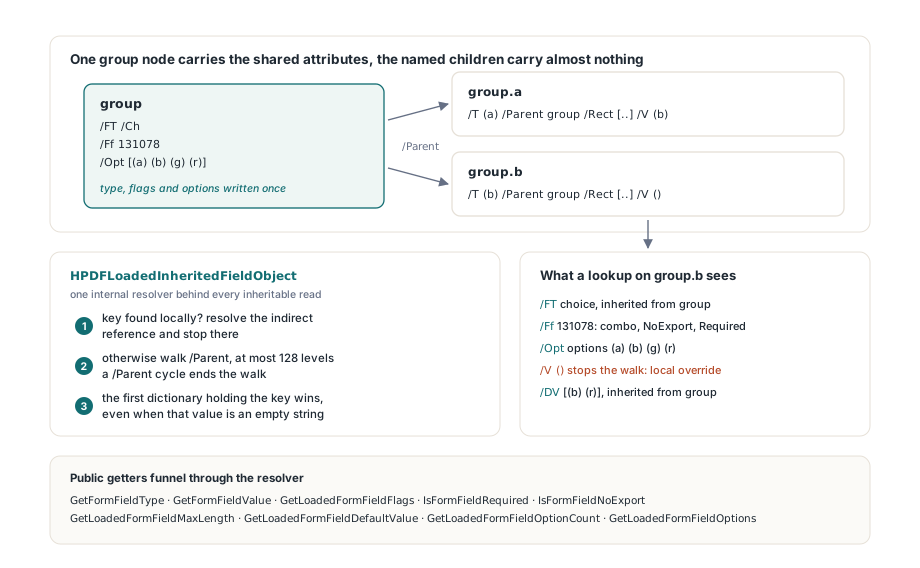
The form that exposes all of this is not exotic. An authoring tool builds a group node group that carries /FT /Ch, the field flags and the option list once, and hangs two named children a and b underneath it, each one a merged field-plus-widget dictionary with nothing but /T, /Parent, /Rect and its own /V. That is a perfectly legal way to share attributes, and it is exactly the case the Limits section of setting form field values in a loaded PDF with Delphi flagged as unhandled: button reconciliation looked only at the local /FT. This article picks up where that one stopped, covering how the field tree is classified, how inherited values are read, and what a single-field reset is allowed to write
Which AcroForm entries can a field inherit from its parent?
ISO 32000-1 §12.7.3.1, Table 220, marks /FT, /Ff, /V and /DV as inheritable, and Table 229 in §12.7.4.3 does the same for a text field's /MaxLen, so any reader that looks only at the local dictionary will report the wrong type, the wrong flags and an empty value for a perfectly valid child. HotPDF funnels all of these reads through one internal resolver, HPDFLoadedInheritedFieldObject, which checks the dictionary for the key, resolves an indirect reference if it finds one, and otherwise follows /Parent for at most 128 levels, because malformed files can build /Parent cycles that have nothing to do with /Kids. The public getters sit on top of it: GetFormFieldType, GetFormFieldValue, GetLoadedFormFieldFlags, IsFormFieldRequired, IsFormFieldNoExport, GetLoadedFormFieldMaxLength, GetLoadedFormFieldDefaultValue and the option helpers GetLoadedFormFieldOptionCount and GetLoadedFormFieldOptions, which also pick up an /Opt array stored on the parent. One rule in the resolver is easy to get wrong: the walk stops at the first dictionary that contains the key, even if the value there is an empty string. A local /V () is a deliberate override that masks the parent, not a gap to fill from further up the tree
var
  Pdf: THotPDF;
  Field: THPDFLoadedFormField;
begin
  Pdf := THotPDF.Create(nil);
  try
    if Pdf.LoadFromFile('survey.pdf') <= 0 then Exit;
    // 'group' carries /FT /Ch, /Ff 131078 and /Opt; the child
    // 'group.b' carries only /T, /Parent, /Rect and its own /V
    Field := Pdf.GetFormField('group.b');
    try
      if Pdf.GetFormFieldType(Field.Index) = lfftChoice then
      begin
        // 131078 = Combo (bit 18) + NoExport (bit 3) + Required (bit 2)
        Writeln(Pdf.GetLoadedFormFieldFlags(Field.Index));
        Writeln(Pdf.IsFormFieldRequired(Field.Index));    // TRUE
        Writeln(Pdf.GetLoadedFormFieldOptionCount(Field.Index));
        Writeln(Pdf.GetFormFieldValue(Field.Index));       // the local /V
      end;
    finally
      Field.Free;
    end;
  finally
    Pdf.Free;
  end;
end;
Why is a local /FT the wrong test for a terminal field?
Because a parent can supply the type and still own named child fields, so the presence of /FT says nothing about where the field tree ends. The old traversal declared a node terminal whenever it had its own /FT or no /Kids. In the form above, group has both /FT /Ch and /Kids, so it was registered as one field named group with two widgets, and the fully qualified names group.a and group.b simply vanished. GetFormFieldCount returned 1, a lookup by child name failed, and SetFormFieldValue could only write the shared parent. The replacement test, HPDFLoadedFieldHasChildFields, looks at the kids instead of the parent: a kid is a child field if it has its own /T, has its own /Kids, or is not a /Subtype /Widget dictionary at all. Only when no kid qualifies is the node terminal, with its kids treated as its widget annotations
The two edge cases that shaped that rule both come from merged dictionaries, which §12.7.3.1 permits when a field has a single widget. A named merged dictionary carries /Subtype /Widget and still is a child field, so the subtype alone cannot send it into the parent's anonymous widget list; the /T wins. The reverse also happens: some producers repeat the parent's /FT on every anonymous widget, so /FT cannot be used as evidence that a widget starts a new field either. The classification is shared by the relationship cache, FormFieldExists and RemoveFormField, and each of those walks now records the dictionaries it has already visited and stops past 128 levels. A regression file whose group lists itself twice, /Kids [5 0 R 5 0 R 6 0 R 7 0 R], still reports exactly two fields instead of recursing forever or counting the same node twice
How does RemoveFormField avoid deleting sibling fields?
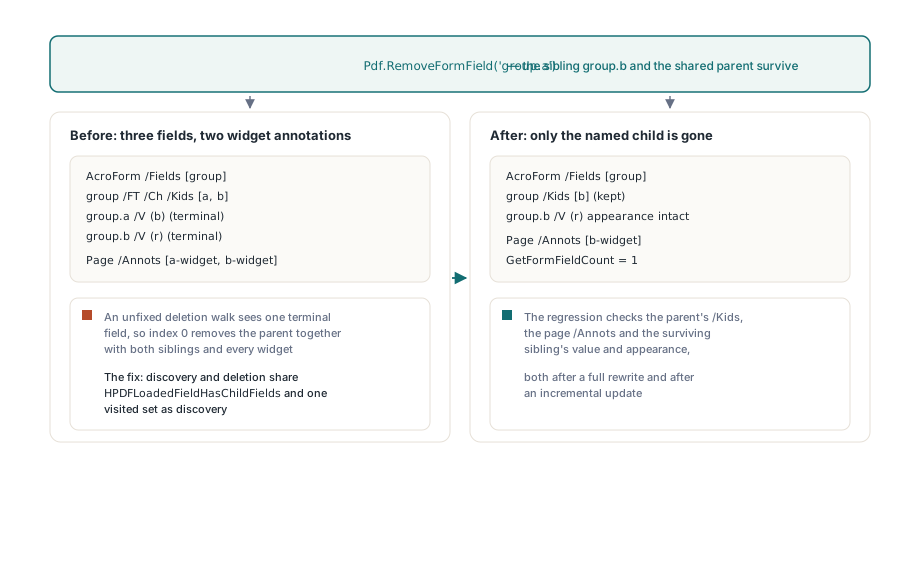
RemoveFormField now deletes only the child you name, because discovery and deletion finally agree on what a terminal field is. That agreement matters more than it looks. The by-name overload resolves an index through the relationship cache and then counts terminal fields in a second walk over /AcroForm /Fields. Once the cache was fixed to see group.a and group.b, an unfixed deletion walk would still have treated group as a single terminal field, and index 0 would have removed the parent together with every sibling and all of their widgets. The deletion walk now uses the same HPDFLoadedFieldHasChildFields test and the same visited set, collects the widget annotations of the removed child only, strips those from each page's /Annots, and removes the parent only when its /Kids array ends up empty. The regression checks all three places a mistake would show up: the parent's /Kids, the page /Annots, and the surviving sibling's value and appearance, both after a full rewrite and after an incremental update
// Remove one named child; its sibling and the shared parent survive
Pdf.RemoveFormField('group.a');

Assert(Pdf.GetFormFieldCount = 1);
Assert(Pdf.FormFieldExists('group.b'));
// Type, flags and options are still resolved through the parent
Assert(Pdf.GetFormFieldType('group.b') = lfftChoice);
Pdf.SaveLoadedDocument('survey-trimmed.pdf');
What does ResetLoadedFormField write when the default is inherited?
ResetLoadedFormField writes a local /V that is a fresh copy of the inherited /DV with the same PDF object type, and it validates the whole default before touching the field. The object type matters because the scalar getters flatten everything to text. A checkbox default is a name such as /Yes, a multi-select list box default is an array of strings, and a text default may be a hexadecimal UTF-16 string; copying any of them through GetLoadedFormFieldDefaultValue would turn the name into a string, the array into an empty string and the hex string into its literal digits. The reset behavior therefore branches on the inherited type: text and choice fields get a new string object that keeps the IsHexadecimal flag, choice fields with an array default get a new array of new strings, and non-pushbutton buttons get a new name object. Copying, rather than pointing at the parent's objects, is deliberate: a /V that shared the parent's /DV array or its object number would change the default the next time anyone edited the value. A default of the wrong type, or a choice array containing anything but strings, raises an exception and leaves /V and /I exactly as they were. Pushbuttons, which have no value (Table 226, bit 17), and signature fields fall back to the older string-only path
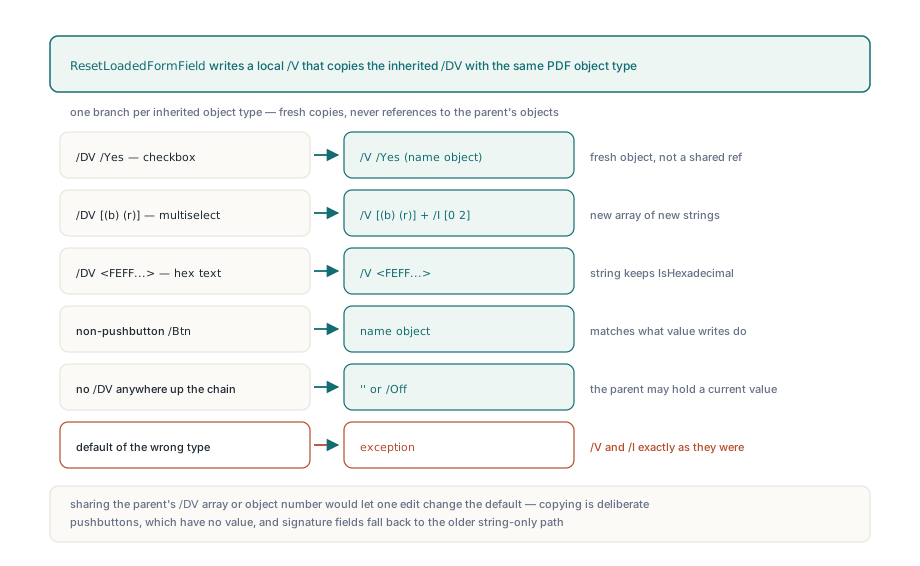
When no /DV exists anywhere up the chain, the method keeps its clearing contract by writing a local empty string, or /Off for a checkbox or radio field. Deleting the local /V would look tidier and be wrong: the parent may hold a current value, and removing the child's override would silently bring that value back. This is also why a single-field reset is not the ResetForm action of §12.7.5.3, which a viewer runs over a set of fields when the user clicks a button, as described in building AcroForm fields and actions with HotPDF. ResetLoadedFormField is an editing operation on one loaded field, with its own rule for the no-default case, and it records the field through NoteLoadedFormFieldDirty so incremental recalculation sees the change
var
  Field: THPDFLoadedFormField;
begin
  Field := Pdf.GetFormField('group.a');
  try
    // Parent holds /DV [(b) (r)] on a MultiSelect list box: group.a gets
    // its own /V [(b) (r)] and a fresh /I [0 2]; the parent is untouched
    Pdf.ResetLoadedFormField(Field.Index);
    // Scalar getters cannot represent the array default
    Writeln(Pdf.GetLoadedFormFieldDefaultValue(Field.Index)); // empty
  finally
    Field.Free;
  end;
  Pdf.SaveLoadedDocument('survey-reset.pdf');
end;
Keeping /V, /I and /AS in agreement
A reset is only correct if the selection index and the appearance state follow the value, so ResetLoadedFormField finishes with the same two reconcilers as SetFormFieldValue. HPDFReconcileChoiceSelection now accepts an array value: it deletes the local /I without mutating it, matches every value against the export half of each /Opt entry, and writes one new sorted /I, so a reset to [(b) (r)] against options b, g, r yields /I [0 2]. ReconcileLoadedButtonAppearanceStates now asks for the inherited type, so a child checkbox whose /FT /Btn lives on the parent finally gets its /AS set. On the write side, SetFormFieldValue and SetLoadedFormFieldDefaultValue store a name object for an inherited non-pushbutton button even when the child has no local entry to copy the type from. And when EnsureLoadedFieldAppearanceStream rebuilds button appearances, it writes /AS /Off unless the value matches the on state, and gives each state stream a proper /Type /XObject, /Subtype /Form and /BBox; before v2.754.4, regenerating the appearance after a reset could tick the box again before the file was saved
Limits worth knowing before you build on this
The scalar getters stay scalar. GetFormFieldValue and GetLoadedFormFieldDefaultValue return an empty string for an array value, stringify numbers and booleans as 42 or true, and report a hex-encoded string in its hexadecimal spelling. A /Parent cycle ends the walk without an exception, so a field whose type is lost in a cycle reports lfftUnknown and flags of 0 rather than failing. SetFormFieldValue and ResetLoadedFormField always write the child you address and never promote a value to the shared parent, which is right for independent children but means radio groups should be addressed through the field that owns the selection. And each call commits one field on its own; nothing here makes a batch of resets transactional
The inherited-attribute resolution, the unified field-tree classification and the typed reset described here are part of the loaded-form API in the HotPDF Delphi Component for Delphi and C++Builder, alongside the field creation covered in adding AcroForm fields to a loaded PDF in Delphi