PDF Library for Delphi draws Japanese and Chinese text down the page. SetVerticalWritingMode turns vertical writing on, ordinary DrawText calls then run downwards, and GetVerticalWritingMode reports the current state. Before this existed, setting text vertically meant placing every character by hand and hoping the spacing looked right
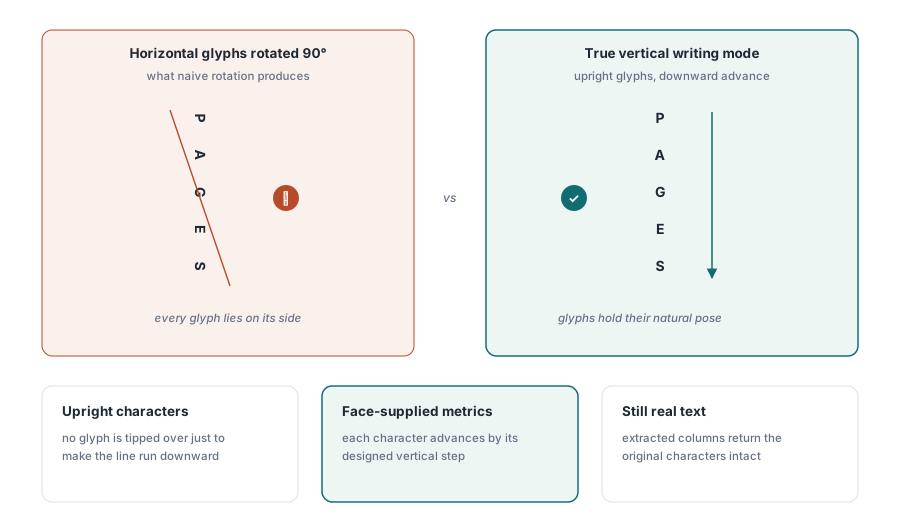
Vertical writing is not horizontal text rotated ninety degrees. The characters stay upright, the advance runs down instead of across, and a number of characters change shape entirely — which is the part that separates a document that reads naturally from one that a Japanese reader recognizes immediately as machine-made
What changes inside the PDF
Text drawn this way goes through a Type0 font in vertical writing mode carrying the face's own vertical metrics. That matters in two directions. A reader advances each character by the distance its designer intended rather than by a uniform step, so the column has the rhythm the typeface was drawn for. And copying the text out returns the original characters, because the vertical run is still real text with a proper mapping rather than a sequence of positioned glyphs
A face that carries no vertical metrics of its own advances one em per character, which is what a reader would do with the default. That fallback is worth knowing about because it is the difference you will see when a document renders correctly with a proper CJK face and looks mechanically spaced with a Latin face that happens to contain some kana
var
  Lib: TPDFlib;
  H: Double;
begin
  Lib := TPDFlib.Create;
  try
    Lib.SetOrigin(1);
    Lib.AddTrueTypeFont('MS Mincho', 1);      // 1 = embed the face
    Lib.SetTextSize(12);
    Lib.SetVerticalWritingMode(1);            // ordinary DrawText now runs down
    H := Lib.GetVerticalTextHeight('MS Mincho', 12, '第三章 保守点検');
    Lib.DrawText(480, 72, '第三章 保守点検');
    Lib.SetVerticalWritingMode(0);            // back to horizontal
    Lib.DrawText(72, 72 + H, 'Chapter 3');
    Lib.SaveToFile('manual-ja.pdf');
  finally
    Lib.Free;
  end;
end;
Why do brackets look wrong in vertical text?
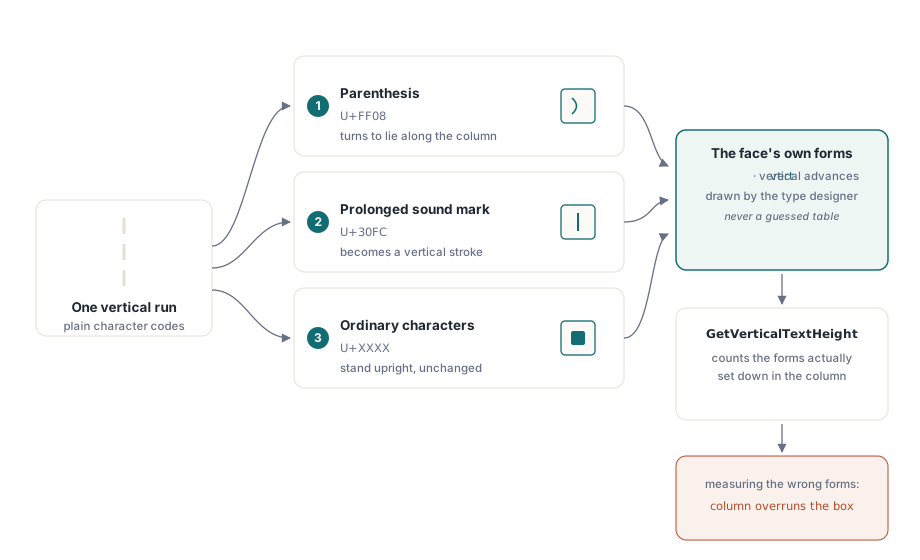
Because a bracket has two forms and only one of them belongs in a column. Brackets, the long vowel mark and the small kana are drawn differently when text runs down the page — a parenthesis rotates to sit along the column rather than lying across it, and the long vowel mark becomes a vertical stroke. Draw the horizontal forms in a vertical column and every one of them lies on its side
PDF Library for Delphi takes the forms from the font's own vertical feature, so each face supplies what its designer drew rather than a substitution guessed from the character. That distinction matters for correctness: a guessed substitution table is right for the common cases and wrong for the faces that treat a character differently, and a face naming no vertical forms is drawn exactly as before rather than being forced through a table it never asked for
GetVerticalTextHeight measures the forms that will actually be drawn, so a column whose characters change shape is still measured correctly. Measuring the horizontal forms and drawing the vertical ones is the classic source of columns that overrun their box by a few characters
Drawing one run without changing the mode
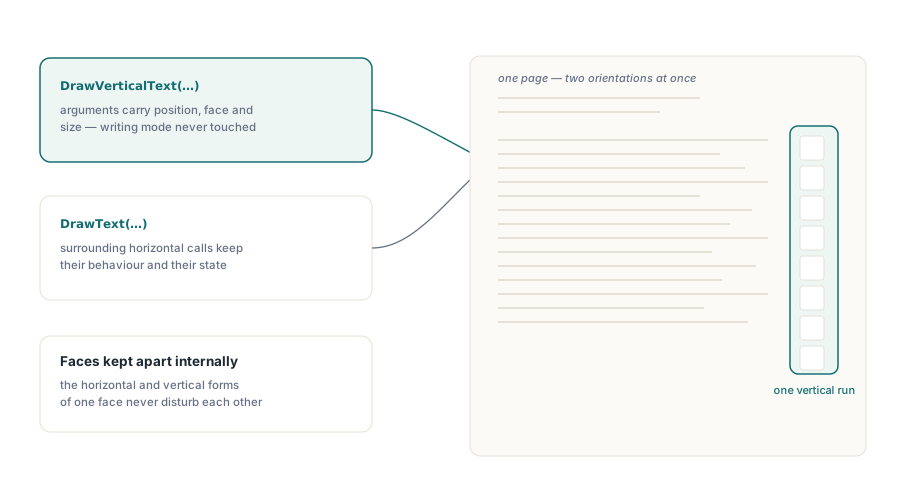
DrawVerticalText draws a single run vertically, taking the position, font name, size and text, and leaves the writing mode alone. Use it for the vertical exception inside a horizontal document — a spine label, a stamp, a single column of names — where switching a global mode on and off around every call is more state than the task deserves
The horizontal and vertical forms of one face are kept apart internally, so a page can carry both without either disturbing the other. That is what makes a mixed page practical: a Japanese book page with vertical body text and horizontal running heads, or a Chinese certificate with a vertical title over horizontal detail lines
// One vertical run inside an otherwise horizontal page
Lib.DrawVerticalText(520, 96, 'MS Mincho', 14, '保守点検記録');
// The horizontal text around it is unaffected
Lib.DrawText(72, 96, 'Maintenance inspection record');
Getting the font right before anything else
Vertical writing depends entirely on the face. A CJK font with proper vertical metrics and a vertical feature produces correct output with no further work; a font without them produces upright characters advancing one em at a time and no shape changes at all. If vertical text looks subtly wrong, examine the font before examining the code
Embedding follows the usual rules and the usual costs. A full CJK face is large, so subsetting is not optional for documents that go anywhere — the notes on PDF file size optimization and font subsetting cover what to expect, and the walkthrough of embedding missing fonts into an existing PDF covers the repair case where a vertical document arrives without its fonts
Where vertical text still needs a layout decision from you
Column order. Japanese vertical text runs right to left by column, so a two-column page starts at the right edge, and no writing mode setting can infer that from the text. The same applies to page order in a document that reads right to left as a whole, and to where furigana, footnotes and figure captions sit
What the library guarantees is that each run is set correctly: correct forms, correct advances, extractable text. Where the runs go on the page is a layout problem, and for documents assembled from data the walkthrough of text search and page element enumeration is useful for verifying afterward that what landed on the page is what you intended
PDF Library for Delphi is a native Pascal PDF library for Delphi, C++Builder and Lazarus, and vertical CJK writing is part of the drawing API rather than an add-on — see the PDF Library for Delphi product page for the text and font feature list