Extracting the text of a page is the easy half of the problem. The moment a user types a word into a search box and expects the viewer to jump to it and draw a yellow box around it, you need something the flat text string cannot give you: the page each match sits on, and the rectangle it occupies in PDF coordinates. A string concatenated across a page has lost that geometry. You can find the substring, but you cannot point at it
PDF Library for Delphi is a native Object Pascal PDF library for Delphi and C++Builder, and from v3.78.0 it answers exactly that question. Three query APIs sit on top of the existing text-block extractor: SearchText walks a page range and returns each hit with its page and axis-aligned rectangle, EnumPageElements lists everything on one page (text blocks and embedded images alike), and GetTextInAreaEx reports the rectangle of every block inside a region instead of flattening them to a string list. None of them touches the write path; they are pure read-side additions over machinery the library already had
Why the geometry lives in the text-block list, not the funnel
The natural instinct is to reuse whatever GetPageText runs internally. That path goes through a transient extraction "funnel" that produces the page string and then frees itself before the call returns. By the time you hold the result, the per-block coordinates are gone. They were never yours to keep
The coordinates do survive in a different structure. ExtractPageTextBlocks(3) returns a text-block list handle whose items each carry an eight-double bounding quad, a font name, a font size, and the block's text. That handle is the only place the geometry is retained after extraction, which is why every one of the new query APIs is built on it rather than on the funnel. Reusing the block list means search, enumeration, and region queries all share one extraction pass and one definition of where a block is
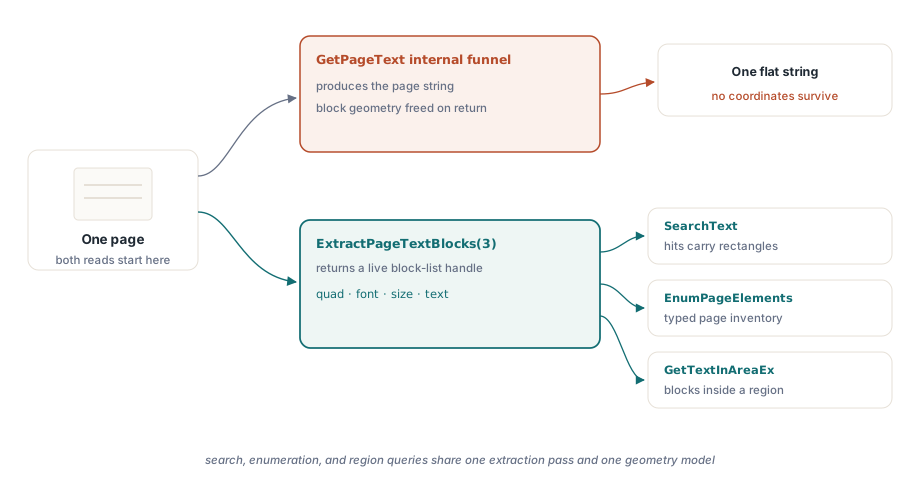
So the shape of SearchText follows from that constraint. For each page in range it extracts the block list, reads each block's text with GetTextBlockText, tests it against the query, and for the blocks that match it reduces the quad to a rectangle. The hit it returns is a small record:
type
  TPDFlibSearchHit = record
    Page: Integer;                       // 1-based page of the match
    Left, Top, Right, Bottom: Double;    // axis-aligned hit rectangle
    MatchText: WideString;               // the block text that contained the query
  end;
The bound array is X/Y interleaved, not four corners
This is the detail that bites first. GetTextBlockBound(ListID, Index, BoundIndex) takes a BoundIndex from 1 to 8, and those eight values are not "corner 1, corner 2, corner 3, corner 4" with two fields each grouped together the way you might guess. They are X, Y, X, Y, X, Y, X, Y: the odd indices are X coordinates, the even indices are Y coordinates, four points in all. Read them in the wrong pairing and your rectangle is nonsense
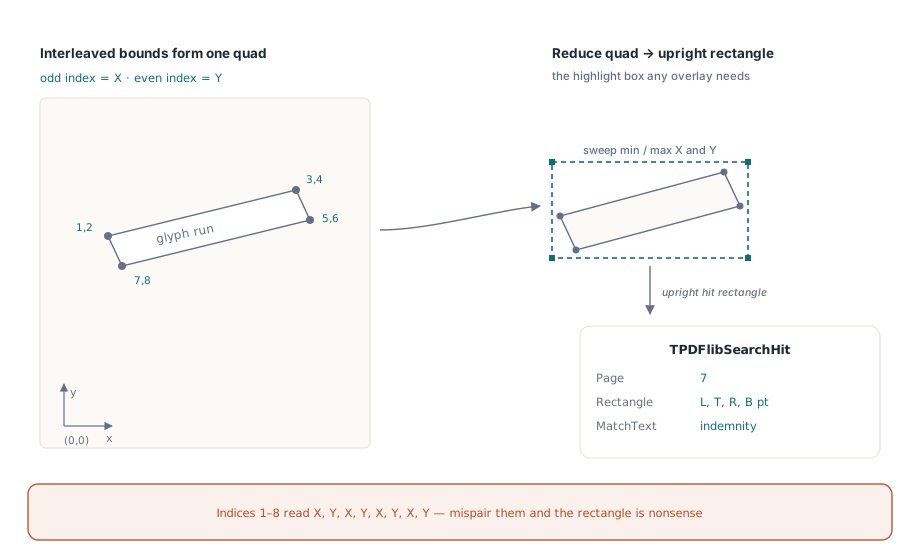
The reason there is a quad at all, rather than a plain rectangle, is rotation. A text block set at an angle has a genuine four-point bounding polygon, and the eight doubles describe it faithfully. For the highlight-and-jump use case you almost always want an upright box instead, so the library reduces the quad to an axis-aligned rectangle by sweeping the four points for their minimum and maximum X and Y. Rotated text collapses to the upright box that encloses it, which is what a highlight overlay needs:
var
  Pdf: TPDFlib;
  Hits: array[0..255] of TPDFlibSearchHit;
  Found, I: Integer;
begin
  Pdf := TPDFlib.Create;
  try
    Pdf.LoadFromFile('contract.pdf', '');
    // Search pages 1 to 10, case-insensitive, substring match.
    Found := Pdf.SearchText('indemnity', [], '1-10', Hits);
    for I := 0 to Found - 1 do
      if I <= High(Hits) then
        WriteLn(Format('p%d: [%.1f %.1f %.1f %.1f] %s',
          [Hits[I].Page, Hits[I].Left, Hits[I].Top,
           Hits[I].Right, Hits[I].Bottom, Hits[I].MatchText]));
  finally
    Pdf.Free;
  end;
end;
Note the rectangle is in PDF user-space points with the origin at the bottom-left of the page, the same coordinate system you pass to drawing and annotation calls. That is deliberate: the rectangle you get back from a search hit is the rectangle you can hand straight to a highlight annotation or a "scroll here" command without converting anything
Case sensitivity, whole words, and where CJK differs
The second parameter is a TPDFlibSearchOptions set drawn from soCaseSensitive and soWholeWord. The empty set [] is the common case: a case-insensitive substring search. Add soCaseSensitive to make Indemnity and indemnity distinct, add soWholeWord to stop sign from matching inside signature, or combine both
Whole-word matching needs a definition of what a word boundary is, and here the rule is worth stating plainly because it is ASCII-centric by design. A character counts as part of a word when it is an ASCII letter, an ASCII digit, or an underscore: the [A-Za-z0-9_] class familiar from identifier rules. A match qualifies as whole-word only when the characters immediately before and after it are not word characters (or the match sits at the block's edge)
The consequence for non-Latin scripts is something to know before you ship a multilingual search box. Because Han characters, kana, and other non-ASCII letters fall outside that class, every boundary next to them reads as a non-word edge. In practice that means whole-word search over CJK text behaves as if every position is a valid word boundary, so the flag effectively degrades to substring matching there. That is a documented limitation, not a bug, and it matches the behavior the feature was modeled on. If your corpus is primarily CJK, whole-word mode will not give you the segmentation a dedicated tokenizer would; plan around it rather than relying on it
One implementation footnote that explains a class of subtle failures elsewhere: the case-insensitive comparison uses UpperCase on the WideString, not AnsiUpperCase. The Ansi variant returns an AnsiString, which would not line up with the WideString the rest of the path uses, and mixing the two produces type mismatches and, worse, lossy folding for characters outside the active code page. Unicode in, Unicode out, all the way through
One page range parser for the whole library
The third parameter is a page range string such as "1,3,5-9". There is nothing custom about how it is parsed: the same PLParsePageRangeList that backs PrintPages and the page-copy routines handles it here too, so a range that prints correctly searches correctly. An empty range string is the sentinel for "every page," in which case SearchText builds the full list itself
Scope matters for cost. Searching a ten-page slice of a thousand-page document extracts blocks for ten pages, not a thousand, because the loop only selects and extracts the pages the range names. When you already know a clause lives in the appendix, say so in the range and skip the rest of the file
Internally, search and enumeration both change the selected page as they iterate, so each one saves the caller's selected page on entry and restores it in a finally block. Call SearchText in the middle of building a page and your selection is exactly where you left it when the call returns. That save-and-restore contract is the kind of thing you only notice when it is missing, which is precisely why it is there
Enumerating a whole page: text and images in one list
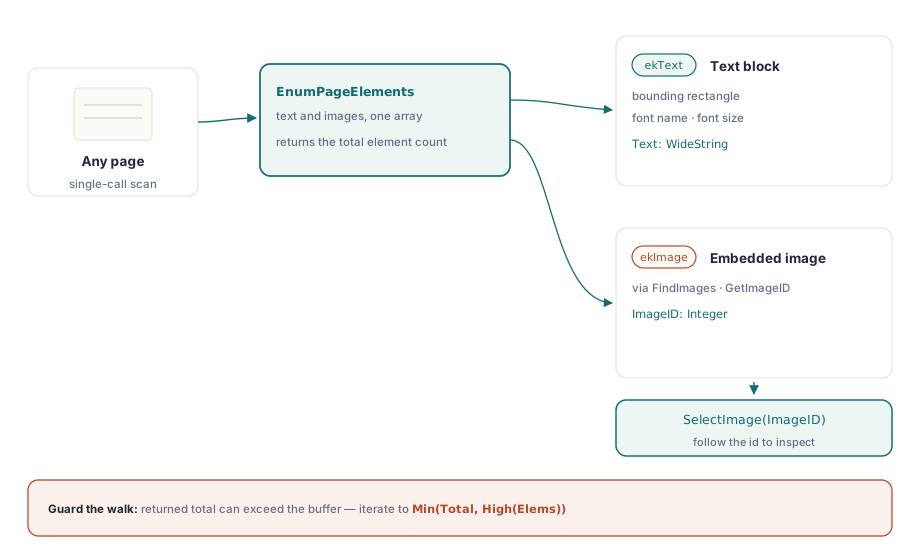
Search answers "where is this word." The other half of introspection is "what is on this page at all," and that is EnumPageElements. It returns one unified list where each element is either a text block or an embedded image, distinguished by a Kind field:
type
  TPDFlibPageElementKind = (ekText, ekImage);

  TPDFlibPageElement = record
    Kind: TPDFlibPageElementKind;
    Page: Integer;
    Left, Top, Right, Bottom: Double;
    Text: WideString;        // ekText
    FontName: WideString;    // ekText
    FontSize: Double;        // ekText
    ImageID: Integer;        // ekImage; usable with SelectImage / GetImageID
  end;
Text elements come from the same ExtractPageTextBlocks pass, so each one arrives with its rectangle, its font name, and its size already filled in. Image elements come from the page's embedded image list via FindImages and GetImageID; the ImageID they carry is the handle you feed to SelectImage to inspect the image further. The two kinds land in one array so a single walk over a page sees everything on it
var
  Pdf: TPDFlib;
  Elems: array[0..511] of TPDFlibPageElement;
  Total, I: Integer;
begin
  Pdf := TPDFlib.Create;
  try
    Pdf.LoadFromFile('report.pdf', '');
    Total := Pdf.EnumPageElements(1, Elems);
    for I := 0 to Total - 1 do
      if I <= High(Elems) then
        if Elems[I].Kind = ekText then
          WriteLn(Format('text  %s/%.1f  "%s"',
            [Elems[I].FontName, Elems[I].FontSize, Elems[I].Text]))
        else
          WriteLn(Format('image id=%d', [Elems[I].ImageID]));
  finally
    Pdf.Free;
  end;
end;
There is a counting convention here that follows the rest of the library and that you must respect or you will read uninitialized memory. The return value is the total element count, which can be larger than the array you passed in. The function fills only as many slots as fit and keeps counting the rest, exactly the way signature enumeration works. So the guard is always the same: clamp your loop to the smaller of the returned count and High(array), never iterate to the count blindly. The examples above show the I <= High(...) check for that reason. If the return value exceeds your buffer, size a bigger array and call again
If you have used the library's lower-level text-block calls, this is the typed, geometry-aware layer over them; the underlying extraction is the same one described in Delphi PDF text, image, and font extraction with PDF Library for Delphi. And when the goal is not "where is this text" but "how is this document structured for assistive technology," the parallel read-side story is the tagged-PDF structure tree, which exposes the logical reading order rather than the physical block layout
Region queries when you already know where to look
Sometimes you do not have a search term at all; you have a rectangle. A form template always puts the invoice number in the top-right corner, or a scanned layout reserves a fixed band for a table. GetTextInAreaEx serves that case. It is the bounds-carrying counterpart of GetTextInArea: where the older call hands back a flat list of strings for a region, the new one returns each retained block's rectangle alongside its text, so you learn not just what is in the box but where inside it each line sits
var
  Pdf: TPDFlib;
  Hits: array[0..63] of TPDFlibSearchHit;
  Found, I: Integer;
begin
  Pdf := TPDFlib.Create;
  try
    Pdf.LoadFromFile('invoice.pdf', '');
    Pdf.SelectPage(1);
    // Left, Top, Width, Height in PDF points on the selected page.
    Found := Pdf.GetTextInAreaEx(360, 720, 180, 60, Hits);
    for I := 0 to Found - 1 do
      if I <= High(Hits) then
        WriteLn(Hits[I].MatchText);
  finally
    Pdf.Free;
  end;
end;
Two things to keep straight. GetTextInAreaEx works on the currently selected page, so call SelectPage first; unlike SearchText, it does not take a range. And a block is kept when it intersects the query rectangle, not only when it is fully contained, so a line that straddles the boundary still comes through. That is usually what you want for a hand-drawn selection box, but if you need strict containment you can filter the returned rectangles yourself, since you now have them
Putting it to work
The throughline across all three calls is that geometry is no longer something you reconstruct after the fact. A search hit knows its page and its box. A page element knows its rectangle and, for text, its font. A region query reports where each line falls. That is enough to build a real find-and-highlight feature, a click-to-locate index, or a layout-aware extractor without dropping below the public API or rebuilding the text-extraction pipeline by hand
These query APIs ship as part of the PDF Library for Delphi Delphi PDF Library, alongside the full text-block extraction layer they are built on and the rest of the read-side introspection surface for Delphi and C++Builder