An accessible PDF rests on one structure that the visible page never shows: the structure tree defined in ISO 32000-1 §14.7. It is a logical hierarchy of headings, paragraphs, tables, and figures, layered over the painted content and mapped to standard roles through a role map. A screen reader reads that tree, not the marks on the page. Without it, a generated invoice that looks immaculate is semantically empty, because the content stream records drawing order and nothing else. The total can be announced before the line items, the footer can cut into a paragraph, the items table can collapse into one undifferentiated run of words. The cost of preventing that is lopsided in your favor. Emitting structure while you draw is minutes of code; retrofitting it into finished documents is a remediation project. losLab PDF Library (PDF Library for Delphi) exposes the tree to Delphi and C++Builder through a small set of calls that wrap each drawing operation in its logical role
How marked content binds to the structure tree
Two layers cooperate. In the content stream, drawing operations are bracketed into marked-content sequences, each carrying an integer MCID. In the document catalog, the structure tree maps those MCIDs into a hierarchy of typed elements (H1, P, Table, Figure) with attributes such as alternate text and language. Custom element types are legal, but each one must resolve to a standard role through the role map (ISO 32000-1 §14.8.4). Content that carries no meaning at all, like rules, backgrounds, and repeated page furniture, is marked as an artifact so assistive technology skips it instead of reading it mid-sentence
PDF Library for Delphi maintains both layers behind one bracket pair. BeginTag opens a structure element and starts the marked-content sequence, drawing calls land inside it, and EndTag closes both. The bookkeeping that trips up hand-rolled tagging, the MCIDs and the parent tree and the page references, happens internally where you cannot get it wrong
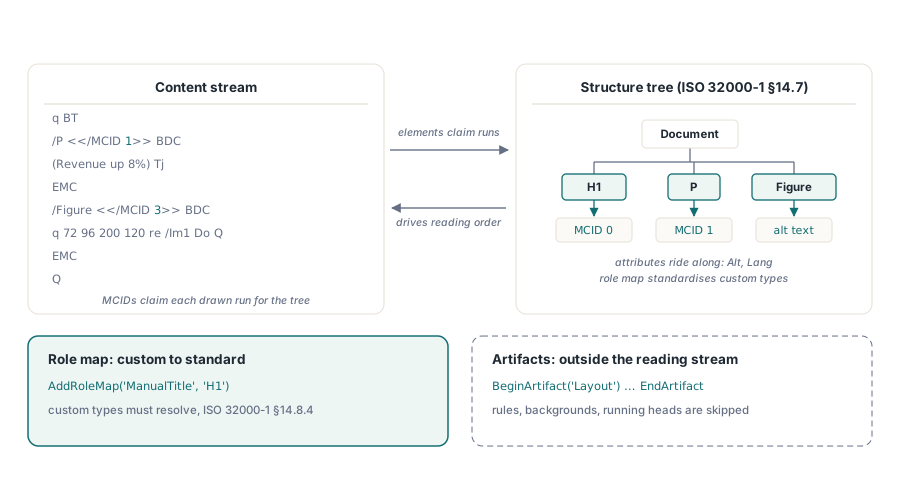
Two document-level switches frame the work before any tag opens. SetMarkInfo writes the catalog flag that declares the document tagged, and IsTaggedPDF reads it back, which is the cheap first probe when deciding whether an inbound file has any structure worth preserving. Language has two entry points. SetDocumentLanguage sets the document default on its own, while SetPDFUAMode sets it as part of enabling full PDF/UA output. A file can be usefully tagged without claiming PDF/UA conformance, and a phased rollout often starts exactly there
Tagging while drawing, not afterward
The generation pattern that works is to treat the tag bracket as part of every draw call's signature, never as a later pass:
var
  Lib: TPDFlib;
begin
  Lib := TPDFlib.Create;
  try
    Lib.SetOrigin(1);                          // top-left origin
    Lib.SetPDFUAMode('en-US');                 // bumps the save version to PDF 1.7
    Lib.SetInformation(1, 'Service Manual');   // /Title is mandatory for PDF/UA
    Lib.AddRoleMap('ManualTitle', 'H1');       // custom type -> standard role
    Lib.AddStandardFont(4);
    Lib.SetTextSize(18);
    Lib.BeginTagEx2('ManualTitle', '', '', 'en-US', '', 'h1-cover', '');
    Lib.DrawText(72, 96, 'Service Manual');
    Lib.EndTag;
    Lib.BeginTag('Figure', 'Exploded view of the gearbox assembly', '');
    Lib.AddImageFromFile('gearbox.png', 0);
    Lib.EndTag;
    Lib.BeginArtifact('Layout');               // page decoration: excluded from reading
    // ... draw rules and background tint ...
    Lib.EndArtifact;
    Lib.SaveToFile('manual.pdf');
  finally
    Lib.Free;
  end;
end;
Three calls in that sequence carry compliance weight. SetPDFUAMode enables PDF/UA output and silently bumps the document version to PDF 1.7, which collides with version pinning. A document locked to PDF 1.4 with LockSaveVersion refuses to save and returns error code 602 once UA mode is active, a clash that tends to surface when archival profiles and accessibility requirements are configured by different teams. SetInformation(1, ...) writes the document title, which ISO 14289 expects viewers to show in place of the filename; its absence is one of the most common PDF/UA findings in the wild. AddRoleMap registers the custom ManualTitle type as an H1, and skipping it leaves the diagnostics described below flagging an unmapped role
Heading levels deserve a deliberate policy, not ad-hoc choices made for the look of a page. Screen-reader users jump between sections by heading shortcut, so a template that goes from H1 to H3 because the intermediate level looked too large in the visual design quietly breaks that navigation, and no visual review will ever catch it. It is exactly the defect the HEADING-LEVEL-SKIP diagnostic exists to name. Map each template's visual styles to a fixed heading ladder once, in one place, and the drift never starts
Tables a screen reader can actually navigate
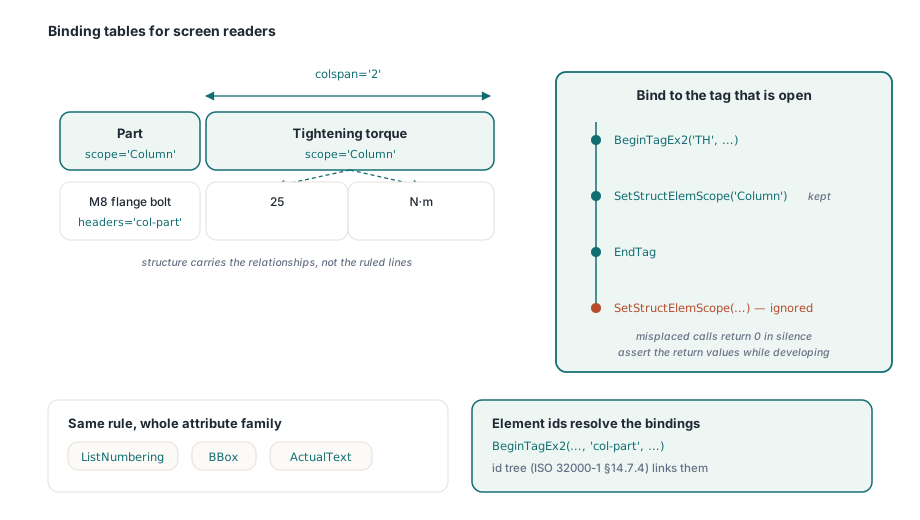
Drawn grid lines mean nothing off screen. What screen readers navigate are structural relationships: which cells are headers, what each header governs, and how data cells bind to headers in irregular layouts. The structure-element attribute calls handle all three:
Lib.BeginTag('Table', '', '');
Lib.BeginTag('TR', '', '');
Lib.BeginTagEx2('TH', '', '', '', '', 'col-part', '');
Lib.SetStructElemScope('Column');          // valid only while this TH is open
Lib.DrawText(72, 120, 'Part');
Lib.EndTag;
Lib.BeginTagEx2('TH', '', '', '', '', 'col-torque', '');
Lib.SetStructElemScope('Column');
Lib.SetStructElemColSpan(2);               // header spans the value and unit columns
Lib.DrawText(200, 120, 'Tightening torque');
Lib.EndTag;
Lib.EndTag;
Lib.BeginTag('TR', '', '');
Lib.BeginTag('TD', '', '');
Lib.SetStructElemHeaders('col-part');      // explicit binding for irregular tables
Lib.DrawText(72, 140, 'M8 flange bolt');
Lib.EndTag;
Lib.EndTag;
Lib.EndTag; // Table
The ordering rule is strict and enforced in silence. Every SetStructElem* call applies to the tag that is open at that moment, between its BeginTag and its EndTag, and it returns 0 without raising anything when no tag is open or the attribute does not apply to the current one. A misplaced call simply vanishes. Wrapping the return values in assertions during development catches the drift while you can still see it; left alone, a missing scope shows up only when an accessibility audit runs a real screen reader across the table. The element IDs passed through BeginTagEx2 feed the ID tree (ISO 32000-1 §14.7.4), and that is what makes the SetStructElemHeaders binding resolvable in the first place
The same attribute family covers the rest of what assistive technology leans on. SetStructElemListNumbering declares how list items are labeled, so a screen reader announces position within the list instead of reciting bullet glyphs. SetStructElemBBox records the bounding box of figures and tables, which reflow views use to place content. SetStructElemActualText supplies replacement text for runs whose glyphs do not map to readable characters, such as a drop cap assembled from vector art. Each one follows the same rule: it binds to the open tag, or it vanishes
Artifacts, language, and the pre-save diagnostics gate
Repeated page furniture, meaning running headers, fold marks, watermarks, and background tints, belongs inside BeginArtifact and EndArtifact brackets so it never enters the reading stream. Language is inheritable. The document default comes from the SetPDFUAMode argument, and a run in another language overrides it per element through BeginTagEx or SetStructElemLang. That is what keeps a French quotation inside an English manual pronounceable
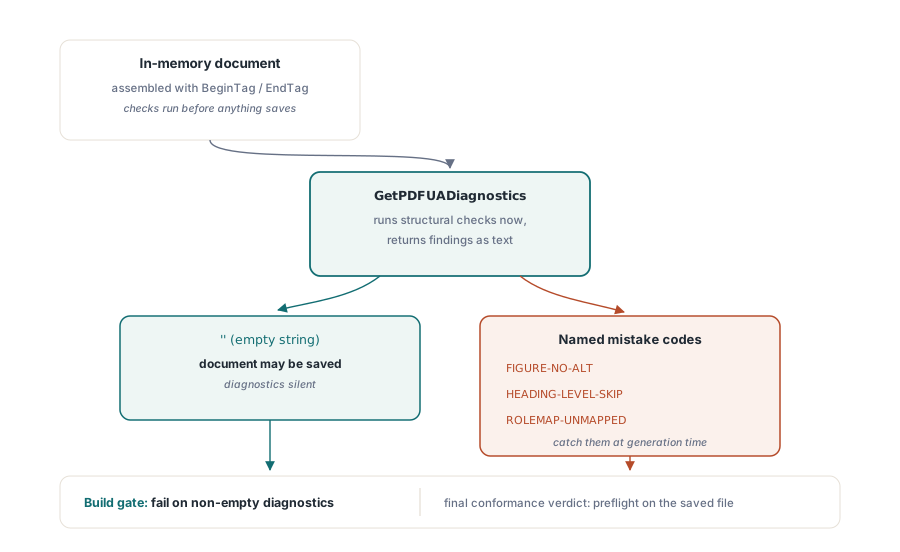
Before saving, GetPDFUADiagnostics runs the library's structural checks over the in-memory document and returns findings as text, where an empty string means nothing was found. The codes name the classic authoring mistakes directly: FIGURE-NO-ALT for an image with no alternate text, HEADING-LEVEL-SKIP for an H3 following an H1, ROLEMAP-UNMAPPED for a custom type that was never registered. Wire this into the build (generate the document set, fail the step on non-empty diagnostics) and accessibility regressions become compile-time-style failures instead of audit findings months later. The full conformance verdict still belongs to preflight on the saved file, covered in PDF/A and PDF/UA preflight in Delphi, because some normalizations are applied only during serialization
Annotation navigation has its own knob. PDF/UA expects keyboard traversal of form fields and links to follow the structure order, and SetTabOrderMode writes the page-level tab-order entry that viewers honor, with GetTabOrderMode available for auditing inbound files. It is the kind of requirement nobody notices until a keyboard-only user files the bug, and it costs one call per document to get right
Structure trees do not survive every merge
Tagged documents stay tagged only when every later processing step preserves the tree, and the sharp edge inside PDF Library for Delphi is the merge-list family. MergeFileListFast trades structure-tree preservation for speed. That is the right trade for scanned image batches and the wrong one for tagged reports, because the output opens fine, renders identically, and has quietly lost its accessibility layer. Use the default MergeFileList or the strict variant whenever any input is tagged, and make IsTaggedPDF part of the post-assembly assertions so a flattened batch cannot ship without someone noticing. Assembly pipelines for large document sets carry more trade-offs of this kind, explored in large PDF merge, split, and direct access
The verification loop closes outside the library: open the output in Acrobat, inspect the tags panel, and read at least one document per template family with a real screen reader. Diagnostics catch structural mistakes; only a human ear catches a reading order that is technically valid and practically baffling. Evaluation builds and the complete tagging API reference are on the losLab PDF Library for Delphi product page