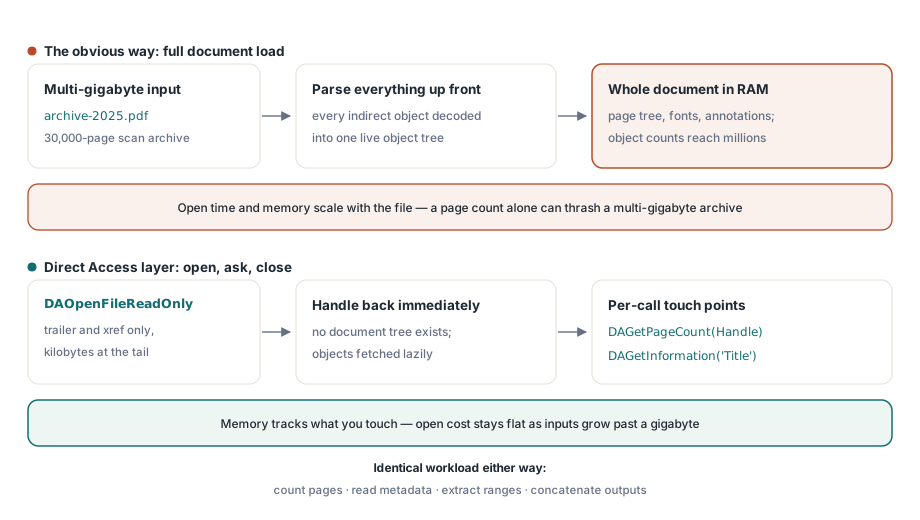
Merging or splitting a two-gigabyte PDF the obvious way costs you two things at once: wall-clock time and address space. The obvious way is to load each input, do the work, write the output. Loading is where it breaks. A scan archive that moves from 300 to 600 DPI doubles its linear resolution and roughly quadruples on disk, so the same assembly job that handled 400 MB files all year starts thrashing the moment an input crosses a gigabyte, often while doing nothing more than counting pages. The task never got harder. Open, count, pick ranges, concatenate is the whole of it. Full-tree loading simply stopped being a sane default at that size. PDF Library for Delphi, losLab's PDF library for Delphi and C++Builder, answers this with its Direct Access layer: a family of DA-prefixed functions backed by a streaming reader that walks the cross-reference table in place instead of building the whole document in memory
Where the memory goes in a full load
Loading a PDF "normally" means parsing the xref, resolving every indirect object into an in-memory tree, decoding object streams, and wiring up the page tree, fonts, and annotations into objects you can manipulate. For editing workflows that is the right trade. For merge, split, and inspection work it is mostly waste. A 30,000-page scan archive might hold millions of indirect objects, and a split job needs to read a few hundred of them: the page nodes in the requested range, plus whatever those nodes reference
The Direct Access layer inverts the model. DAOpenFile and DAOpenFileReadOnly parse the trailer and xref, a few kilobytes at the tail of the file, and return a file handle. Objects are fetched lazily when a call needs them. The practical consequence is that opening a multi-gigabyte file takes about as long as opening a small one, and memory tracks what you touch rather than what the file contains
Probing a huge file without loading it
The pattern below comes from the library's own large-file benchmark: open read-only, ask questions, close. No document tree ever exists
var
  Lib: TPDFlib;
  Handle, Pages: Integer;
begin
  Lib := TPDFlib.Create;
  try
    Handle := Lib.DAOpenFileReadOnly('archive-2025.pdf', '');
    if Handle = 0 then
      raise Exception.Create('Direct access open failed');
    Pages := Lib.DAGetPageCount(Handle);
    Writeln('pages : ', Pages);
    Writeln('title : ', Lib.DAGetInformation(Handle, 'Title'));
    Lib.DACloseFile(Handle);
  finally
    Lib.Free;
  end;
end;
Read-only mode is worth preferring whenever you can: it lets the intake stage run while other processes hold the file, and it documents intent. A probe stage that accidentally calls a mutating function fails fast instead of corrupting the archive
PageRef is an object handle, not a page number
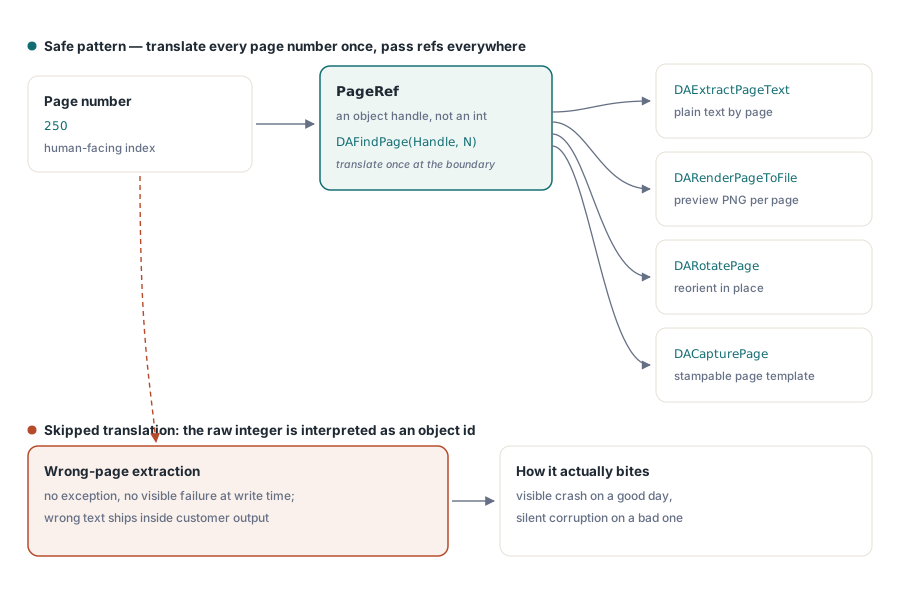
The single most common mistake with the DA API is passing a page number where a function expects a PageRef. Almost every per-page DA call takes a reference handle to the page object rather than a page number: DAExtractPageText, DARenderPageToFile, DARotatePage, and DACapturePage all expect a ref. You get one by translating the human-facing number through DAFindPage:
PageRef := Lib.DAFindPage(Handle, 250);          // page number -> object handle
if PageRef <> 0 then
begin
  Text := Lib.DAExtractPageText(Handle, PageRef, 0);
  Lib.DARenderPageToFile(Handle, PageRef, 5, 150, 'page250.png');
end;
Passing the raw number 250 instead does not raise an error. It addresses whatever object happens to sit behind that handle value, which on a good day fails visibly and on a bad day extracts text from the wrong page into a customer-facing document. If you wrap the DA layer in your own service code, make the translation impossible to skip: accept page numbers at the boundary, call DAFindPage immediately, and pass only refs internally
Merging hundreds of files with a named list
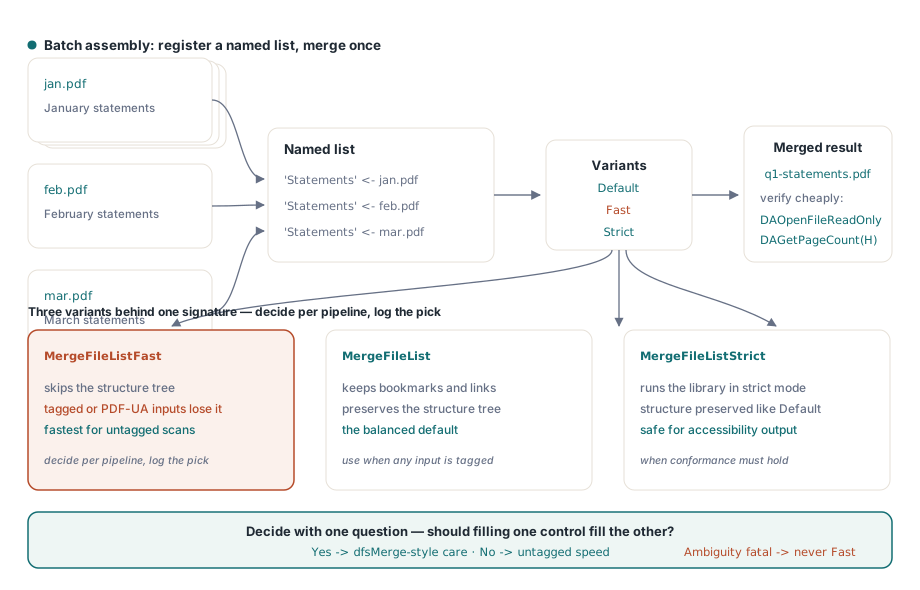
For two files, MergeFiles(First, Second, Output) is enough. Batch assembly scales better through file lists: register inputs under a list name, then merge the list in one pass
Lib.AddToFileList('Statements', 'jan.pdf');
Lib.AddToFileList('Statements', 'feb.pdf');
Lib.AddToFileList('Statements', 'mar.pdf');
Lib.MergeFileList('Statements', 'q1-statements.pdf');

// Verify the result the cheap way: direct access again
Handle := Lib.DAOpenFileReadOnly('q1-statements.pdf', '');
Writeln('merged pages: ', Lib.DAGetPageCount(Handle));
Lib.DACloseFile(Handle);
The merge family has three variants, and the difference is not speed alone. MergeFileListFast skips preservation of the structure tree; MergeFileListStrict enforces strict mode; the unsuffixed version is the balanced default. The operational rule that falls out: if any input is a Tagged PDF whose accessibility structure must survive, anything produced for PDF/UA being the obvious case, reach for the default or Strict variant, because Fast silently drops the structure tree. For plain scan archives with no tagging, Fast is free performance. Decide per pipeline, not per developer mood, and record the variant used in the job log
Splitting without loading: range extraction
Splitting follows the same no-load philosophy. ExtractFilePages(InputFileName, Password, OutputFileName, RangeList) pulls a page range straight from file to file, with a range list such as '1-500', '501-1000', or comma-separated selections, and the source never becomes a document tree. When a document is already loaded for other reasons, ExtractPageRanges produces a new in-memory document from the current one, and CopyPageRanges pulls ranges across from another loaded document by ID. For per-statement splitting of consolidated print streams, the file-to-file form is the one that keeps a 4 GB input from ever inflating into RAM
Files that lie about their geometry
Large-file pipelines meet damaged files at a rate small-file pipelines never see, simply because the inputs pass through more systems. Two failure shapes deserve explicit handling
First, shifted headers. Mail gateways and print spoolers sometimes prepend bytes to a PDF, so the %PDF marker no longer sits at offset 0 and every xref offset in the file is wrong by the same amount. The streaming reader detects this and exposes it (DAShiftedHeader at the flat level, ShiftedHeader on TSmartPDFReader), then compensates for it during reads. Home-grown offset arithmetic typically does not, which is why "works on every file we generate, fails on files from customer X" is the classic symptom
Second, broken cross-reference tables. DACopyFile(InputFileName, OutputFileName, PageCount) streams the entire file to a new copy while rebuilding the xref, returning the page count as a by-product. Running it as a normalization stage in front of a picky downstream consumer converts a class of intermittent parse failures into one predictable repair step. And when your own edits need saving, DAAppendFile writes them as an incremental update, appending a new revision rather than rewriting gigabytes, which keeps the save cost proportional to the change instead of to the file
Delivery details: linearization and composition
Two adjacent capabilities round out a large-file pipeline. When the assembled output is served over HTTP for in-browser viewing, LinearizeFile reorganizes it for byte-range streaming so the first page displays before the rest of a 500 MB packet has finished downloading. Run it as the final stage, after all merging, because any later modification de-linearizes the file again. And when packets need composition rather than plain concatenation, say a coversheet stamped behind every statement or two source pages imposed onto one output sheet, DACapturePage turns any page into a reusable template that DADrawCapturedPage places onto a destination page at an arbitrary rectangle, still without a full document load on the multi-gigabyte source
Limits and what stays read-only
The format itself runs out of room long before Direct Access does. Offsets are Int64 the whole way through the DA layer, so the real ceilings are available disk and the 10-digit xref offset field of classic (non-stream) cross-reference tables. Multi-gigabyte scan archives are unremarkable in practice, and memory stays bounded regardless of file size because objects are read only when a call asks for them
Two questions come up often enough to answer directly. Merging through the default path carries document structure across, so bookmarks and links survive; the Fast variant is the one that trades the structure tree for speed, which is the whole reason to reserve it for untagged inputs. The safe habit is to open the merged output, walk its outline, and spot-check a few internal links before shipping it. As for editing: there is a useful middle ground between read-only probing and a full load. Page-level operations work on the handle directly, DARotatePage, DAMovePage, and DAHidePage among them, along with form-field reads, and DAAppendFile persists those edits as an incremental revision. Content-level editing, anything that rewrites the marking operators inside a page, still belongs to the full document layer
Related articles
If your merged output must remain accessible, the structure-tree background is covered in the Tagged PDF accessibility article, which explains exactly what the Fast merge variant would discard. For pulling content out of the ranges you split, see the text, image, and font extraction guide
The full Direct Access function list ships with the library; editions and trial downloads are on the PDF Library for Delphi product page