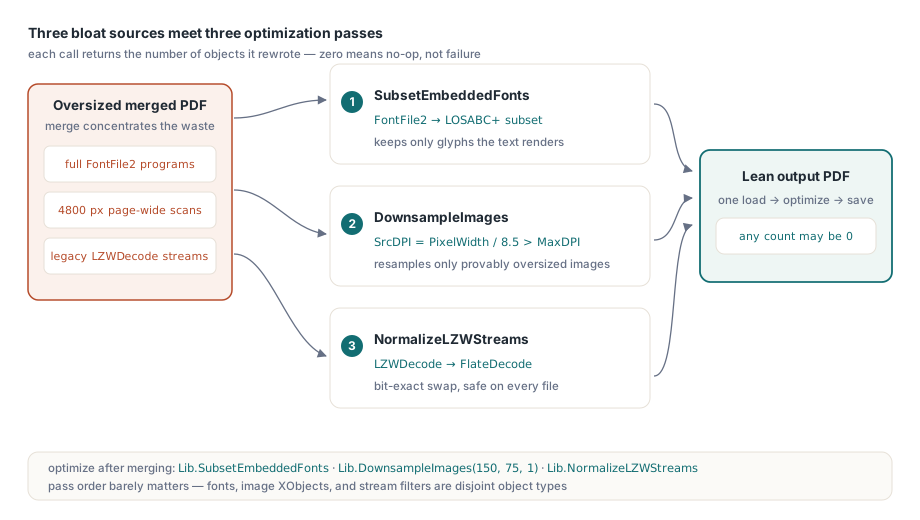
To reduce PDF file size in Delphi, losLab PDF Library provides three APIs that attack the three biggest sources of bloat: SubsetEmbeddedFonts rewrites every embedded TrueType font program down to the glyphs the document actually renders, DownsampleImages resamples raster images that exceed a target DPI, and NormalizeLZWStreams replaces legacy LZWDecode compression with FlateDecode. Each returns the number of objects it changed, so a zero tells you the pass was a no-op rather than a silent failure
Why is my merged PDF larger than its source files?
A merged or programmatically generated PDF is usually oversized for one of three reasons: fully embedded fonts, images sampled far above their display resolution, and streams still compressed with the legacy LZW filter. ISO 32000-1 §9.9 lets a producer embed the complete font program, and most producers do exactly that because it is the safe default. A complete Arial FontFile2 runs to hundreds of kilobytes; embed it in a dozen source files, merge them, and you are carrying a dozen copies of glyph outlines for characters nobody typed. Merging itself does not create the waste, it just concentrates it into a single file where the total finally becomes visible
Images are the second offender. A 4800-pixel-wide scan placed into a quarter-page frame ships roughly 40 times more pixel data than a 300 DPI print pipeline can use. The third is quieter: streams filtered with LZWDecode. ISO 32000-1 §7.4.4 specifies both LZWDecode and FlateDecode, and notes that Flate usually compresses at least as well; in practice Flate output is consistently smaller on the same data, and LZW survives mostly in files that passed through 1990s-era tooling at some point in their history. The rest of this article walks through the three losLab PDF Library passes that fix each problem, then combines them into one pipeline
Font subsetting with SubsetEmbeddedFonts
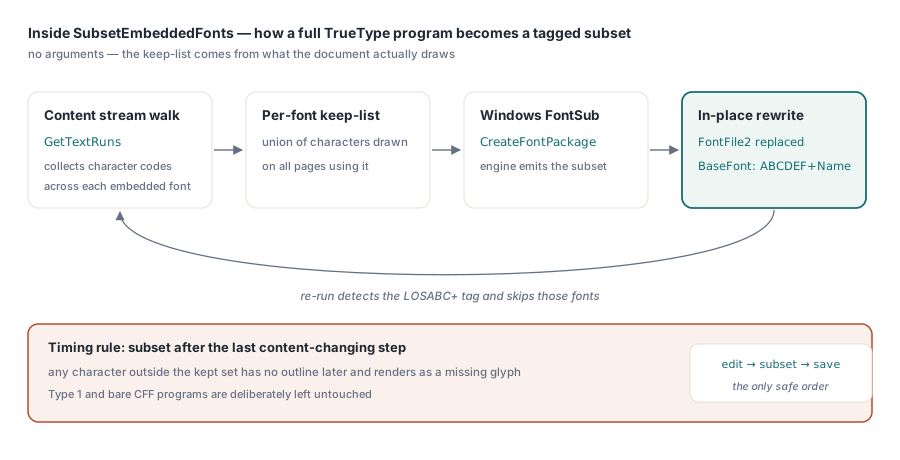
SubsetEmbeddedFonts shrinks every embedded TrueType font in a loaded document to the characters the document actually uses, and it needs no arguments because it derives the keep-list from the content streams themselves. Internally the pass walks every page's content stream with GetTextRuns, collects the character codes referenced under each font resource, builds a keep-list, and hands the original font program to the Windows FontSub engine (CreateFontPackage) to produce a subset. The rewritten program replaces the FontFile2 stream in place, and the BaseFont name gains a LOSABC+ tag, the six-uppercase-letters-plus-sign convention ISO 32000-1 §9.6.4 defines for subset fonts. That prefix is also what makes the call idempotent: run the pass twice and already-subsetted fonts are recognized and skipped, so wiring it into a batch job that may revisit files is safe
var
  Lib: TPDFlib;
  Fonts: Integer;
begin
  Lib := TPDFlib.Create;
  try
    if Lib.LoadFromFile('merged-report.pdf', '') = 1 then
    begin
      Fonts := Lib.SubsetEmbeddedFonts;
      // Fonts = number of FontFile2 programs rewritten;
      // 0 means nothing embedded, or everything already subsetted
      Lib.SaveToFile('merged-report-subset.pdf');
    end;
  finally
    Lib.Free;
  end;
end;
Two implementation details are worth knowing because they explain the API's boundaries. First, the pass targets FontFile2, so it covers embedded TrueType programs; fonts embedded as Type 1 or bare CFF are left untouched rather than risked. Second, it relies on FontSub, which makes SubsetEmbeddedFonts Windows-only. A subtler point from the implementation: whether a font qualifies is decided by actually resolving the FontDescriptor → FontFile2 reference chain, not by trusting an embedded-flag heuristic, because fonts in a loaded document never went through the creation-side bookkeeping that sets such flags. If the resolved stream exists, the font is a candidate; if not, it is skipped without error
The honest trade-off: a subset font contains only the glyphs present at subsetting time. If a downstream tool, or your own code, later adds text in that same font, any character outside the subset has no outline and will render as a missing glyph. Subset as the last content-changing step, never before an editing stage. The same caution applies if you plan to pull the font back out later for reuse; the article on extracting text, images, and fonts with PDF Library for Delphi covers what an extracted subset program can and cannot give you
How does DownsampleImages decide which images to shrink?
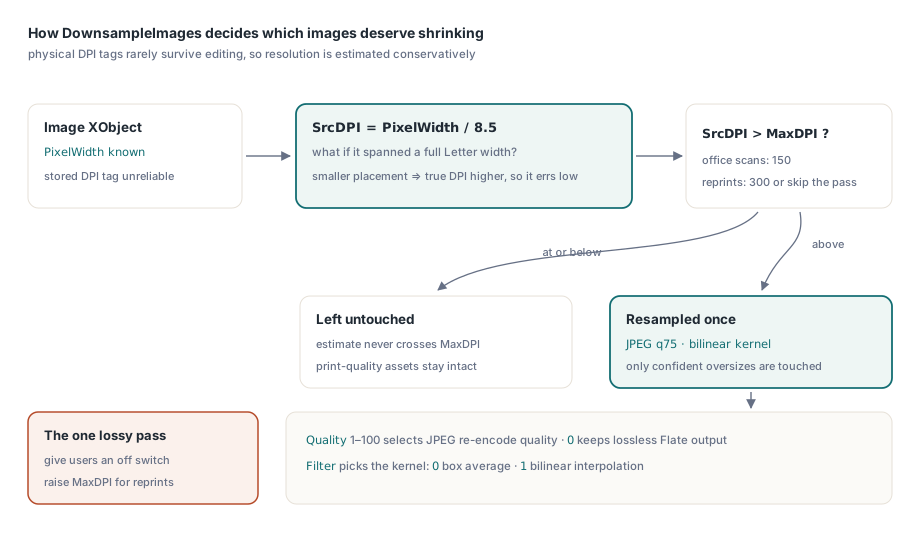
DownsampleImages(MaxDPI, Quality, Filter) resamples only the images it can confidently call oversampled, using a deliberately conservative DPI estimate. A PDF image XObject stores pixel dimensions but no trustworthy physical resolution, and any DPI tag from the source image rarely survives a load-edit-save cycle. So the pass estimates SrcDPI = PixelWidth / 8.5, in effect asking: if this image spanned the full width of a Letter page, what would its resolution be? Only images whose estimate exceeds MaxDPI are touched. The bias is intentional: an image placed small on the page has a true DPI higher than the estimate, so the pass under-triggers rather than degrading a print-quality asset it cannot measure
Quality from 1 to 100 selects the JPEG re-encode quality, while 0 keeps the output as lossless PNG-style Flate; Filter chooses the resampling kernel, 0 for a box average and 1 for bilinear. For scanned office paperwork, DownsampleImages(150, 75, 1) is a sensible starting point; for anything that may be reprinted, raise MaxDPI to 300 or skip the pass entirely. Downsampling is the one lossy step of the three, so it belongs behind a setting your users can turn off
Converting legacy LZW streams with NormalizeLZWStreams
NormalizeLZWStreams is the free win: it losslessly decompresses every LZWDecode stream and recompresses it with FlateDecode, in place, returning the count of streams converted. It handles both a single /Filter /LZWDecode entry and LZW appearing inside a filter chain array, where only the LZW link is replaced and the rest of the chain is preserved. Predictor parameters (Predictor, Columns, Colors, BitsPerComponent) are read from the stream's DecodeParms and passed through to the decompressor, so predictor-encoded image data round-trips correctly. Because both filters are bit-exact codecs, the decoded bytes are identical before and after; only the container compression changes, which is why this pass is safe to run unconditionally on every file
On a document with no LZW streams the call simply returns 0 and touches nothing, which the library's regression suite exercises explicitly: a freshly created Flate-only file must report zero conversions. That no-op guarantee matters when the pass sits in a pipeline that processes thousands of heterogeneous files, some from 2024 and some from 1998
The complete size-optimization pipeline in Delphi
The three passes combine into a single load-optimize-save function, and the order matters less than you might expect because they operate on disjoint object types: fonts, image XObjects, and stream filters. Running subsetting first is still the tidy choice, since it is the pass with an editing-order constraint
function OptimizePDF(const Src, Dst: string): Boolean;
var
  Lib: TPDFlib;
  Fonts, Images, Streams: Integer;
begin
  Result := False;
  Lib := TPDFlib.Create;
  try
    if Lib.LoadFromFile(Src, '') <> 1 then
      Exit;
    Fonts   := Lib.SubsetEmbeddedFonts;        // TrueType FontFile2 -> subset
    Images  := Lib.DownsampleImages(150, 75, 1); // >150 DPI -> JPEG q75, bilinear
    Streams := Lib.NormalizeLZWStreams;        // LZWDecode -> FlateDecode
    Result := Lib.SaveToFile(Dst) = 1;
    // Log Fonts/Images/Streams: three zeros mean the file was already lean
  finally
    Lib.Free;
  end;
end;
Verify the pipeline the way the library verifies itself: round-trip. The v3.130 regression tests create a document, save it, reload it, run the optimization, save again, and then assert three things: the output is smaller, the returned counts match expectations, and a reload of the optimized file still parses and renders. Reproducing that create-optimize-reload loop against a sample of your own production files, and comparing extracted text before and after, is a one-hour investment that catches integration mistakes long before a customer opens a broken invoice
// Round-trip check: the optimized file must still load cleanly
Lib := TPDFlib.Create;
try
  Assert(Lib.LoadFromFile('merged-report-opt.pdf', '') = 1);
  Assert(Lib.GetPageCount > 0);
finally
  Lib.Free;
end;
Where does the pipeline fit in a merge workflow? After the merge, not during it. Merging first and optimizing the single result means each embedded font is subsetted once against the union of all used characters, instead of per source file. If merge throughput is the bottleneck, PDF Library for Delphi offers a byte-level fast path that avoids full object parsing, described in the article on fast PDF merging with byte reference shifting; and for inputs too large to hold fully in memory, direct-access merge and split for large PDFs covers the streaming route. Both pair naturally with a final optimization pass on the merged output
What the three passes will not do
losLab PDF Library's optimization trio deliberately excludes anything that changes document semantics. SubsetEmbeddedFonts does not unify duplicate fonts across merged sources into one program, it shrinks each independently; deduplication is a different, riskier transform. DownsampleImages will pass over an image whose conservative DPI estimate stays under the threshold even when a human could tell it is oversized for its frame. And none of the passes touch document structure, so a file bloated by thousands of orphaned objects needs a rewrite-style save rather than these stream-level passes. Within those limits, the combination of font subsetting, image downsampling, and LZW-to-Flate normalization removes the three classic sources of PDF bloat with one predictable API call each. The three functions ship as part of losLab PDF Library for Delphi, C# and VB.NET, alongside the merge, extraction, and rendering APIs discussed above