losLab PDF Library can embed the missing font programs of an already loaded PDF with a single call: EmbedMissingFonts walks every font dictionary in the document, locates the matching installed system font by its BaseFont name, and writes the font program back into the file. For teams repairing third-party documents that fail PDF/A validation on font embedding, this is the fix that makes preflight error 00030 go away
The scenario is depressingly common. An archive ingestion pipeline receives PDFs from suppliers, customers, or a scanning bureau; the documents render fine on every desk in the building; and then the PDF/A validator rejects the whole batch with the same complaint repeated once per file: at least one font is not embedded. Nobody upstream will regenerate the files, so the pipeline has to repair them. This article covers that repair path. It is the companion to the preflight article, which covers detecting PDF/A and PDF/UA violations: that piece tells you which documents are broken, this one fixes the most frequent way they are broken
Why does PDF/A require every font to be embedded?
ISO 19005-1 §6.3.4 requires that every font used by a conforming document carry its font program inside the file, because PDF/A's entire promise is reproducibility: the document must render identically on a machine fifty years from now that shares no fonts with the machine that produced it. A non-embedded font is an instruction to go find Arial somewhere on the viewing system, and the standard's position is that "somewhere on the viewing system" is not an archival guarantee. Whatever glyphs, metrics, and coverage the substitute font has, that is what the reader gets, and it may not be what the author saw
The historical culprit is the Standard 14 convention. PDF 1.0 promised that every viewer ships Helvetica, Times, Courier, Symbol, and ZapfDingbats, so generators learned to reference those fonts by name and embed nothing, and thirty years of tooling still does exactly that. losLab PDF Library takes the requirement seriously enough that in PDF/A creation mode AddStandardFont is deliberately a no-op: the library does not ship the Standard 14 font programs, cannot embed what it does not have, and refuses to write a non-embedded reference into a document that claims conformance. It returns 0 without selecting a font, so a PDF/A document must use AddTrueTypeFont with embedding instead, and any Embed=0 request is silently promoted to Embed=1 while PDF/A mode is active. That is the writer side. The harder problem is the reader side: a document someone else already wrote, full of font dictionaries you did not create
How does EmbedMissingFonts repair a loaded document?
losLab PDF Library repairs fonts in place rather than rebuilding them. When a PDF generator writes a non-embedded TrueType font, the FontDescriptor dictionary it produces is already complete: FontName, FontBBox, Flags, Ascent, Descent, StemV, all present. The only thing separating it from an embedded font is the absence of one entry, the /FontFile2 stream reference holding the actual font program. So EmbedMissingFonts does not touch the font dictionary, the encoding, the widths array, or any content stream that references the font by resource name. It reads the matching font program from the system, compresses it into a new stream object, and appends a single /FontFile2 reference (or /FontFile3 for CIDFontType0 fonts) to the FontDescriptor that is already there. Everything the document's pages point at stays exactly where it was, which is what makes the operation safe to run on files you do not control
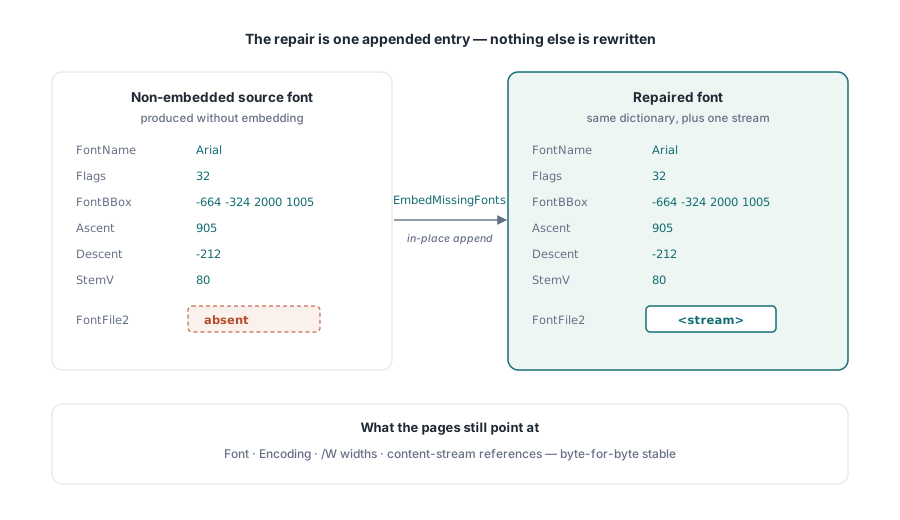
Coverage includes both font architectures you will meet in practice: simple TrueType fonts and composite Type0/CID fonts, the kind produced for CJK text and modern Unicode output. The traversal deliberately enumerates every Font dictionary in the document's object tree rather than relying on a page-by-page resource walk, so fonts referenced from annotations or shared across pages are picked up too. The API is a single call on the loaded document
var
  PDF: TPDFlib;
  Repaired: Integer;
begin
  PDF := TPDFlib.Create;
  try
    if PDF.LoadFromFile('supplier-invoice.pdf', '') <> 1 then
      raise Exception.Create('Could not load PDF');

    // Walks every Font dictionary; returns how many fonts
    // gained a font program. Fonts whose program cannot be
    // found on the system are skipped, not failed.
    Repaired := PDF.EmbedMissingFonts;
    Writeln(Format('%d font program(s) embedded', [Repaired]));

    PDF.SaveToFile('supplier-invoice-repaired.pdf');
  finally
    PDF.Free;
  end;
end;
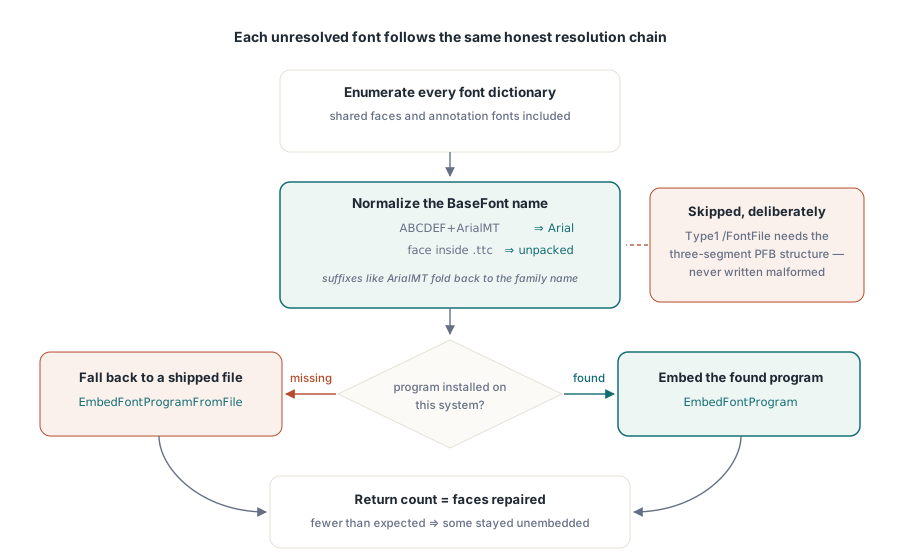
One detail worth knowing because it explains why the name matching works better than a naive string compare: the library normalizes BaseFont names before looking them up. Subset prefixes (the ABCDEF+ pattern of six uppercase letters and a plus sign) are stripped, PostScript-style suffixes such as ArialMT resolve to Arial, and TrueType Collection files are detected and unpacked so a face living inside a .ttc still embeds correctly
Verifying the repair with a preflight report
CreatePreflightReport is the verification step, and the loop is deliberately closed: the same audit that condemned the file should be the one that clears it. Error code 00030 is the PDF/A deep-audit finding that reads "At least one font is not embedded (FontFile/FontFile2/FontFile3 missing)", and it is reported against the file as a whole, so a single overlooked font keeps it alive. Run the report on the source file, repair, save, and run it again on the output
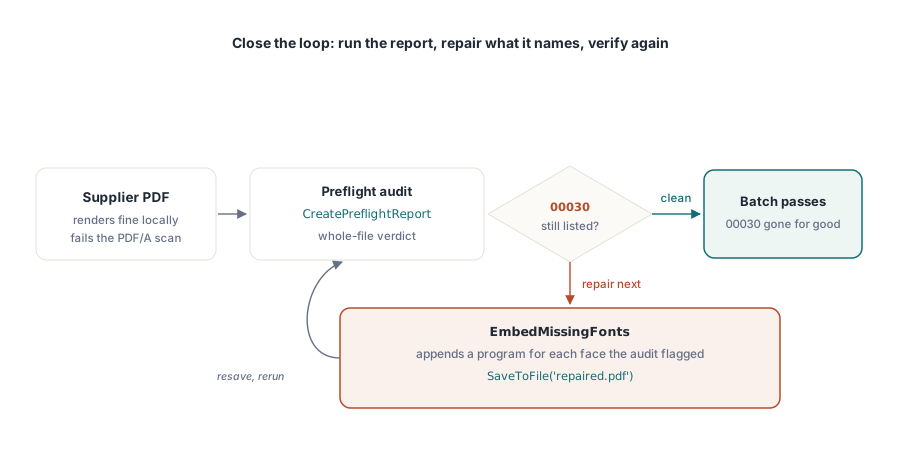
function HasFontEmbeddingViolation(PDF: TPDFlib;
  const FileName: string): Boolean;
var
  Report: string;
begin
  // ComplianceTests = 1 selects the PDF/A checks
  Report := PDF.CreatePreflightReport(FileName, '', 1, 0);
  Result := Pos('00030', Report) > 0;
end;
For a per-font view rather than a per-file verdict, load the repaired document again and enumerate: FindFonts followed by SelectFont and GetFontIsEmbedded reports embedding status font by font, which is the right tool when a batch job needs to log exactly which face in which file could not be repaired. The same enumeration pattern appears in the article on extracting text, images, and fonts from loaded PDFs, where it feeds extraction instead of repair
What happens when the font is not installed on the system?
EmbedMissingFonts skips any font whose program it cannot find, and reports the skip through its return value: if the count comes back lower than the number of non-embedded fonts you counted, the difference is fonts the system does not have. This is the honest failure mode, and it is better than the alternatives, because inventing a substitute program for a font named in the document would change rendering, which is precisely what an archival repair must never do. For these cases losLab PDF Library provides EmbedFontProgramFromFile, which embeds a caller-supplied .ttf or .otf into the named font, so a pipeline can ship the corporate fonts it expects to encounter and fall back to them deliberately
var
  I, FontID: Integer;
begin
  PDF.FindFonts;
  for I := 1 to PDF.FontCount do
  begin
    FontID := PDF.GetFontID(I);
    if (FontID > 0) and (PDF.SelectFont(FontID) = 1) then
      if PDF.GetFontIsEmbedded = 0 then
        // Try the installed system font first, then fall back
        // to a font file shipped alongside the application
        if PDF.EmbedFontProgram(PDF.FontName) = 0 then
          PDF.EmbedFontProgramFromFile(PDF.FontName,
            'fonts\CorporateSans.ttf');
  end;
end;
Two boundaries deserve stating plainly. First, Type1 fonts are not repaired in the current implementation: their /FontFile entry requires the three-segment PFB structure with explicit length keys, and the library skips them rather than writing a malformed stream; they are rare in modern documents but they do appear in old archives. Second, embedding a font is a licensing act. A TrueType font's embedding permissions belong to its foundry, and a repair pipeline that stuffs licensed font programs into documents leaving the organization should have someone confirm the font licenses actually permit it. The library will do what you ask; whether you may ask is a question for your legal department, not your compiler
Embedding is necessary, not sufficient
Repairing fonts clears error 00030, and nothing else. A document that fails PDF/A on encryption, on missing XMP metadata, on a device-dependent color space without an OutputIntent, or on absent ToUnicode maps will still fail after every font is embedded, which is why the repair belongs inside a preflight-driven loop rather than replacing one. Run the full report, fix what it names, and let the report tell you when you are done. There is also a cost dimension: a full CJK font program runs to megabytes, so embedding several of them can inflate a small document dramatically. The counterweight is subsetting, covered in the article on PDF file size optimization and font subsetting, which cuts each embedded program down to the glyphs the document actually renders
Keeping new documents from regressing
SetEmbedAllFonts is the prevention half of the same feature: a writer-side guard that stops your own code from producing the documents this article repairs. With SetEmbedAllFonts(1) active, any subsequent AddTrueTypeFont call requesting Embed=0 is promoted to an embedded reference, which extends to every document the guarantee PDF/A mode already enforces. It affects fonts added after the call, not fonts already in a loaded file, so the division of labor is clean: SetEmbedAllFonts for the documents you create, EmbedMissingFonts for the documents you inherit
PDF.NewDocument;
PDF.SetEmbedAllFonts(1);
// From here on, AddTrueTypeFont(Name, 0) behaves
// like AddTrueTypeFont(Name, 1): no non-embedded
// reference can reach the output file
Both halves, the writer-side guard and the load-repair-save path, are part of losLab PDF Library for Delphi, C# and VB.NET, alongside the preflight engine that verifies the result; the product page carries the full font API reference including the per-font embedding and subsetting calls