PDFium Component for Delphi fills an AcroForm atomically with TPdf.SetFormFieldValues: you pass 1 to 256 typed requests addressed by page and widget, and the component either applies every value in one document replacement or applies none. When one request is invalid, TPdfFormValuesWriteReport.FailedRequest names the request that sank the batch
That guarantee matters most in the jobs nobody watches. A nightly import pushes CRM rows into a claim form, or a print service overlays policy data onto a pre-printed template. Run those field by field and the first bad value, a code that is not a valid radio export, a string longer than the field's MaxLen, leaves you holding a PDF that is half old data and half new. Nothing crashed, so nothing alerted anyone. The batch API exists so that a failure is a clean refusal instead of a half-written document
Why is field-by-field form filling dangerous for data import?
Field-by-field filling is dangerous because every write commits on its own, so an error in the middle of the loop leaves a document that matches neither the source record nor the original template. The classic pattern is a loop over FormField[Index] assignments, each going through PDFium's native form-fill environment one widget at a time. Value 1 through 17 land, value 18 raises, and the caller now has to know exactly which values went in in order to undo them
Most callers never write that undo code, and the ones that do usually get it subtly wrong: a shared field has already changed on every page it appears on, and checkbox states have already flipped. If the save runs in a finally block, the half-filled file goes to disk looking complete. In an overprint job that is worse than no file, because it prints and someone signs it
The other quiet problem is focus. The classic setter drives PDFium's interactive editor: it kills any existing focus, focuses the target widget, selects all text, replaces it and kills focus again. That is fine for a headless job, but in a viewer it also ends whatever edit session the user had open in another field. The typed write path that arrived in PDFium Component 3.231.0 does not go through native field focus at all, and 3.233.0 extended it from single fields to cross-page batches
How SetFormFieldValues applies a batch in one replacement
TPdf.SetFormFieldValues stages every request against one captured snapshot of the document, writes all field dictionaries in one pass, and swaps the finished result in with a single replacement. The original document stays live until the very last step, so any failure before that step leaves it untouched
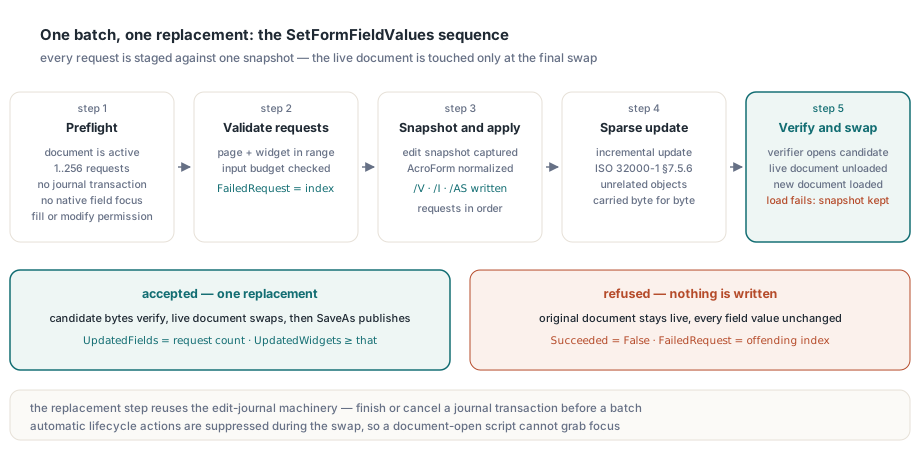
The sequence explains both the guarantee and the cost:
- Preflight checks run first: the document must be active, the request count must be 1..256, no page-object or edit-journal transaction may be open, no native field may hold focus, and the document must grant fill-forms or modify permission
- Each request is validated for page range and input budget, and
FailedRequesttracks the index being checked - The component captures an edit snapshot, normalises the AcroForm in that copy, and applies every request in order, writing
/V,/Ifor choice selections and/ASfor every widget that shares the field - The changes are appended to the snapshot as one sparse incremental update in the sense of ISO 32000-1 §7.5.6, so unrelated objects are carried over byte for byte
- A separate verifier instance loads the candidate bytes first; only after it opens cleanly does the component unload the live document and load the new one, falling back to the original snapshot if that load fails
The internal replacement step is the same machinery the component uses for its edit-journal snapshots, which is why the undo and crash-recovery journal and a batch write cannot overlap: finish or cancel the journal transaction first. Automatic lifecycle actions are suppressed while the document is swapped, so a document-open script cannot rewrite fields or grab focus in the middle of the replacement
Building a typed request batch in Delphi
A batch is a dynamic array of TPdfFormValueRequest records, each holding a one-based Page, a zero-based page-local FieldIndex and a typed TPdfFormValue. The value record carries a Kind of fvkText, fvkChoice, fvkCheckBox or fvkRadioButton, plus Text, ChoiceIndices and Checked members used according to that kind
Import data usually arrives keyed by field name, so the first job is translating names into page and widget addresses. FieldIndex counts widget annotations on a page in the same order as FormFieldCount and FormFieldInfo, so a simple scan works. The helper takes the first widget it finds for a name, which matters for shared fields, as the next section explains
type
  TFieldAddress = record
    Page, FieldIndex: Integer;
  end;

function FindFieldAddress(Pdf: TPdf; const FieldName: WString;
  out Address: TFieldAddress): Boolean;
var
  P, I: Integer;
begin
  Result := False;
  for P := 1 to Pdf.PageCount do
  begin
    Pdf.PageNumber := P;
    for I := 0 to Pdf.FormFieldCount - 1 do
      if Pdf.FormFieldInfo[I].Name = FieldName then
      begin
        Address.Page := P;
        Address.FieldIndex := I;
        Exit(True);      // first widget only: one request per field
      end;
  end;
end;

procedure AddRequest(var Requests: TPdfFormValueRequests;
  const FieldName: WString; Pdf: TPdf; const Value: TPdfFormValue);
var
  Address: TFieldAddress;
  N: Integer;
begin
  if not FindFieldAddress(Pdf, FieldName, Address) then
    raise Exception.CreateFmt('Template has no field "%s"', [FieldName]);
  N := Length(Requests);
  SetLength(Requests, N + 1);
  Requests[N].Page := Address.Page;
  Requests[N].FieldIndex := Address.FieldIndex;
  Requests[N].Value := Value;
end;
Note that AddRequest raises on an unknown name instead of skipping it. The batch validates addresses, not your mapping, so a missing template field has to fail here or it will never fail at all. With the addresses resolved, building the values and committing them is short
var
  Pdf: TPdf;
  Requests: TPdfFormValueRequests;
  Report: TPdfFormValuesWriteReport;
  V: TPdfFormValue;
begin
  Pdf := TPdf.Create(nil);
  try
    Pdf.FileName := 'claim-template.pdf';
    Pdf.Active := True;

    V := Default(TPdfFormValue);
    V.Kind := fvkText;
    V.Text := 'Maria Lopez';
    AddRequest(Requests, 'Claimant.Name', Pdf, V);

    V := Default(TPdfFormValue);
    V.Kind := fvkCheckBox;
    V.Checked := True;
    AddRequest(Requests, 'Consent', Pdf, V);

    V := Default(TPdfFormValue);
    V.Kind := fvkRadioButton;
    V.Text := 'Express';                // export value of the button to select
    AddRequest(Requests, 'Shipping', Pdf, V);

    V := Default(TPdfFormValue);
    V.Kind := fvkChoice;
    SetLength(V.ChoiceIndices, 1);
    V.ChoiceIndices[0] := 2;            // zero-based index into the field Opt array
    AddRequest(Requests, 'Region', Pdf, V);

    if Pdf.SetFormFieldValues(Requests, Report) then
      Pdf.SaveAs('claim-filled.pdf')
    else
      LogBatchFailure(Requests, Report);
  finally
    Pdf.Free;
  end;
end;
The typed kinds are checked against the field type before anything is written. A text value aimed at a checkbox, a radio value aimed at a plain checkbox, or a write to a push button all reject. Choice indices must be valid, unique and ascending; more than one index requires the MultiSelect flag, and free text in a choice field is accepted only by an editable combo box. A text value longer than the field's MaxLen rejects rather than being truncated, and read-only fields reject outright. For radio groups with the NoToggleToOff flag, an empty export value, meaning "clear the group", rejects too
Why does writing a shared field twice fail the whole batch?
TPdf.SetFormFieldValues rejects two requests that resolve to the same terminal field because they would both write a single value, and the component refuses to let one request silently overwrite another. The check runs on the field owner, not the widget, so two different widgets of one field on two different pages still count as a duplicate
The reason is the field model in ISO 32000-1 §12.7.3.1. A terminal field owns the value; its widget annotations are only places where that value is displayed. A field named PolicyNumber that appears in the header of every page is one field with several widgets, and every one of those widgets shows the same /V. A radio group works the same way: each button is a widget, the group is the field. Writing PolicyNumber through the page 1 widget and again through the page 9 widget is one field written twice, and any rule that picks a winner hides a bug in your mapping
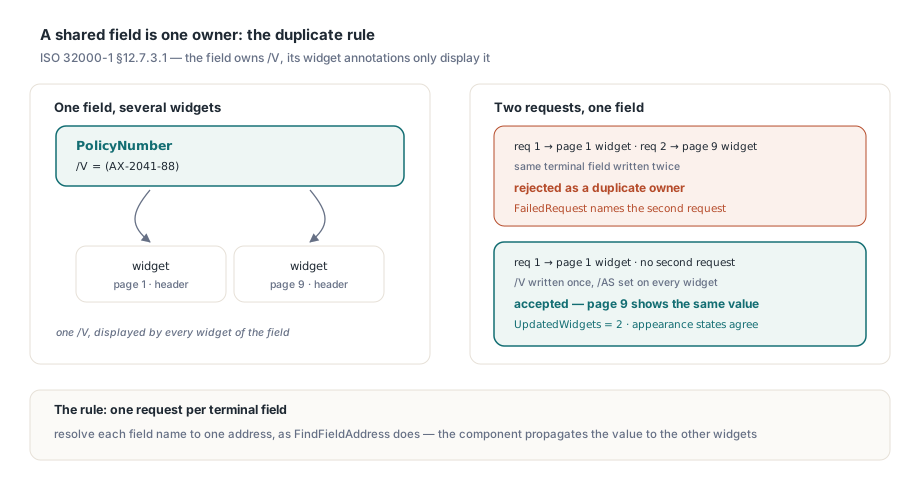
So the batch treats it as an error and names the second request in FailedRequest. In practice the fix is upstream: resolve each field name to exactly one address, as FindFieldAddress does, and let the component propagate the value to the other widgets. It does that as part of the write, setting /AS on every widget of a shared checkbox or radio group so that the appearance state agrees with the field value, the same split covered in the article on checkbox field values versus widget states
Reading the failure report
A failed batch returns False, does not raise, and leaves the original document and every field value exactly as they were. TPdfFormValuesWriteReport then reports Succeeded = False, zero for both UpdatedFields and UpdatedWidgets, the zero-based index of the offending request in FailedRequest, and a human-readable reason in ErrorMessage
procedure LogBatchFailure(const Requests: TPdfFormValueRequests;
  const Report: TPdfFormValuesWriteReport);
var
  R: Integer;
begin
  R := Report.FailedRequest;
  if R >= 0 then
    Log(Format('Request %d (page %d, widget %d) rejected: %s',
      [R, Requests[R].Page, Requests[R].FieldIndex, Report.ErrorMessage]))
  else
    Log('Batch rejected as a whole: ' + Report.ErrorMessage);
end;
A FailedRequest of -1 means the rejection belongs to the transaction rather than a request: native focus was active, the document is signed, the form is XFA, or a permission check failed. A non-negative value points at one entry. For an aggregate budget overflow it points at the request that pushed the batch over the limit, which is not necessarily the request that is wrong. Keep a parallel array of source column names next to Requests and you can turn index 14 straight into "row 2087, column ShipDate" in the import log
On success, UpdatedFields equals the request count and UpdatedWidgets counts every widget touched, shared ones included, a cheap sanity check against the template
Preconditions and limits you will hit
The most common rejection in a viewer application is native focus: if a user is typing in a field, SetFormFieldValues refuses before it even captures the snapshot, and the pending editor buffer survives intact. The component will not drop the focus behind your back, because that would either commit or lose text the user has not finished. Call ClearFormFieldFocus deliberately, which ends the editor session the way clicking outside the field would, and then retry
The budgets are fixed and documented, so you can size your imports against them:
- 1 to 256 requests per batch; split larger records into several batches and accept that atomicity then holds per batch
- At most 262,144 UTF-16 units of text and 4,096 choice indices per request
- At most 1,048,576 UTF-16 units of text and 16,384 choice indices across the whole batch
- The usual document budgets for the snapshot parser still apply, including a 64 MiB source and 65,536 objects
A successful replacement also invalidates native handles, searches and selections obtained before the call, because the document underneath is new. Page and view activation and logical field cursors are kept; anything else you cached, such as annotation or page-object handles, has to be fetched again
How is this different from XFDF import?
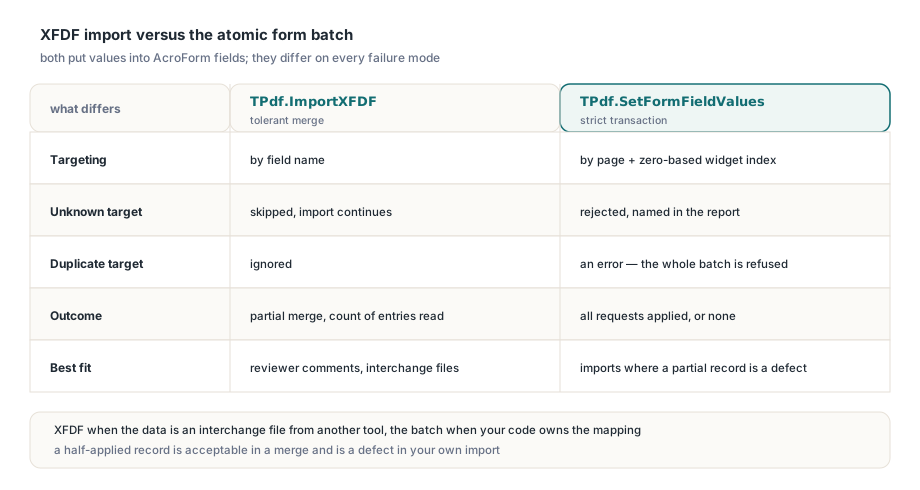
TPdf.ImportXFDF and TPdf.SetFormFieldValues both put data into fields, but XFDF import is a tolerant merge while the batch is a strict transaction. XFDF import matches values to fields by name, skips names it cannot find, ignores duplicates, and returns how many entries it applied. That is exactly right for merging a reviewer's comments, where a partial result is still useful
The batch does the opposite on every point. It addresses widgets explicitly, rejects unknown or mistyped targets, treats duplicates as errors, and has no partial outcome. Use XFDF when the data is an interchange file from another tool; use SetFormFieldValues when your own code owns the mapping and a half-applied record would be a defect
What the batch write does not cover
The batch is a bounded AcroForm profile, and it says no rather than guessing outside that profile. XFA forms reject and need their dedicated editor. Signed documents reject, since rewriting field dictionaries under an existing signature is a signature workflow, not a fill operation; encrypted snapshots are outside the profile as well. Malformed or ambiguous button export arrays reject, and radio export values that match more than one button are refused unless the group sets RadiosInUnison. The transaction also normalises direct field dictionaries before writing, the case behind field values that appear to revert
Appearances deserve one sentence of care. For changed text and choice widgets the batch drops the stale /AP instead of shipping an appearance that shows the old value, and it turns off NeedAppearances so that PDFium does not rebuild every unrelated widget in the form. PDFium regenerates the missing appearances when it renders. If the filled PDF goes to a strict print pipeline that never synthesises appearances, render or flatten it through PDFium first, and test that path with your own templates
SetFormFieldValues and the typed value records ship in the PDFium Component for Delphi and Lazarus, where the product page lists the full form-filling and AcroForm API alongside rendering, editing and viewer controls