Checkboxes and radio buttons can flatten as unchecked when appearance state /AS has not been synchronised with field value /V. PDFium Component, the PDFium-based VCL and LCL component for Delphi, C++Builder and Lazarus, reads that value through FPDFAnnot_GetFormFieldValue, resolving the parent field dictionary rather than the widget annotation
The bug report that led here is the kind you distrust at first. A customer flattens a signed consent form, opens the result, and every checkbox is empty. Open the source file in Acrobat and the boxes are visibly ticked. Read the source file back through the same component and the field values are correct. Only the flattened output loses them, and only for checkboxes and radio buttons: text fields on the same page come out fine
Why are checkboxes unchecked after flattening?
Because flattening never looks at /V. FPDFPage_Flatten bakes the widget appearance stream into page content, and the appearance it picks is the one named by /AS. If /AS still says /Off while the field value says the box is on, flattening faithfully bakes the off appearance. The value was never lost; it was never consulted
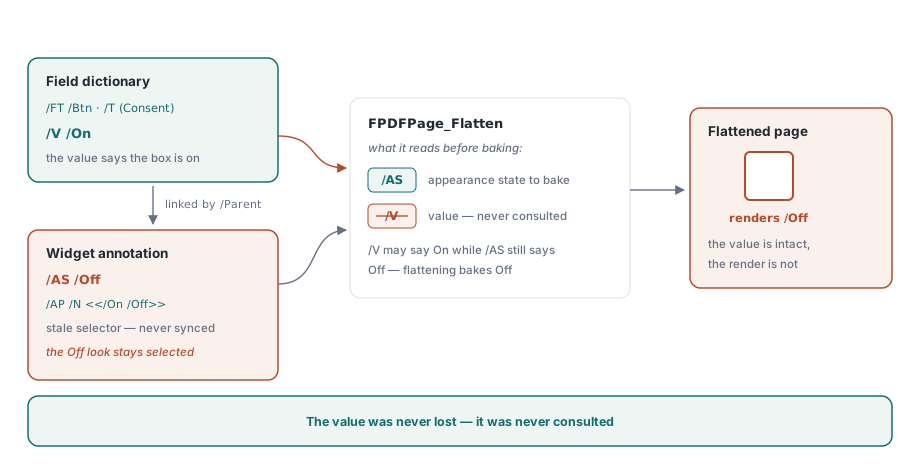
ISO 32000-1 §12.5.5 defines the appearance dictionary /AP with three possible entries, /N, /R, and /D. For a check box or radio button the /N entry is not a stream but a subdictionary whose keys are appearance state names, and §12.5.2 makes /AS the required selector when /N is a subdictionary. So a checkbox carries two prebuilt appearances and one pointer. Get the pointer wrong and the rendering is wrong in a way no amount of correct /V will repair. This is also why the failure mode differs from text fields, which have no prebuilt appearance to select at all: a text field /N is a single stream that must be regenerated from scratch after the value changes, so GenerateFormAppearances handles the two cases through completely separate code paths and only the button path was broken
Where does the checkbox value actually live?
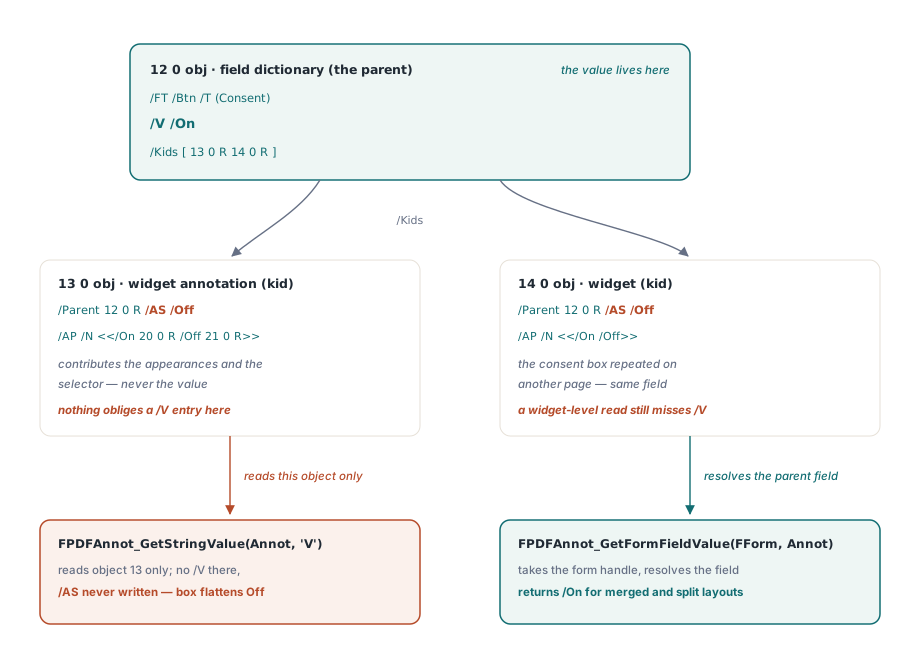
On the field dictionary, not on the widget. ISO 32000-1 §12.7.5.2 describes check boxes and radio buttons as button fields whose /V is a name object naming the current appearance state, and §12.7.3.1 places /V among the entries common to all field dictionaries. The widget annotation defined in §12.5.6.19 contributes /AS and /AP. Nothing in the specification obliges a widget to carry /V
// Wrong: reads the widget annotation dictionary directly
buflen := FPDFAnnot_GetStringValue(Annot, 'V', nil, 0);
// For most real forms buflen comes back as 2 (an empty UTF-16 string),
// so /AS is never written and the box flattens as Off

{ What the two objects look like when the field has several widgets:

  12 0 obj                          % field dictionary (the parent)
  << /FT /Btn  /T (Consent)  /V /On
     /Kids [ 13 0 R 14 0 R ] >>
  endobj

  13 0 obj                          % widget annotation (a kid)
  << /Type /Annot  /Subtype /Widget  /Parent 12 0 R
     /AS /Off
     /AP << /N << /On 20 0 R  /Off 21 0 R >> >> >>
  endobj }
FPDFAnnot_GetStringValue is not defective. Its contract is exactly what its name says: fetch a string entry from the annotation dictionary you handed it. Asking it for /V on object 13 returns nothing because object 13 genuinely has no /V. The defect was in the caller, which assumed a flat object model that ISO 32000-1 never promised
When do field and widget share one dictionary?
Whenever a field has exactly one widget. §12.5.6.19 permits the field dictionary and its single widget annotation to be merged into one object, and most authoring tools take that shortcut. In a merged object /FT, /T, /V, /AS, and /AP all sit side by side, so a widget-level read of /V succeeds and the whole bug stays invisible
The moment a field owns two or more widgets the merge is impossible, and §12.7.3.1 requires the widgets to become /Kids of a separate field dictionary. Every radio group is in this shape by construction. So are consent checkboxes repeated in a header and a footer, and any field an authoring tool has copied to a second page. That is the whole explanation for why the defect survived a regression suite: the test corpus was full of single-widget forms and the customer files were not. If you walk widgets yourself rather than relying on the component, the same asymmetry shows up in enumeration order, and the notes on PDF form field navigation with PDFium Component cover how a page-level annotation walk relates to the document-level field tree
Reading the value the way PDFium intends
FPDFAnnot_GetFormFieldValue is the correct API, and it had been bound in the component for some time without the checkbox path using it. It takes the form handle as well as the annotation, which is the signal that matters: with the form-fill environment available, PDFium resolves the annotation to its form control and reads the value from the field object, so it returns the right answer for merged and split layouts alike
FPDF_FORMFIELD_CHECKBOX, FPDF_FORMFIELD_RADIOBUTTON:
  begin
    // /AP is prebuilt per state; only /AS has to be synchronised with /V.
    // FPDFAnnot_GetFormFieldValue resolves the parent field dictionary,
    // which is where ISO 32000-1 12.7.5.2 keeps the value.
    buflen := FPDFAnnot_GetFormFieldValue(FFormHandle, Annot, nil, 0);
    if buflen >= 4 then
    begin
      SetLength(OrigVal, buflen div 2 - 1);
      FPDFAnnot_GetFormFieldValue(FFormHandle, Annot, PWideChar(OrigVal), buflen);
      FPDFAnnot_SetStringValue(Annot, 'AS', Pointer(OrigVal));
    end;
  end;
Two details in that snippet are easy to get wrong. The returned length is a byte count for UTF-16 text including the terminator, so the character count is buflen div 2 - 1 and a value of 2 means an empty string. The guard buflen >= 4 therefore means at least one real character, which is what keeps a field with no /V at all from having its /AS overwritten with an empty name
What /AS and /AP /N really agree on
They agree on a name, and the name is chosen by whoever produced the file. §12.7.5.2 requires the off state to be called /Off, and leaves the on state entirely to the producer. /Yes is a convention, not a rule. Acrobat writes /Yes, but plenty of generators write /On, /1, /Choice1, or a localised word, and a radio group normally gives every kid a distinct on-state name so the group can express which button is selected. This is precisely why copying /V verbatim into /AS is the right operation rather than a hack: for a checked control PDFium reports the on-state name that the file itself defines, and for an unchecked one it reports Off, so the value you write into /AS is guaranteed to be a key that exists in that widget /AP /N subdictionary. Hard-coding /Yes would work on Acrobat output and silently break everywhere else
Order of operations, and where it still needs care
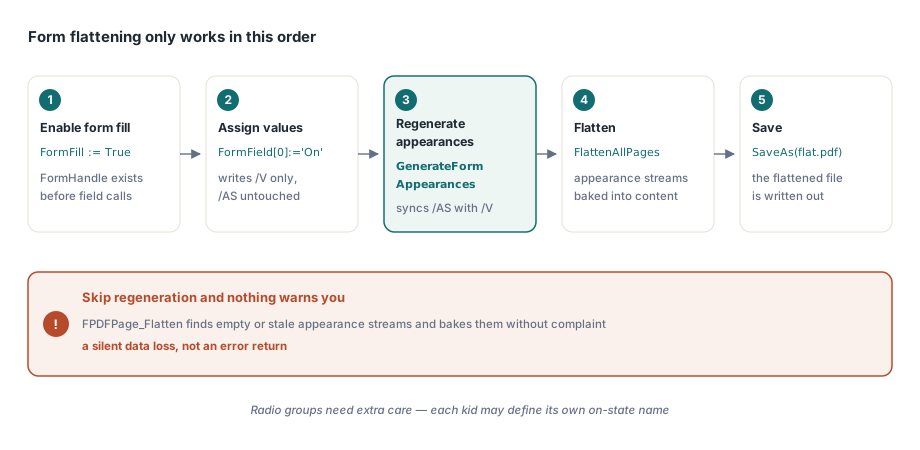
The sequence is fixed and unforgiving: enable form fill, assign values, regenerate appearances, flatten, then save. Skip the regeneration step and FPDFPage_Flatten finds empty or stale appearance streams and bakes them without complaint, which is a silent data loss rather than an error return
Pdf.FileName := FormPath;
Pdf.FormFill := True;          // required: FormHandle must exist
Pdf.Active := True;

Pdf.FormField[0] := 'On';      // writes /V only

Pdf.GenerateFormAppearances;   // syncs /AS for buttons, rebuilds /AP for text
if Pdf.FlattenAllPages(FLAT_PRINT) then
  Pdf.SaveAs('consent-flat.pdf');
Two honest limits remain. First, the sync writes the field value into the /AS of every widget of that field, which is correct for checkboxes but approximate for radio groups whose kids each define their own on-state name; a kid whose /AP /N has no entry matching the written /AS has no appearance to select under §12.5.5, so an unselected button can flatten to nothing instead of an empty circle. Auditing a radio group with FPDFAnnot_GetFormControlIndex before flattening is worth the few lines. Second, none of this applies to XFA, where the value lives in an XML data packet rather than the AcroForm dictionaries, a separation covered in the notes on XFA field edits that are not persisted. The general lesson is worth keeping past this one fix: whenever an API takes the form handle in addition to the annotation, it is telling you it will resolve the field hierarchy for you, and whenever it takes only the annotation it will read exactly the object you passed. That distinction also governs data exchange, since exporting and importing XFDF form data works in fully qualified field names, never in widget positions
Form flattening is one of those features that looks like a single API call and turns out to be a contract between three dictionaries. If you would rather work against a component that already encodes that contract, the PDFium Component for Delphi and C++Builder ships the appearance regeneration, flattening, and form field access described here as ordinary properties and methods