On a Windows machine set to German, Delphi's FloatToStr(70.5) returns 70,5. Drop that into an XFDF rect attribute, which is itself a comma-separated list of four numbers, and rect="70,5,540,200,560" now carries five values. A reader that takes the first four puts the annotation at x = 70, y = 5, and the document is still perfectly well-formed XML. XFDF, the XML form of FDF standardised as ISO 19444-1, fixes the full stop as its decimal separator, so code that writes or reads it has to step around the process locale in both directions
The decimal comma is only the most visible of the details that decide whether an XFDF exchange works. Field names have to match exactly, an empty <value/> means something different from a missing one, and a value written into a form field does not repaint the widget by itself. The sections below follow the data out of the PDF, back into it, and then look at what survives the trip
PDFium has no XFDF API, so where does the XML come from?
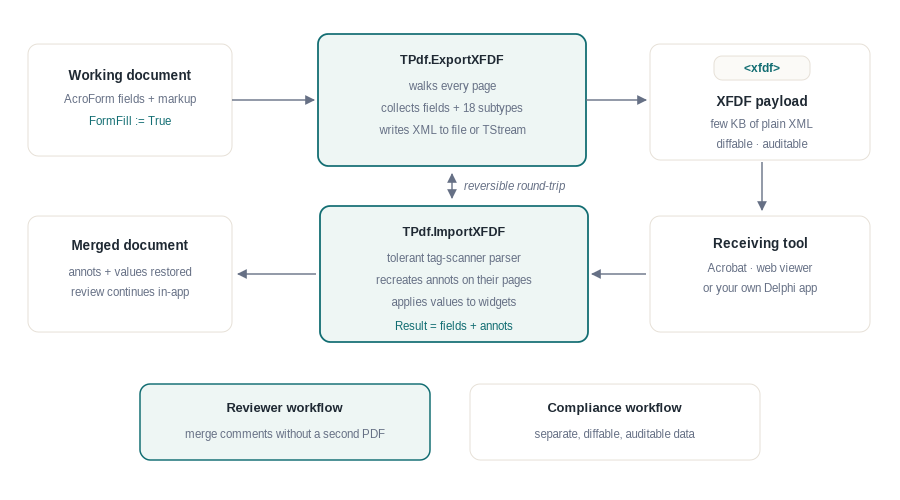
The PDFium Component writes and parses XFDF itself, in a dedicated Pascal unit (FPdfXfdf), because the PDFium C library has nothing to wrap: its public headers contain no XFDF or FDF functions at all. The unit sits on top of the component's own annotation and form-field model. The writer assembles the XML text directly and the reader is a hand-written tag scanner, so there is no dependency on Delphi's XMLDoc, MSXML or the FPC DOM units, and Delphi, C++Builder and Lazarus run the same code path
Three methods cover the whole job. TPdf.ExportXFDF takes a file name or a TStream and returns the number of UTF-8 bytes it wrote; ExportXFDFToStream is the explicit stream form of the same thing. TPdf.ImportXFDF takes a file name or a stream and merges the content into the loaded document. There is no per-page or per-field variant; one call handles the whole document
uses
  System.SysUtils, PDFium;

var
  Pdf: TPdf;
  Bytes: Integer;
begin
  Pdf := TPdf.Create(nil);
  try
    Pdf.FormFill := True;   // the default; field values are read through the form handle
    Pdf.FileName := 'expense-report.pdf';
    Pdf.Active := True;
    if not Pdf.Active then
      raise Exception.Create('expense-report.pdf could not be opened');
    Bytes := Pdf.ExportXFDF('expense-report.xfdf');
    Writeln(Format('%d bytes of XFDF written', [Bytes]));
  finally
    Pdf.Free;
  end;
end;
The Active check is there on purpose. Setting Active := True on a file that cannot be loaded (damaged, or encrypted without a password) leaves the component inactive instead of raising, and the export call would then fail on an inactive document with a less helpful message
Inside the fields and annots blocks
An exported file has at most two payload blocks under the <xfdf> root, preceded by an <f href> element naming the source PDF when the document was opened from a file. <fields> holds the AcroForm values and <annots> holds the markup. A small export looks like this:
<?xml version="1.0" encoding="UTF-8"?>
<xfdf xmlns="http://ns.adobe.com/xfdf/" xml:space="preserve">
  <f href="expense-report.pdf"/>
  <fields>
    <field name="employee">
      <field name="name">
        <value>Ana Lee</value>
      </field>
    </field>
  </fields>
  <annots>
    <text page="0" color="#FFF0B0" rect="50,630,170,600" title="Reviewer">
      <contents>Receipt for line 4 is missing</contents>
    </text>
  </annots>
</xfdf>
The nesting in <fields> comes straight from PDF field naming. ISO 32000-1 §12.7.3.2 builds a fully qualified name by joining partial names with full stops, so a field called employee.name is exported as a name element inside an employee element. Text, combo and list fields export their current value. A check box or radio button exports its export value when it is on and an empty value when it is off. Push buttons appear with no value, and signature fields are left out entirely, since a signature is a dictionary and has no text value to carry

The <annots> block takes 18 element types: text, link, freetext, line, square, circle, polygon, polyline, highlight, underline, squiggly, strikeout, stamp, caret, ink, fileattachment, sound and redact. Widget annotations stay out because their data already lives in <fields>, and popups are not top-level XFDF elements. Each element gets a zero-based page attribute, a rect, colours as #RRGGBB, annotation flags as the XFDF keyword list (print, hidden, readonly, locked and the rest), plus name, title, subject, date, creationdate, opacity and icon when the annotation has them. Text markup adds coords with eight numbers per quadrilateral, lines add start and end, polygons and polylines get a <vertices> child, and ink gets one <gesture> per stroke
Those values come from the same TPdfAnnotation record the Annotation[] property returns. Its XFDF-related members (Name, Subject, ModificationDate, CreationDate, Icon, Opacity, line endpoints, vertices, ink list) each pair with a Has* flag, and a member whose flag is unset is left out of the export. If you already build markup in code, as in the article on text markup annotations with quad points, those annotations export without any extra work. When the XFDF is bound for an HTTP response or a database column, the stream overload skips the temporary file:
var
  Buffer: TMemoryStream;
  Size: Integer;
begin
  Buffer := TMemoryStream.Create;
  try
    Size := Pdf.ExportXFDF(Buffer);   // UTF-8 bytes appended at the current position
    Buffer.Position := 0;
    // hand Buffer to the web response, blob field or archive entry here
    Writeln(Format('%d bytes ready to send', [Size]));
  finally
    Buffer.Free;
  end;
end;
How does ImportXFDF decide which field gets a value?
TPdf.ImportXFDF matches by fully qualified name, exactly and case-sensitively. The nested <field> tree is flattened back into dotted names, and each widget in the document whose field name appears in that list receives the value. Employee.Name in the XFDF will not fill employee.name in the PDF. When a value fails to appear, the case of hand-typed names in a script-generated XFDF is the first thing to check
- A
<field>with no<value>child leaves the PDF field as it is, while<value/>or<value></value>clears it. Generators that emit every field with an empty value wipe whatever the form already held - If the same qualified name appears twice, the first occurrence wins
- Leading and trailing spaces inside
<value>are kept, because in a text field they can be part of the data - The merge writes one string per field, so when a multi-select list box arrives with several
<value>elements, the last one is what ends up in the field
The value is written as /V on each matching widget. In PDF, though, the value and the picture of the value are separate things: the widget's appearance stream (ISO 32000-1 §12.5.5) and, for check boxes and radio buttons, its /AS state decide what a viewer draws and what gets printed. XFDF carries only the value. Viewers differ in whether they rebuild a stale appearance on open, so the safe sequence is to regenerate appearances in your own code before saving. The XfdfLab demo does exactly that, and it also refuses to overwrite the PDF it opened. Writing to a new file is the better habit here: if the XFDF turns out to come from the wrong form, the original is still on disk
procedure MergeAndSave(Pdf: TPdf; const XfdfFile, OutFile: string);
begin
  Pdf.ImportXFDF(XfdfFile);
  if Pdf.FormType = ftAcroForm then
    Pdf.GenerateFormAppearances;   // rebuild /AP and sync /AS with the new /V
  if not Pdf.SaveAs(OutFile) then
    raise Exception.CreateFmt('Could not save %s', [OutFile]);
end;
Leave FormFill at its default for this. With it off, there is no form handle, and GenerateFormAppearances returns without touching a single widget
Merging a reviewer's comments back into the PDF
The annotation half of the import is what closes a review loop. A colleague marks up a contract in another PDF viewer, exports the comments, and sends a few kilobytes of XML instead of a second copy of the document. ImportXFDF maps each element under <annots> to its annotation type and creates it on the page named by its page attribute. That attribute is zero-based, while TPdf.PageNumber starts at 1, so page="0" lands on PageNumber 1. Elements without a page, with a page beyond the end of the document, or without the rect that ISO 19444-1 requires are skipped, as are element names outside the 18 types listed earlier
The parser is lenient about everything around the data. It accepts a UTF-8 byte order mark, skips the XML declaration, processing instructions, DOCTYPE and comments, ignores namespace prefixes on element names, drops flag names it does not recognise, and resolves the five predefined entities plus decimal and hexadecimal character references. Malformed structure is a different story: an unterminated <value> or <contents>, an invalid character reference, input above 64 MB or field nesting deeper than 64 levels raises an exception, so wrap the call when the XFDF comes from outside your own code
The integer that ImportXFDF returns describes the input: the number of top-level <field> elements plus the number of annotation elements the parser read. Skipped annotations still count, and a nested field group counts once. To report what actually arrived, count annotations before and after:
// TotalAnnotations is a helper you add yourself; it is not part of TPdf
function TotalAnnotations(Pdf: TPdf): Integer;
var
  P: Integer;
begin
  Result := 0;
  for P := 1 to Pdf.PageCount do
  begin
    Pdf.PageNumber := P;               // AnnotationCount reads the current page
    Inc(Result, Pdf.AnnotationCount);
  end;
end;

var
  Before, Parsed: Integer;
begin
  Before := TotalAnnotations(Pdf);
  try
    Parsed := Pdf.ImportXFDF('review-comments.xfdf');
  except
    on E: Exception do
    begin
      Writeln('XFDF rejected: ' + E.Message);
      Exit;
    end;
  end;
  Writeln(Format('%d items in the file, %d new annotations in the document',
    [Parsed, TotalAnnotations(Pdf) - Before]));
end;
Once the comments are in, replies and status changes follow the approach in building an annotation review workflow with the PDFium Component. Imported field values take part in focus and tab order like any other value, as covered in form field navigation
Why does a decimal comma break XFDF coordinates?
Because every coordinate attribute in XFDF is a comma-separated list, and ISO 19444-1 requires the full stop as the decimal separator inside it. The component formats each number with FloatToStr, rewrites the locale's decimal separator to a full stop, and trims trailing zeros, so 540.50 becomes 540.5 and 200.0 becomes 200. An export from a de-DE machine therefore carries the same coordinate text as one from en-US
The reader does the reverse. Before converting, it turns the full stop into whatever separator the running process uses, so a French or German build reads 70.5 as 70.5, where a plain StrToFloat on the same system fails on the full stop. Field values are a separate matter. A <value>129,90</value> is text. It is copied into the field byte for byte, and the form's own format scripts decide whether a total field expects 129,90 or 129.90
What a round trip keeps, and what stays in the XFDF file
On import, each annotation is created with its rect, flags, contents, author (title), colour, interior colour, quadrilaterals from coords, name, subject, modification and creation dates, and icon. Dates travel as the PDF date strings stored in the annotation, unchanged. Opacity, line endpoints, polygon and polyline vertices and ink gestures are written on export and not applied on import. Popup state and the inreplyto thread link are read by the parser and not applied either, so each imported reply arrives as its own annotation

Appearance streams are outside XFDF altogether, whichever tool writes it. The receiving viewer draws each annotation from its properties, so highlights, squares and sticky notes look right everywhere, while a stamp with custom artwork shows whatever the target viewer draws for that stamp name. That shapes how XFDF fits an archive. For form data and text comments it is the right carrier: small, diffable, and easy to audit line by line. If the record has to reproduce freehand ink or polygon callouts exactly, archive the annotated PDF and keep the XFDF next to it as the searchable copy
For consumers that want binary FDF instead, TPdf.ExportFDF and TPdf.ImportFDF exchange field values only, through the same field tree and the same name matching, so every rule in the import section applies to them unchanged
The XfdfLab sample ships in the Delphi, C++Builder and Lazarus demo sets. The Delphi version opens any PDF, exports and imports XFDF from buttons and saves the merged result to a separate file, which makes it a quick way to try a third-party XFDF before writing code against it. Both calls are part of the PDFium Component for Delphi and Lazarus, next to the annotation and form APIs they are built on