In a viewer built on stock PDFium, a user who deletes page 4, drags a stamp annotation to a new spot and then presses Ctrl+Z gets neither change back. The only undo the engine exposes, FORM_Undo with its FORM_CanUndo check, operates on the form field that currently holds keyboard focus, so a text box remembers its own typing and the page tree, annotations, attachments and metadata have no history at all. Users expect the opposite: one undo stack for the whole document, and their work still there after the process dies
Where the engine's own undo stops
PDFium Component builds document-level undo, redo and crash recovery on top of that engine through an edit journal on TPdf. You open a transaction with BeginEditTransaction, make any number of ordinary edits, and close it with CommitEditTransaction. Each committed transaction becomes one journal entry that UndoEdit and RedoEdit can apply in either direction, and SaveRecoverySnapshot or EnableRecoveryAutosave writes the journal to disk so a later session can rebuild the work
The journal does not care which API made the change. Rotating a page through PageRotation, deleting one with DeletePage, appending one with AddPage, importing pages, editing annotations or rewriting metadata all land in the same entry, because the journal records what the document looks like at the transaction boundaries rather than which calls ran in between
How does a byte-level journal undo any edit?
The textbook design records semantic operations, such as "deleted page 4" or "moved annotation 7", and stores an inverse for each. That works for a small editor. Once the operation set grows, every new feature needs a hand-written inverse, and any inverse that is slightly off (an annotation that comes back with a different appearance stream, a page that returns without its structure-tree reference) corrupts the document a little more with each step down a long undo chain
The journal avoids inverses entirely. At BeginEditTransaction and again at commit it serializes the whole document, then stores only the difference: the length of the common prefix, the bytes removed from the old state and the bytes inserted in the new one, with the common suffix trimmed off. Because the record carries both the removed and the inserted bytes, the same entry replays forwards for redo and backwards for undo
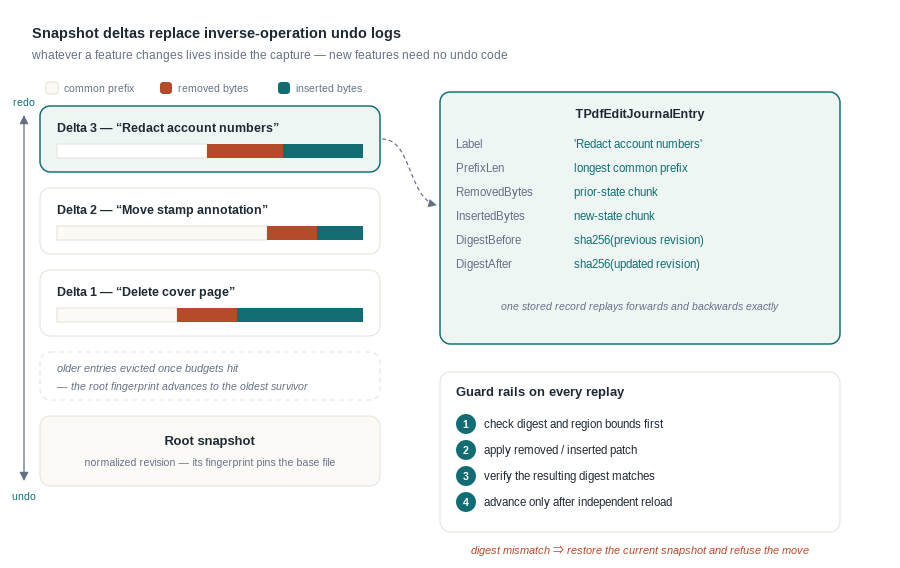
A plain full save cannot serve as that snapshot. PDFium's ordinary full save stamps non-deterministic values into the output, such as the file identifier and time fields, so saving an untouched document twice can produce two different byte streams. A diff between those two would report a change that never happened, and the digest recorded at commit would no longer match the document a moment later. The journal therefore runs every capture through the same normalisation that reproducible PDF output uses, which is why an empty transaction compares byte-for-byte equal and CommitEditTransaction returns False without creating an entry
Every entry also stores the SHA-256 digest of the document before and after the change. Undo and redo check the current digest and the exact region they are about to replace before touching anything, apply the patch, and check the resulting digest. The target PDF is then loaded into a separate TPdf instance first; only when that load succeeds does it replace the live document and the journal position move. If the swap fails, the previous snapshot is loaded back, so a failed undo leaves the user on the state they were looking at
Transactions, labels and a commit that can raise
The label passed to BeginEditTransaction is what the undo menu shows. GetEditJournalInfo returns UndoLabelText and RedoLabelText for the entries on either side of the current position, along with EntryCount, Position and StoredBytes, so the menu never has to keep a parallel list. Note the shape of the error handling below: the edit sits inside the try, the commit sits after it
uses
  SysUtils, PDFium;

procedure DeleteCoverPage(Pdf: TPdf);
begin
  Pdf.BeginEditTransaction('Delete cover page');
  try
    Pdf.DeletePage(1);
  except
    // The edit itself failed: put the pre-transaction document back
    Pdf.RollbackEditTransaction;
    raise;
  end;
  // Outside the try on purpose. If the commit raises, the transaction is
  // already closed (and, unless only the autosave write failed, the
  // baseline is back), so a second RollbackEditTransaction would only
  // raise "No edit transaction is active"
  if not Pdf.CommitEditTransaction then
    Writeln('Nothing changed, no undo entry created');
end;

procedure OpenForEditing(Pdf: TPdf; const FileName: string);
var
  Options: TPdfEditJournalOptions;
begin
  Pdf.FileName := FileName;
  Pdf.Active := True;
  Options := TPdfEditJournalOptions.Default;  // 256 entries, 256 MB of deltas,
  Options.MaxEntries := 50;                   // 1 GB per snapshot
  Pdf.ConfigureEditJournal(Options);
end;

procedure RefreshUndoMenu(Pdf: TPdf);
var
  Info: TPdfEditJournalInfo;
begin
  Info := Pdf.GetEditJournalInfo;
  UndoItem.Enabled := Info.CanUndo;     // UndoItem/RedoItem: your own menu items
  RedoItem.Enabled := Info.CanRedo;
  UndoItem.Caption := 'Undo ' + Info.UndoLabelText;
  RedoItem.Caption := 'Redo ' + Info.RedoLabelText;
end;
CommitEditTransaction has three outcomes. It returns True when the document changed and an entry was added, False when the before and after snapshots are identical, and it raises EPdfError when capture fails, the delta exceeds MaxStoredBytes or the entry cannot be built. In that last case the baseline captured at BeginEditTransaction is reloaded and the transaction is closed before the exception leaves the method, so the journal never holds a half-written entry
Committing a new entry while the position sits below the top of the stack discards the redo branch, the same rule every text editor follows. While a transaction is open, EditCanUndo and EditCanRedo both return False, which keeps a keyboard shortcut from firing in the middle of a multi-step edit
Edits the journal never saw
The digest checks have a consequence that surprises people the first time. Suppose an editor commits two transactions, then a background routine sets PageRotation on some page without opening a transaction. The document now differs from the state the journal last recorded. The next UndoEdit raises EPdfError with "The document no longer matches the edit journal" before changing a byte, and the next BeginEditTransaction notices the same mismatch and starts a fresh history from the current state
That is deliberate. A byte patch applied to bytes it was not computed against produces garbage, and refusing is the only behaviour that keeps the file intact. The practical rule follows directly: every mutation that should stay undoable goes through a document transaction, including small housekeeping ones. BeginPageObjectEditTransaction is a separate rollback scope for one page's object edits; it writes no journal entry and cannot be nested with a document transaction in either direction, so committing one also counts as a change the journal did not record
Closing the document resets the journal. Setting Active to False clears the history and switches off recovery autosave, which matches what a user expects when they close a file and open another
What happens when the journal fills up?
TPdfEditJournalOptions bounds three things: the number of entries (MaxEntries), the total bytes held by all deltas (MaxStoredBytes) and the size of any single normalised snapshot (MaxSnapshotBytes). A snapshot over the last limit is refused at BeginEditTransaction. When a commit pushes the journal past either of the first two, the oldest entry is dropped and the root fingerprint advances to the state that entry produced
Delta size depends on where the change lands, since only one contiguous region between the common prefix and suffix is stored. For a file that keeps its cross-reference table at the end, an edit that lengthens an object near the start shifts every later offset, so the common suffix shrinks to almost nothing and the entry holds most of the file twice, once as removed bytes and once as inserted bytes. For a hypothetical 40 MB scan with that layout, each such entry comes to roughly 80 MB, and the default 256 MB budget keeps about three of them. Size MaxStoredBytes against the documents your users actually open, not against the entry count
Eviction matters most for recovery. A journal can only be replayed onto a document whose normalised fingerprint matches its root, and after the first eviction that root is no longer the file on disk. Watching RootFingerprint tells you when that happens:
var
  BaseFingerprint: string;   // fingerprint of the file as loaded

procedure CommitWithRecovery(Pdf: TPdf);
var
  Before: string;
  Info: TPdfEditJournalInfo;
begin
  // Called after BeginEditTransaction and the edit itself
  Before := Pdf.GetEditJournalInfo.CurrentFingerprint;
  try
    Pdf.CommitEditTransaction;
  except
    on E: Exception do    // a failed disk write raises an OS or stream error
      if Pdf.GetEditJournalInfo.CurrentFingerprint = Before then
        raise    // the commit failed; the document is back at its baseline
      else
        // The entry landed, only the autosave write failed.
        // ReportAutosaveFailure is your own routine, not part of the library
        ReportAutosaveFailure(E.Message);
  end;

  Info := Pdf.GetEditJournalInfo;
  if BaseFingerprint = '' then
    BaseFingerprint := Info.RootFingerprint
  else if Info.RootFingerprint <> BaseFingerprint then
    // Oldest entry evicted: the recovery file no longer applies to the
    // original PDF. Prompt the user to save, or raise the limits
    WarnRecoveryDetached;  // also your own routine
end;
The fingerprint comparison in the except branch separates the two ways a commit can raise once autosave is on. A failed commit leaves the journal untouched, so CurrentFingerprint is unchanged. A successful commit followed by a failed disk write has already moved CurrentFingerprint to the new state; the document and the journal are valid, and only the file on disk is stale
Crash recovery from the original file
A recovery package holds the source file name, the SHA-256 fingerprints of the source and recovered states, and the journal. It does not embed the source PDF. That keeps the package roughly the size of the stored deltas, which is what makes rewriting it after every commit affordable, and it means recovery needs the original file loaded first
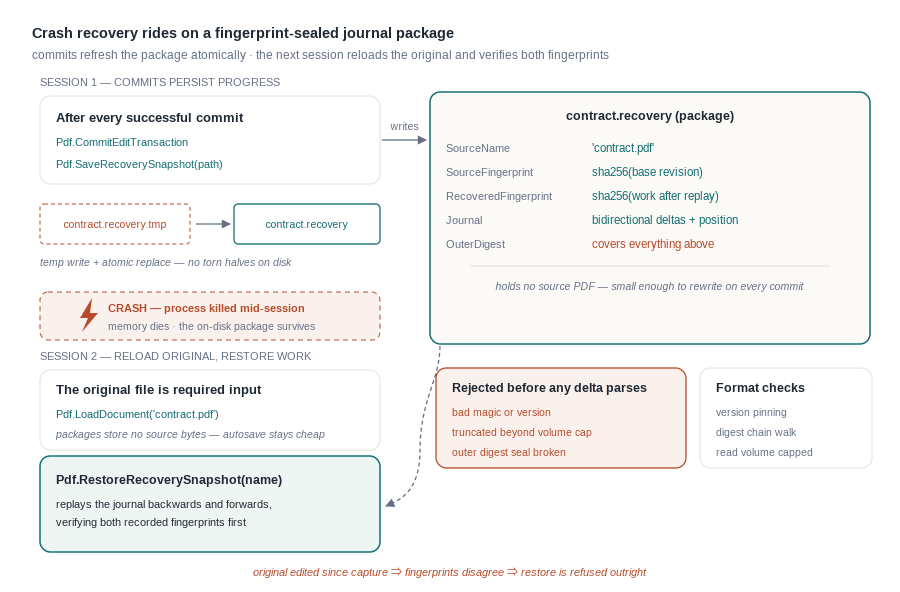
EnableRecoveryAutosave takes a path and refreshes the package after every commit that changed something, every undo and every redo. A timer-based autosave guarantees that whatever happened after the last tick is lost; commit-driven saves lose at most the transaction in progress, so wire autosave to commits and leave timers out of it. The path cannot be the source PDF itself; both EnableRecoveryAutosave and SaveRecoverySnapshot refuse that. Writes go to a temporary file beside the target and then replace it in one step, so a crash during the write leaves the previous package intact
const
  SourcePdf    = 'C:\Contracts\contract.pdf';
  RecoveryFile = 'C:\Contracts\contract.recovery';

// Session 1: turn on autosave right after loading
procedure StartEditing(Pdf: TPdf);
begin
  Pdf.FileName := SourcePdf;
  Pdf.Active := True;
  Pdf.EnableRecoveryAutosave(RecoveryFile);
end;

// Session 2, at startup: inspect the package before loading anything
procedure OfferRecovery(Pdf: TPdf);
var
  Rec: TPdfRecoverySnapshotInfo;
begin
  if not FileExists(RecoveryFile) then
    Exit;
  Rec := Pdf.InspectRecoverySnapshot(RecoveryFile);
  if MessageDlg(Format('Recover %d edit(s) to %s?',
       [Rec.Position, Rec.SourceName]),
       mtConfirmation, [mbYes, mbNo], 0) <> mrYes then
    Exit;
  Pdf.FileName := SourcePdf;
  Pdf.Active := True;
  try
    Pdf.RestoreRecoverySnapshot(RecoveryFile);
    Pdf.EnableRecoveryAutosave(RecoveryFile);
  except
    on E: EPdfError do
      // The original changed since the package was written, or the
      // package is damaged; a changed original is refused before any
      // edit is replayed
      ShowMessage('Recovery refused: ' + E.Message);
  end;
end;
InspectRecoverySnapshot reads and verifies the package without a loaded document and returns SourceName, both fingerprints, EntryCount, Position and StoredBytes. SourceName is the file name only, without its folder, so the application has to know where the original lives. An outer SHA-256 digest covers the header, name and journal, and the package is rejected on a bad signature, wrong version, size mismatch or broken digest before any delta is parsed; total read volume is capped at MaxStoredBytes plus a fixed overhead
RestoreRecoverySnapshot then replays the journal onto the loaded file, checking every entry's digests on the way, and compares the result against both fingerprints in the package. An original that was edited or swapped for a different version since the package was written fails that comparison. Deleting the package is the application's job: once the user saves the document, call DisableRecoveryAutosave and remove the file, or the next start will offer to recover work that is already saved. For a lower-level hand-off, ExportEditJournal and ImportEditJournal move the bare journal through any TStream with the same validation
Signed documents need an explicit opt-in
A transaction snapshot is a new normalised revision of the file, so committing on a signed PDF breaks the byte ranges every existing signature covers. BeginEditTransaction therefore raises EPdfError when SignatureCount is above zero unless the caller passes True for its second parameter, AllowSignedDocument, and ImportEditJournal and RestoreRecoverySnapshot carry the same parameter with the same default
Workflows that edit a signed document and re-sign it afterwards set the flag on purpose. Everyone else gets an exception at the moment a user tries to edit, which is far easier to explain than a contract whose signature quietly turned invalid. Checking signature state before and after such an edit is covered in inspecting PDF digital signatures and PAdES levels, and writing the finished result back to an encrypted file is covered in encrypted PDF incremental updates
The journal, recovery packages and the page, annotation and metadata editing calls they wrap all come with PDFium Component for Delphi, C++Builder and Lazarus; the PDFium Component product page lists the editions and the full editing API