HotXLS writes XLSX pivot table definitions whose pivotField and cacheField elements validate against the ECMA-376 Part 1 §18.10 schema: axis attributes use the ST_Axis tokens axisRow, axisCol and axisPage, value-area fields carry dataField="1", item lists are never empty, and cache fields store a numeric numFmtId. Since v2.384.33 the reader also honours the schema defaults it used to get wrong
The bugs behind this cleanup share an unflattering trait: none of them ever failed a test. HotXLS wrote a pivot, HotXLS read it back, every field landed on the right axis, and the round-trip suite stayed green for years. The problem was that the writer and the reader had quietly agreed on a private dialect. A pivot built from Delphi looked fine to the component that made it, while a check against CT_PivotField and CT_CacheField turned up invalid enumeration tokens, an empty element the schema forbids and flags Excel expects but never got. If you generate pivots on a server and ship them to people who open them in Excel or feed them to their own parsers, the only contract that counts is the schema, not whatever your own reader happens to forgive
Why did HotXLS round trips never catch the wrong axis tokens?
HotXLS round trips never caught the wrong axis tokens because the reader accepted both spellings. The old XlsxPivotAxisAttr emitted axis="rowAxis", colAxis and pageAxis, which read naturally in English but do not exist in the schema; ST_Axis defines exactly four values, axisRow, axisCol, axisPage and axisValues. Meanwhile PivotAxisFromToken in lxPivotXml.pas matched both the schema token and the invented one, so every self-test passed. The writer now emits only the schema tokens, and the reader keeps accepting the old spellings so that files saved by earlier HotXLS versions still load with their layout intact
<!-- before v2.384.33: invalid ST_Axis value, empty CT_Items -->
<pivotField axis="rowAxis" defaultSubtotal="1"><items count="0"></items></pivotField>

<!-- since v2.384.33 -->
<pivotField axis="axisRow" defaultSubtotal="1">
  <items count="4"><item x="0"/><item x="1"/><item x="2" h="1"/><item t="default"/></items>
</pivotField>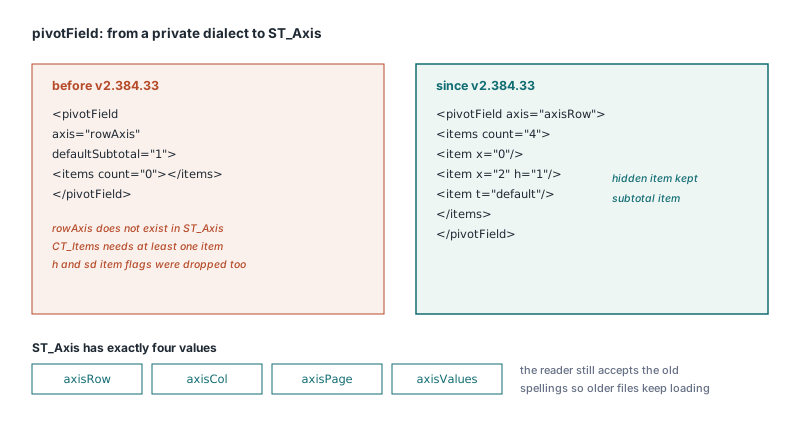
What does CT_PivotField require that the old writer skipped?
CT_PivotField requires three things the old BuildPivotTableXml left out or got wrong. First, a field aggregated in the values area must say so on its own definition with dataField="1"; the writer now sets that flag on every field referenced by an entry in DataFields, not only in the <dataFields> list. Second, CT_Items needs at least one item, so an item-less field no longer gets an empty <items count="0"> and the whole element is simply omitted. Third, each item keeps its state: h="1" for a hidden item (TXLSPivotItem.IsHidden) and sd="0" for collapsed details (IsDetailHidden), both of which the old writer dropped on every save
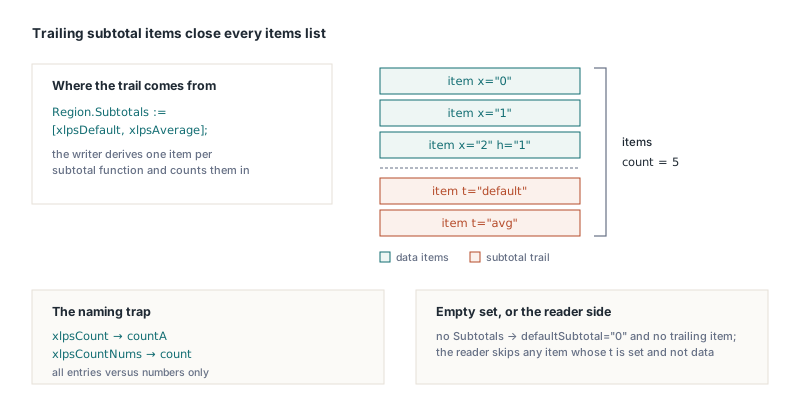
The subtle part is the trailing subtotal items. When a field has items, Excel lists one extra item per subtotal function after the data items, typed with ST_ItemType: <item t="default"/> for the automatic subtotal, then sum, countA, avg, max, min, product, count, stdDev, stdDevP, var and varP for explicit ones. HotXLS derives those entries from TXLSPivotField.Subtotals at save time and counts them into items count. Fields created by AddPivotTable start with an empty Subtotals set, which writes defaultSubtotal="0" and no trailing item, so ask for subtotals explicitly when the report needs them. Note the naming trap: xlpsCount maps to countA (all entries) and xlpsCountNums maps to count (numbers only)
uses
  lxHandleX, lxPivot;

var
  Book  : TXLSXWorkbook;
  Sheet : TXLSXWorksheet;
  Pivot : TXLSPivotTable;
  Region: TXLSPivotField;
begin
  Book := TXLSXWorkbook.Create;
  try
    Book.Open('orders.xlsx');
    Sheet := Book.Sheets[1];                  // 1-based, like the XLS engine
    Pivot := Sheet.AddPivotTable('Data!$A$1:$D$800', 3, 6, 'RegionTotals');
    if Pivot = nil then
      raise Exception.Create('Bad source range or anchor');

    Region := Pivot.AddRowField('Region');    // nil if no such field
    if Region <> nil then
      Region.Subtotals := [xlpsDefault, xlpsAverage];  // -> t="default", t="avg"
    Pivot.AddColumnField('Quarter');
    Pivot.AddDataFieldByName('Revenue', xlpaSum);      // flags Revenue dataField="1"

    Book.SaveAs('orders-pivot.xlsx');
  finally
    Book.Free;
  end;
end;
How does HotXLS read subtotal items and schema defaults now?
The HotXLS reader now skips any item whose t attribute is present and not data, because subtotal, grand-total and blank entries carry no cache index. Before v2.384.34 those entries were loaded as ordinary items with CacheItemIndex set to -1, so an Excel-made pivot came back with phantom members that pointed nowhere, and any code walking Items had to filter them out by hand. Since the writer rebuilds the trailing entries from Subtotals, the reader's job is to translate them into that set, not to keep them as data
The second reader fix is about attributes that are absent. In the schema, defaultSubtotal on CT_PivotField and containsString on CT_SharedItems both default to true, and Excel omits them when they hold that default. HotXLS used to read a missing attribute as false, which meant every pivot saved by Excel silently lost its default subtotal on load, and a plain text cache field was classified as mixed instead of string. This is the mirror image of the axis bug: a writer that always spells out every attribute never exercises the default path, so only files from another producer expose it
Why was numFmtId="General" invalid on cache fields?
The value numFmtId="General" was invalid because ST_NumFmtId is an unsigned integer, not a format name. The old cache writer hard-coded that string on every cacheField, borrowing the name users see in the Format Cells dialog. HotXLS now writes the cache field's NumberFormat as a number, which is 0 (the built-in General format) unless something set it. A strict parser that types attributes from the schema rejects the old value outright, and that is exactly the class of failure that turns into a repair dialog; the article on the OPC and markup rules behind the Excel repair prompt covers how those dialogs are triggered
Why were pivot tables below row 65535 cut off?
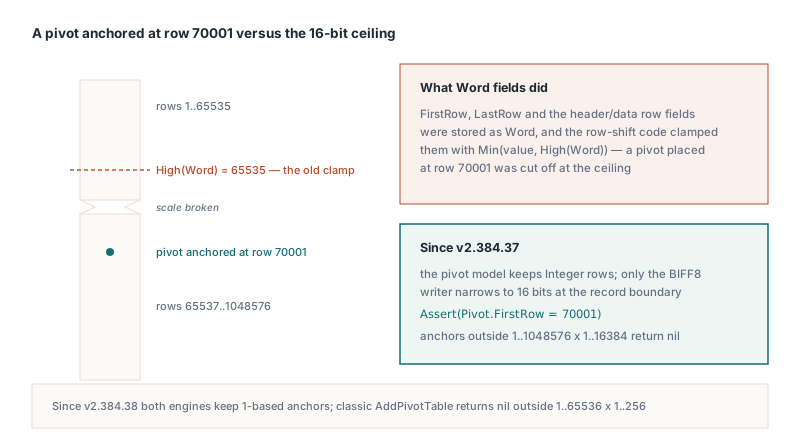
XLSX pivot tables placed at or below row 65536 were cut off because the shared pivot model stored FirstRow, LastRow, FirstHeaderRow, FirstDataRow and the column counterparts as Word, and the row-shift code clamped them with Min(.., High(Word)). That is a leftover of the BIFF8 SxView record, where 16 bits are enough, but an XLSX sheet runs to 1,048,576 rows. Since v2.384.37 those properties on TXLSPivotTable are Integer, the clamps are gone, and only the BIFF8 writer narrows the values. TXLSXWorksheet.AddPivotTable and AddPivotTableCopy now return nil for an anchor outside 1..1048576 by 1..16384, or for a copy whose extent would run off the grid
var
  Pivot: TXLSPivotTable;
  Check: TXLSXWorkbook;
begin
  // Row 70001 used to wrap into the 16-bit range; now it survives save and load
  Pivot := Sheet.AddPivotTable('Data!$A$1:$D$800', 70001, 1, 'LateTotals');
  if Pivot = nil then
    Exit;  // anchor outside the sheet or unresolvable source range
  Pivot.AddRowField('Region');
  Pivot.AddDataFieldByName('Revenue', xlpaSum);
  Book.SaveAs('late.xlsx');

  Check := TXLSXWorkbook.Create;
  try
    Check.Open('late.xlsx');
    Pivot := Check.Sheets[1].PivotTables.FindByName('LateTotals');
    Assert((Pivot <> nil) and (Pivot.FirstRow = 70001));
  finally
    Check.Free;
  end;
end;
The classic XLS engine got the matching fix in v2.384.38. Its model used to store the raw 0-based SxView and DConRef values and passed AddPivotTable anchors straight through, while the documentation, the demos and the XLSX engine all used 1-based cells like Cells[Row, Col]. Both engines now keep 1-based positions in the model, the BIFF8 reader adds 1 and the writer subtracts 1 at the record boundary, so code that anchored at (0, 0) must move to (1, 1), because the classic AddPivotTable now returns nil for an anchor outside 1..65536 by 1..256; the new call writes the same bytes as the old one. The record layout itself is unchanged and is described in the BIFF8 SX records behind classic .xls pivot tables
Validate against the schema, not your own reader
The lesson generalises beyond pivots: a lenient reader hides writer violations, so a round trip through your own code proves consistency, not correctness. Every bug here survived because the tolerant side and the faulty side lived in the same library. The checks that actually catch this class of defect are a schema validation of the generated parts, files produced by Excel fed through your reader with attributes omitted at their defaults, and fixtures that pin the exact token rather than the parsed result. Pivots you build through the API, including the calculated fields, calculated items and percent-of-total layouts shown in building and refreshing XLSX pivot tables with calculated fields, get the corrected XML with no code change, while pivots loaded from Excel files keep replaying their original parts until you modify them
All of these fixes ship in the current HotXLS Delphi spreadsheet component, which reads and writes XLS, XLSX and pivot tables from Delphi and C++Builder without Excel or COM automation on the machine