Excel shows "We found a problem with some content" on an XLSX that LibreOffice and every homegrown reader open without complaint because Excel enforces two things those readers ignore: schema-required attributes and the uniqueness rules of the Open Packaging Conventions. HotXLS, the native Excel spreadsheet component for Delphi and C++Builder, hit exactly that in v2.382.5 the first time its output went through a real Excel COM instance, and the three causes were a <phoneticPr> without fontId, a duplicated Override in [Content_Types].xml, and two root relationships sharing rId4
Why does Excel reject a package that every other reader accepts?
Because the repair prompt is a schema and package validator, not a parser failure. The HotXLS corpus had been round-tripping a 4805-formula loan template through the library, through LibreOffice, and through the XML validators in the test suite for weeks. The saved file was structurally sound in the OPC sense used in the article on XLSX OPC relationship resolution: every part reachable, every target resolvable. Then a Windows box with Excel 16.0 build 20326 became available, the corpus runner opened the saved template through Workbooks.Open in an isolated COM instance with DisplayAlerts off, and the call failed outright. Interactively the same file produces the familiar dialog offering to repair, and the repair log, when Excel bothers to write one, names the part but not the rule. Three independent defects were hiding in that one prompt, and Excel does not report them one at a time; it rejects the workbook and leaves you to find and analyse them. What follows is each rule, the line of HotXLS that violated it, and the fix that shipped, because every one of them is a rule any Delphi XLSX writer can trip over
Rule 1: phoneticPr fontId is required, even when it is zero
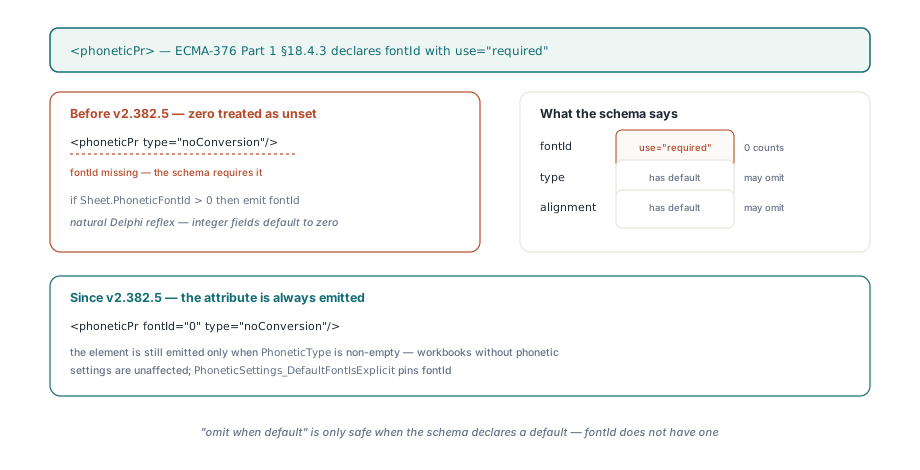
The <phoneticPr> element carries a fontId attribute declared use="required" in ECMA-376 Part 1 §18.4.3, and a value of 0 is a legal font index, not an absence. The old HotXLS worksheet writer treated zero as "unset" and only emitted the attribute when Sheet.PhoneticFontId > 0. That is a natural Delphi reflex, since integer fields default to zero, but it produces <phoneticPr type="noConversion"/> for any workbook whose phonetic font happens to be the first font in styles.xml, which is exactly what the loan template in the HotXLS corpus carried. Excel then rejects on the way back in a value it had written itself
// lxHandleX.pas, worksheet writer — before v2.382.5
phoneticXml:= '<phoneticPr';
if Sheet.PhoneticFontId > 0 then
  phoneticXml:= phoneticXml+ ' fontId="'+ IntToStr(Sheet.PhoneticFontId)+ '"';

// v2.382.5 — the attribute is required, zero included
phoneticXml:= '<phoneticPr fontId="'+ IntToStr(Sheet.PhoneticFontId)+ '"';
phoneticXml:= phoneticXml+ ' type="'+ XlsxEscapeAttr(Sheet.PhoneticType)+ '"';
if Sheet.PhoneticAlignment<> '' then
  phoneticXml:= phoneticXml+ ' alignment="'+ XlsxEscapeAttr(Sheet.PhoneticAlignment)+ '"';
HotXLS still emits the element only when TXLSXWorksheet.PhoneticType is non-empty, so workbooks that never carried phonetic settings are unaffected. The regression test PhoneticSettings_DefaultFontIsExplicit sets PhoneticFontId to zero on a fresh sheet, saves, and asserts that <phoneticPr fontId="0" is present in xl/worksheets/sheet1.xml. The wider lesson is that "omit when default" is only safe when the schema declares a default; type and alignment have defaults in that element, fontId does not
Rule 2: one Override per part name in [Content_Types].xml
The content types stream may declare each part name at most once, and Excel treats a second Override for the same PartName as corruption even when both entries carry the same ContentType. HotXLS has two writers feeding that stream. BuildContentTypesXml declares every part the object model generates: workbook, styles, shared strings, theme, worksheets, and, when TXLSXWorkbook.CustomProperties.Count > 0, /docProps/custom.xml. When PreserveUnsupportedParts is on, TXLSXOpaquePackage then appends an Override for every part it captured verbatim from the source package so those bytes stay declared on the way out. The collision is a part that lives on both sides. Custom document properties are parsed into the model, but the source package's docProps/custom.xml was also captured opaquely, so the merged stream declared it twice, and chart and pivot cache parts can land in the same spot when the model regenerates a part the opaque layer also retained. Before v2.382.5, ContentTypeOverridesXml had no view of what the model had already written, so it could not know
![How two HotXLS writers collided in [Content_Types].xml: BuildContentTypesXml declared docProps/custom.xml from the object model while TXLSXOpaquePackage appended an Override for the same part captured verbatim, and since v2.382.5 the opaque layer parses the generated stream first, normalises names with OpcLowerPartName and lets the model win every collision](../../assets/media/HotXLS-ContentTypes-Override-Dedupe.svg)
<!-- What Excel saw before v2.382.5 -->
<Override PartName="/docProps/custom.xml"
    ContentType="application/vnd.openxmlformats-officedocument.custom-properties+xml"/>
...
<Override PartName="/docProps/custom.xml"
    ContentType="application/vnd.openxmlformats-officedocument.custom-properties+xml"/>
The fix passes the generated XML into ContentTypeOverridesXml and lets the opaque writer parse it before it emits anything. Two details carry the correctness. OpcLowerPartName lowercases, flips backslashes to forward slashes, and strips leading slashes before comparison, because OPC part names are compared case-insensitively and the model writes them with a leading slash while the opaque layer stores ZIP item names without one. And the caller in BuildContentTypesXml passes Result + '</Types>', closing the partially built document so TXMLReader sees well-formed input rather than a truncated stream. The rule that emerges is first-wins with the model in front: whatever the object model declares is authoritative, and the opaque replay only fills gaps
// lxOpcPackage.pas — TXLSXOpaquePackage.ContentTypeOverridesXml
function TXLSXOpaquePackage.ContentTypeOverridesXml(const ExistingXml: WideString): WideString;
begin
  ...
  UsedNames.Sorted:= True;
  UsedNames.Duplicates:= dupIgnore;
  if ExistingXml<> '' then
    // Parse the model-generated stream and collect every declared PartName.
    while Reader.Read do
      if (Reader.NodeType= xmlntElement)and (Reader.Name= 'Override') then
      begin
        Index:= Reader.AttributeIndex('PartName');
        if Index>= 0 then
          UsedNames.Add(String(OpcLowerPartName(Reader.Attribute[Index].Value)));
      end;
  for i:= 0 to FParts.Count- 1 do
  begin
    Part:= TXLSXOpaquePart(FParts[i]);
    if (Part.ContentType= '')or (LowerCase(ExtractFileExt(String(Part.PartName)))= '.rels')or
      (UsedNames.IndexOf(String(OpcLowerPartName(Part.PartName)))>= 0) then
      Continue;                       // already declared, or a rels part
    UsedNames.Add(String(OpcLowerPartName(Part.PartName)));
    Result:= Result+ '<Override PartName="/'+ OpcXmlEscapeAttribute(Part.PartName)+
      '" ContentType="'+ OpcXmlEscapeAttribute(Part.ContentType)+ '"/>';
  end;
end;
Rule 3: relationship Ids are unique within a relationships part
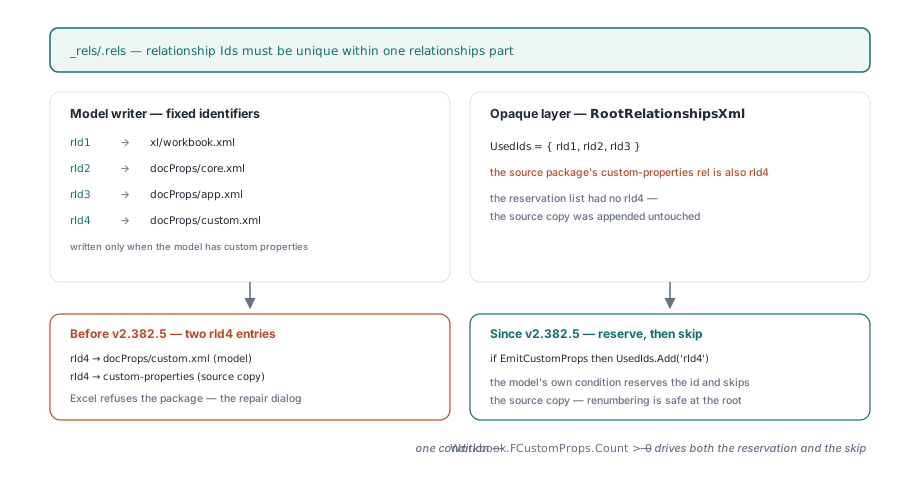
Every Relationship in a .rels part needs an Id that is unique within that part, and Excel refuses the package when two share one. HotXLS writes the package-level _rels/.rels with fixed identifiers: rId1 for the workbook, rId2 and rId3 for core and extended document properties, and rId4 for custom properties when the model has any. The opaque package then appends whatever root relationships it retained from the source, renumbering any identifier already in a UsedIds list. The list knew about rId1 through rId3. It did not know about rId4, and it did not know that the model was about to emit its own custom-properties relationship, so a source package whose custom-properties relationship was also rId4, which is what Excel writes by default, came out with two rId4 entries pointing at the same target. The caller, BuildRootRelsXml, now passes Workbook.FCustomProps.Count > 0 as the second argument, so the reservation and the skip are driven by the same condition that decides whether the model emits rId4 at all. Renumbering is safe at the package root because nothing inside the workbook references root relationship identifiers by name; the same trick would be wrong one level down, where r:id attributes in workbook.xml bind to identifiers in the workbook relationships part, which is why MergeWorkbookRelationshipsXml keeps a separate identifier map
// lxOpcPackage.pas — TXLSXOpaquePackage.RootRelationshipsXml
UsedIds.CaseSensitive:= False;
UsedIds.Add('rId1');
if EmitCustomProps then UsedIds.Add('rId4');   // reserved by the model writer
if EmitDocProps then
begin
  UsedIds.Add('rId2');
  UsedIds.Add('rId3');
end;
for i:= 0 to FRootRelationships.Count- 1 do
begin
  Rel:= TXLSXOpaqueRelationship(FRootRelationships[i]);
  // The model owns custom properties now; do not replay the source copy.
  if EmitCustomProps and OpcEndsWith(LowerCase(Rel.RelType), '/custom-properties') then
    Continue;
  Id:= Rel.Id;
  if (Id= '')or (UsedIds.IndexOf(String(Id))>= 0) then
    Id:= AllocateRelationshipId(UsedIds);      // lowest free rIdN
  UsedIds.Add(String(Id));
  ...
end;
What do the three failures have in common?
All three are symptoms of a writer with two sources and no single owner of the package invariants. The object model generates parts it understands; the opaque layer replays parts it does not, so that a round trip keeps charts, pivot caches, custom XML, and everything else described in the notes on lossless round-trip of theme, extLst, and calcChain. Each side was individually consistent. The constraints OPC puts on the whole package, unique Override part names and unique relationship identifiers per part, only exist at the seam where the two are concatenated, and until v2.382.5 nobody checked the seam. The fontId bug is the same shape one level down: the writer knew what it wanted to omit but never consulted the schema that says it may not. The fix HotXLS settled on is a fixed precedence rather than a merge heuristic. The model writes first, the opaque layer sees what was written and yields on any collision, and the corpus runner now enforces the invariants from the outside with verify_opc_uniqueness, which reads [Content_Types].xml and every .rels item in a saved package and fails the case on any duplicate PartName, Extension, or Id. That check is cheap, needs no Excel, and would have caught two of the three defects on the first corpus run
Same batch: print areas that are formulas, not ranges
The Excel pass also flagged the loan template's _xlnm.Print_Area, which Excel reported as $A$1:$J$29 on the original and had to report identically on the saved copy. Two separate bugs sat behind that one assertion. On import, XlsxStripSheetPrefix cut everything up to the first unquoted !, so a dynamic print area such as OFFSET('Print Data'!$A$1,0,0,2,2) came back as $A$1,0,0,2,2), and a qualified union such as 'Print Data'!$A$1:$B$2,'Print Data'!$D$1:$E$2 lost the prefix on its first segment only. On export, the writer prepended the sheet name once to the whole stored PrintArea, so a plain union $A$1:$B$2,$D$1:$E$2 left the library with a qualified first segment and a bare second one, which Excel does not accept as a _xlnm.Print_Area definition under ECMA-376 Part 1 §18.2.5
// Import: only strip the prefix when what remains is a plain sqref
function XlsxPrintAreaFromDefinition(const Formula: WideString): WideString;
begin
  Result:= Formula;
  if not XlsxReadFormulaSheetPrefixAt(Formula, 1, Prefix, SheetPart, Start) then
    Exit;
  Area:= Copy(Formula, Start, Length(Formula));
  if XlsxParseSqrefPart(Area, R1, C1, R2, C2) then
    Result:= Area;                    // 'Sheet'!$A$1:$J$29 -> $A$1:$J$29
end;                                  // OFFSET(...) is returned untouched

// Export: qualify every comma-separated segment, or none of them
function XlsxPrintAreaDefinition(const SheetName, Area: WideString): WideString;
begin
  Result:= Area;
  ... split Area on ',' with StrictDelimiter ...
  for I:= 0 to Parts.Count- 1 do
    if not XlsxParseSqrefPart(WideString(Trim(Parts[I])), R1, C1, R2, C2) then
      Exit;                           // a formula: emit verbatim
  Result:= '';
  for I:= 0 to Parts.Count- 1 do
  begin
    if I> 0 then Result:= Result+ ',';
    Result:= Result+ XlsxQuoteSheetName(SheetName)+ '!'+ WideString(Trim(Parts[I]));
  end;
end;
The pairing rule is the same on both sides: a print area is a bare range only if every segment parses as one, otherwise it is a formula and travels verbatim. PrintArea_FormulaDefinitionSurvivesRoundTrip covers the named base, the sheet-qualified base, and the union through two save-and-reopen cycles. How print areas interact with page setup and the rest of the printing model is covered in the article on sheet protection, page setup, and printing
How do you find which rule Excel is objecting to?
Start from the assumption that your own validator is wrong, because it passed. The Open XML SDK validator will name a schema violation like the missing fontId with the part and the XPath, and the packaging layer underneath it refuses to open a package with duplicate content-type entries at all, so run it before anything else. When it is silent and Excel still repairs, bisect the package: unzip, delete a part and its relationship and its Override, rezip, and reopen, halving the candidate set each time until the prompt disappears. The three defects here fell out in that order, and none of them would have been visible in the repaired file Excel offers to save, since the repair silently drops or renumbers the offending entries. The boundaries of the v2.382.5 fix are worth stating just as plainly. The deduplication is first-wins with the model in front, so if the source package declared a different content type for a part the model also generates, the model's declaration wins and the source's is discarded, which is correct for the parts HotXLS regenerates and is not a general merge. verify_opc_uniqueness checks uniqueness only; it does not validate schemas, so a future required attribute would still need Excel or a schema validator to surface. And the extra TXMLReader pass over the generated content types stream runs on every save with PreserveUnsupportedParts enabled, a small cost against a stream that is rarely more than a few kilobytes. With those in place, both the Win32 and Win64 builds of the loan template now open in Excel without a prompt, recalculate all 4805 verified formulas with zero mismatches, and report the same print area as the original
If you are writing XLSX from Delphi yourself, the checklist is short: emit every attribute the schema marks required regardless of its value, declare each part name once, and keep one list of used identifiers per relationships part across every writer that touches it. If you would rather that list already exist and be tested against Excel rather than only against your own reader, the package writer described here ships in the HotXLS Delphi spreadsheet component, together with the opaque-part round-trip that made the seam worth guarding in the first place