A valid xlsx does not have to contain xl/worksheets/sheet1.xml. HotXLS, the native Excel spreadsheet component for Delphi and C++Builder, locates every part through the OPC relationship graph instead of guessing names, because ISO/IEC 29500-2 guarantees only that parts are reachable from _rels/.rels, never that they sit at conventional paths
Why does my parser fail on a valid xlsx?
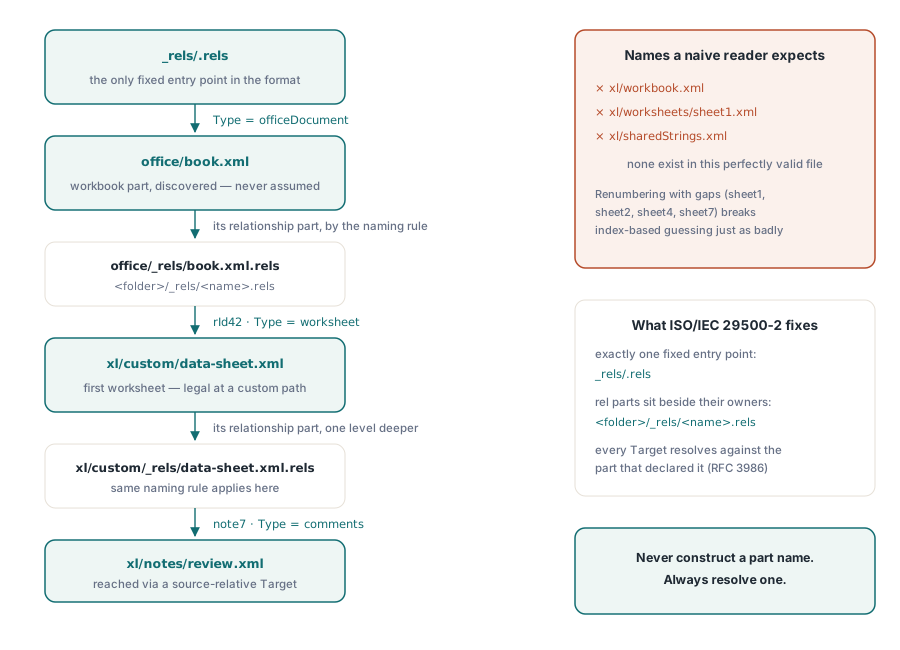
Because the part names you memorised are a convention of one producer, not a requirement of the format. Every path you have ever hardcoded, xl/workbook.xml, xl/sharedStrings.xml, xl/styles.xml, xl/worksheets/sheetN.xml, is what the desktop Excel writer happens to emit. A conforming package may put the workbook at office/book.xml and the first worksheet at xl/custom/data-sheet.xml and still be legal SpreadsheetML, as long as the relationships point there. This is the single most common reason a homegrown reader reports "cannot find sheet1.xml" on a file that Excel, LibreOffice, and Numbers all open without complaint
Producers that do this are not exotic. Server-side report generators reuse a template package and keep its original layout. Export pipelines that merge two workbooks renumber sheets and leave gaps, so a five-sheet workbook has sheet1, sheet2, sheet4, sheet7, and sheet9. Tools that strip a sheet do not always renumber the survivors. In every one of those cases the index-based guess xl/worksheets/sheet + IntToStr(i + 1) + .xml silently reads the wrong sheet or reads nothing, which is worse than an exception because the workbook loads and the numbers are wrong. The minimal package below exercises the whole problem, and it is the shape HotXLS regression-tests against
<!-- _rels/.rels -->
<Relationships xmlns="http://schemas.openxmlformats.org/package/2006/relationships">
  <Relationship Id="rId1"
      Type="http://schemas.openxmlformats.org/officeDocument/2006/relationships/officeDocument"
      Target="office/book.xml"/>
</Relationships>

<!-- office/_rels/book.xml.rels -->
<Relationships xmlns="http://schemas.openxmlformats.org/package/2006/relationships">
  <Relationship Id="rId42"
      Type="http://schemas.openxmlformats.org/officeDocument/2006/relationships/worksheet"
      Target="../xl/custom/data-sheet.xml"/>
</Relationships>

<!-- xl/custom/_rels/data-sheet.xml.rels -->
<Relationships xmlns="http://schemas.openxmlformats.org/package/2006/relationships">
  <Relationship Id="note7"
      Type="http://schemas.openxmlformats.org/officeDocument/2006/relationships/comments"
      Target="../notes/review.xml"/>
</Relationships>
What does ISO/IEC 29500-2 actually guarantee?
It guarantees reachability, not location. ISO/IEC 29500-2 is the Open Packaging Conventions part of the standard, and its relationships clause defines exactly one fixed entry point: the package relationship part at _rels/.rels. From there you follow the relationship whose Type is http://schemas.openxmlformats.org/officeDocument/2006/relationships/officeDocument to reach the workbook part, and every other part is discovered by reading that part's own relationship part and following typed edges outward
Two further rules from the same standard do the real work. The part-naming clause fixes where a relationship part lives: for a part at <folder>/<name>, its relationships are at <folder>/_rels/<name>.rels, and for a part at the package root the folder is simply _rels/. The relationship markup clause states that Target is a URI reference resolved against the URI of the source part, in the ordinary RFC 3986 sense, unless TargetMode="External" marks it as pointing outside the package. Source-relative resolution is the step everyone skips, and it is why the same literal ../notes/review.xml means one thing inside xl/custom/_rels/data-sheet.xml.rels and something else entirely inside a rels file one folder deeper. One last wrinkle sits between the logical model and the bytes on disk: part names in the logical model are absolute and begin with a forward slash, but the ZIP physical mapping clause strips that slash when it turns a part name into a ZIP item name, so a resolver that forgets it looks up /xl/sharedStrings.xml in the archive and finds nothing
Inside XlsxResolveRelationshipTarget
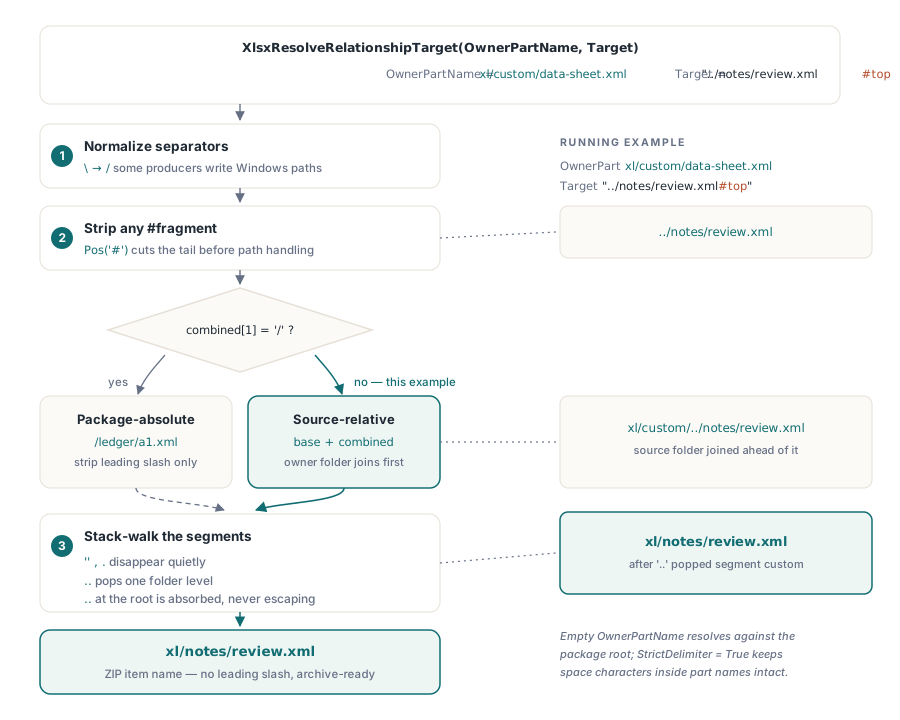
HotXLS concentrates the entire resolution rule in one function, XlsxResolveRelationshipTarget, declared in lxHandleX.pas as function XlsxResolveRelationshipTarget(const OwnerPartName, Target: WideString): WideString. It takes the ZIP item name of the source part and the raw Target attribute, and returns a ZIP item name with no leading slash, ready to hand straight to the archive. Passing an empty OwnerPartName resolves against the package root, which is exactly what the package relationship part needs. The order of operations matters more than the individual steps: backslashes are normalised to forward slashes first, because some producers write Windows separators into Target; any fragment introduced by # is cut before path handling, so ../charts/chart1.xml#Sheet1 resolves to a part name rather than to a nonexistent archive entry; only then does the function split absolute from relative
// Normalization core, as implemented in lxHandleX.pas.
combined := StringReplace(Target, '\', '/', [rfReplaceAll]);
p := Pos('#', combined);
if p > 0 then
  combined := Copy(combined, 1, p - 1);
if (combined <> '') and (combined[1] = '/') then
  Delete(combined, 1, 1)              // package-absolute: strip the slash only
else
begin
  p := LastDelimiter('/', String(OwnerPartName));
  if p > 0 then
    baseName := Copy(OwnerPartName, 1, p)
  else
    baseName := '';
  combined := baseName + combined;    // relative to the source part folder
end;

source.StrictDelimiter := True;       // '/' only, no quote or space handling
source.Delimiter := '/';
source.DelimitedText := String(combined);
for i := 0 to source.Count - 1 do
begin
  segment := WideString(source[i]);
  if (segment = '') or (segment = '.') then
    Continue;                         // empty and dot segments vanish
  if segment = '..' then
  begin
    if parts.Count > 0 then
      parts.Delete(parts.Count - 1);  // pop, and never below the root
  end
  else
    parts.Add(String(segment));
end;
The segment loop is a plain stack walk: empty segments and . are dropped, .. pops one level, and a .. that would escape the package root is absorbed instead of producing a negative index or a name beginning with ../. The StrictDelimiter := True assignment is not cosmetic. Without it a Delphi TStringList treats spaces as delimiters and honours quote characters, which mangles any part name containing a space, and part names with spaces are legal
Following the graph: workbook, worksheet, drawing
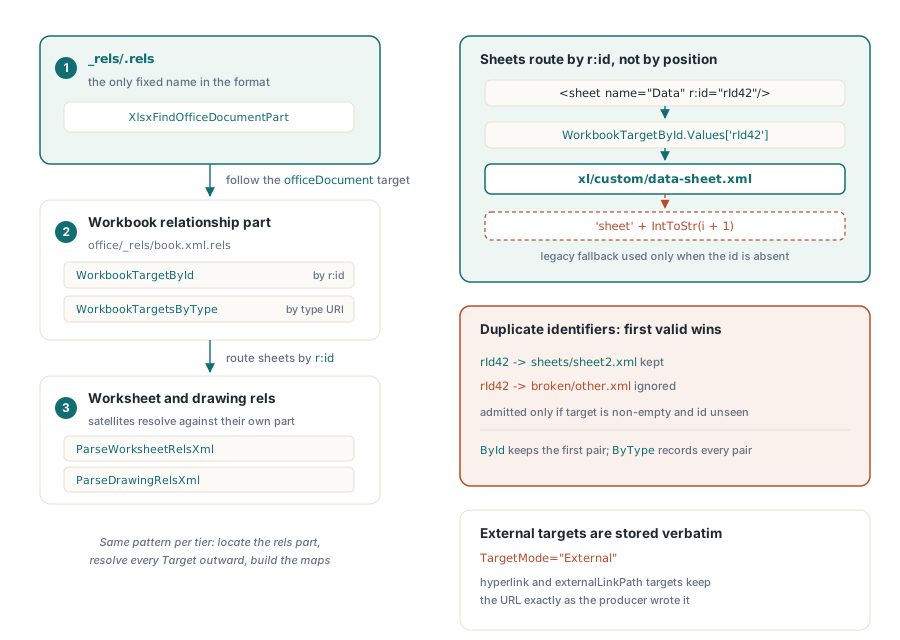
HotXLS walks three tiers of relationship parts on the TXLSXWorkbook.Open path. The package tier is handled by XlsxFindOfficeDocumentPart, which reads _rels/.rels and returns the officeDocument target. The workbook tier reads the workbook relationship part and builds two maps at once: an identifier map for r:id lookups and a type map for singleton parts. The worksheet and drawing tiers repeat the pattern with ParseWorksheetRelsXml and ParseDrawingRelsXml, each passing its own part name as the resolution base so a drawing that references ../media/image3.png lands on the right blob
// Tier 1: the only fixed name in the whole format.
WorkbookPartName := XlsxFindOfficeDocumentPart(zip);
if WorkbookPartName = '' then
  WorkbookPartName := 'xl/workbook.xml';        // legacy fallback
if not zip.Exists(WorkbookPartName) then
  Exit;

// Tier 2: <folder>/_rels/<name>.rels for the workbook part itself.
relsName := XlsxRelationshipPartName(WorkbookPartName);
if zip.Exists(relsName) then
begin
  relsStream := zip.OpenFile(relsName);
  try
    ParsePartRelationshipsXml(relsStream, WorkbookPartName,
      WorkbookTargetById, WorkbookTargetsByType);
  finally
    relsStream.Free;
  end;
end;

// Typed singletons resolve by relationship type URI.
PartName := WorkbookTargetsByType.Values[XlsxRtSharedStrings];
if PartName = '' then
  PartName := 'xl/sharedStrings.xml';
Sheets specifically must go through the identifier map, not the type map. The <sheet> elements in the workbook part carry r:id attributes, and that identifier is the only thing binding a sheet name to a part. HotXLS collects those identifiers during ParseWorkbookXml and resolves each one against the workbook relationship map, falling back to the conventional numbered name only when the identifier is absent or unresolvable
// Tier 2b: r:id -> worksheet part, per sheet, in workbook order.
PartName := '';
if (i < SheetRelIds.Count) and (SheetRelIds[i] <> '') then
  PartName := WorkbookTargetById.Values[SheetRelIds[i]];
if PartName = '' then
  PartName := 'xl/worksheets/sheet' + IntToStr(i + 1) + '.xml';
SheetPartNames.Add(String(PartName));

// Tier 3: each worksheet resolves its own satellites against its own name.
relsName := XlsxRelationshipPartName(PartName);
if zip.Exists(relsName) then
begin
  relsStream := zip.OpenFile(relsName);
  try
    ParseWorksheetRelsXml(relsStream, PartName,
      FParRels[i], ParTableTargets[i], ParPartTargets[i]);
  finally
    relsStream.Free;
  end;
end;
Everything downstream rides on that same mechanism. Shared strings, styles, theme, the VBA project under the Microsoft-namespaced type http://schemas.microsoft.com/office/2006/relationships/vbaProject, external links, the workbook-scoped person part, legacy comments, threaded comments, the VML drawing that carries comment balloon geometry, drawings, images, charts, tables, and PivotTables all reach their bytes through resolved targets. The theme part in particular has to be located correctly or a round-trip quietly overwrites a customer brand palette with the stock Office theme, one of the failure modes covered in the notes on lossless XLSX round-trip of theme, extLst, and calcChain. Relationship reading is also why the load is staged the way it is: all archive access happens on one thread before worksheet XML is parsed, because the inflate state of a ZIP archive is not thread-safe, a constraint explained in the write-up on parallel XLSX parsing and the memory allocator
Why does a duplicate rId break type-based routing?
Because a later malformed entry can overwrite an earlier valid one and hijack the lookup. Relationship identifiers are supposed to be unique within a relationship part, but malformed packages reuse them, and a naive Values[Id] := assignment is last-write-wins. If rId3 first points at a real worksheet and a second rId3 points at an unsupported or empty target, last-write-wins loses the worksheet. ParsePartRelationshipsXml therefore applies a first-wins rule with two conditions: the resolved target must be non-empty, and the identifier must not already be present. Both conditions together are what make it safe, because the non-empty test stops a relationship with a missing Target from claiming the slot before a usable one arrives
if (TargetById <> nil) and (Id <> '') and (resolvedTarget <> '') and
  (TargetById.IndexOfName(String(Id)) < 0) then
  TargetById.Values[String(Id)] := String(resolvedTarget);
if (TargetsByType <> nil) and (relType <> '') and (resolvedTarget <> '') then
  TargetsByType.Add(String(relType + '=' + resolvedTarget));
Note the deliberate asymmetry in that snippet. The identifier map is a true map with a first-wins guard, while the type collection is an append-only list of type=target pairs. That distinction is load-bearing: a workbook has exactly one shared-strings relationship but many worksheet and external-link relationships, so type lookup via Values[] returns the first match for singletons, and multi-valued types such as externalLink are enumerated by walking the list
Where relationship following stops
Honest boundaries matter more than a clean story. HotXLS falls back to conventional names whenever a relationship is absent, so a package with a damaged or missing relationship part still opens if it happens to follow the Excel layout; that fallback is a compatibility feature, not a second source of truth, and it can mask a producer bug during testing. Three more limits are worth knowing. Targets marked TargetMode="External" are stored verbatim rather than resolved, which is correct for hyperlinks and for the externalLinkPath relationship carrying a remote workbook URL, but it means the value you get back is whatever the producer wrote. Chart parts discovered through a drawing relationship part are paired with drawing anchors positionally rather than by identifier, so an unusual anchor ordering can misalign chart bindings. And the streaming direct reader in lxDirectRead.pas keeps its own lighter path handling keyed to xl/, so the full resolver described here governs the TXLSXWorkbook.Open and GetSheetNames entry points, not the low-allocation scan path documented in the article on the streaming direct reader for Delphi
If you are building this yourself, the shortest correct summary is: never construct a part name, always resolve one. Read _rels/.rels, follow officeDocument, resolve every Target against the part that declared it, and route sheets by r:id. If you would rather have that already tested against renamed parts, non-contiguous sheet numbering, and duplicate relationship identifiers, the resolver described here ships in the HotXLS Delphi spreadsheet component, along with the round-trip machinery that keeps the parts it does not parse intact