A Delphi loader parsing an eight-sheet XLSX package across eight worker threads can produce a CPU graph that scarcely climbs above one core, and sweeping the thread count from two to eight leaves the stopwatch virtually where it started. With two threads the load can even finish slower than a plain serial loop. The parsing code takes no locks of its own and the sheets share no data, so the waiting happens somewhere the source never mentions: inside the memory manager, which each of those workers calls for every element name, attribute value and cell
Thread count is the knob everybody reaches for first. For allocation-bound code it barely shifts anything. What moves the curve is the number of heap allocations each cell costs
How HotXLS divides Open into three phases
HotXLS parses the worksheets of a multi-sheet XLSX package on worker threads by default. TXLSXWorkbook.ParallelParse begins life True, and ParallelParseThreads begins at 0, meaning one worker per logical processor the operating system reports, and never more workers than there are sheets to parse. Only one of the three phases of Open runs on those workers. Phase A is serial: it reads the workbook part, shared strings and styles, creates every sheet with its name and visibility, and parses each sheet's relationships file so that hyperlink and table targets are already resolved. By the time a worker starts, every lookup table it consults is complete and is only ever read
Phase B hands each worksheet to a worker. Workers claim sheet indexes from a shared counter by way of an interlocked increment, so a workbook holding one large sheet and seven small ones balances itself without a scheduler: whoever finishes a small sheet simply takes the next index. The ZIP container is the part that cannot be shared naively, because a deflate stream carries state from one block to the next and two threads cannot advance the same decompressor. Each worker therefore opens its own decompressor over its own sheet entry and streams the XML straight into its own reader. The file handle is the sole shared resource, and the lock around it covers a single seek-and-read of compressed bytes at a time. Decompression and parsing both run in parallel, and no worksheet's XML is ever held fully inflated in memory. Once parsing ends, the worker reads its entry to the end so the ZIP size and CRC checks still run
Phase C returns to a single thread for the parts hanging off each sheet: comments and threaded comments, drawings and charts, tables, and printer settings. In most workbooks these are small beside the cell XML
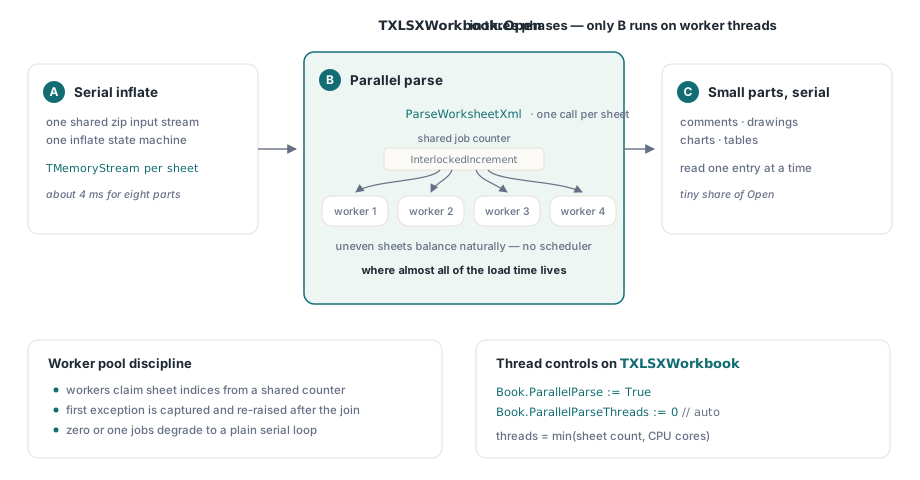
Errors come back on the calling thread. When a sheet raises during parsing, the pool stops handing out new indexes, waits for the workers still running, then re-raises from Open the exception of the lowest-numbered sheet that failed, so the report follows sheet order and the caller never has to grapple with an exception escaping a worker thread. With RecoveryMode set to True, a sheet that fails to parse is skipped instead, a warning lands in Diagnostics, and the remaining sheets load normally. Setting ParallelParse to False runs the same parser over the sheets one at a time and produces identical results
var
  Book: TXLSXWorkbook;
begin
  Book := TXLSXWorkbook.Create;
  try
    // Both values are the defaults; spelling them out keeps the choice
    // visible in code review
    Book.ParallelParse := True;
    Book.ParallelParseThreads := 0;  // 0 = one worker per logical CPU, capped at the sheet count
    Book.RecoveryMode := False;      // a sheet that fails to parse raises from Open
    if Book.Open('quarterly-ledger.xlsx') <> 1 then
      raise Exception.Create('open failed');
    // every sheet is fully loaded here; read cells as usual
  finally
    Book.Free;
  end;
end;
Why do extra threads leave an allocation-heavy parser slower?
Worksheet parsing consists mostly of small allocations, and the default Delphi memory manager makes threads queue for them. A naive XML reader produces a string for each element name, another for each attribute name and value, a Variant for the cell and a string for its text. The default memory manager keeps small blocks in pools grouped by size and stands guard over each pool with a lock. A thread that finds the lock taken backs off and sleeps before retrying. When eight workers all ask for the same handful of tiny sizes, they keep colliding on the same pools, and threads that look independent in the source end up running one after another
That accounts for both symptoms from the opening. CPU time stays close to wall-clock time because a sleeping thread burns no CPU, and the thread sweep stays flat because the pool locks, not the cores, set the pace. Two threads can lose to one outright: every allocation now pays for handing a lock back and forth between cores, whilst the serial loop never contends at all
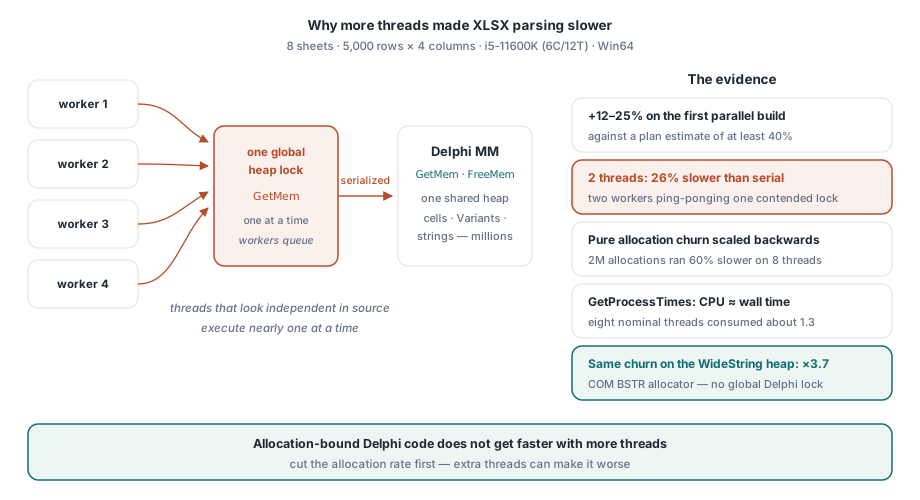
One string type sits outside all this on Windows. A WideString is a COM BSTR, allocated by the system OLE string allocator rather than by the Delphi memory manager, so WideString traffic never queues on the Delphi pools. HotXLS stores cell text as WideString, which matters far more for parallel loading than it ever did for the serial path
Measuring the contention across your own workbooks
Two numbers tell you whether a load is allocation-bound: how wall-clock time changes as the worker count rises, and how much CPU the process consumed over the same interval. If CPU time divided by wall time stays near 1.0 whilst eight workers are nominally busy, they are queueing rather than parsing. The sweep below opens the same file with one through eight workers and prints both figures. It is a measuring harness for your own test project; only the TXLSXWorkbook members come from HotXLS
uses
  Winapi.Windows, System.SysUtils, System.Math, System.Diagnostics;

// Your own helper: user + kernel CPU time of this process, in milliseconds
function ProcessCpuMs: Int64;
var
  Created, Exited, Kernel, User: TFileTime;
begin
  GetProcessTimes(GetCurrentProcess, Created, Exited, Kernel, User);
  Result := (Int64(Kernel) + Int64(User)) div 10000;  // 100 ns ticks to ms
end;

procedure SweepThreads(const FileName: string);
var
  N: Integer;
  Book: TXLSXWorkbook;
  SW: TStopwatch;
  Cpu0, Cpu: Int64;
begin
  for N := 1 to 8 do
  begin
    Book := TXLSXWorkbook.Create;
    try
      Book.ParallelParseThreads := N;  // 1 runs the plain serial loop
      Cpu0 := ProcessCpuMs;
      SW := TStopwatch.StartNew;
      if Book.Open(FileName) <> 1 then
        raise Exception.CreateFmt('open failed: %s', [FileName]);
      SW.Stop;
      Cpu := ProcessCpuMs - Cpu0;
      Writeln(Format('%d workers: %d ms wall, CPU/wall %.2f',
        [N, SW.ElapsedMilliseconds, Cpu / Max(Int64(1), SW.ElapsedMilliseconds)]));
    finally
      Book.Free;
    end;
  end;
end;
Run the sweep several times and keep the best figure for each worker count, since the opening run also pays for a cold disk cache. A flat wall-time curve with CPU/wall near 1 means the memory manager is the ceiling. If wall time keeps falling whilst CPU/wall climbs towards the worker count, the file is parse-bound and the extra workers are earning their place
A flat curve leads on to the next question: which allocations are to blame? A memory manager wrapper that counts calls by size answers that within minutes with no profiler involved. The version below counts only GetMem and leaves FreeMem and ReallocMem pointing at the original manager, which is enough to see where the traffic comes from
// Diagnostic you add to your own test harness; not part of HotXLS
var
  OldMM, NewMM: TMemoryManagerEx;
  AllocCount, TinyCount: Int64;

function CountingGetMem(Size: NativeInt): Pointer;
begin
  AtomicIncrement(AllocCount);
  if Size <= 32 then
    AtomicIncrement(TinyCount);  // the small-block churn worth watching
  Result := OldMM.GetMem(Size);
end;

procedure InstallCounter;
begin
  GetMemoryManager(OldMM);
  NewMM := OldMM;
  NewMM.GetMem := CountingGetMem;
  SetMemoryManager(NewMM);
end;

procedure RemoveCounter;
begin
  SetMemoryManager(OldMM);
end;
Install the counter just before Open, remove it straight afterwards, and divide AllocCount by the number of cells in the file. That per-cell figure is the one to track from build to build, and the share of blocks at 32 bytes or below shows whether short strings dominate. Check it before writing a cell-object pool: each cell object is one allocation, and the short-lived strings created whilst that cell is parsed can easily outnumber it several times over
Where the allocations lurk in worksheet XML
A cell such as <c r="B7" s="3" t="s"><v>42</v></c> looks tiny on disk. A straightforward reader still turns it into a run of fresh strings: the element names c and v, three attribute names, three attribute values and the text content. Converting each UTF-8 token through the RTL inserts an intermediate UnicodeString before the final WideString exists. None of those strings outlives the cell, and every one of them is a trip through the memory manager
The HotXLS XML reader goes for the two largest sources. Element names in worksheet XML come from a very small vocabulary (row, c, v, f, is), so the reader keeps a short cache of names it has already met, compares the raw bytes of each new name against that cache and hands back the cached string on a match. The cached copies are deliberately AnsiString. AnsiString is reference-counted, so handing out a cached instance costs one counter increment and no allocation whatsoever. A cache of WideString names would buy nothing: WideString carries no reference count, and every assignment makes a fresh system allocation
Attribute names, attribute values and cell text take the other route. The reader decodes UTF-8 straight from its scan buffer in two passes: the first counts UTF-16 code units, the second fills a WideString allocated once at exactly that length. That is one allocation per token, and it lands on the system string allocator instead of the Delphi pools. Character references such as A and the predefined entities are resolved by the scanner before decoding starts, so the decoder sees only plain UTF-8. For byte sequences that are not valid UTF-8, the decoder copies the offending bytes through one at a time where the RTL conversion would drop or replace them, so a damaged file still yields readable ASCII around the bad spot. Valid input decodes to the same text either way
Both moves carry across to your own Delphi parsing code. Caching strings only saves allocations when the string type is reference-counted, and decoding straight into the destination type removes the temporary that the convenient RTL conversion functions create on every call
Which workbooks gain, and which settings to pick
Parallel parsing works at worksheet granularity, so the shape of the workbook decides most of the outcome. Several sheets of comparable size are the best case, including the files you get by duplicating a template worksheet once per region or per month. A workbook that is one giant sheet parses on one worker whatever ParallelParseThreads says; for that shape the streaming direct reader is the better fit, because it never builds the whole workbook in memory. Time spent on comments, charts and drawings stays in the serial Phase C. A file with zero or one sheet to parse skips the pool and runs the plain serial loop
When only some sheets matter, list their names in SelectedSheets before calling Open. The other sheets are still created with their names and visibility but no cells, the workers pass over them, and LoadSheet fills one in later should the user open it
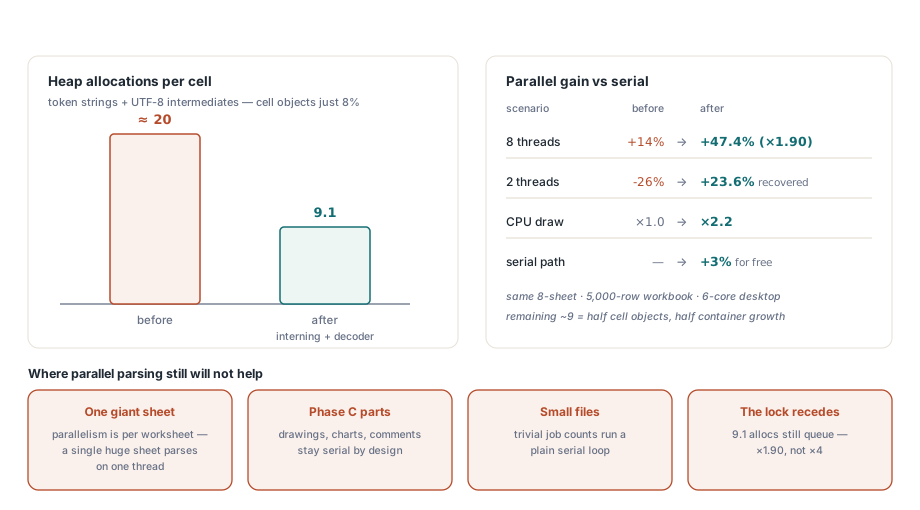
Leave ParallelParse switched on for desktop tools and batch jobs that open one workbook at a time. That default is the safer one: results match the serial path, and one property turns it off should a threading question ever arise. A server already opening several workbooks concurrently is another matter. Every request thread is allocating too, so each extra parse worker adds another contender for the same memory manager pools; set ParallelParseThreads to 2 there, and raise it only once the sweep above, run on that server under its normal load, shows the extra workers paying their way. Fewer allocations per cell raise the ceiling without removing it. Cell objects and container growth still go through the Delphi pools, which is why the gain from eight workers stays well below eight times. For the rest of the load-and-save toolkit, from style reuse to bulk row callbacks, see the guide to large-workbook performance in Delphi
The worker pool, the ParallelParse and ParallelParseThreads switches and the allocation-lean XML reader all ship in the HotXLS Delphi Excel Component, which reads and writes XLS, XLSX and ODS straight from Delphi and C++Builder code with no need for Excel on the machine