Almost every part of the legacy Excel binary format is a single record with a clean two-byte type and a two-byte length. A cell is a LABELSST or a NUMBER. A merged region is a MERGEDCELLS. You can read most of a worksheet by walking the records one at a time and dispatching on the type word. PivotTables break that rhythm. A single pivot table is not a record, it is a small program made of dozens of cooperating records spread across two different places in the same OLE compound document stream, and the relationships between them are positional, bit-packed and thoroughly unforgiving. This is the structure most BIFF8 readers either skip altogether or keep as opaque bytes, because writing one from scratch means reproducing every cross-reference Excel itself maintains
The reason a pivot table is hard is that it is really two artefacts welded together. There is the pivot cache, a self-contained snapshot of the source data with its own substream, and there is the table view, the layout that says which fields sit on which axis. The cache and the view reference each other by index. Get a single index wrong and the file opens to a refresh error, or to a silently empty grid
The pivot cache is a substream of its own
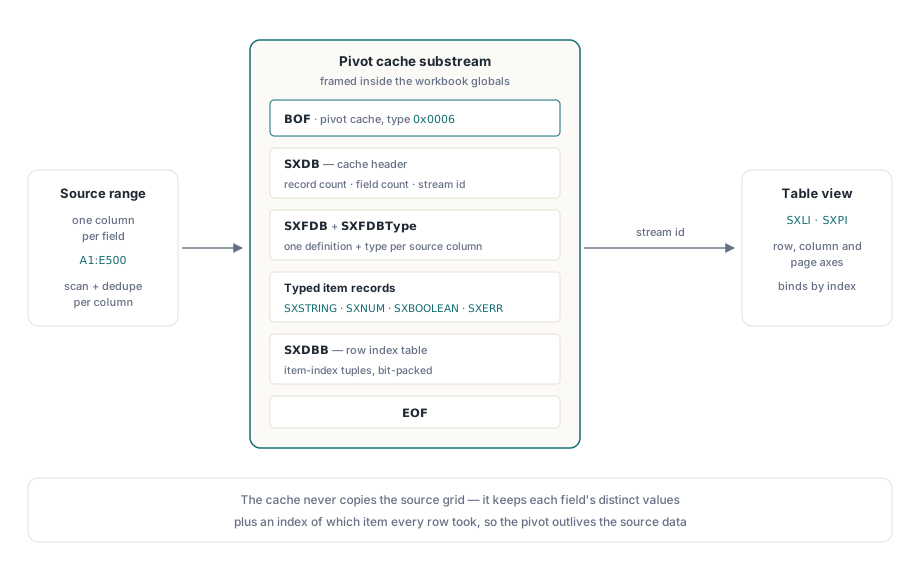
The cache lives in the workbook globals stream as a complete BIFF substream, framed by a BOF record whose document type is 0x0006 (the value that marks a pivot cache, as opposed to 0x0005 for the workbook or 0x0010 for a worksheet) and closed by the matching EOF. Inside that frame the structure is fixed and predictable. An SXDB record is the cache header. It carries the record count, the number of cache fields and the stream identifier the table view quotes to bind itself to this cache. Each source column then contributes an SXFDB field-definition record followed by an SXFDBType that classifies it, and then the unique values that column took, emitted as one typed item record per distinct value
The item records are where the cache earns its keep. A text value becomes an SXSTRING, a numeric value an SXNUM, a logical value an SXBOOLEAN, and a formula error an SXERR. The cache does not store the source grid, it stores the distinct values per field plus an index table that says, for record n, which distinct item each field took. That is why building a pivot table programmatically is not a matter of copying cells across. You have to scan the source range, infer each field's type from the values it holds, de-duplicate them into a typed item list and record every row as a tuple of item indices. HotXLS does exactly this: an all-numeric column is emitted with SXNUM items, a mixed-text column becomes SXSTRING items, and dates are carried as serial values through the same numeric path
SXDBB and the bit-packing that makes it interesting
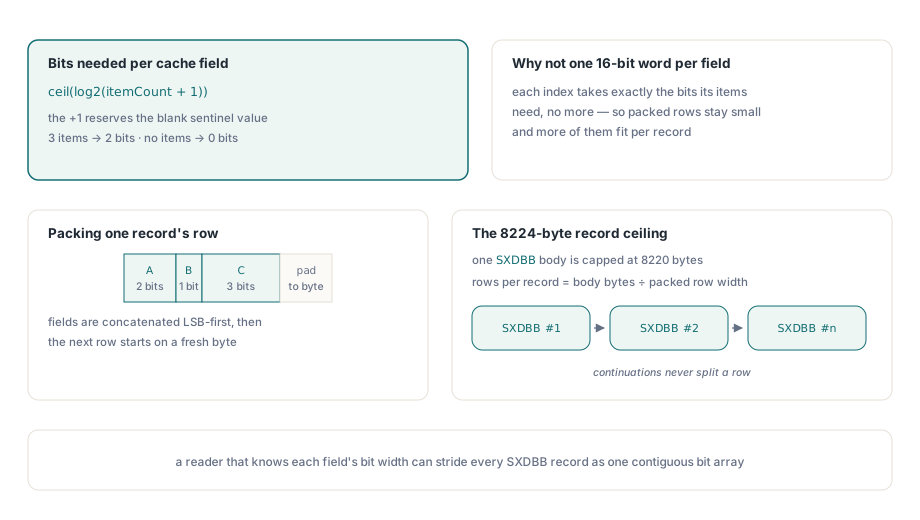
The per-record index table is the single most technically curious part of the whole structure, and it lives in the SXDBB record. The naive encoding would store each field's item index as a 16-bit word. Excel does nothing of the sort. It packs each field's index into exactly the number of bits required to address that field's items, and no more. The width is ceil(log2(itemCount + 1)) bits. The + 1 matters: the extra value is a sentinel meaning "blank, no value for this field in this record", so a field with three distinct items has to represent four states and therefore takes two bits, not the single bit three items alone would suggest. A field with no items at all contributes zero bits and is skipped entirely during packing
The bits for one record are concatenated across all fields, then the next record begins on a fresh byte boundary. Records are byte-aligned, not bit-packed end to end, which makes random access into the table tractable at the cost of a few padding bits per row. The packing within a byte is least-significant-bit first. Once you have accepted those two rules the encoder is a straightforward bit pump, and the decoder is simply its mirror
// Width of one field's index in the SXDBB stream.
// citmTotal distinct items need ceil(log2(citmTotal + 1)) bits,
// the +1 reserving a "blank" sentinel value.
function BitsForFieldItems(itemCount: Integer): Integer;
var
  capacity: Integer;
begin
  Result := 0;
  if itemCount <= 0 then
    Exit;            // empty field contributes zero bits
  Result := 1;
  capacity := 2;
  while capacity < itemCount + 1 do
  begin
    Inc(Result);
    capacity := capacity * 2;
  end;
end;
The reason this detail cannot be ignored is the 8224-byte ceiling on a single BIFF record. Every record in the format, pivot records included, must fit its payload in at most 8224 bytes, and a busy pivot cache with thousands of source rows sails past that long before it has emitted every row. So the index table gets split. HotXLS caps a single SXDBB body at 8220 bytes, which is the 8224 record limit minus the four-byte record header of type and length, divides that by the byte width of one packed record to learn how many whole rows fit, and then emits as many continued SXDBB records as the row count demands. Each continuation restarts cleanly on a record boundary, so no row is ever cut across two records. A reader that knows the per-record bit width can stride through every SXDBB in sequence as if they were one contiguous bit array
The view layout: SXLI for the body, SXPI for the page
With the cache built, the table view is the second half. Its core is the axis line items, the rows of the pivot body that enumerate every combination of row-field and column-field values that the table draws. These are carried in SXLI records (record type 0x00B5, described in [MS-XLS] §2.4.275). One SXLI holds many lines, again until the 8224-byte limit forces a new record, and it leans on a small compression trick: each line stores only how it differs from the line above it, expressed as a common-prefix count, so a deeply nested axis does not repeat the outer field values on every row. The grand-total line and the first line of any record always reset that prefix count to zero so a reader never has to look back across a record boundary to reconstruct a line
The page axis, the filter dropdowns that sit above a pivot table, is a separate record. SXPI (record type 0x00B6, [MS-XLS] §2.4.276) carries one ten-byte entry per page field: the pivot field index isxvd, the selected cache item iCache, a position word ipos, and a legacy object id objId. The iCache value is the one worth watching. A page field that shows "(All)", filtering nothing, stores the sentinel 0x7FFD rather than a real item index. A programmatically built pivot opens with every page field set to "(All)" until the caller pre-selects an item, at which point that item's cache index replaces the sentinel and Excel opens with the filter already applied. Alongside these sit the supporting records that describe individual fields and their formatting, SXVD and SXVDEx for field view definitions, SXIVD for the field-index lists that order each axis, and SXFormat for number formatting, each one indexing back into the same cache the body lines reference
Two writers in one: raw blobs and the typed model
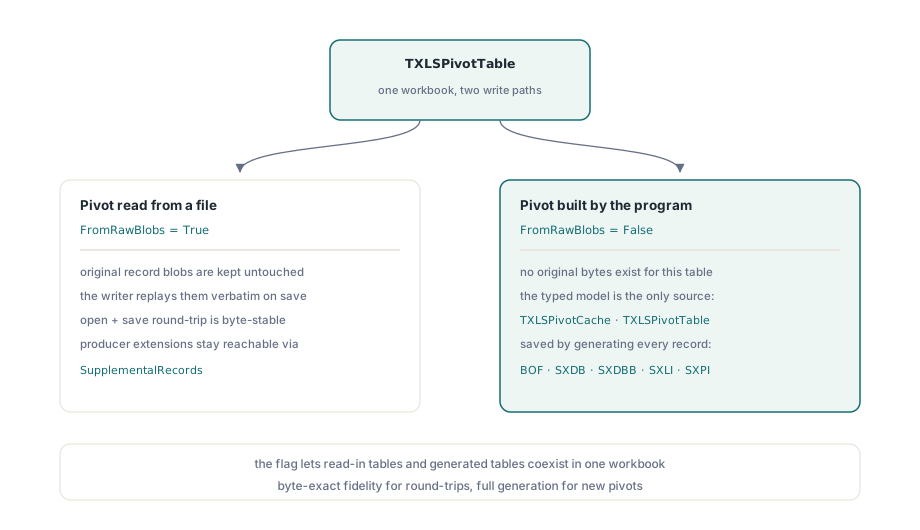
There is a structural reason HotXLS keeps two completely separate paths for writing a pivot table, and it comes straight from the demands of fidelity. When a workbook is read from disk, its pivot records were written by Excel or by some other producer, and they may use record variants, ordering quirks, or extension records that no third-party writer fully models. The only safe thing to do with those bytes is to hand them back unchanged. So a pivot table that came in from a file is flagged FromRawBlobs = True, and on save the writer replays the preserved record blobs verbatim. Nothing is regenerated, nothing is reinterpreted, and a round-trip through open and save is byte-stable
A pivot table that the program built is the opposite case. There are no original bytes to preserve, only the typed object model: a TXLSPivotCache with its fields and item lists, and a TXLSPivotTable with its axis assignments. That table is flagged FromRawBlobs = False, and the writer serialises it the hard way, emitting a fresh BOF = 0x0006 cache substream, packing the SXDBB index table from the item indices the typed model holds, and laying out the SXLI and SXPI records from the axis configuration. The flag is what lets both kinds coexist in one workbook. Without it a single writer would have to either discard the fidelity of read-in tables or refuse to generate new ones. Any producer-specific extension records a read-in table carried are kept as supplemental records, reachable through the table's SupplementalRecords list, so a table inspected through the typed model does not lose the parts the model does not describe
Building a pivot table in code
All of the machinery above sits behind one call. AddPivotTable takes the source range in A1 notation, the destination cell where the table's top-left corner anchors, and a name. It parses the range, scans it to infer field types and build the cache (reusing an existing cache if another table already binds to the same range), and returns a typed TXLSPivotTable with one field per source column, every field initially off-axis. You then place fields on the axes and pick an aggregation. The signature is exactly this, and the cache, the SXDBB packing, and the view records are all produced for you at save time
uses
  lxHandle, lxPivot;

var
  Book : TXLSWorkbook;
  Sheet: IXLSWorkSheet;
  Pivot: TXLSPivotTable;
begin
  Book := TXLSWorkbook.Create;
  try
    Book.Open('Sales.xls');
    Sheet := Book.Sheets[1];

    // Source A1:E500 on 'Data'; anchor the pivot at row 3, col 1.
    Pivot := Sheet.AddPivotTable('Data!$A$1:$E$500', 3, 1, 'SalesByRegion');
    if Pivot <> nil then
    begin
      Pivot.AddRowField('Region');
      Pivot.AddColumnField('Quarter');
      Pivot.AddDataFieldByName('Revenue', xlpaSum);
    end;

    Book.SaveAs('Sales-Pivot.xls');
  finally
    Book.Free;
  end;
end;
The first row of the source range is read as the header that names the cache fields, so AddRowField('Region') matches a column by its header text rather than by position. Because the returned table is a typed model with FromRawBlobs = False, the writer takes the from-scratch path: it builds a self-contained cache that does not depend on the source range still being present at refresh time, which is precisely the property you want when the pivot is going to a recipient who may move or delete the underlying data
Reading and reconciling the pivot and cache records of a file you did not produce, including the raw-blob preservation path, is covered in the workbook audit and conversion workbench walkthrough. When the source range runs to tens of thousands of rows and the SXDBB stream spans many continued records, the techniques in the large-workbook performance notes stop the cache build from dominating your runtime. Both pair with the pivot writer that ships in the HotXLS Delphi spreadsheet component for Delphi and C++Builder, alongside the cell, formula, chart and formatting APIs covered elsewhere on this blog