HotXLS Delphi Component reads the same pattern string four different ways, because Excel 16 does. In COUNTIF and SUMIF the text a~b is a literal unless the criterion also contains * or ?; in MATCH and XLOOKUP wildcard mode the tilde is always an escape, so a~b finds ab; in DSUM and the other database functions plain text means "begins with"; and whole-cell Find must backtrack into the last *. HotXLS follows these measured rules since v2.384.52, v2.384.60 and v2.384.64
The bug reports in this area never mention wildcards. They say a server-generated report counts a couple of rows fewer than the same file recalculated in Excel, or that a part number containing a tilde is found by one formula and ignored by the next. The cause is a matcher that assumes a pattern means one thing everywhere. Excel does not work that way, so an engine whose cached results must agree with Excel cannot either. Before v2.384.52 HotXLS fed every criterion through a DOS-style file mask, which got everyday patterns right and the edge cases quietly wrong
Why does one pattern string mean four different things in Excel?
One pattern string means four different things because Excel inherited four matching rules from four features and never unified them. The criteria functions (COUNTIF, SUMIF, AVERAGEIF and the *IFS family) decide per criterion whether wildcards apply at all. The lookup functions (MATCH with match type 0, XLOOKUP with match_mode 2) always apply them. The database functions (DSUM, DCOUNTA and friends) follow the Advanced Filter, where a bare word is a prefix. The Find dialog has its own whole-cell and partial modes. The table below lists which cells match each pattern against one column holding a~b, ab, AB, abc, abcb, a*b and axb, with every function in its default case-insensitive mode
| Pattern | COUNTIF / SUMIF | MATCH(…,0) / XLOOKUP mode 2 | DSUM criterion | Find, whole cell, wildcards on |
|---|---|---|---|---|
ab | ab, AB | ab, AB | ab, AB, abc, abcb | ab, AB |
a*b | a~b, ab, AB, abcb, a*b, axb | same as COUNTIF | every entry, abc included | same as COUNTIF |
a~b | a~b only | ab, AB | ab, AB, abc, abcb | ab, AB |
a~*b | a*b only | a*b only | a*b only | a*b only |
=ab | ab, AB | not applicable | ab, AB | not applicable |
The a~b row is the one where COUNTIF and MATCH disagree, and part numbers and hand-typed codes contain tildes more often than anyone expects. The a*b row shows the other trap: abc matches for DSUM but not for COUNTIF, because the database function silently appends a *. The DSUM entries for ab, a*b and =ab come straight from Excel 16 runs; the DSUM entry for a~b follows from the same prefix rule, since the appended * turns the criterion into a wildcard pattern in which ~b is an escaped b
When does COUNTIF switch into wildcard mode?
COUNTIF switches into wildcard mode only when the criterion text contains * or ?, escaped or not. Without either character, Excel compares the criterion with each cell as a whole string, case-insensitively, and a tilde is just a tilde, so COUNTIF(A1:A7,"a~b") counts the cell that literally holds a~b. Add a single star and the meaning flips: in "a~b*" the tilde now escapes the b, the pattern reads as "ab followed by anything", and the cell a~b is no longer counted. HotXLS has applied this rule in both engines since v2.384.52, through one criteria matcher in lxCalc shared by COUNTIF, SUMIF, AVERAGEIF, COUNTIFS, SUMIFS, AVERAGEIFS and the database functions
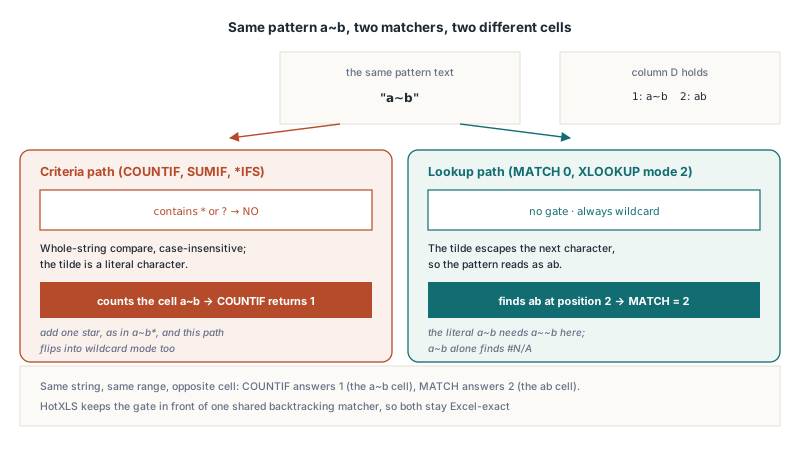
Inside wildcard mode the escape rules are the same as everywhere else in Excel: ~ makes the next character literal whatever it is, so ~b means b and ~~ means one tilde, and a tilde at the very end of the pattern is dropped, so "a*~" behaves as "a*". Square brackets are never special. A criterion of "[x]" counts cells that hold the three characters [x], and "[a-z]" counts nothing on ordinary data. TXLSXWorkbook.Calculate evaluates a formula string against the active sheet and returns a Variant, the quickest way to check these rules against your own data
uses
  System.Variants, lxHandleX;

const
  Names: array [1..7] of string = ('a~b', 'ab', 'AB', 'abc', 'abcb', 'a*b', 'axb');
var
  Book: TXLSXWorkbook;
  Sheet: TXLSXWorksheet;
  i: Integer;

  procedure Show(const Formula: string);
  begin
    Writeln(Formula, ' = ', VarToStr(Book.Calculate(Formula)));
  end;

begin
  Book := TXLSXWorkbook.Create;
  try
    Sheet := Book.Sheets.Add('Data');
    for i := 1 to High(Names) do
    begin
      Sheet.Cells[i, 1].Value := Names[i];
      Sheet.Cells[i, 2].Value := 1 shl (i - 1);  // 1, 2, 4 ... so a SUMIF total names its rows
    end;
    Sheet.Cells[8, 1].Value := 5;                // a number; A9 stays blank

    Show('=COUNTIF(A1:A7,"a~b")');      // 1    no * or ?: plain text, the cell a~b
    Show('=COUNTIF(A1:A7,"a~b*")');     // 4    wildcard mode: ab, AB, abc, abcb
    Show('=COUNTIF(A1:A7,"a*b")');      // 6    whole-string wildcard, abc excluded
    Show('=SUMIF(A1:A7,"a*b",B1:B7)');  // 119  every row except abc (8)
    Show('=COUNTIF(A1:A7,"a~*b")');     // 1    the literal a*b
    Show('=COUNTIF(A1:A9,"<>ab")');     // 7    the number 5 and blank A9 count
    Show('=COUNTIF(A1:A9,"<>")');       // 8    non-blank cells
  finally
    Book.Free;
  end;
end.
What does "<>text" count?
A "<>text" criterion counts every cell that is not that text, and in Excel 16 that includes numbers, booleans, error values and blank cells. A bare "<>" is a different question altogether: it means "not a blank cell", so it skips empty cells but counts every value, including the empty text that a formula such as ="" returns. The old HotXLS code got text cells right but not numbers: a Variant inequality made Delphi convert 'ab' to a number, the conversion raised an exception, a handler swallowed it as "no match", and numeric cells silently dropped out of the count. The blank-cell side of this story, including what an empty operand equals in an ordinary comparison, is covered in how HotXLS handles comparison chains, blank cells and SUMIF
Why does MATCH find ab when you search for a~b?
MATCH finds ab when you search for a~b because MATCH with match type 0 and XLOOKUP with match_mode 2 are always in wildcard mode, so the tilde is an escape even when the pattern contains no * or ?. Excel 16 confirms it on a two-cell range holding a~b and ab: MATCH("a~b",D1:D2,0) returns 2, and on a range that holds only a~b the same call returns #N/A. To look up the literal text a~b you have to write "a~~b". Meanwhile COUNTIF(D1:D2,"a~b") over the same two cells returns 1, counting the other cell. Same string, same range, opposite cell
That is why HotXLS keeps the two decisions apart rather than behind one "match a pattern" entry point. The matcher itself is shared: since v2.384.52, MATCH, XLOOKUP and the criteria functions run the same backtracking matcher, with the same escape handling and the same trailing-tilde rule. What differs is the gate in front of it. The criteria path asks "does this text contain * or ??" first; the lookup path never asks. Merging the two would fix one family and break the other, and both directions are checked against Excel 16 values in both engines. Wildcard lookups also have a precondition of their own: XLOOKUP rejects wildcard matching combined with a binary search mode, a rule described in the HotXLS guide to XLOOKUP and XMATCH search modes
How do DSUM and the database functions read a plain text criterion?
DSUM and the other database functions read a text criterion without a leading =, < or > as "begins with", with wildcards still active. That is the Advanced Filter rule, and it differs from COUNTIF on purpose. Excel 16 measured over a Name column holding abc, ab, xab, AB, a~b and a*b: the criterion ab matches abc, ab and AB; =ab matches only ab and AB; <>ab is a whole-entry inequality; a*b and a? are prefix patterns too; >ab is an ordinary comparison. Before v2.384.64 HotXLS matched ab exactly, so a DSUM over that test data returned 10 where Excel returns 11
The fix had to work around the condition parser, which folds both ab and =ab into the same equality condition. HotXLS therefore inspects the raw criterion text before it trusts the parsed condition: a text criterion whose first character is not =, < or > gets a * appended and goes through the wildcard matcher, and everything else keeps its whole-entry comparison. One practical note when you build criteria ranges in code: in the XLSX engine, assigning the string '=ab' to TXLSXCell.Value stores text, while the classic TXLSWorkbook engine compiles a value that starts with = as a formula unless you prefix it with an apostrophe
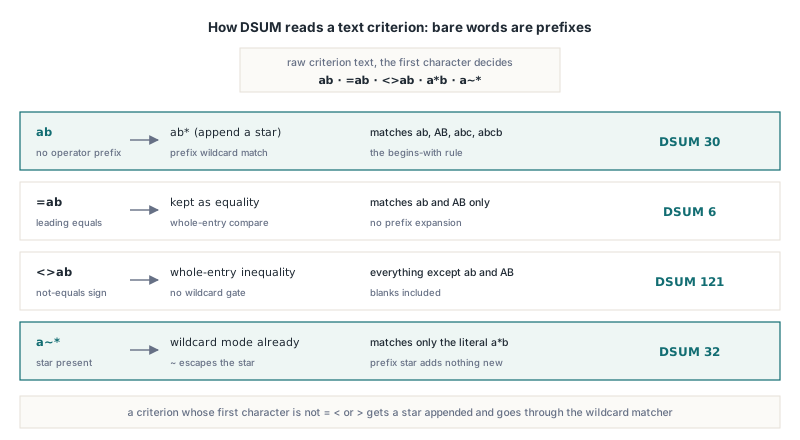
const
  Names: array [1..7] of string = ('a~b', 'ab', 'AB', 'abc', 'abcb', 'a*b', 'axb');
  Criteria: array [0..4] of string = ('ab', '=ab', '<>ab', 'a*b', 'a~*');
var
  Book: TXLSXWorkbook;
  Sheet: TXLSXWorksheet;
  i: Integer;
begin
  Book := TXLSXWorkbook.Create;
  try
    Sheet := Book.Sheets.Add('Db');
    Sheet.Cells[1, 1].Value := 'Name';
    Sheet.Cells[1, 2].Value := 'Val';
    for i := 1 to High(Names) do
    begin
      Sheet.Cells[i + 1, 1].Value := Names[i];
      Sheet.Cells[i + 1, 2].Value := 1 shl (i - 1);
    end;
    Sheet.Cells[1, 4].Value := 'Name';            // criteria header in D1
    for i := 0 to High(Criteria) do
    begin
      Sheet.Cells[2, 4].Value := Criteria[i];     // stays text in the XLSX engine
      Writeln(Criteria[i], ' -> ',
        VarToStr(Book.Calculate('=DSUM(A1:B8,"Val",D1:D2)')));
    end;
    // ab   -> 30   ab, AB, abc, abcb (begins with)
    // =ab  -> 6    ab, AB (whole entry)
    // <>ab -> 121  everything except ab and AB
    // a*b  -> 127  a*b* matches all seven, abc included
    // a~*  -> 32   only the literal a*b
  finally
    Book.Free;
  end;
end;
One related difference outlived the prefix fix and matters on older builds. Text comparisons such as >ab used code-point order, while Excel puts punctuation before letters, so "a~b">"ab" is FALSE in Excel and was TRUE in HotXLS. Since v2.384.67 the > and < criteria, together with ordinary text comparison and sorting, use Excel's word-sort collation under the current user locale, and the two agree again
Why did whole-cell Find miss abcb?
Whole-cell Find missed abcb because the matcher stopped at the first point where the pattern was used up instead of backtracking into the last *. The partial-match matcher behind Replace returns as soon as the pattern is exhausted; whole-cell Find reused it and then demanded that the match cover the entire cell: a*b against abcb stopped after ab, consumed 2 characters out of 4, and was rejected. Since v2.384.60 the whole-cell matcher is a separate implementation that treats "pattern ended, text did not" as one more mismatch and retries from the last star, so a*b matches abcb and a?b*b matches axbyb, as Excel 16 Find does with "Match entire cell contents" checked
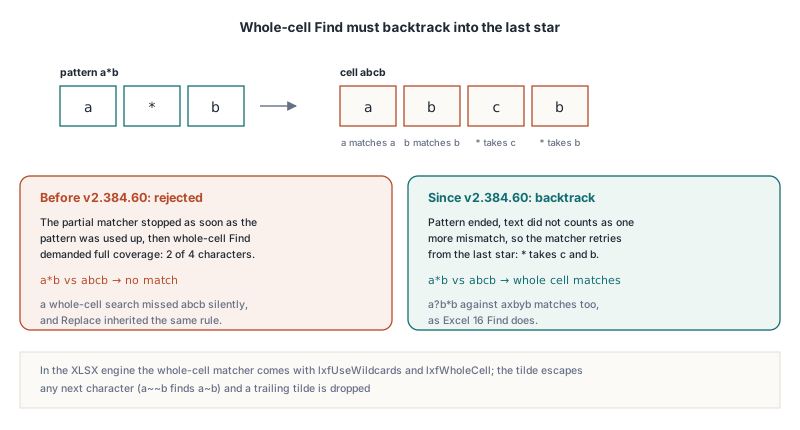
The same release changed the tilde. Excel 16 Find, in both whole-cell and partial mode, treats ~ as an escape for any following character: a~b finds ab, a~~b finds a~b, and a trailing tilde is ignored, so q~ behaves as q. The older HotXLS matcher recognised only ~*, ~? and ~~ as escapes, so a~b found the text a~b. A Find pattern of a single ~ is unstable in Excel itself, matching any cell like an empty pattern, and HotXLS does not imitate that
In the XLSX engine the search is TXLSXWorksheet.FindText with a TXLSXFindOptions set: lxfUseWildcards turns on *, ? and ~, lxfWholeCell requires the whole cell to match, and lxfMatchCase makes the comparison case-sensitive. Without lxfUseWildcards every character, star included, is literal. Find looks at text values only; numeric cells are skipped, and formula cells are skipped unless lxfSearchFormulas is set, in which case the formula text is searched. The anchor given by StartRow and StartCol is inclusive, so a Find All loop steps one column past each hit
var
  Book: TXLSXWorkbook;
  Sheet: TXLSXWorksheet;
  Row, Col, NextRow, NextCol, Changed: Integer;
  Opts: TXLSXFindOptions;
begin
  Book := TXLSXWorkbook.Create;
  try
    Sheet := Book.Sheets.Add('Parts');
    Sheet.Cells[1, 1].Value := WideString('abc');
    Sheet.Cells[2, 1].Value := WideString('abcb');
    Sheet.Cells[3, 1].Value := WideString('a~b');
    Sheet.Cells[4, 1].Value := WideString('ab');

    Opts := [lxfUseWildcards, lxfWholeCell];
    if Sheet.FindText('a*b', Row, Col, Opts, 1, 1) then
      Writeln('a*b  whole cell -> row ', Row);   // 2: abc rejected, abcb backtracks
    if Sheet.FindText('a~b', Row, Col, Opts, 1, 1) then
      Writeln('a~b  whole cell -> row ', Row);   // 4: ~b is an escaped b
    if Sheet.FindText('a~~b', Row, Col, Opts, 1, 1) then
      Writeln('a~~b whole cell -> row ', Row);   // 3: ~~ is one literal tilde

    // Partial match, Find All: the anchor cell is included, so step past each hit
    NextRow := 1;
    NextCol := 1;
    while Sheet.FindText('a*b', Row, Col, [lxfUseWildcards], NextRow, NextCol) do
    begin
      Writeln('a*b  contained in row ', Row);     // rows 1, 2, 3 and 4
      NextRow := Row;
      NextCol := Col + 1;
    end;

    // Whole-cell wildcard replace rewrites the literal a~b only
    Changed := Sheet.ReplaceText('a~~b', 'a-b', Opts);
    Writeln(Changed, ' cell(s) replaced');         // 1
  finally
    Book.Free;
  end;
end;
The partial loop finds all four rows, including abc, because in partial mode a*b only has to occur somewhere inside the cell. FindTextIn and ReplaceTextIn take the same options plus a FirstRow, FirstCol, LastRow, LastCol window, the programmatic equivalent of searching within a selection. The classic engine exposes the same rules through an overload with three booleans, TXLSWorksheet.FindText(SearchText, Row, Col, MatchCase, UseWildcards, WholeCell), plus a matching ReplaceText overload, with 1-based row and column results:
var
  Classic: IXLSWorkbook;
  Sheet: TXLSWorksheet;
  Row, Col: Integer;
begin
  Classic := TXLSWorkbook.Create;
  Sheet := Classic.Sheets.Add;
  Sheet.Range['A1', 'A1'].Value := 'abcb';
  // MatchCase = False, UseWildcards = True, WholeCell = True
  if Sheet.FindText('a*b', Row, Col, False, True, True) then
    Writeln('found at ', Row, ',', Col);           // 1,1
  if not Sheet.FindText('a*c', Row, Col, False, True, True) then
    Writeln('a*c does not cover abcb');
end;
What did the old DOS-mask matcher get wrong?
The old matcher got the special characters wrong, because a DOS file mask is a different language from an Excel wildcard. Before v2.384.52 the criteria functions and the database functions passed every pattern to MatchesMask, a file-mask matcher in the lxMasks unit. Its syntax overlaps with Excel's for common cases, which is why the problem stayed hidden, but it diverges where real data gets interesting:
[x]was read as a character set, soCOUNTIF(A1:A10,"[x]")counted cells holdingxinstead of the bracketed text, and"[a-z]"matched any one-letter cell- There was no tilde escape, so
"a~*b"could not match a literal asterisk - A malformed mask, such as an unclosed bracket, raised an exception that the caller swallowed as "no match", turning a typo in a criterion into a silently wrong total
- On the lookup side,
MATCHandXLOOKUPtreated only~*,~?and~~as escapes, soMATCH("a~b",…,0)found the literala~binstead ofab
If your workbooks only ever used * and ? on plain alphanumeric data, the results were already right and will not change. If they contain brackets, tildes, mixed-type columns under "<>text", or DSUM criteria written as bare words, recalculating them with v2.384.64 or later can change totals, and the new totals are the ones Excel shows. The same distinction between how Excel stores a criterion and how it compares it comes up for saved filters, discussed in the HotXLS article on BIFF8 AutoFilter DOPER criteria
Quick reference: Excel wildcard rules in HotXLS
COUNTIF,SUMIF,AVERAGEIFand the*IFSfamily use wildcards only when the criterion contains*or?; otherwise they compare whole strings case-insensitively and~is literal (since v2.384.52)MATCHwith match type 0 andXLOOKUPwith match_mode 2 always use wildcards, soa~bfindsaband the literal needsa~~b(since v2.384.52)- In wildcard mode
~escapes any next character and a trailing~is dropped;[and]are ordinary characters "<>text"counts numbers, booleans, errors and blank cells; a bare"<>"counts non-blank cells,=""results includedDSUMand the other database functions treat plain text as "begins with";=textand<>textcompare the whole entry (since v2.384.64)- Whole-cell Find with
lxfUseWildcardsandlxfWholeCellbacktracks, soa*bmatchesabcb; Find and Replace treat~as an escape for any character (since v2.384.60) - Text order in
>and<criteria follows Excel's word-sort collation, punctuation before letters (since v2.384.67)
Excel compatibility in a formula engine is mostly edge cases like these, measured against Excel rather than guessed from documentation. HotXLS evaluates COUNTIF, MATCH, XLOOKUP, DSUM and the rest of its function library natively in Delphi and C++Builder, in both the classic engine and the XLSX engine, without Excel installed. Details, editions and the trial download are on the HotXLS Delphi spreadsheet component page