HotXLS, the native spreadsheet component for Delphi and C++Builder, evaluates XLOOKUP and XMATCH through a shared lookup core. It accepts four match modes (-1, 0, 1, 2) and four search modes (-2, -1, 1, 2), follows a logarithmic binary descent whenever the absolute search mode is 2, and returns a formula error for every other combination
The bug report that sends you here never says "search mode". It says the server-generated workbook shows a different number than the same file opened in Excel, on maybe four rows out of nine thousand. Those four rows always have something in common: a duplicated lookup key, or an approximate match that had to pick a neighbour, or a lookup column somebody sorted by a different column last week. Lookup functions are where a formula engine stops being arithmetic and starts being a contract, and the contract has clauses most callers never read
Which mode numbers does XLOOKUP actually accept?
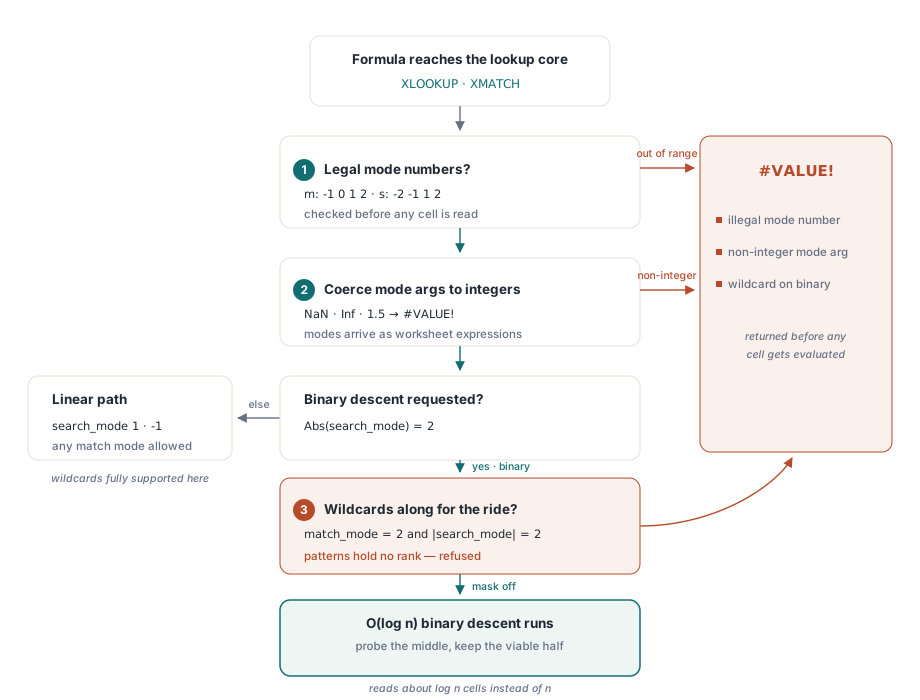
Exactly four of each, and nothing else. HotXLS validates match_mode against -1, 0, 1 and 2 and search_mode against -2, -1, 1 and 2 before it touches a single cell, and any other value returns #VALUE! rather than being clamped into the nearest legal mode. The four match modes are 0 for exact, -1 for exact or next smaller, 1 for exact or next larger, and 2 for wildcard; the four search modes are 1 for a forward linear scan, -1 for a reverse linear scan, 2 for a binary search over ascending data, and -2 for a binary search over descending data. Omitting them selects match mode 0 and search mode 1, the pairing almost every real formula uses. Argument counts are policed the same way: XLOOKUP takes three to six arguments and XMATCH takes two to four, and anything outside those ranges is a #VALUE! before evaluation begins
// Shared by XLOOKUP and XMATCH, before any cell is read
if ((RequestedMatchMode <> -1) and (RequestedMatchMode <> 0) and
    (RequestedMatchMode <> 1) and (RequestedMatchMode <> 2)) or
   ((RequestedSearchMode <> -2) and (RequestedSearchMode <> -1) and
    (RequestedSearchMode <> 1) and (RequestedSearchMode <> 2)) then
begin
  Result := lxErrorValue;          // #VALUE!
  Exit;
end;

if Abs(RequestedSearchMode) = 2 then
begin
  if RequestedMatchMode = 2 then   // wildcards cannot ride a binary descent
  begin
    Result := lxErrorValue;
    Exit;
  end;
  // ... O(log n) descent over the lookup vector
end;
One step earlier there is a quieter check worth knowing about. The mode arguments arrive as worksheet expressions, so HotXLS coerces them to a number, refuses NaN and infinity, and then demands that the number equal its own rounded value. XLOOKUP(x, A:A, B:B, "none", 0, 1.5) is a #VALUE!, not a search mode 2 in disguise. That matters when the mode comes from a cell that a rounding-heavy calculation produced, which is more common in generated workbooks than in hand-written ones
Why does search_mode 2 give the wrong answer on unsorted data?
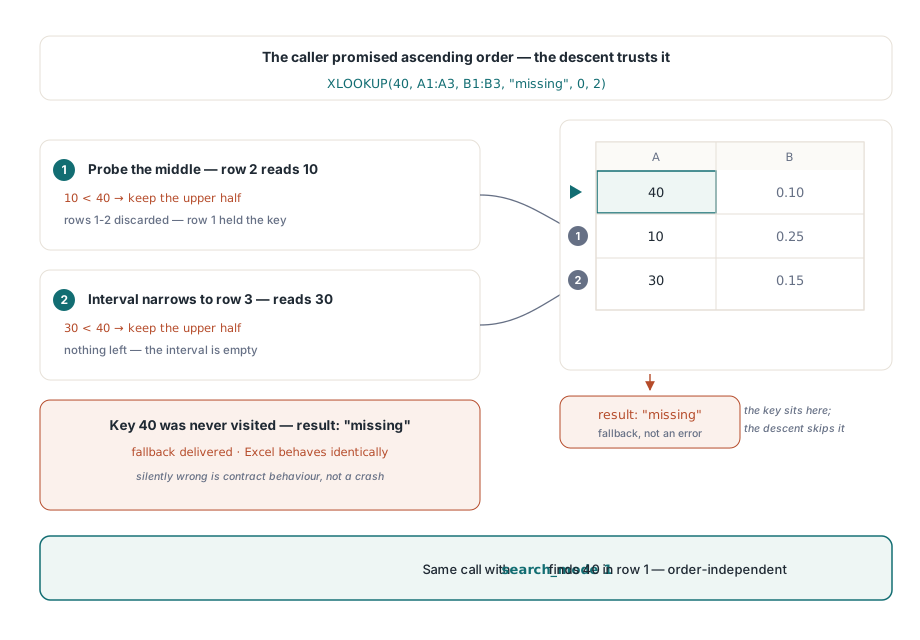
Because it is doing exactly what you asked. Search mode 2 tells the engine that the lookup vector is already in ascending order, and a binary search cannot verify that claim without an O(n) pass that would destroy the reason for using it. HotXLS therefore trusts the caller, halves the interval, and returns whatever the descent lands on. On unsorted input the answer is not an error, it is silently wrong, and this is a contract violation rather than a defect in the engine
Microsoft documents the same asymmetry for XLOOKUP and XMATCH: the binary modes require sorted data and produce invalid results otherwise. ISO 29500-1 clause 18.17, which defines the SpreadsheetML formula grammar, carries the older LOOKUP and VLOOKUP descriptions with their own ascending-order requirement, and XLOOKUP and XMATCH postdate that text far enough that they travel in the file as _xlfn.XLOOKUP and _xlfn.XMATCH under the future-function convention. Different generation, same bargain: the caller supplies the ordering invariant, the engine supplies the logarithm
var
  Book: TXLSXWorkbook;
  Sheet: TXLSXWorksheet;
begin
  Book := TXLSXWorkbook.Create;
  try
    Sheet := Book.Sheets.Add('Rates');
    Sheet.Cells[1, 1].Value := 40;  Sheet.Cells[1, 2].Value := 0.10;
    Sheet.Cells[2, 1].Value := 10;  Sheet.Cells[2, 2].Value := 0.25;
    Sheet.Cells[3, 1].Value := 30;  Sheet.Cells[3, 2].Value := 0.15;

    // Forward linear scan: finds key 40 wherever it sits
    Sheet.Cells[5, 1].Formula := 'XLOOKUP(40,A1:A3,B1:B3,"missing",0,1)';
    // Binary ascending: the promise was broken, the key is never visited
    Sheet.Cells[6, 1].Formula := 'XLOOKUP(40,A1:A3,B1:B3,"missing",0,2)';

    Book.SaveAs('lookup-modes.xlsx');
  finally
    Book.Free;
  end;
end;
Trace the second formula and the failure is completely mechanical. The descent probes the middle cell, reads 10, decides 10 is smaller than 40, discards the left half including the row that actually held 40, probes 30, discards again, and runs out of interval. Excel behaves the same way, which is the point: reproducing the wrong answer is a compatibility requirement, not a courtesy. The ordering premise is also stricter than "numbers ascending", because the comparator ranks values by kind first, in the order numbers, then text, then booleans, then error values, then blanks, and only compares within a kind after that. A column of numeric part codes that has three cells storing text instead is not ascending under that comparator no matter how it looks on screen, and the binary modes will happily misread it
Where do duplicate keys land?
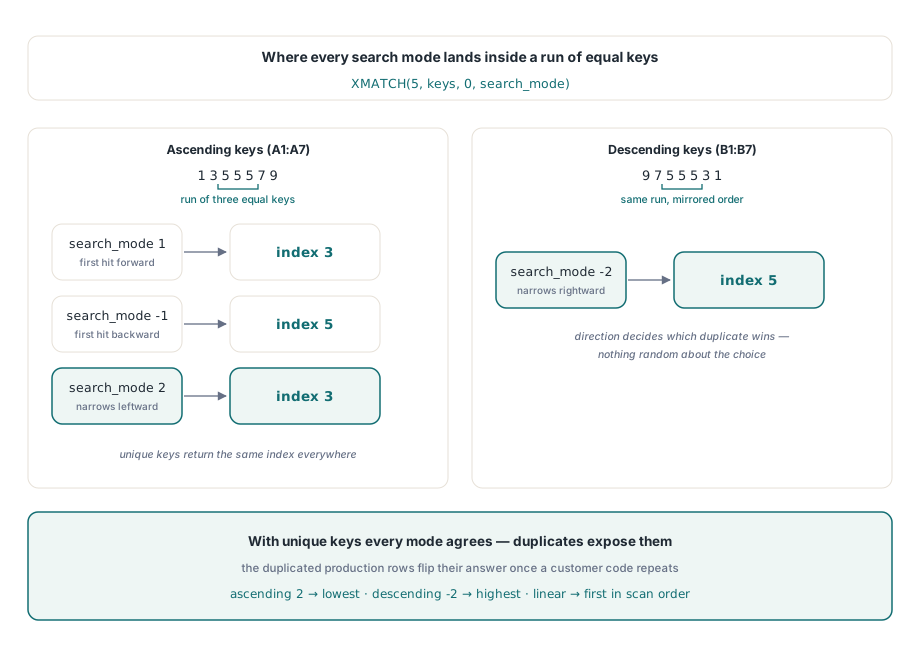
On a deterministic end of the duplicate run, and which end depends on the search mode rather than on luck. When the binary descent hits an equal key under search mode 2 it records the position and then keeps narrowing to the left, so the result is the lowest index of the run; under search mode -2, over descending data, it records the position and narrows to the right, so the result is the highest index. The linear modes are simpler: search mode 1 returns the first hit going forward, search mode -1 the first hit going backward. This is the detail that produces the four-row discrepancy from the opening paragraph, because a workbook whose keys are unique gives identical answers under all four search modes and hides the difference through every test you wrote from a clean sample file. Add one duplicated customer code to production data and the modes start disagreeing on precisely the rows that duplicated: nothing changed in the engine, the input just stopped being a set and became a multiset
// A1:A7 holds 1, 3, 5, 5, 5, 7, 9 - ascending, with a run of three
Sheet.Cells[1, 3].Formula := 'XMATCH(5,A1:A7,0,1)';   // 3, first forward hit
Sheet.Cells[2, 3].Formula := 'XMATCH(5,A1:A7,0,-1)';  // 5, first reverse hit
Sheet.Cells[3, 3].Formula := 'XMATCH(5,A1:A7,0,2)';   // 3, lowest index of the run

// B1:B7 holds 9, 7, 5, 5, 5, 3, 1 - descending
Sheet.Cells[4, 3].Formula := 'XMATCH(5,B1:B7,0,-2)';  // 5, highest index of the run
How does approximate match choose the runner-up?
By keeping a best candidate alongside the exact-match search and returning it only if no exact hit appears. HotXLS treats match_mode -1 as "the largest value that is not greater than the target" and match_mode 1 as "the smallest value that is not smaller", and both are resolved over the whole scanned region rather than by stopping at the first acceptable neighbour. In the binary path the same idea falls out of the descent for free: every step that overshoots or undershoots updates the candidate, so the final candidate is the boundary element next to the position where the key would have been inserted
// Linear path: refine the candidate only on a strict improvement
if (RequestedMatchMode = -1) or (RequestedMatchMode = 1) then
begin
  CompareResult := CompareDynamicValues(CurrentValue, RequestedValue);
  if ((RequestedMatchMode = -1) and (CompareResult <= 0) and
      ((CandidateIndex < 0) or
       (CompareDynamicValues(CurrentValue, CandidateValue) > 0))) or
     ((RequestedMatchMode = 1) and (CompareResult >= 0) and
      ((CandidateIndex < 0) or
       (CompareDynamicValues(CurrentValue, CandidateValue) < 0))) then
  begin
    CandidateIndex := ScanIndex;
    CandidateValue := CurrentValue;
  end;
end;
Read the inner condition closely, because the tie-break lives there. A new cell replaces the standing candidate only when it is strictly better, never when it merely equals it, so among several cells holding the same runner-up value the one kept is the first met in scan order: the lowest index under a forward scan, the highest under a reverse scan. If XLOOKUP and XMATCH find neither an exact hit nor an acceptable neighbour, XLOOKUP falls back to its if_not_found argument when one was supplied and to #N/A when it was not, while XMATCH always yields #N/A
Why wildcards and binary search cannot coexist
Because a wildcard pattern is not a position in an order. Match mode 2 asks whether a cell matches a mask, and mask matching answers yes or no; a binary descent needs a three-way answer that tells it which half to keep. There is no defensible way to ask whether ACME-* lies to the left or to the right of a given cell, so HotXLS rejects match_mode 2 combined with search_mode 2 or -2 up front with #VALUE! instead of guessing an ordering and producing plausible nonsense. The two paths also compare values differently, which reinforces the split: the linear scan decides equality with a case-insensitive text comparison, or with mask matching when wildcards are on, while the binary descent decides equality by asking the ordering comparator for a zero. That is deliberate rather than an accident of layering, since the binary path may only use the relation it is actually navigating by. If you need wildcards, use search mode 1 or -1 and accept the linear cost, which is the same trade the dependency tracking behind incremental recalculation is designed to keep off your critical path
Shape errors: two-dimensional ranges and mismatched return vectors
Both functions require a genuinely one-dimensional lookup range. If the supplied range spans more than one row and more than one column at the same time, HotXLS returns #VALUE! rather than picking an axis on your behalf, and a single-row or single-column range is read along its long axis. XLOOKUP adds a second shape rule: the return range must be exactly as long as the lookup range along the matching axis, so a vertical lookup over 500 rows paired with a 499-row return range is an error, not an off-by-one quietly resolved at the last row. When the return range is wider than one column for a vertical lookup, or taller than one row for a horizontal one, XLOOKUP hands back the whole matched slice as an array and it spills into the neighbouring cells under the same rules as the other dynamic array functions, described in the article on spill ranges and dynamic arrays. That is genuinely useful for pulling an entire record out of a table with one formula, and it is also the fastest way to overwrite a column you meant to keep
Choosing a mode when nobody is watching the screen
Server-side generation deserves a stricter policy than interactive use, because there is no human to notice that a total looks wrong. The defensible default is search mode 1 with match mode 0: linear, exact, order-independent, and impossible to invalidate by re-sorting a sheet. Reach for search mode 2 only where the same code path also produced the ordering, in the same run, over the same column, and write that dependency down next to the formula, because a binary search on a column sorted by a different key is the cheapest possible way to compute a confident wrong number. When the lookup is genuinely hot and the data genuinely sorted the payoff is real: the descent reads on the order of log n cells instead of n, and each of those reads goes through a full workbook cell resolution, so the saving is larger than the instruction count suggests
If the shape of the problem is closer to a domain rule than to a lookup, a callback into your own Pascal code, as covered in the article on custom worksheet functions, will usually beat any clever arrangement of the built-in ones. The XLOOKUP and XMATCH implementations discussed here ship with the standard HotXLS Delphi spreadsheet component, whose product page carries the full supported-function reference for Delphi and C++Builder