HotXLS evaluates Excel 365 dynamic array spill formulas natively in Delphi and C++Builder: you hand it a workbook whose cells hold XLOOKUP or FILTER, and its formula engine computes the result set and spills it across the anchored output rectangle, the same values Excel would produce. The HotXLS Delphi Excel component models a spill formula as one root cell that owns the calculation plus a block of dependent cells that read back from it, which is the whole picture you need before writing a line of code
That model matters because the everyday task is not abstract. A customer sends an .xlsx built in Excel 365, its sheets are full of =FILTER(...) and =XLOOKUP(...), and your service has to reproduce the exact same numbers headless, on a machine with no Excel installed, then either read the spilled values or write a fresh spill region of your own. Dynamic arrays changed the calculation contract from "one formula, one cell" to "one formula, a rectangle of cells", and the HotXLS engine follows that contract rather than faking it with a pre-expanded grid
How do you evaluate XLOOKUP and FILTER in Delphi?
HotXLS dispatches every dynamic-array function through a single evaluator entry point, CalcDynArrayFunc in lxCalc.pas, so the whole family shares one spill code path. The supported set is XLOOKUP and FILTER (the original two), joined by XMATCH, SORT, UNIQUE, and SEQUENCE. Each returns a 2-D variant array rather than a scalar: SEQUENCE(3;2;1;1) yields a 3-by-2 grid, SORT reorders rows by any key column ascending or descending, UNIQUE collapses duplicate rows keeping the first occurrence, and XMATCH reports the 1-based position of a value under the same exact, wildcard, next-smaller, and next-larger match modes as XLOOKUP. Unlike the scalar statistical distribution functions, which return one number per call, these functions hand back a whole shape
To compute a workbook that already carries these formulas, open it, call Recalculate once, and read the cells the spill landed in. TXLSXWorkbook.Recalculate walks the dependency graph and evaluates each dirty formula in topological order, so a spill root is calculated a single time and its elements are written straight into the member cells
var
  Book: TXLSXWorkbook;
  Sheet: TXLSXWorksheet;
  r, c: Integer;
begin
  Book := TXLSXWorkbook.Create;
  try
    Book.Open('from-customer.xlsx');
    Book.Recalculate;                 // evaluate every formula, spills included
    Sheet := Book.Sheets[1];          // Sheets is 1-based
    // Read back the block the XLOOKUP / FILTER spilled into, say D2:F9.
    for r := 2 to 9 do
      for c := 4 to 6 do
        Writeln(Sheet.Cells[r, c].Text);
  finally
    Book.Free;
  end;
end;
If the workbook needs a function the engine does not ship, the same evaluator lets you plug your own logic in through the custom worksheet functions hook, and a custom function is free to return a variant array so it spills exactly like the built-ins
Anchoring the spill range with SetArrayFormula
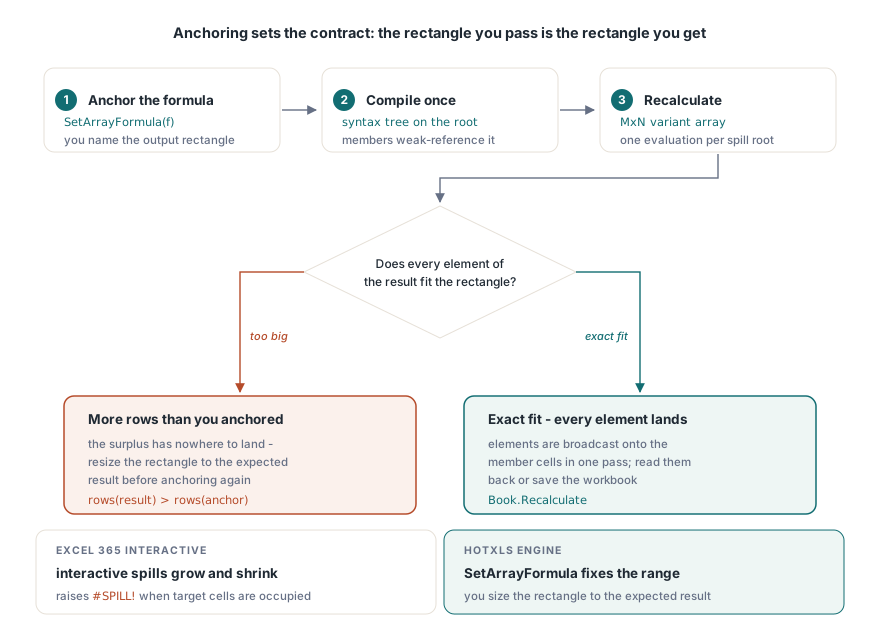
HotXLS never guesses how large a spill should be: you name the output rectangle, and TXLSRange.SetArrayFormula anchors the formula to it. The method compiles the formula once, stores the syntax tree on the top-left root cell together with the anchored range, and gives every other cell in the rectangle a lightweight formula that weak-references the root. At recalculation the root evaluates once and its matrix elements are broadcast directly onto each member cell, which is also how a spill root shows up as one node in the incremental recalculation dependency graph. This is the path to use when the job is to write a spill region back into the file rather than read one out
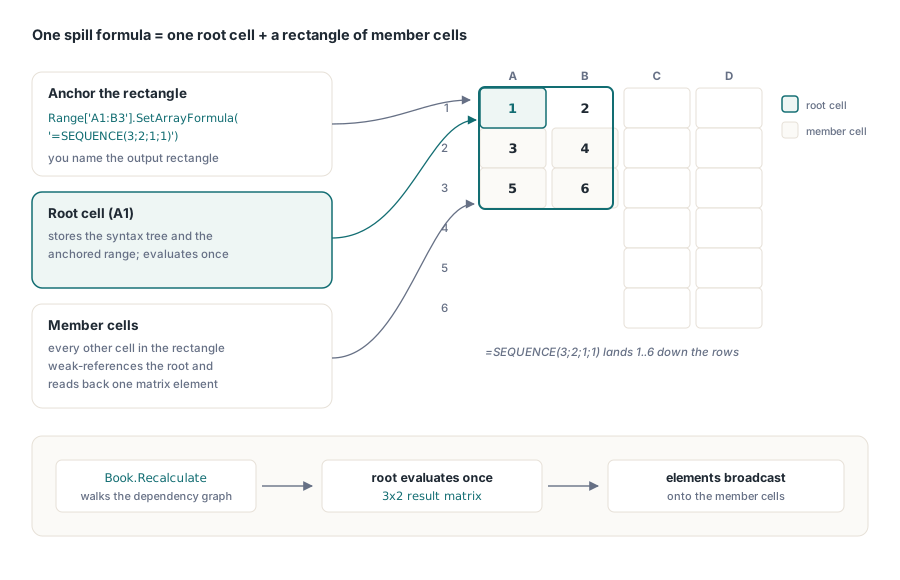
var
  Book: TXLSXWorkbook;
  Sheet: TXLSXWorksheet;
begin
  Book := TXLSXWorkbook.Create;
  try
    Book.Open('report.xlsx');
    Sheet := Book.Sheets[1];
    // Size the rectangle to the result: a 3-row by 2-column grid.
    if Sheet.Range['A1:B3'].SetArrayFormula('=SEQUENCE(3;2;1;1)') > 0 then
      Book.Recalculate;               // fill A1:B3 with 1..6 down the rows
    Book.SaveAs('report-out.xlsx');
  finally
    Book.Free;
  end;
end;
The consequence of explicit anchoring is a boundary worth stating plainly: HotXLS does not auto-resize a spill the way interactive Excel does. Excel grows and shrinks the spilled region as its inputs change and raises #SPILL! when the target cells are occupied. In HotXLS the rectangle you pass to SetArrayFormula is the rectangle you get, so you size it to the result you expect, and if a function produces more rows than you anchored, the surplus has nowhere to land
Element-wise array broadcasting across the operators
HotXLS applies the arithmetic operators element by element when either side of the operation is an array. The helper ApplyArrayBinaryOp covers +, -, *, /, and ^ over 1-D and 2-D variant arrays: a scalar operand is broadcast to every element, two arrays must match in shape or the operation is rejected, and division by zero propagates as an error rather than crashing. The scalar arithmetic path is untouched, so this only activates when at least one operand is genuinely an array, such as a spilled range or a matrix-function result. That means a formula like =D2:D13*1.1 anchored over a column multiplies each element in turn, and =D2:D13*E2:E13 multiplies two equal-shaped columns position by position
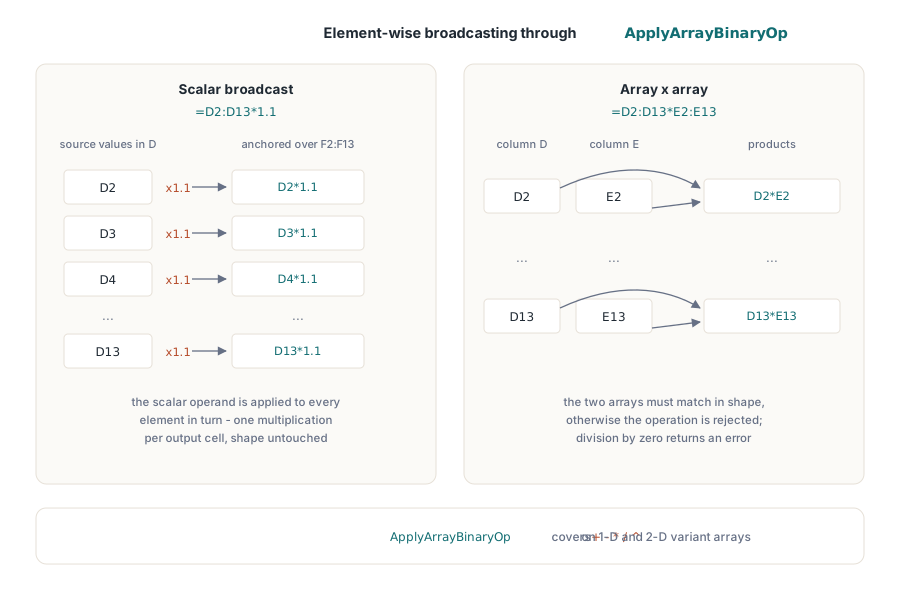
// Scalar broadcast: every cell of the anchor gets D(n) * 1.1.
Sheet.Range['F2:F13'].SetArrayFormula('=D2:D13*1.1');
// Two arrays of identical shape multiply element by element.
Sheet.Range['G2:G13'].SetArrayFormula('=D2:D13*E2:E13');
Book.Recalculate;
What does the @ operator do versus a legacy CSE array?
HotXLS reads an explicit @ as the reference-intersection operator, not as the row-picking implicit intersection of live Excel. In the engine, A1:A3 @ B1:B3 returns the single cell where the two ranges cross, and the operator binds tighter than ^ and looser than %. One honesty note goes with that: the implicit space-separated intersection form is not tokenised yet, because the lexer still skips whitespace, so you get intersection only through the explicit @ symbol
The deeper distinction is between a legacy CSE array formula and a modern dynamic array, and in HotXLS both flow through the same anchoring machinery. A classic array formula was the {=...} block entered with Ctrl+Shift+Enter over a pre-sized selection, every cell sharing one compiled formula. A dynamic array is a single formula whose result determines its own shape. HotXLS unifies them under SetArrayFormula: you always name the rectangle, the root owns the compiled tree, and the members reference it, whether the formula is an old-style matrix expression or a new SORT. What you never get is Excel's automatic ripple where the region silently regrows, and holding that line in mind keeps the two mental models from blurring
Where the dynamic-array support stops
Knowing the edges saves an afternoon of debugging. SORT honours a per-key direction, ascending by default and descending when the order argument is negative; the comparison direction is a place worth testing your own key columns against Excel, since a reversed compare silently returns rows in the opposite order rather than failing. UNIQUE keeps the first occurrence of each distinct row, which the engine confirms by scanning the earlier rows rather than trusting a raw duplicate count. The TABLE function (What-If Analysis data tables) is recognised so it round-trips through the file, but it evaluates to a placeholder because the real substitution results are the cached values Excel already stored, and HotXLS does not re-run the what-if grid
LET is the sharpest limit to call out. HotXLS registers LET and carries an evaluation path for it, but the parser rejects a bare name that is not an already-defined name, so =LET(x;10;x) fails while parsing before the evaluator is ever reached. Treat LET as unsupported until the parser gains scope awareness for its bound names. A smaller portability note: the formula strings in these examples use the engine list separator, a semicolon, so match whatever separator your build expects when you assemble formula text. The dynamic-array functions covered here, from XLOOKUP and FILTER through SORT, UNIQUE, SEQUENCE, and XMATCH, ship in the HotXLS Delphi Excel Component, whose formula reference lists the full function catalogue and each function's supported argument modes