HotXLS saves every BIFF8 AutoFilter criterion as an AUTOFILTER record that carries two 10-byte DOPER structures, and the DOPER type decides how Excel compares. Since v2.384.45, TXLSWorksheet.ApplyAutoFilter writes a comparison such as '>=100' as an IEEE number DOPER, so Excel matches numeric cells instead of comparing text. The bug report that prompted the change was short and maddening: a nightly export applied a filter on an amount column, the file opened without complaint, the dropdown arrow showed the criterion, and the filter matched zero rows. Nothing was corrupt. The bytes were valid BIFF8, just the wrong kind of valid, and that is the class of failure this article walks through, together with two older byte-level mistakes fixed in v2.384.18
What does a BIFF8 AutoFilter actually store?
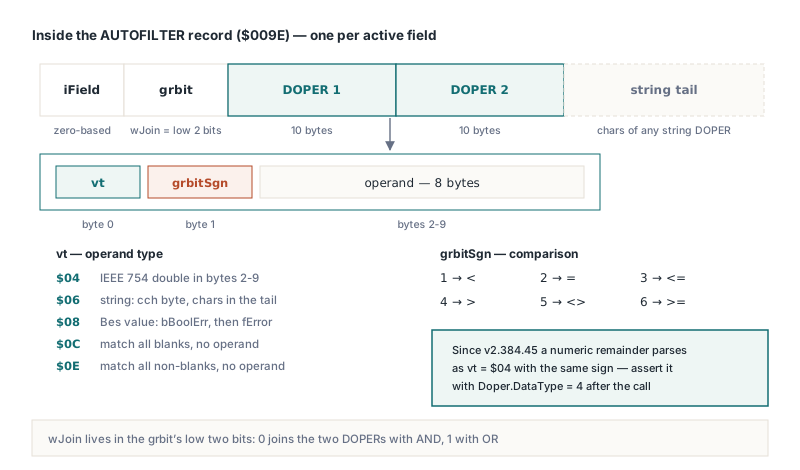
A BIFF8 AutoFilter is a set of three record types, not one, and only the per-field record holds criteria. AUTOFILTERINFO ($009D, [MS-XLS] §2.4.8) records how many columns the filter range covers. FILTERMODE ($009B) is a bodyless marker that HotXLS emits only when at least one field has an active criterion. Then each active field gets its own AUTOFILTER record ($009E, §2.4.6): a zero-based field index, a grbit word whose low two bits are wJoin, two DOPERs of exactly 10 bytes each, and an optional tail that holds the characters of any string DOPER. The field index is zero-based on disk even though ApplyAutoFilter numbers fields from 1, which matters the first time you go hunting for a record in a hex dump. The first byte of each DOPER, vt, says what kind of operand follows:
$04is an IEEE 754 double stored in the remaining 8 bytes, which is how Excel stores a numeric comparison$06is a string whose length lives in a singlecchbyte, with the characters themselves pushed into the record tail$08is a Bes value, a Boolean or error code packed into two bytes$0Cand$0Ecarry no operand and mean match all blanks and match all non-blanks
The second byte, grbitSgn, holds the comparison: 1 through 6 map to <, =, <=, >, <> and >=. HotXLS keeps both bytes visible after the fact through AutoFilterColumns, whose items expose Criteria1 and Criteria2 as TXLSAutofilterDOPER objects with DataType, grbitSgn and Value, so you can assert on what will be written instead of guessing
Why did a '>=100' filter match no rows in Excel?
The filter matched nothing because the operand was stored as text, and Excel compares a string DOPER against the cell as text. Before v2.384.45, CreateFilterDoper in lxFilter.pas correctly stripped the >= prefix and set the sign to 6, then always built a vtString DOPER holding the characters 100. A number cell holding 250 never satisfies a text comparison against "100", so every row dropped out. No exception, no diagnostic, no repair prompt from Excel. The rule since v2.384.45 is narrow on purpose: if the criterion starts with a comparison operator and the remainder parses as a number under invariant-culture rules, HotXLS writes a vtIEEENumber DOPER with the same sign. A bare value with no operator keeps the string form, because that is how Excel itself stores an item picked from the dropdown list
var
  Wb: IXLSWorkbook;
  Sh: TXLSWorksheet;
  Doper: TXLSAutofilterDOPER;
begin
  Wb := TXLSWorkbook.Create;
  Sh := Wb.Sheets.Add;
  Sh.Cells[1, 1].Value := 'Region';
  Sh.Cells[1, 2].Value := 'Amount';
  Sh.Cells[2, 1].Value := 'North';
  Sh.Cells[2, 2].Value := 250;

  // Field 2 = second column of A1:B100 (1-based on the API side)
  Sh.ApplyAutoFilter('A1:B100', 2, '>=100');

  Doper := Sh.AutoFilterColumns.Find(2).Criteria1;
  // v2.384.45+: DataType = 4 (IEEE number), grbitSgn = 6 (>=)
  // Before the fix: DataType = 6 (string), which matched nothing
  Assert(Doper.DataType = 4);

  Wb.SaveAs('orders.xls');
end;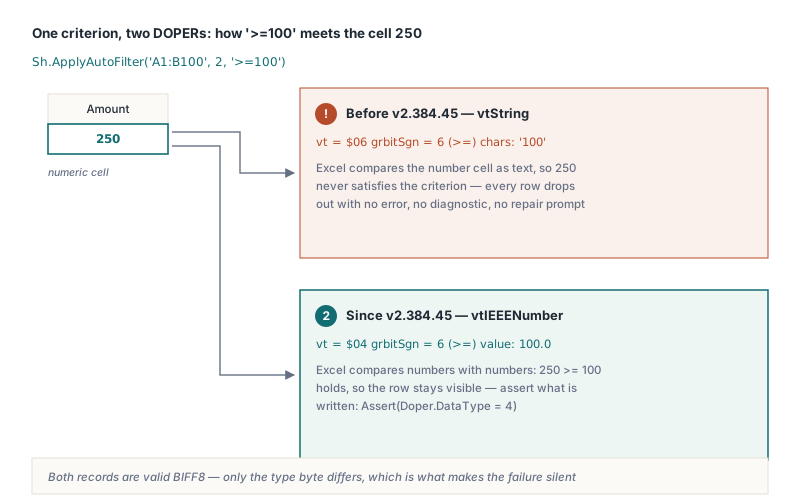
The parse is where the remaining sharp edges live. The operand goes through TryStrToFloat with a period as decimal separator, so '>=1.5' becomes a number and '>=1,5' stays a string DOPER and silently matches nothing again, whatever the Windows locale says. Dates are the same trap in a different costume: '>=2026-01-01' is not a number, so it is written as text, while Excel holds date cells as serial numbers. For equality on a number, both '=100' and a numeric Variant such as 100 produce an IEEE DOPER with sign 2, while the bare string '100' produces a text match. Build numeric operands in code rather than formatting them for humans:
var
  Fmt: TFormatSettings;
  Since: TDateTime;
begin
  Fmt := TFormatSettings.Create;
  Fmt.DecimalSeparator := '.';

  // Threshold with a fraction: always format with a period
  Sh.ApplyAutoFilter('A1:D500', 3, '>' + FloatToStr(1499.5, Fmt));

  // Dates: compare against the serial number Excel stores in the cell.
  // A Delphi TDateTime equals the 1900-system serial for dates after March 1900
  Since := EncodeDate(2026, 1, 1);
  Sh.AutoFilterColumns.SetFieldCriteria(4, '>=' + IntToStr(Trunc(Since)),
    xlAnd, Unassigned);
end;
How do AND and OR join two conditions?
The wJoin bits of the AUTOFILTER grbit are 0 for AND and 1 for OR, and HotXLS had those two constants reversed until v2.384.18. A between-style filter such as at least 100 and below 500 was saved as at least 100 or below 500, which in practice matches every number and looks like the filter simply did not apply. The public operator constants add a second porting hazard. In HotXLS, xlAnd is 0 and xlOr is 1, whereas Excel automation numbers them 1 and 2. XlAutoFilterOperator is a plain Byte, so code translated from a VBA macro with literal numbers compiles cleanly, and a literal 1 that meant AND in COM now means OR. Use the named constants and the problem cannot arise:
// Amount between 100 (inclusive) and 500 (exclusive)
Sh.ApplyAutoFilter('A1:D500', 3, '>=100', xlAnd, '<500');

with Sh.AutoFilterColumns.Find(3) do
begin
  Assert(Operator = xlAnd);            // wJoin = 0 on disk
  Assert(Criteria2.grbitSgn = 1);      // 1 = less than
end;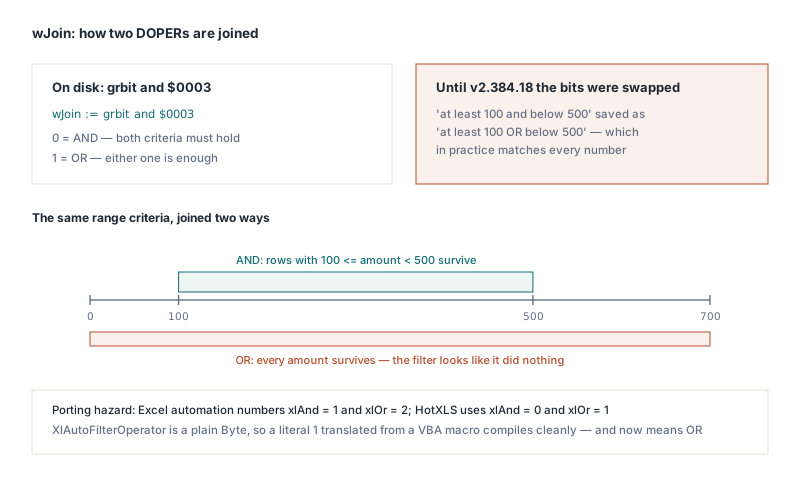
Booleans, blanks and the 255-character ceiling
A Boolean criterion is stored as a Bes value ([MS-XLS] §2.5.10), and Bes puts the value byte bBoolErr first and the fError flag second. HotXLS wrote them in the opposite order before v2.384.18, so a filter for TRUE put 1 into the error flag and Excel read the criterion as an error code. Writer and reader were swapped together, which is why HotXLS round-tripped its own files without complaint while Excel disagreed, a reminder that a self-consistent round trip proves nothing about spec conformance. Blanks need no operand at all: passing '=' on its own produces a match-all-blanks DOPER ($0C) and '<>' on its own a match-all-non-blanks DOPER ($0E)
String criteria hit a hard limit in the DOPER layout. The cch length field is a single byte, so a string operand cannot exceed 255 characters, and CreateFilterDoper truncates longer text after stripping the operator rather than letting the length byte wrap and desynchronise the record tail. Truncation is silent, and a filter on a long description column may match differently from the full text you passed. In BIFF8 the tail stores each string as a one-byte flag followed by UTF-16 code units, and the declared record size must count those bytes exactly, the same bookkeeping discipline covered in how BIFF record length declarations drift in a Delphi XLS writer
Why does a second ApplyAutoFilter call erase the first?
Each ApplyAutoFilter call redefines the whole filter range, so only the criterion from the last call survives. Internally it calls SetAutoFilter, which clears every field before rebuilding the range, and that is correct for one column and surprising for two. To filter several columns, call ApplyAutoFilter once to establish the range and the first criterion, then add the others through AutoFilterColumns.SetFieldCriteria, which leaves the range and the other fields alone. Both paths ignore a field number outside the range without raising, so verify by reading back, ideally after reopening the saved file:
Sh.ApplyAutoFilter('A1:D500', 1, 'North');                     // range + field 1
Sh.AutoFilterColumns.SetFieldCriteria(3, '>=100', xlAnd, Unassigned);
Sh.AutoFilterColumns.SetFieldCriteria(4, True, xlAnd, Unassigned);
Wb.SaveAs('orders.xls');

Wb := TXLSWorkbook.Create;
Wb.Open('orders.xls');
Assert(Wb.Sheets[1].AutoFilterColumns.Find(1).Active);
Assert(Wb.Sheets[1].AutoFilterColumns.Find(3).Criteria1.DataType = 4);
Keep in mind that the AUTOFILTER record is a stored definition: HotXLS writes the criteria and does not evaluate them on the classic XLS worksheet, so a pipeline that needs the matching rows on the server has to compute them itself there, while the XLSX facade offers row-level evaluation as shown in HotXLS data validation, AutoFilter and tables in Delphi. Once Excel does hide rows, any totals beneath the range depend on how SUBTOTAL and AGGREGATE treat hidden and filtered rows, which is the next place a numeric filter that silently matches nothing shows up as a wrong number
HotXLS reads and writes BIFF8 XLS and XLSX workbooks natively from Delphi and C++Builder, including AutoFilter criteria with numeric, Boolean and AND/OR DOPERs that Excel evaluates as intended. See the HotXLS Delphi spreadsheet component for features, editions and a trial download